Close Menu
    Facebook X (Twitter) Instagram
    Wifi PortalWifi Portal
    • Blogging
    • SEO & Digital Marketing
    • WiFi / Internet & Networking
    • Cybersecurity
    • Tech Tools & Mobile / Apps
    • Privacy & Online Earning
    Facebook X (Twitter) Instagram
    Wifi PortalWifi Portal
    Home»Cybersecurity»Microsoft releases Windows 10 KB5082200 extended security update
    Cybersecurity

    Microsoft releases Windows 10 KB5082200 extended security update

    adminBy adminApril 14, 2026No Comments3 Mins Read
    Facebook Twitter LinkedIn Telegram Pinterest Tumblr Reddit WhatsApp Email
    Windows 10
    Share
    Facebook Twitter LinkedIn Pinterest Email

    Windows 10

    Microsoft has released the Windows 10 KB5082200 extended security update to fix the April 2026 Patch Tuesday vulnerabilities, including 2 zero-days.

    This update brings some interesting changes, including new Remote Desktop Protocol file phishing protections and new Windows Security indicators that provide the status of the rollout of new Secure Boot certificates.

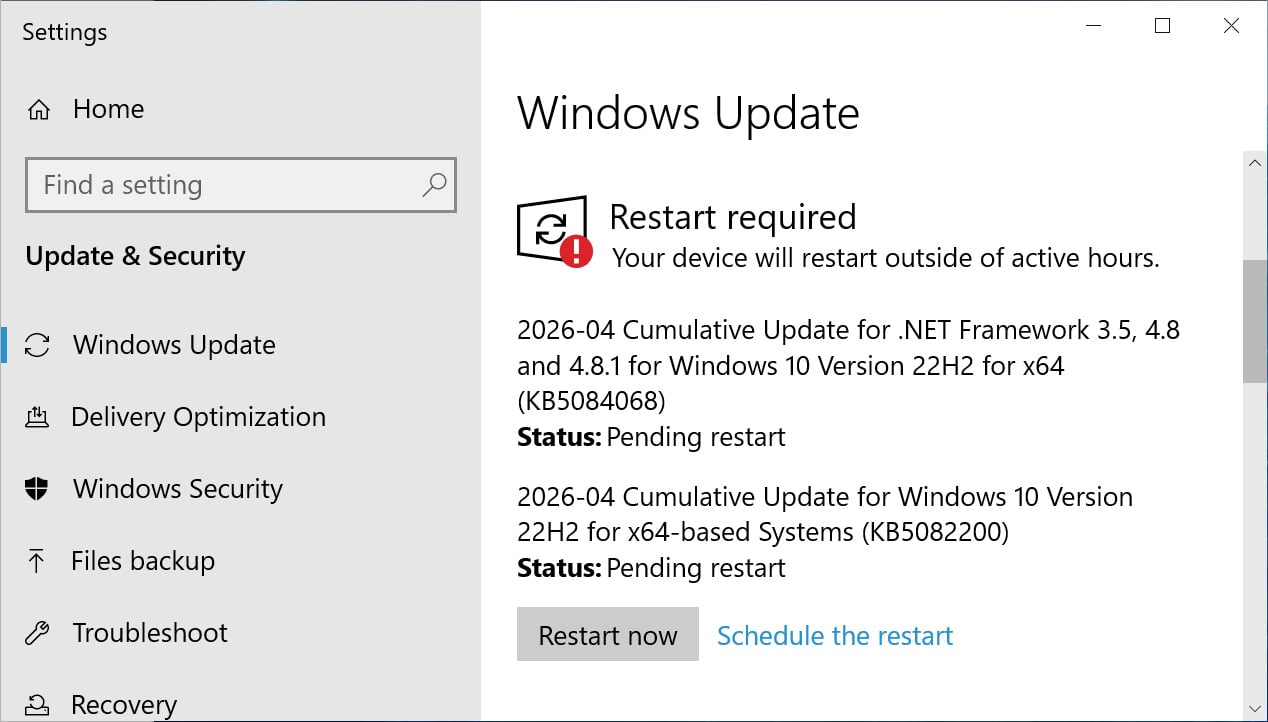
    If you are running Windows 10 Enterprise LTSC or are enrolled in the ESU program, you can install this update like normal by going into Settings, clicking on Windows Update, and manually performing a ‘Check for Updates.’

    Wiz
    Windows 10 KB5082200 update
    Windows 10 KB5082200 update
    Source: BleepingComputer

    After installing this update, Windows 10 will be updated to build 19045.7184, and Windows 10 Enterprise LTSC 2021 will be updated to build 19044.7184.

    What’s new in Windows 10 KB5082200

    Microsoft is no longer releasing new features for Windows 10, and the KB5082200 update primarily contains security updates and bug fixes.

    With today’s April 2026 Patch Tuesday, Microsoft has fixed 167 vulnerabilities, including two zero-day flaws.

    The complete list of fixes is below:

    • [Sign-In] Fixed: After you install the Windows update released on or after March 10, 2026, some users might experience an issue signing in to apps with a Microsoft account. Even when the device has a working Internet connection, a “no Internet” error appears during sign in and prevents access to Microsoft services and apps such as Microsoft Teams.
    • [Remote Desktop] This update improves protection against phishing attacks that use Remote Desktop (.rdp) files. When you open an .rdp file, Remote Desktop shows all requested connection settings before it connects, with each setting turned off by default. A one-time security warning also appears the first time you open an .rdp file on a device. For more information, see Understanding security warnings when opening Remote Desktop (RDP) files.
    • [Secure Boot] 
      • This update enables dynamic status reporting for Secure Boot states in the Windows Security App (Settings > Update & Security > Windows Security). Learn more about the status alerts via badges and notifications. Note that these enhancements are disabled by default on commercial devices and servers.
      • This update fixes an issue that could cause a device to enter BitLocker Recovery after Secure Boot updates.
      • With this update, Windows quality updates include additional high confidence device targeting data, increasing coverage of devices eligible to automatically receive new Secure Boot certificates. Devices receive the new certificates only after demonstrating sufficient successful update signals, maintaining a controlled and phased rollout.

    As explained in the changelog above, this update fixes a longstanding issue that causes some Intel-based devices that support Connected Standby to enter the BitLocker recovery screen when restarted.

    Microsoft is also continuing to roll out new Secure Boot certificates to replace older 2011 certificates that expire in June 2026. With this update, Windows users can go into Windows Security to check the status of this rollout.

    Microsoft states that there are no known issues with this update.


    tines

    Automated pentesting proves the path exists. BAS proves whether your controls stop it. Most teams run one without the other.

    This whitepaper maps six validation surfaces, shows where coverage ends, and provides practitioners with three diagnostic questions for any tool evaluation.

    Extended KB5082200 Microsoft releases Security update Windows
    Share. Facebook Twitter Pinterest LinkedIn Tumblr Telegram Email
    Previous Article15 Tiny Copy Tweaks That Immediately Improve Conversions
    Next Article 3 excellent new HBO Max shows to binge this week (April 13
    admin
    • Website

    Related Posts

    Sweden Blames Pro-Russian Group for Cyberattack Last Year on Its Energy Infrastructure

    April 15, 2026

    Microsoft, Salesforce Patch AI Agent Data Leak Flaws

    April 15, 2026

    Actively Exploited nginx-ui Flaw (CVE-2026-33032) Enables Full Nginx Server Takeover

    April 15, 2026
    Add A Comment
    Leave A Reply Cancel Reply

    Search Blog
    About
    About

    At WifiPortal.tech, we share simple, easy-to-follow guides on cybersecurity, online privacy, and digital opportunities. Our goal is to help everyday users browse safely, protect personal data, and explore smart ways to earn online. Whether you’re new to the digital world or looking to strengthen your online knowledge, our content is here to keep you informed and secure.

    Trending Blogs

    Sweden Blames Pro-Russian Group for Cyberattack Last Year on Its Energy Infrastructure

    April 15, 2026

    The automation drift and how to correct course

    April 15, 2026

    Posts in your Shorts? What to expect from YouTube’s experiment

    April 15, 2026

    Microsoft, Salesforce Patch AI Agent Data Leak Flaws

    April 15, 2026
    Categories
    • Blogging (63)
    • Cybersecurity (1,329)
    • Privacy & Online Earning (167)
    • SEO & Digital Marketing (814)
    • Tech Tools & Mobile / Apps (1,590)
    • WiFi / Internet & Networking (224)

    Subscribe to Updates

    Stay updated with the latest tips on cybersecurity, online privacy, and digital opportunities straight to your inbox.

    WifiPortal.tech is a blogging platform focused on cybersecurity, online privacy, and digital opportunities. We share easy-to-follow guides, tips, and resources to help you stay safe online and explore new ways of working in the digital world.

    Our Picks

    Sweden Blames Pro-Russian Group for Cyberattack Last Year on Its Energy Infrastructure

    April 15, 2026

    The automation drift and how to correct course

    April 15, 2026

    Posts in your Shorts? What to expect from YouTube’s experiment

    April 15, 2026
    Most Popular
    • Sweden Blames Pro-Russian Group for Cyberattack Last Year on Its Energy Infrastructure
    • The automation drift and how to correct course
    • Posts in your Shorts? What to expect from YouTube’s experiment
    • Microsoft, Salesforce Patch AI Agent Data Leak Flaws
    • Why ChatGPT Cites One Page Over Another (Study of 1.4M Prompts)
    • I Tried Binge, the Letterboxd Alternative That I Now Like More Than Letterboxd
    • How Endpoint Network Monitoring Enables Remote Work
    • Actively Exploited nginx-ui Flaw (CVE-2026-33032) Enables Full Nginx Server Takeover
    © 2026 WifiPortal.tech. Designed by WifiPortal.tech.
    • Home
    • About Us
    • Contact Us
    • Privacy Policy
    • Terms and Conditions
    • Disclaimer

    Type above and press Enter to search. Press Esc to cancel.