


Microsoft is rolling out an update to Office for the web that removes a long-standing limitation around document protection, adding new control to browser-based apps.
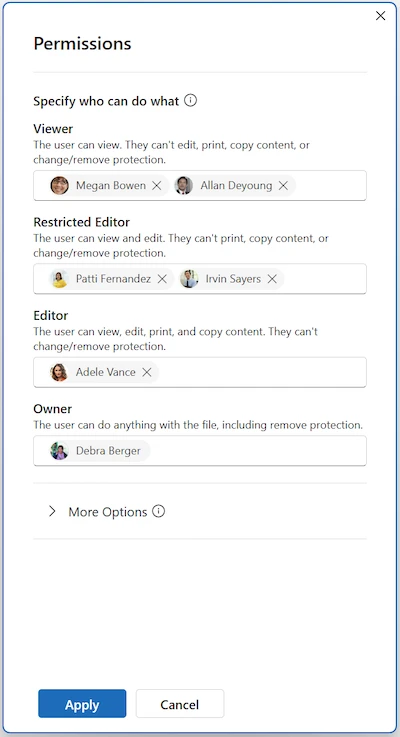
Specifying users in the Permissions dialog (Source: Microsoft)
Users can now apply sensitivity labels with user-defined permissions directly in the web versions of Word, Excel, and PowerPoint. The change brings the web apps in line with capabilities that were previously limited to desktop versions.
Previously, browser-based users could only open and edit files that already had custom permissions applied. Creating new labels or changing access settings required switching to desktop applications. With this update, those actions can be handled within the web apps.
When a label configured for user-defined permissions is selected, a Permissions dialog opens. This allows users to add specific people or entire domains and assign access levels such as Viewer, Editor, or Owner, which map to Rights Management settings.
“The user can expand additional settings to configure options such as a contact email for access requests. Note that web apps do not currently support setting a custom expiration date for permissions,” Microsoft said in a blog post.
The interface matches the experience already present in desktop Office apps, using the same structure and terminology across platforms. Enforcement continues to follow existing sensitivity label policies, encryption configurations, and Rights Management Service settings.
For organizations using sensitivity labels configured in Microsoft Purview, the change allows users to classify and protect files without leaving the browser.
“You may want to update internal guidance and training materials to reflect that users can now complete these workflows entirely in the browser and ensure that security operations and compliance teams are prepared to monitor usage through existing Purview auditing and reporting capabilities,” the company advises.
The feature requires appropriate licensing, sensitivity labeling enabled for files in SharePoint and OneDrive, and at least one label configured for user-defined permissions.
