

Ever since I saw Live Activities in action on the iPhone, I have been hooked. There’s something about the way an ongoing app just sits there on the pill, updating in real time, that feels both useful and oddly satisfying. It looks clean, it’s easy to glance at, and with a single tap, you’re right back into the app. Simple, but so well done. As someone who primarily uses Android, I couldn’t help but feel a little envious every time I used it on my secondary iPhone.
So I decided to find something similar for Android. I went through a bunch of apps, most of which didn’t quite get it right. Then I came across one that came pretty close. It’s not perfect and definitely has its quirks, but it delivers the one thing I was looking for. It brings that Live Activities-like experience to my Google Pixel 10 Pro, and that’s enough for me.

This free Android app is now the first thing I install on every phone
I can navigate my Android phone twice as fast thanks to this one app.
The closest Android gets to Live Activities
Not perfect, but close enough

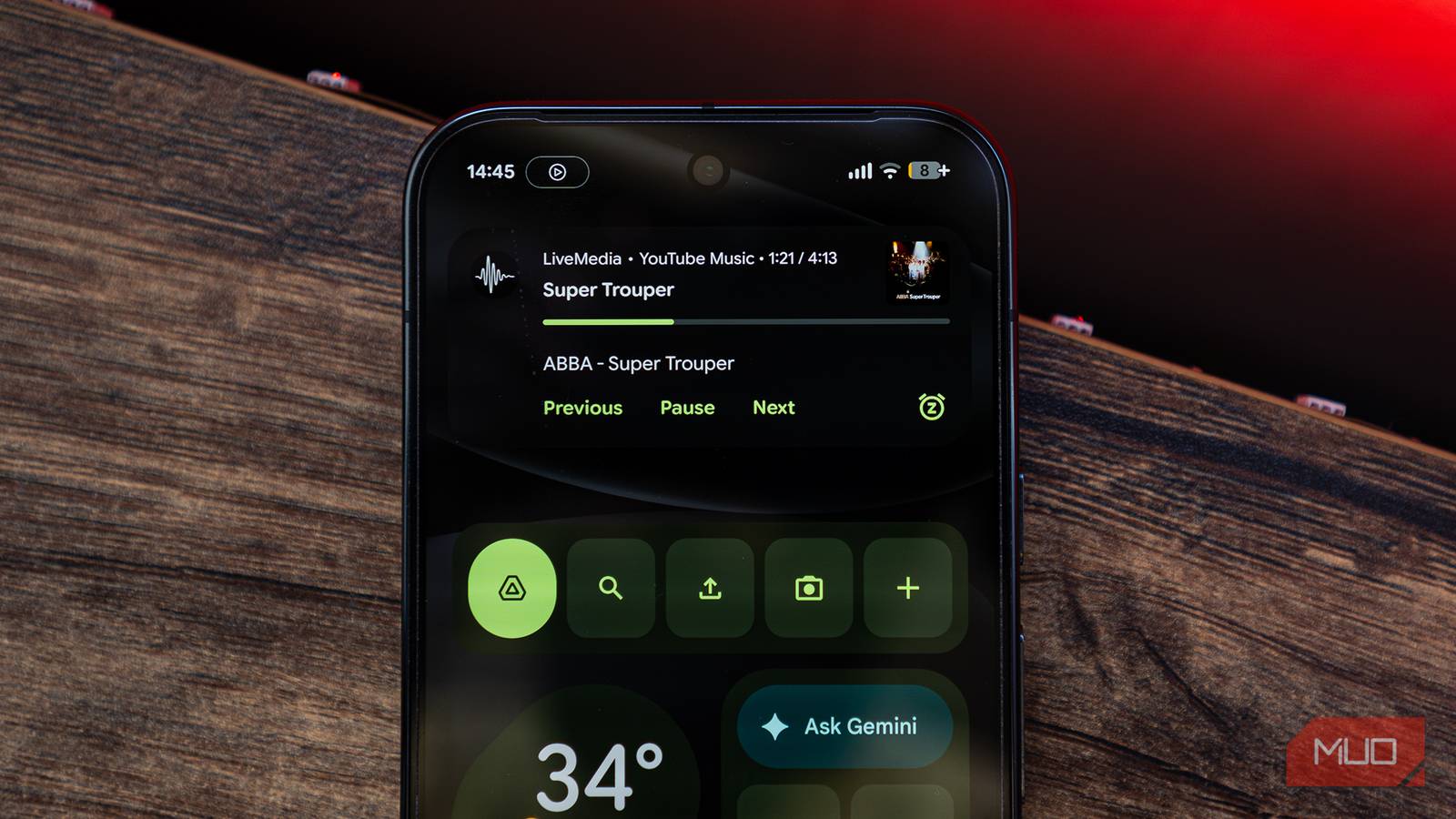
LiveMedia is an Android app that tries to recreate the Live Activities experience from the iPhone, and for the most part, it gets surprisingly close. Once it’s set up, it pushes your media activities and controls right into the notification pill at the top of the screen. So, instead of pulling down the notification shade every time, you can just glance at the top and see what’s playing. It’s cleaner and involves fewer steps.
It works with apps like Spotify, YouTube Music, and any audio app running in the background. That’s where the name “LiveMedia” comes from. Whatever is playing gets surfaced right there in the pill. You can play or pause, skip tracks, and quickly jump back into the music player with a tap.
That said, it’s not perfect. One thing that stood out to me was the lack of scrubbing. You can’t swipe to move forward or backward in a track. If you try, the whole activity just swipes away instead, which can be a bit frustrating when you’re used to finer controls.
Where LiveMedia really shines, though, is customization. You get surprising control over how everything looks. You can choose to show or hide album art, artist name, album name, action buttons, progress bar, timestamps, and even the app name. So, you can tweak things until it feels just right for you. You also get to decide which apps can use this live pill. For me, I’ve enabled YouTube Music, Spotify, Apple Music, Amazon Music, and YouTube. So whether I’m listening to music or watching a video, the pill adapts and shows me what I need at that moment. It makes the overall experience feel a bit more alive and connected.
The app is available through GitHub and is currently built mainly for Android 16, especially on Pixel devices. It’s still a bit niche and not entirely polished.
This app relies on notification access, which might not sit well with everyone. To function properly, it needs permission to read your notifications so it can show what’s playing and bring those controls into the pill. But for some people, giving an app that level of access can feel a bit intrusive. It’s not necessarily a deal breaker, but it’s definitely something you’ll want to be aware of before using it.
The art of using your phone without using it
A media pill that gives you quick access

This app has been quite useful for me. I use YouTube Music pretty much all day — commuting, working, and even for winding down. And every time I wanted to skip a track, I’d pull down the notification bar, find the media card, tap skip, and go back. Took maybe three to four seconds. What LiveMedia does is skip the redundancy and offer the key controls up front.
The app is quite well thought out, too. For example, it automatically hides itself on the lock screen so it doesn’t clash with the default media player. This keeps things clean and avoids duplication.

9 Useful Android Apps That’ll Make Your Phone Smarter
Want a smarter phone? Replace your default camera, SMS, gallery, and other apps with these smarter alternatives.
That said, it’s not a complete replacement for Live Activities on iPhones. LiveMedia is limited to media controls. On iPhones, Live Activities go much further. You can track rides, check food deliveries, follow flights, and more, all from that same space. And this is something some Android manufacturers have started implementing, but the Pixel steers clear of all these. Here, it’s strictly about music and audio. There are also some system-level limitations. Android doesn’t currently allow full customization of these notification layouts, so the app has to work within the default design. That means it looks good, but not entirely unique.

- OS
-
Android
- Price model
-
Free
- App Type
-
Mobile
- Open-Source?
-
Yes
LiveMedia is an Android app that brings glanceable, interactive live activity controls to phones running Android 16. Think of it as the media pill iPhone users have had for years, finally making its way to Android. For now, it’s specifically optimized for the Google Pixel series, where it sits right on your screen showing album art, track info, and playback controls without you ever having to pull down the notification shade.
It’s not much, but it’s enough to ruin you
LiveMedia is actually filling a gap that you didn’t fully realize was there until you experienced it elsewhere. Yes, it has its limitations. It’s restricted to media, depends on notification access, and is currently mostly useful for a small set of devices. It’s also not as polished or as deeply integrated as what you get on the iPhone. But even with all that, it does something important for me — it changes how I interact with my phone. That quick glance at the top of the screen, a single tap to jump back into what I was doing, all of this adds up.
And that’s really the takeaway here. This app isn’t perfect, but it’s enough to give you a taste of what Android could feel like if it leaned more into this kind of experience. Once you get used to it, even with its flaws, it’s hard not to miss it when it’s gone.
