

AirDrop makes it look effortless to share files between my iPhone, iPad, and MacBook. But the feature is limited only to Apple’s products. Hence, I end up emailing the files to myself, which feels like an outdated workaround.
That has got me looking for an alternative. I noticed several of my XDA colleagues recommending LocalSend as a worthy AirDrop replacement. That caught my interest. I wanted to try it to see if it aligns with my workflow.
I was looking for a solution that works offline, doesn’t rely on syncing folders, demands no account, and avoids cloud services entirely. LocalSend checks all those boxes. It’s now a game-changer for my workflow, and I use AirDrop while sharing files with friends who are deeply inside Apple’s ecosystem.

I swapped Dropbox for this self-hosted alternative
This open-source app is an unexpected alternative that’s faster and more private than Dropbox
Limited reach of AirDrop hits hard
Only for Apple devices
Within Apple’s ecosystem, AirDrop offers the smoothest file-sharing experience. No additional setup or need to install an extra app. It’s an excellent OS-level integration. But its biggest limitation is that it works only with Apple devices.
That limitation becomes apparent if you, like me, have a mixed setup. I regularly use a Windows PC, an Android phone, an iPhone, an iPad, a MacBook Air, a Linux server, and a Raspberry Pi box. But, AirDrop is convenient only for Apple devices, and has become a limitation for others.
Besides emailing files to myself, I tried solutions that involve third-party servers, an active internet connection, and struggling with large files. That often beats me despite all my devices already connected to the same home network.
Solves local file sharing woes without cloud
No accounts, no logins

LocalSend is a free, open-source alternative to AirDrop, available on popular platforms and usable as a web app. Quite often I want to share files between devices and end up using a workaround. With large file sizes, a USB drive comes in handy, but it’s not entirely intuitive when phones are involved. I prefer using it for local file sharing because it doesn’t ask me to sign up or log in with any account.
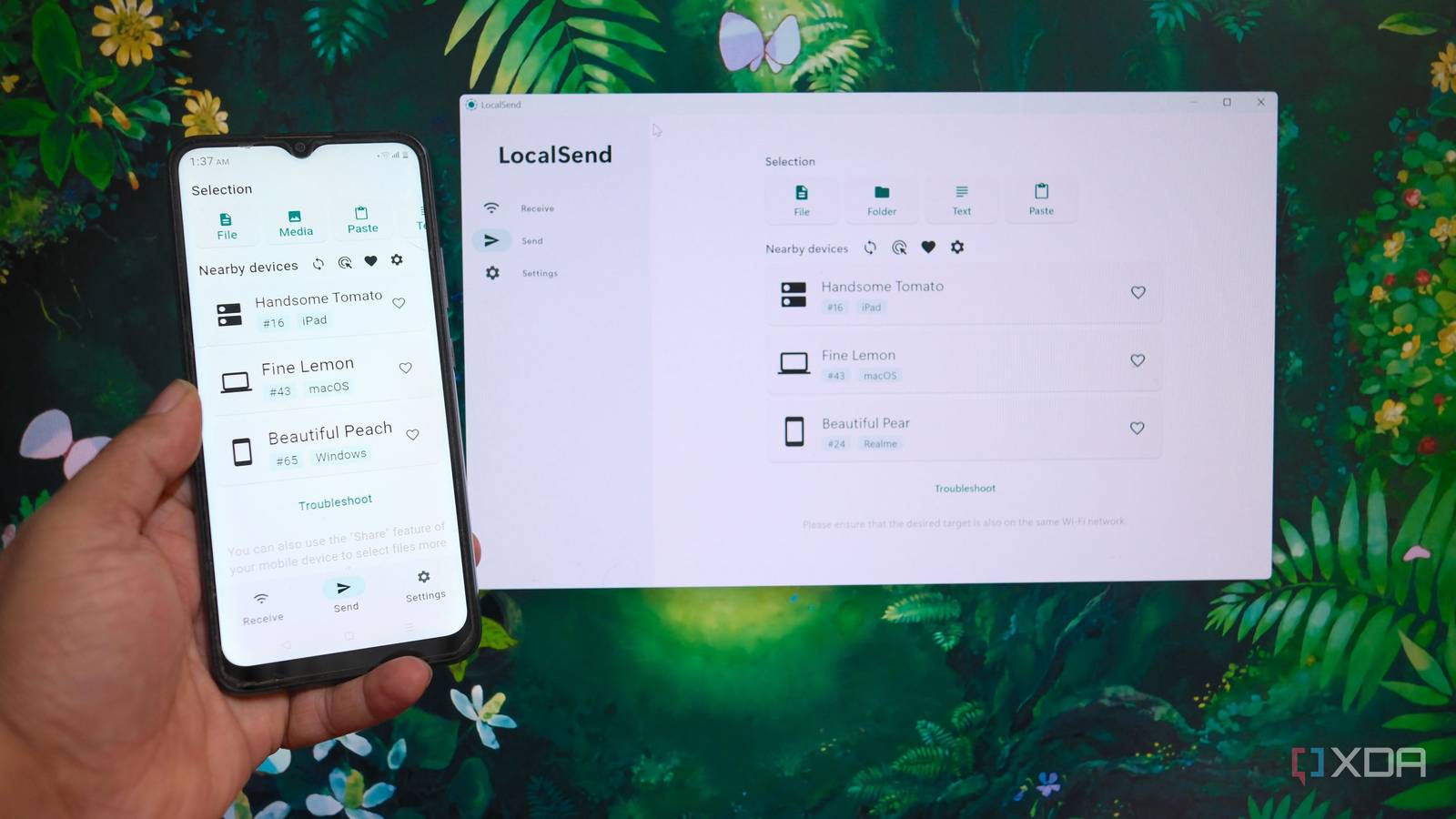
Also, there’s no need to use any cloud storage service to act as an intermediary for file transfers. All I need to do is install it. When you open it, the app looks for other LocalSend devices already on the same network.
Next, you can select a file, choose a target device, and accept the transfer to it. There’s no pairing required between devices.
How and why LocalSend upstaged AirDrop
Sheer convenience
LocalSend has removed the biggest friction in my mixed setup, enabling local file sharing to move files between devices. Though it’s an AirDrop alternative, it functions almost like that, with a subtle difference.
Sending documents from an iPhone or Android to a Windows PC is smooth and hiccup-free. The only requirement is that all devices need to run the LocalSend app. It’s a one-time setup, and things are quicker.
To use AirDrop, you still need to sign in to the devices involved with an Apple account. No such limitation for LocalSend. Besides sending files, I can share entire folders, text, and even other items that can be pasted. And for security, you can set up a PIN for receiving to ensure you don’t accept a compromised file.
Besides that, LocalSend’s web version offers an app-free experience. But making it work with the LocalSend app is tricky. For starters, the native app can detect the web version to send files. But the other way around is a hit-or-miss affair.
Also, the native app includes the ‘Share via Link’ option to directly share a link for downloading files in a web browser. Another convenient option is the capability to send the same file to multiple devices at one go.
The only limitation of LocalSend I experienced
Not entirely a dealbreaker

LocalSend is designed to be used on the local network: wired or wireless. That means all my devices need to be on the same network for the discovery to work. Besides, it doesn’t work with VPN services like Tailscale without extra tools and tweaks.
Also, sending or sharing files using LocalSend from outside my house isn’t possible. Even with Tailscale, LocalSend still won’t let me send files outside the network. For remote transfers between devices over the network, I use Tailscale’s similar feature, Taildrop.
In comparison, LocalSend works when the devices are on the same network, and preferably at a close range for better throughput.

I replaced cloud storage with a local NAS and learned this the hard way
Abandoning big tech for a local NAS might not be a smart choice
Built for mixed devices’ setup, not just ecosystems
AirDrop is an excellent tool for file sharing, though it’s limited to Apple’s ecosystem. It remains hard to beat, and you don’t need to look elsewhere if you only use Apple devices. However, my daily setup isn’t limited to them; it’s a mix of Apple, Windows, Android, and Linux machines.
LocalSend fits my requirements and sets up better. It delivers fast, local file sharing without having to worry about the devices’ operating systems. As long as the LocalSend app is installed, the transfer takes place swiftly. If you, too, have a mix of devices at home, give LocalSend a try.
