
Close Menu
    Facebook X (Twitter) Instagram
    Wifi PortalWifi Portal
    • Blogging
    • SEO & Digital Marketing
    • WiFi / Internet & Networking
    • Cybersecurity
    • Tech Tools & Mobile / Apps
    • Privacy & Online Earning
    Facebook X (Twitter) Instagram
    Wifi PortalWifi Portal
    Home»Tech Tools & Mobile / Apps»I finally fixed my Android phone’s home screen mess and it’s about time
    Tech Tools & Mobile / Apps

    I finally fixed my Android phone’s home screen mess and it’s about time

    adminBy adminMarch 22, 2026No Comments5 Mins Read
    Facebook Twitter LinkedIn Telegram Pinterest Tumblr Reddit WhatsApp Email
    I finally fixed my Android phone's home screen mess and it's about time
    Share
    Facebook Twitter LinkedIn Pinterest Email

    As a decade-long user of Android phones, my Android home screen keeps getting worse the more I use my phone. It has nothing to do with hardware or sluggishness.

    The problem is very simple and straightforward. Everything just piles up.

    Between new apps, widgets that I try out once in a while, and folders that I create to get some semblance of organization, at some point my phone stops feeling like a tool and more clutter.

    For a while I accepted it for what it is. But then I made the switch to Niagara launcher.

    The goal behind it was simple. I wanted to solve the problem once and for all.

    I don’t want to redesign my home screen again or spend time tweaking layouts. I wanted a one-and-done solution to reduce friction so that I could unlock my phone, do what I need to do and just move on.

    Niagara Launcher is built specifically around that idea, and it changes how home screens behave from the ground up.

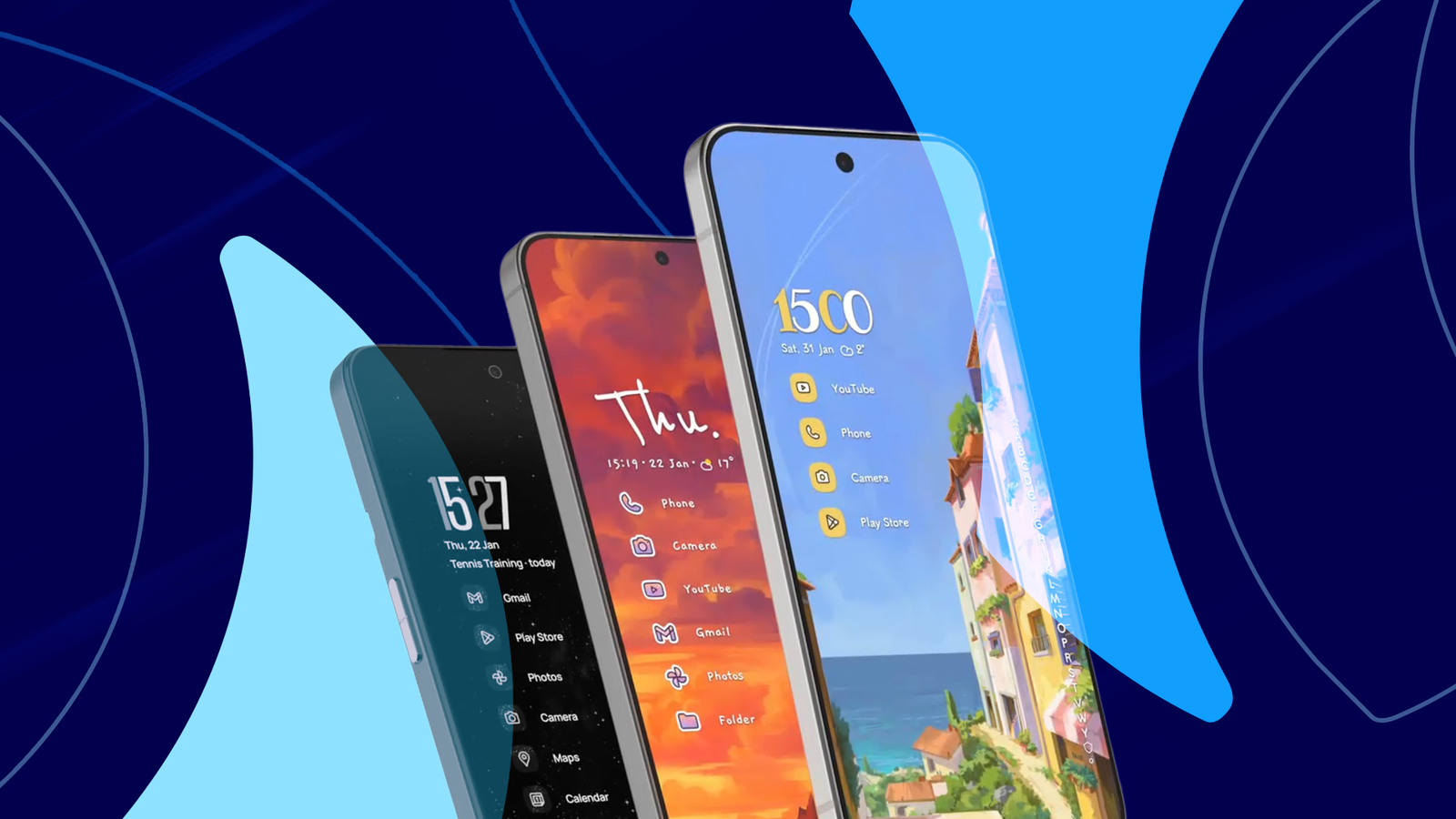
    Instead of a grid packed with icons, Niagara launcher gives you a single vertical list centered around the curated selection of apps you use.

    That might sound like a small change in theory, but in practice it removes most of the frustrations associated with a cluttered home page.

    Android mascot standing among labeled cardboard boxes for apps, screenshots, notifications, and distractions, in front of a smartphone screen, with a broom leaning on the boxes.

    6 Android tweaks I made to cut clutter from my phone

    A quick cleanup helped me use my phone more mindfully

    Forcing better user habits

    A design that stays out of the way and optimizes for one-handed use

    apps-2024-niagara-launcher-01

    After you’ve installed Niagara Launcher from the Play Store, the setup process forces a small but important decision.

    It asks you to pick a handful of apps that you use the most. Not everything on your phone. It makes you select the apps that you open daily. And that becomes your home screen. As simple as that.

    There are no grids, no pages, no folders. Just a simple list of favorites that sit right within a thumb’s reach.

    That doesn’t mean that the rest of your apps aren’t available. They’re just tucked away behind an alphabetical scroll on the side.

    I can slide my thumb up and down to reach specific alphabets and the apps under it. After that, it’s a straightforward tap to launch the app process.

    That one-handed flow is what really stands out. Not only does Niagara reduce home screen clutter, it also makes it improves usability.

    With a regular home screen layout and oversized phones, you’re still left reaching out and stretching your thumb. Not so with Niagara. It keeps everything within easy reach.

    Niagara goes a long way towards simplifying notifications too. Notifications from your preferred apps show up right there on the home screen, and you can swipe to reply or cancel them out.

    The overall impact of this simplification is hard to overstate. Your home screen no longer screams for attention. It’s predictable, easy to navigate and optimized for productivity.

    How Niagara Launcher changed the way I use my phone

    Less time spent navigating

    A few days into making the switch to Niagara, the biggest observation for me is that I’m spending less time on my home screen. And that’s without even trying too hard.

    I unlock my phone, tap an app, and I’m done. There’s nothing competing for attention, nor do I get distracted and end up going down a random path of opening apps or games.

    You won’t find any visual distractions either, which have a massive impact on how you use your phone throughout the day.

    Niagara Launcher makes search a big part of the experience. Instead of scrolling, you can swipe up and start searching for the app in question.

    It’s faster, much more intentional, especially when you’re looking for something specific.

    It’s not that Niagara doesn’t offer customization. It does. But there’s a lot of restraint built in.

    You can change themes, icons and more. But it’s far from as extensive as what other launchers offer. And it’s certainly not a distraction.

    And yes, you can have widgets if you want. However, all you get is a single row of swipeable widgets instead of them being cluttered throughout the interface.

    Over time, you start using some of the features a lot more. I’ve hidden most of the apps that used to distract me. Beyond the essential messaging apps, I don’t have anything else on my home screen.

    Elsewhere, I’ve really come to appreciate some of the contextual features.

    For example, I don’t need to keep a Spotify icon on my home screen because Niagara automatically surfaces a Spotify widget when I connect my Bluetooth headphones. It all feels extremely responsive.

    Less control, much more clarity

    Most Android launchers are built around the idea of control. Be it more layouts, more gestures, or simply more ways to customize your interface.

    As much as that sounds appealing, it leads to the usual problems of facing too many decisions and visual clutter.

    Niagara removes all that. I’d go as far as saying that the list-based layout isn’t a limitation, it forces you to think about how you use your phone. And that just might be its biggest strength.

    Android finally fixed Home mess phones screen time
    Share. Facebook Twitter Pinterest LinkedIn Tumblr Telegram Email
    Previous ArticleThe Kindle Colorsoft 16GB just dropped to its Black Friday price
    Next Article I found out firsthand that some USB cables are too long for their own good
    admin
    • Website

    Related Posts

    I tested the Moto G Stylus 2026, and it’s finally starting to feel like an affordable alternative to the Galaxy S26 Ultra, but the price tag makes it a tougher sell

    April 16, 2026

    Who goes there? Your Ring doorbell can now recognise up to 50 familiar faces, and let you know if a caller is a friend or a stranger

    April 16, 2026

    COSMIC desktop surprised me, because it’s the Linux DE I’ve been waiting for

    April 16, 2026
    Add A Comment
    Leave A Reply Cancel Reply

    Search Blog
    About
    About

    At WifiPortal.tech, we share simple, easy-to-follow guides on cybersecurity, online privacy, and digital opportunities. Our goal is to help everyday users browse safely, protect personal data, and explore smart ways to earn online. Whether you’re new to the digital world or looking to strengthen your online knowledge, our content is here to keep you informed and secure.

    Trending Blogs

    Gemini blocked more than 99% of bad ads before they ran in 2025

    April 16, 2026

    I tested the Moto G Stylus 2026, and it’s finally starting to feel like an affordable alternative to the Galaxy S26 Ultra, but the price tag makes it a tougher sell

    April 16, 2026

    IBM unveils security services for thwarting agentic attacks, automating threat assessment

    April 16, 2026

    What Is Answer Engine Optimization? And How to Do It

    April 16, 2026
    Categories
    • Blogging (63)
    • Cybersecurity (1,345)
    • Privacy & Online Earning (168)
    • SEO & Digital Marketing (826)
    • Tech Tools & Mobile / Apps (1,611)
    • WiFi / Internet & Networking (226)

    Subscribe to Updates

    Stay updated with the latest tips on cybersecurity, online privacy, and digital opportunities straight to your inbox.

    WifiPortal.tech is a blogging platform focused on cybersecurity, online privacy, and digital opportunities. We share easy-to-follow guides, tips, and resources to help you stay safe online and explore new ways of working in the digital world.

    Our Picks

    Gemini blocked more than 99% of bad ads before they ran in 2025

    April 16, 2026

    I tested the Moto G Stylus 2026, and it’s finally starting to feel like an affordable alternative to the Galaxy S26 Ultra, but the price tag makes it a tougher sell

    April 16, 2026

    IBM unveils security services for thwarting agentic attacks, automating threat assessment

    April 16, 2026
    Most Popular
    • Gemini blocked more than 99% of bad ads before they ran in 2025
    • I tested the Moto G Stylus 2026, and it’s finally starting to feel like an affordable alternative to the Galaxy S26 Ultra, but the price tag makes it a tougher sell
    • IBM unveils security services for thwarting agentic attacks, automating threat assessment
    • What Is Answer Engine Optimization? And How to Do It
    • Who goes there? Your Ring doorbell can now recognise up to 50 familiar faces, and let you know if a caller is a friend or a stranger
    • COSMIC desktop surprised me, because it’s the Linux DE I’ve been waiting for
    • Fortinet fixes critical FortiSandbox vulnerabilities (CVE-2026-39813, CVE-2026-39808)
    • Search Ad Growth Slows As Social & Video Gain Faster
    © 2026 WifiPortal.tech. Designed by WifiPortal.tech.
    • Home
    • About Us
    • Contact Us
    • Privacy Policy
    • Terms and Conditions
    • Disclaimer

    Type above and press Enter to search. Press Esc to cancel.