

When I first ditched Microsoft’s software, I expected I’d be in for a downgrade, especially since I was still using Windows. Instead, I was pleasantly surprised. Many of the open-source options available today are as good as Microsoft 365, and they’re completely free.
NextCloud is a self-hosted OneDrive replacement
It is more private and customizable
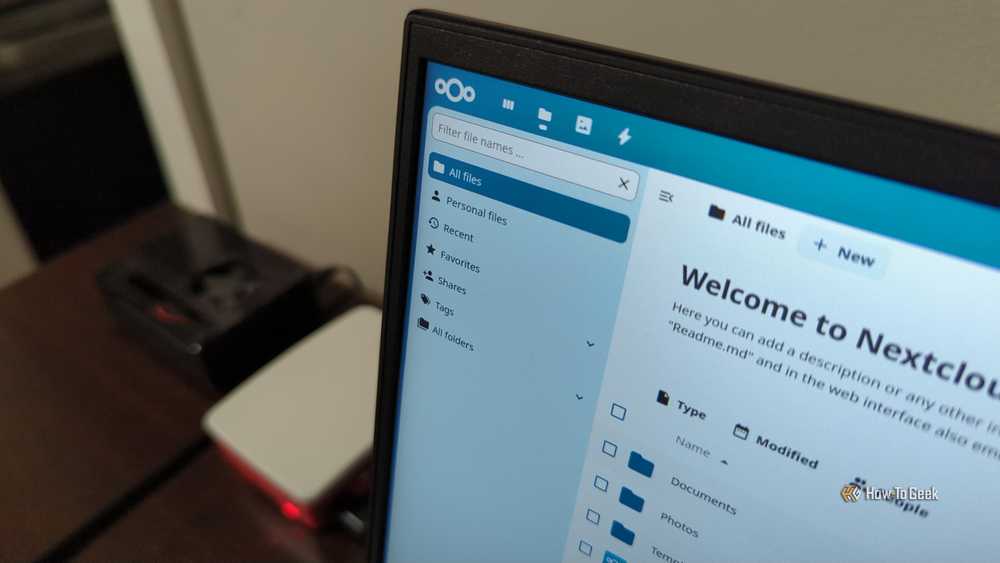
If you’ve been using OneDrive for long enough, you’ve undoubtedly encountered some of its more aggravating bugs: files disappear, sync glitches crop up at bad times, and there is always an update on the horizon that threatens the stability of the platform. It is a recurring headache that I needed to get away from.
Nextcloud offers a better alternative. Nextcloud is a self-hosted cloud storage solution that you can run on your home server or a third-party web server. Because you can pick and choose how you want to host it, it can be as simple or as complex as you need it to be. You can easily configure it to use a versioning system that will allow you to roll back your file if something goes wrong, or provide a neat log if you want to double-check the changes that you made.
If you run low on storage, you can buy a few extra hard drives, put them into the server, and you’re only out the cost of the drives—no recurring subscriptions.
Because you can host it yourself, you can be sure that your data remains private and secure without needing to scroll through hundreds of pages of terms and conditions that could change at any time.
As an added bonus, Nextcloud can also integrate full suite of applications, including a calendar, notes, a word processor, and more.
Ditch Word for LibreOffice Writer
Writer is a lot like Word 2008

Microsoft Word is practically synonymous with word processors, but it isn’t the only option out there, especially if you don’t need the full Office suite or Word’s advanced capabilities. I ditched it more than a year ago and haven’t looked back.
One of the best alternatives is Libre Writer, a free and open-source alternative.
Writer has most of the important features that matter in Word, including:
- The ability to format pages
- Headers and footers
- The ability to generate an index
- The ability to insert and move images
And more. It also supports DOCX files—Word’s default file format—out of the box. In the times I’ve imported a DOCX from Word to Writer, I’ve never run into significant problems.
The only major difference is the user interface, which is denser and more explicit than Word’s. In many ways, it is reminiscent of the user interface Word used to have several years ago. Despite the differences, it doesn’t present a usability issue. I’ve actually found it is a bit easier to use, since there are fewer things buried in submenus.
If you need a free, capable replacement for Microsoft Word, LibreOffice Writer is a great option.
LibreOffice Calc goes toe-to-toe with Excel
I haven’t missed Excel yet

Excel is an extremely capable program, but for most uses, it is completely overkill. Worse yet, it comes with a cost. Unless you’re really making use of all of its advanced features, there are more cost-effective options out there.
My go-to alternative for Excel is LibreOffice Calc, which is part of the LibreOffice suite of tools.
Much like Excel, Calc allows you to create formulas and functions, insert charts, sort and filter data, and format a spreadsheet in whatever way you need to.

I thought Excel was unmatched until I discovered this LibreOffice Calc capability
Calc’s advanced pattern matching is simple and direct.
In the time I’ve used Calc, the only feature I’ve really missed from Excel is VBA scripting, and that isn’t something I use very often.
If you just need a straightforward spreadsheet program, LibreOffice Calc is more than up to the job. I’d only recommend Excel if you really need the advanced scripting and automation options.
ONLYOFFICE is a complete replacement for Microsoft Office
Don’t want to bother with separate apps?
LibreOffice Writer and Calc are great, but their interfaces are significantly different from the current Microsoft Office suite. If you’re looking for an all-in-one replacement that also looks like Microsoft’s software, then ONLYOFFICE should be your first stop.
ONLYOFFICE includes four programs:
- Document — a Microsoft Word alternative
- Spreadsheet — An Excel alternative
- Presentation — A competitor to PowerPoint
- PDF — A tool for authoring and editing PDF files
ONLYOFFICE is very capable, and it is my go-to recommendation for anyone that doesn’t like LibreOffice’s user interface. It is just as capable, can handle DOCX and XLXS files without a problem, but closely resembles Microsoft Office.
I’ve found that ONLYOFFICE is more demanding than LibreOffice, so if you’re looking for an office suite to install on a low-power PC, I’d recommend LibreOffice instead.
Otherwise, ONLYOFFICE is an excellent alternative that is free and open-source.
Open-source now rivals paid software
Moving away from Microsoft doesn’t need to be an abrupt process, either. I’d recommend starting with one application, like Microsoft Word, and trying out an alternative for a while first. If you decide you like it, migrate another service to an open-source solution.
Taking an all-or-nothing approach is just going to end in frustration.

- OS
-
Windows, macOS, Linux, iOS, Android
- Individual pricing
-
Free
- Key highlights
-
Self-hosting option available
OnlyOffice is a Microsoft Office suite alternative that you can self-host, letting you keep your work private and secure.
