

Close Menu
    Facebook X (Twitter) Instagram
    Wifi PortalWifi Portal
    • Blogging
    • SEO & Digital Marketing
    • WiFi / Internet & Networking
    • Cybersecurity
    • Tech Tools & Mobile / Apps
    • Privacy & Online Earning
    Facebook X (Twitter) Instagram
    Wifi PortalWifi Portal
    Home»Cybersecurity»Microsoft ends desktop detour for sensitivity labels in Office web apps
    Cybersecurity

    Microsoft ends desktop detour for sensitivity labels in Office web apps

    adminBy adminApril 14, 2026No Comments2 Mins Read
    Facebook Twitter LinkedIn Telegram Pinterest Tumblr Reddit WhatsApp Email
    Microsoft ends desktop detour for sensitivity labels in Office web apps
    Share
    Facebook Twitter LinkedIn Pinterest Email

    Microsoft is rolling out an update to Office for the web that removes a long-standing limitation around document protection, adding new control to browser-based apps.
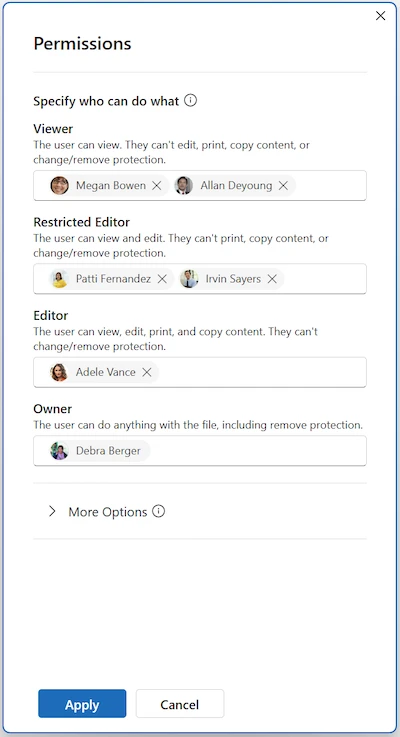
    Microsoft Office sensitivity labels

    Specifying users in the Permissions dialog (Source: Microsoft)

    Users can now apply sensitivity labels with user-defined permissions directly in the web versions of Word, Excel, and PowerPoint. The change brings the web apps in line with capabilities that were previously limited to desktop versions.

    Previously, browser-based users could only open and edit files that already had custom permissions applied. Creating new labels or changing access settings required switching to desktop applications. With this update, those actions can be handled within the web apps.

    When a label configured for user-defined permissions is selected, a Permissions dialog opens. This allows users to add specific people or entire domains and assign access levels such as Viewer, Editor, or Owner, which map to Rights Management settings.

    “The user can expand additional settings to configure options such as a contact email for access requests. Note that web apps do not currently support setting a custom expiration date for permissions,” Microsoft said in a blog post.

    The interface matches the experience already present in desktop Office apps, using the same structure and terminology across platforms. Enforcement continues to follow existing sensitivity label policies, encryption configurations, and Rights Management Service settings.

    For organizations using sensitivity labels configured in Microsoft Purview, the change allows users to classify and protect files without leaving the browser.

    “You may want to update internal guidance and training materials to reflect that users can now complete these workflows entirely in the browser and ensure that security operations and compliance teams are prepared to monitor usage through existing Purview auditing and reporting capabilities,” the company advises.

    The feature requires appropriate licensing, sensitivity labeling enabled for files in SharePoint and OneDrive, and at least one label configured for user-defined permissions.

    apps desktop detour ends Labels Microsoft Office sensitivity Web
    Share. Facebook Twitter Pinterest LinkedIn Tumblr Telegram Email
    Previous ArticleGoogle Chrome Skills Turn Gemini Prompts Into Reusable Workflows
    Next Article The best Hohem mobile gimbals drop to record-low prices!
    admin
    • Website

    Related Posts

    Some Windows servers enter reboot loops after April patches

    April 17, 2026

    Cursor AI Vulnerability Exposed Developer Devices

    April 17, 2026

    Apache ActiveMQ CVE-2026-34197 Added to CISA KEV Amid Active Exploitation

    April 17, 2026
    Add A Comment
    Leave A Reply Cancel Reply

    Search Blog
    About
    About

    At WifiPortal.tech, we share simple, easy-to-follow guides on cybersecurity, online privacy, and digital opportunities. Our goal is to help everyday users browse safely, protect personal data, and explore smart ways to earn online. Whether you’re new to the digital world or looking to strengthen your online knowledge, our content is here to keep you informed and secure.

    Trending Blogs

    OnePlus’ Europe exit isn’t official yet, but the signs aren’t great

    April 17, 2026

    Some Windows servers enter reboot loops after April patches

    April 17, 2026

    Why your website is now the source of truth in local AI search

    April 17, 2026

    Cursor AI Vulnerability Exposed Developer Devices

    April 17, 2026
    Categories
    • Blogging (63)
    • Cybersecurity (1,360)
    • Privacy & Online Earning (170)
    • SEO & Digital Marketing (835)
    • Tech Tools & Mobile / Apps (1,626)
    • WiFi / Internet & Networking (227)

    Subscribe to Updates

    Stay updated with the latest tips on cybersecurity, online privacy, and digital opportunities straight to your inbox.

    WifiPortal.tech is a blogging platform focused on cybersecurity, online privacy, and digital opportunities. We share easy-to-follow guides, tips, and resources to help you stay safe online and explore new ways of working in the digital world.

    Our Picks

    OnePlus’ Europe exit isn’t official yet, but the signs aren’t great

    April 17, 2026

    Some Windows servers enter reboot loops after April patches

    April 17, 2026

    Why your website is now the source of truth in local AI search

    April 17, 2026
    Most Popular
    • OnePlus’ Europe exit isn’t official yet, but the signs aren’t great
    • Some Windows servers enter reboot loops after April patches
    • Why your website is now the source of truth in local AI search
    • Cursor AI Vulnerability Exposed Developer Devices
    • Tux Manager is the perfect Linux Task Manager replacement for Windows refugees
    • Your AI Visibility Strategy Doesn’t Work Outside English
    • Anker’s ultra-compact 45W charger with a screen drops to its best price ever
    • Apache ActiveMQ CVE-2026-34197 Added to CISA KEV Amid Active Exploitation
    © 2026 WifiPortal.tech. Designed by WifiPortal.tech.
    • Home
    • About Us
    • Contact Us
    • Privacy Policy
    • Terms and Conditions
    • Disclaimer

    Type above and press Enter to search. Press Esc to cancel.