
Close Menu
    Facebook X (Twitter) Instagram
    Wifi PortalWifi Portal
    • Blogging
    • SEO & Digital Marketing
    • WiFi / Internet & Networking
    • Cybersecurity
    • Tech Tools & Mobile / Apps
    • Privacy & Online Earning
    Facebook X (Twitter) Instagram
    Wifi PortalWifi Portal
    Home»Tech Tools & Mobile / Apps»Android 17 Beta 3 lets you hide app icon names
    Tech Tools & Mobile / Apps

    Android 17 Beta 3 lets you hide app icon names

    adminBy adminMarch 27, 2026No Comments2 Mins Read
    Facebook Twitter LinkedIn Telegram Pinterest Tumblr Reddit WhatsApp Email
    Android 17 Beta 3 lets you hide app icon names
    Share
    Facebook Twitter LinkedIn Pinterest Email

    Google’s latest Android 17 Beta 3 is out now, and the build marks an important milestone. With Beta 3, Android 17 has reached Platform Stability, but for many, the real headline isn’t the finalized APIs. Instead, it’s the new features that the build brings.

    Android 17 graphic featuring the Android mascot behind the number 17 holding a green patterned sphere.

    Android 17 Beta 3 rolls out to Pixel devices

    Hello, Platform Stability

    Android 17’s stable release isn’t due for a few more weeks, but what we have now with the third Android 17 beta is close as it gets to the final product.

    With that being said, if you’d like to get a head start, and are already on the beta train, the latest Android 17 beta finally unlocks a long-requested visual tweak for the home screen.

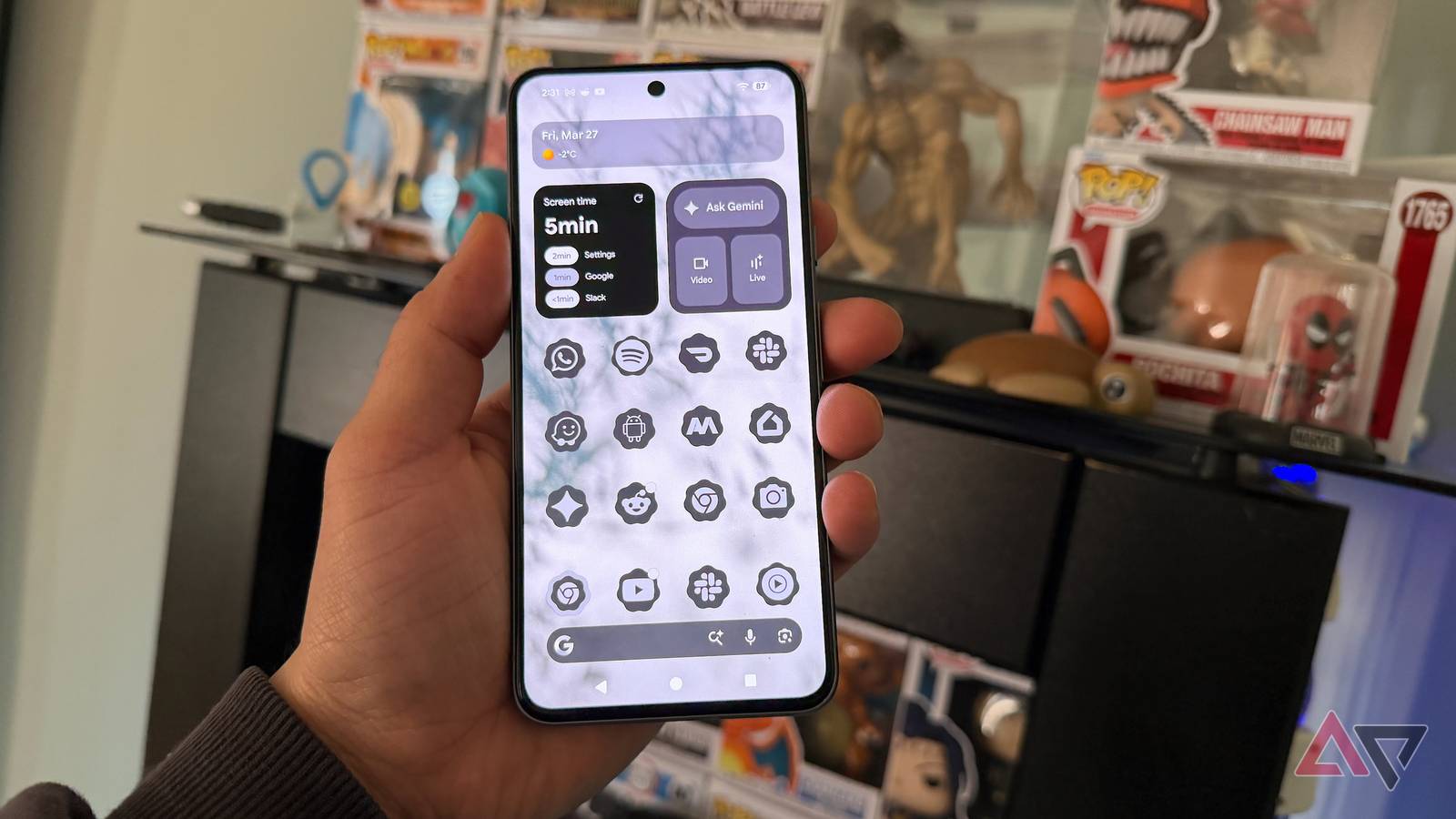
    The Pixel Launcher, with Android 17 Beta 3, finally gives you the ability to hide app icon names on your home screen, a functionality that was previously limited to third-party launchers.

    While not a huge change, it’s one that users have wanted for a long time now, and it’s a dream come true for the crowd that prefer a minimalist aesthetic for their phone’s home screen.

    Here’s how you can enable no-name app icons:

    Screenshots highlighting Android 17 Beta 3's no name icons.

    The only prerequisite here? Being on Android 17 Beta 3. Once you’ve installed the latest beta, enabling no-name home screen icons is simple.

    • Long tap on any empty space on your Pixel’s home screen
    • Tap on Wallpaper and style.
    • Scroll down and tap on Icons.
    • Look for the Names tab and tap on it.
    • Toggle off “Show app names.”
    • Apply the change.

    Who is the new feature for:

    • Minimalist purists.
    • Those who recognize apps by their icons.
    • Those who want less of their wallpaper to be obscured by text

    Who is it not for:

    • The app searchers. If you don’t know where a specific app is on your home screen, you’re better off just searching for it.
    • The app collectors.
    • Those who don’t recognize apps by their icons.
    • Those who’ve just transitioned to Android from iOS.

    Join the Android Beta Program to get the Android 17 Beta 3 update over the air, or go the system image route.

    Elsewhere, Android 17 Beta 3 also fully unlocks bubble mode for apps. Learn more about it in the story below!

    Android 17 graphic featuring the Android mascot behind the number 17 holding a green patterned sphere.

    Android’s next major update will change how you multitask

    Bubbles for all apps!

    Android app Beta hide icon lets names
    Share. Facebook Twitter Pinterest LinkedIn Tumblr Telegram Email
    Previous ArticleEspionage campaign targets telecom with stealthy Linux-based backdoor
    Next Article 20 marketing KPIs to track & improve in 2026
    admin
    • Website

    Related Posts

    This 55-Inch LG OLED TV Is Nearly Half Off Right Now

    April 16, 2026

    4 reasons I use a 19-year-old app to copy and move files in Windows

    April 16, 2026

    Opera’s browsers just picked up a new AI feature that’s actually useful

    April 16, 2026
    Add A Comment
    Leave A Reply Cancel Reply

    Search Blog
    About
    About

    At WifiPortal.tech, we share simple, easy-to-follow guides on cybersecurity, online privacy, and digital opportunities. Our goal is to help everyday users browse safely, protect personal data, and explore smart ways to earn online. Whether you’re new to the digital world or looking to strengthen your online knowledge, our content is here to keep you informed and secure.

    Trending Blogs

    Google AI director outlines new content playbook

    April 16, 2026

    This 55-Inch LG OLED TV Is Nearly Half Off Right Now

    April 16, 2026

    4 reasons I use a 19-year-old app to copy and move files in Windows

    April 16, 2026

    UAC-0247 Targets Ukrainian Clinics and Government in Data-Theft Malware Campaign

    April 16, 2026
    Categories
    • Blogging (63)
    • Cybersecurity (1,342)
    • Privacy & Online Earning (168)
    • SEO & Digital Marketing (823)
    • Tech Tools & Mobile / Apps (1,606)
    • WiFi / Internet & Networking (225)

    Subscribe to Updates

    Stay updated with the latest tips on cybersecurity, online privacy, and digital opportunities straight to your inbox.

    WifiPortal.tech is a blogging platform focused on cybersecurity, online privacy, and digital opportunities. We share easy-to-follow guides, tips, and resources to help you stay safe online and explore new ways of working in the digital world.

    Our Picks

    Google AI director outlines new content playbook

    April 16, 2026

    This 55-Inch LG OLED TV Is Nearly Half Off Right Now

    April 16, 2026

    4 reasons I use a 19-year-old app to copy and move files in Windows

    April 16, 2026
    Most Popular
    • Google AI director outlines new content playbook
    • This 55-Inch LG OLED TV Is Nearly Half Off Right Now
    • 4 reasons I use a 19-year-old app to copy and move files in Windows
    • UAC-0247 Targets Ukrainian Clinics and Government in Data-Theft Malware Campaign
    • Why Your Search Data Doesn’t Agree (And What To Do About It)
    • Opera’s browsers just picked up a new AI feature that’s actually useful
    • GitHub lays out copyright liability changes and upcoming DMCA review for developers
    • Mi Browser 14.54.0-gn APK Download by Zhigu Corporation Limited
    © 2026 WifiPortal.tech. Designed by WifiPortal.tech.
    • Home
    • About Us
    • Contact Us
    • Privacy Policy
    • Terms and Conditions
    • Disclaimer

    Type above and press Enter to search. Press Esc to cancel.