


Email marketing is still the highest-ROI digital channel for most small and mid-market businesses, returning roughly $36 for every $1 spent.
Email marketing has changed in the last 24 months. Apple Mail Privacy Protection (MPP) now pre-fetches the open pixel for roughly 64% of Apple Mail users, so open rate is no longer a reliable headline KPI. In February 2024, Gmail and Yahoo started enforcing three sender requirements for anyone sending 5,000 or more messages a day: authenticate with SPF, DKIM, and DMARC; offer one-click unsubscribe; and keep your spam complaint rate under 0.3%. Microsoft followed with the same rules for Outlook.com and Hotmail in May 2025.
With the proliferation of generative AI tools, the problem of email spam will become even more complex, and email providers will likely respond with more complicated rules and restrictions.
As someone who has spent 10+ years working across a variety of different types of email marketing campaigns, I’ve created this guide to be a current look at email marketing: what to build, what to measure, and what to retire.
Contents
What is email marketing?
Email marketing is the practice of sending opt-in commercial or relationship-based emails to a permission-based subscriber list, with the goal of driving revenue, retention, or engagement.
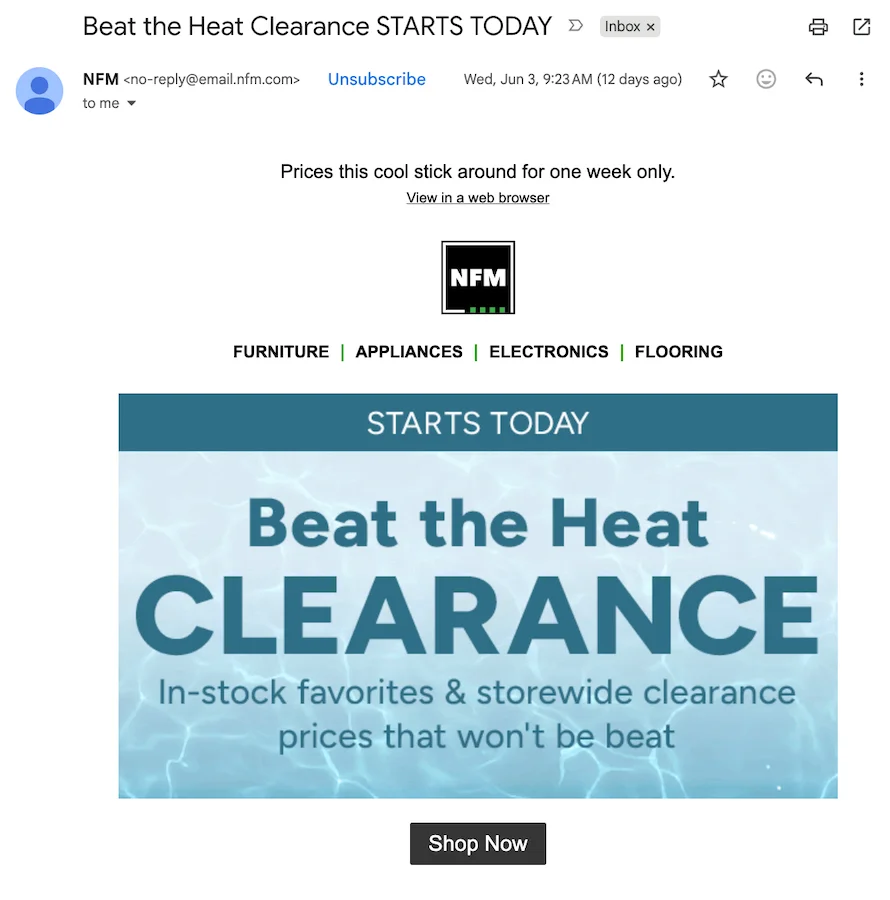
An example of an email marketing message.
The list belongs to you. Other digital marketing channels are rented from a platform that can change its rules tomorrow.
What separates email marketing from spam is consent. Marketing email requires explicit opt-in, identifies the sender, and gives the recipient a one-click way to leave the list. Spam does none of those things, and the line is now enforced by both law (CAN-SPAM, GDPR, CASL) and by Gmail, Yahoo, and Microsoft’s deliverability rules.
📫 Get everything you need for great emails >> The Complete Email Marketing Toolkit: Free Email Templates, Subject Lines & Tips
How email marketing works in 30 seconds
Every email program runs the same five-step loop:
- Capture consent through a signup form, a checkout opt-in, or a gated content download.
- Store and segment the subscribers in your email service provider (ESP) or CRM.
- Design and send either a scheduled campaign (newsletter, promo) or an automated message triggered by behavior (welcome, cart, post-purchase).
- Measure click-through rate, conversion rate, revenue per email, and spam complaint rate.
- Iterate. Cut what does not work, double down on what does.
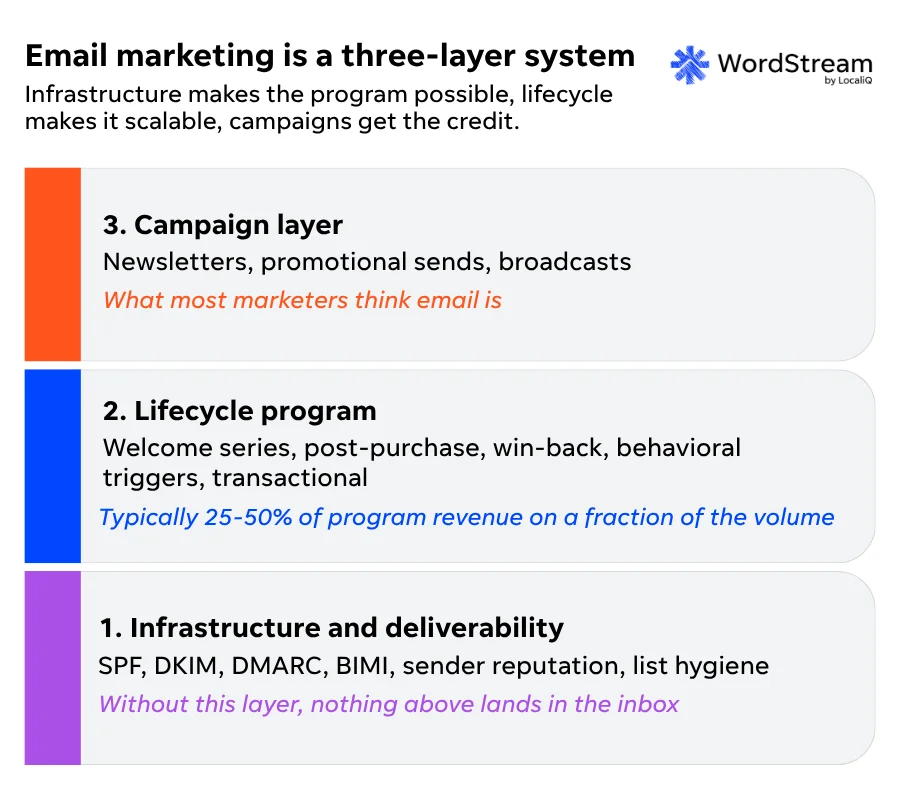
The three-layer chart below explains why most email programs leak money: marketers invest in the visible campaign layer without investing in the lifecycle layer or the deliverability foundation underneath it.
| Layer | Focus | Includes | Key insight |
| 3. Campaign layer | Marketing campaigns and broadcasts | Newsletters, promotional emails, broadcasts | What most marketers think email is |
| 2. Lifecycle program | Automated customer journey communications | Welcome series, post-purchase emails, win-back campaigns, behavioral triggers, transactional emails | Typically drives 25–50% of email program revenue with only a fraction of total send volume |
| 1. Infrastructure and deliverability | Technical foundation for email success | SPF, DKIM, DMARC, BIMI, sender reputation, list hygiene | Without this layer, nothing above reaches the inbox |
Why email is still effective in 2026
Email marketing is still the highest-ROI digital channel for most small and mid-market programs in 2026, and it reaches an estimated 4.7 billion users worldwide.
Email is a fully owned digital channel. Your subscriber list belongs to you. Google can change a ranking algorithm, Meta can raise its CPMs by 40% next quarter, an iOS update can break your retargeting overnight, and your email list still works the same way it did the day before.
That is exactly why email got more important after Apple’s iOS privacy changes and the cookieless squeeze, not less. As paid acquisition got more expensive and harder to measure, the channel you already own at zero marginal cost is the channel that compounds. You can run the numbers for the ROI of your own list below.
Email Marketing ROI Calculator
Project your monthly and annual revenue from email. We do the math; you keep the assumptions honest.
Note: The industry benchmark for email ROI is roughly $36 per $1 spent (Litmus 2025 State of Email). Top-quartile programs see significantly higher; under-invested programs may break even. Treat the projection as directional.
Types of email marketing
Email marketing breaks into two high-level buckets: campaign emails (one-to-many broadcasts sent on a schedule to a list segment) and lifecycle emails (one-to-one messages triggered automatically by user behavior or lifecycle stage).
Lifecycle email flows typically generate roughly 41% of total email revenue from just 5.3% of sends, per Klaviyo’s 2026 Email Marketing Benchmarks, which is why lifecycle is the highest-leverage place to invest after the foundation is built.
Campaign emails (one-to-many broadcasts)
Campaign emails go out on a schedule to a list segment, regardless of what any individual subscriber has done recently.
| Campaign email type | Purpose | Characteristics | Best use cases |
| Newsletter | Build engagement and maintain audience relationships | Recurring informational content sent on a consistent schedule (weekly, biweekly, monthly) | Sharing company updates, educational content, industry news, and keeping subscribers engaged |
| Promotional / sales email | Drive conversions and revenue | Focused on a specific product, offer, discount, or campaign | Product launches, sales events, limited-time offers, and ecommerce marketing |
| Announcement email | Communicate important updates | One-time, non-recurring messages about news or changes | Product releases, feature updates, company news, event invitations, and major milestones |
| Seasonal / holiday campaign | Capitalize on calendar-based opportunities | Planned around specific holidays, seasons, or annual events | Black Friday, Cyber Monday, back-to-school, holiday shopping, and year-end promotions |
Lifecycle/triggered emails (one-to-one, behavioral)
Lifecycle emails fire automatically when a subscriber takes an action or hits a milestone. They are the highest-ROI flows in most programs.
| Lifecycle email type | Purpose | Trigger | Key benefit |
| Transactional | Deliver essential account or order information | Purchase, shipment, password reset, account activity | Critical customer communications with high open rates |
| Welcome series | Introduce new subscribers and build relationships | New signup or first purchase | Converts initial interest into long-term engagement |
| Drip / nurture sequence | Educate and move leads toward conversion | Lead capture, content download, or inquiry | Builds trust and guides prospects through the funnel |
| Abandoned cart / browse abandonment | Recover lost sales opportunities | Cart abandonment or product views without purchase | Often the highest-ROI automation in ecommerce |
| Post-purchase + review request | Reinforce satisfaction and encourage repeat purchases | Completed order | Improves retention, reviews, and customer lifetime value |
| Re-engagement / win-back | Reactivate inactive subscribers | No opens or clicks for 60–90 days | Recovers engaged contacts and improves list health |
| Anniversary / milestone | Celebrate customer moments | Birthday, signup anniversary, loyalty status change | Easy personalization that boosts engagement and revenue |
| Replenishment | Encourage repeat purchases of consumable products | Predicted reorder date | Increases repeat purchase rates and subscription retention |
Pick the four or five flows that match your business and ship those before adding new campaigns.
How to build an email list
To build an email list, you want to capture explicit opt-in consent through a clear form, route every subscriber into your email service provider (ESP) tagged with their source, deliver the value you promised, without buying or scraping addresses.
Permission-based lists drive engagement; bought lists can be effective in well-executed cold email campaigns, but can also drive spam complaints and can get your sending domain blocked.
Permission-based list building
Offering something of value (like a free download or newsletter subscription) is the safest way to build a high-value email list. Cold email tactics and buying or scraping email addresses can be effective for some companies, but can also kill a program before it starts. Recipients have no idea who you are, may hit “Report Spam,” and once your complaint rate clears 0.3%, Gmail and Yahoo will throttle or block your mail.
Single vs. double opt-in
A core consideration as you set up your email marketing campaigns is single versus double opt-in:
- Single opt-in adds the subscriber the moment they submit the form.and bots.
- Double opt-in requires the subscriber to click a confirmation link before they are added. This can lead to smaller lists and limited reach, but also a cleaner list, lower bounce rate, fewer spam complaints, and is required de facto under GDPR.
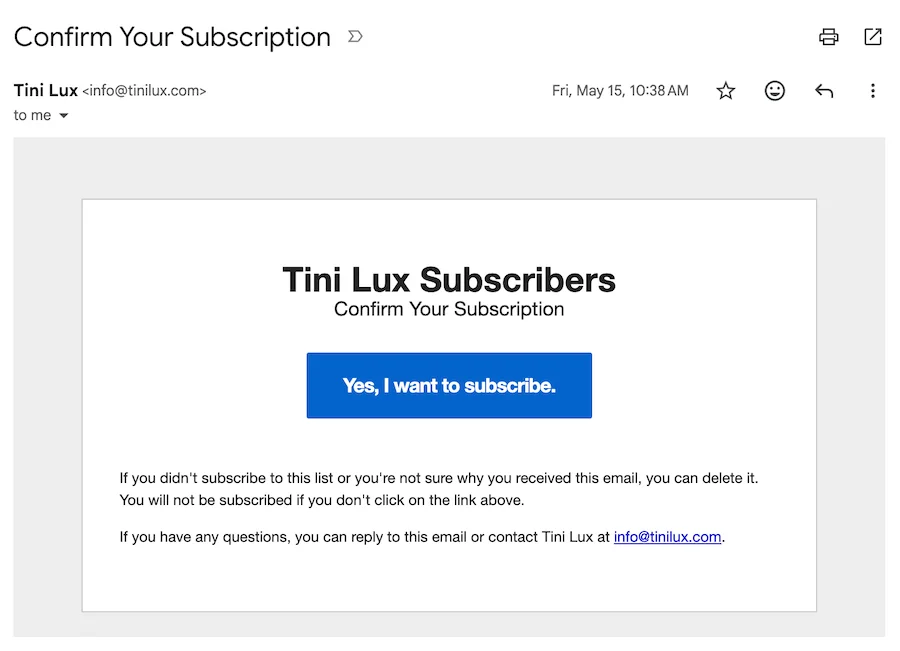
An example of a double opt-in.
For most SMBs in 2026, double opt-in is the safer default. The deliverability gain pays back the volume loss.
Lead magnets that work in 2026
Lead magnets that convert in 2026 are specific, not generic. A “free guide to marketing” gets ignored. A “five-minute checklist for fixing your Google Business Profile” gets signups. Interactive assets (quizzes, calculators, benchmark scorers) outperform static PDFs because they feel earned. Match the magnet to a real, narrow problem your reader has.
Capture email anywhere a visitor is already paying attention:
- Site signup forms (above the fold, exit-intent, embedded mid-content)
- Checkout opt-in (a single consent box, where permitted)
- Gated content (the lead-magnet download)
- Webinar or event registration
- In-store or POS signup if you’re a local business
Email marketing segmentation and personalization
Email segmentation is the practice of dividing your subscriber list into smaller groups based on shared traits (lifecycle stage, behavior, purchase history, source, geography, declared preferences) and sending each group content that fits its context.
Segmented campaigns outperform blasts on every metric that matters (click-through rate, conversion rate, revenue per email, unsubscribe rate), because every recipient is closer to the offer.
Blasting the same email to your full list is the cheapest way to send an email and the most expensive way to lose subscribers.
Segmentation dimensions to start with
Segmented email campaigns generate roughly 30% more opens and 50% more clicks than unsegmented sends, and on the revenue side, segmented campaigns have been reported to drive substantially more revenue per send than blasts (Mailchimp/Campaign Monitor benchmark data).
Six segmentation dimensions cover most of the practical value for SMB programs.
| Segmentation type | Description |
| Lifecycle stage | New subscriber, first-time buyer, repeat buyer, lapsed. |
| Engagement recency | Opened or clicked in the last 30, 60, or 90 days. |
| Purchase history | Category, brand, average order value, frequency. |
| Source of acquisition | Where the subscriber came from (lead magnet, checkout, event, paid ad). |
| Geography | Time zone, region, store proximity for local SMBs. |
| Declared preferences | Categories or cadence the subscriber picked at signup. |
Start with lifecycle stage and engagement recency. Layer the others in once those two are working reliably.
Personalization beyond first name
Real personalization is not “Hi Joe.” It is sending different content to different segments based on what you know about them. Four tactics that can impact performance:
- Dynamic content blocks that swap copy or imagery based on segment.
- Product recommendations drawn from purchase or browse history.
- Send-time optimization that delivers each message at the recipient’s most-likely-open hour.
- Behavioral triggers that fire when a subscriber takes a specific action (visits a page, abandons a cart, downloads a guide).
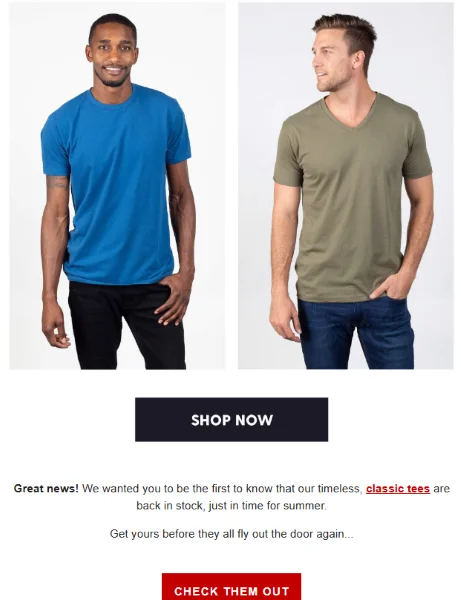
An example of a product recommendation email.
AI-powered predictive segmentation in 2026
Most major ESPs now ship predictive segmentation: churn risk scores, predicted next purchase, propensity to buy, AI-optimized send times. These work, but they need volume to be valuable. If your list is under 10,000 active subscribers, focus on the six segments above before turning on predictive features.
🤖 Want to use AI the right way? Free download >> The Complete Guide to AI for Marketing
Email deliverability: The foundation most marketers skip
Email deliverability is the share of your sent messages that actually reach the inbox, and as of February 2024 it depends on three things: sender authentication (SPF, DKIM, DMARC), one-click unsubscribe, and a spam complaint rate under 0.3%, per Google’s Email Sender Guidelines. Miss any one of those three and Gmail, Yahoo, and Microsoft will throttle, junk, or block your mail.
Sender authentication explained (SPF, DKIM, DMARC, BIMI)
Authentication is how an email provider verifies that you actually own the domain in your From: address. Four protocols, plain-English:
Email Sender Authentication: SPF, DKIM, DMARC, and BIMI
Authentication is how a mailbox provider verifies that you actually own the domain in your From address. Three are required, one is a trust signal.
| Protocol | What It Does | Why It Matters |
|---|---|---|
|
Required SPF Sender Policy Framework |
A DNS record listing the servers allowed to send mail for your domain. | Stops anyone else from forging mail “from” your domain. |
|
Required DKIM DomainKeys Identified Mail |
A cryptographic signature attached to every outgoing message. | Proves the message was not altered in transit. |
|
Required DMARC Domain-based Message Authentication, Reporting and Conformance |
A policy that tells mailbox providers what to do when SPF or DKIM fails. | Lets you enforce alignment and get reports on who is spoofing your domain. |
|
Optional BIMI Brand Indicators for Message Identification |
Displays your verified logo next to your name in the inbox. | Trust signal. Requires DMARC at p=quarantine or stricter, plus a Verified Mark Certificate. |
You need all three of SPF, DKIM, and DMARC. BIMI is a nice-to-have once the other three are clean.
You need all three of SPF, DKIM, and DMARC. BIMI is a nice-to-have once the other three are clean.
Sender reputation, IP warming, and list hygiene
Sender reputation is the running score every mailbox provider keeps on your sending domain and IP. Three habits protect it.
- Sunset inactive subscribers. Anyone who has not opened or clicked in 90 to 180 days goes through one re-engagement attempt, then moves to a suppression list.
- Remove hard bounces immediately. Hard-bouncing addresses are dead. Continuing to mail them tanks your reputation.
- Warm new IPs slowly. If you change ESPs or add a dedicated IP, ramp volume over two to four weeks. Mailbox providers treat brand-new senders with suspicion.
What to do if you are already in spam
If your mail is landing in spam, diagnose before remediating. Check Google Postmaster Tools and Yahoo’s Sender Hub for your current spam rate, authentication status, and reputation score.
The fix usually has three steps:
- Pause sends to your least engaged segment for two weeks.
- Fix the underlying cause (authentication, list quality, or content).
- Ramp volume back up slowly against your most engaged subscribers first.
To get a general deliverability health check, you can use our free tool:
Email Deliverability Health Check
Eight checks against the Gmail, Yahoo, and Microsoft sender requirements. Answer honestly to get a verdict and a prioritized fix list.
Source: Google Sender Guidelines (support.google.com/mail/answer/81126), Yahoo Sender Hub, Microsoft sender requirements (May 2025). Spam complaint thresholds are practical floors; lower is better.
Writing and designing emails that get opened and clicked
The fundamentals of email creative in 2026 are simple: a 30 to 50 character subject line that says what is inside, one primary call to action per message, and a layout that loads cleanly on a phone before it loads on a desktop. Treat every email as something a busy person will read in quickly on their commute.
Subject lines
A good email subject line is specific, 30 to 50 characters long, and clear about what is inside the message. Clarity beats cleverness. The preheader (the snippet of text that appears next to the subject in most inboxes) acts as a second subject line and should expand on the hook, not repeat it.
AI tools (your ESP’s built-in subject-line scorer, the WordStream Subject Line Scorer below, or any LLM you trust) are useful for generating variants and pressure-testing your lines. Never ship a generated subject line without an editor’s pass.
Avoid the patterns that filters and humans both flag: ALL CAPS, manipulative urgency, multiple exclamation marks, “FREE!!!” style hooks, and any phrase that would feel sleazy out loud.
Email Subject Line Pre-Flight Scorer
Paste a subject line (and preheader, if you have one). We score it 0 to 100 and tell you the top three things to fix.
Note: This is a heuristic scorer based on spam-trigger lists, length research, and mobile preview widths. Always A/B test what you actually send.
Email body structure
Every marketing email should have one goal and one primary call to action. If a message is asking the reader to do two things, they may not take action on either.
Six practical rules:
- Write to one reader (not “a list”)
- Put the most important content above the fold
- Use a clear visual hierarchy with one headline
- One supporting image, and one primary button
- Keep body font at 14 pixels or larger
- Make every tap target at least 44 by 44 pixels so it works on a phone
Visual design, dark mode, and accessibility
Most subscribers will open your email on a phone, often in dark mode. Three habits keep your design from breaking.
- Alt text on every image. Half your audience may be reading with images blocked.
- Semantic HTML and high color contrast. Aim for WCAG AA at minimum (4.5:1 ratio for body text).
- Test dark mode before you send. Logos and dark-on-dark text can disappear; use transparent PNGs and check the rendering in your ESP’s preview pane.
All about automation, drip campaigns, and lifecycle email
Email automation is the practice of sending pre-built sequences triggered by user behavior or lifecycle stage (signup, purchase, cart abandonment, inactivity) rather than scheduling each send manually. Lifecycle email flows generate roughly 41% of total email revenue from just 5.3% of sends, per Klaviyo’s 2026 Email Marketing Benchmarks, which is why automation is the highest-leverage place to invest after deliverability is solid.
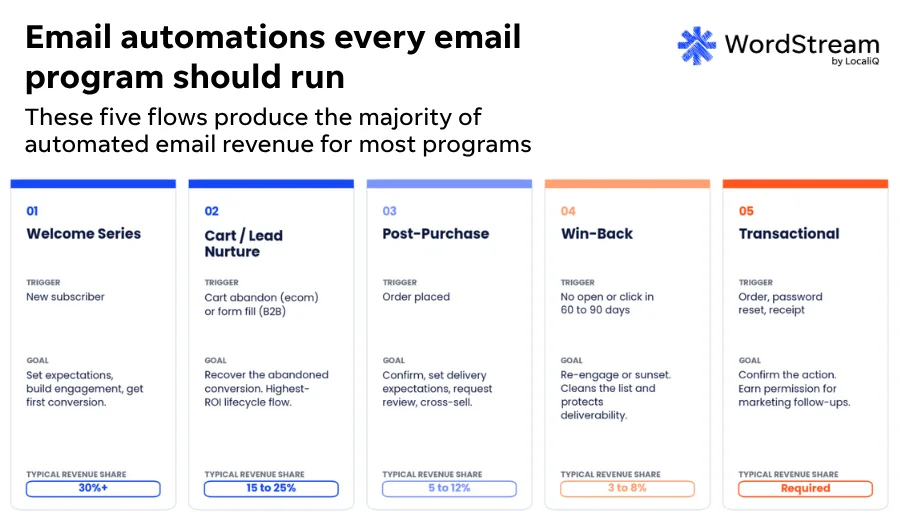
The starter five automations every SMB should run
Build these five before adding anything fancier.
- Welcome series. 4 to 6 messages over the first 14 days. Sets frequency expectations, delivers the lead magnet, introduces your best content, and asks for a first conversion.
- Cart abandonment (ecommerce) or lead nurture (B2B / SaaS). Triggers when a shopper leaves items in the cart, or when a lead fills a form but does not convert. Typically the single highest-ROI flow in an ecommerce program.
- Post-purchase. Confirms the order, sets delivery expectations, asks for a review at the right moment, and primes the next purchase.
- Re-engagement / win-back. Fires when a subscriber goes 60 to 90 days without an open or click. Recovers the still-engaged and sunsets the rest, which protects your sender reputation.
- Transactional. Order confirmations, password resets, shipping notifications. Legally distinct under CAN-SPAM, and the place subscribers actually pay attention.
How to design a drip sequence
Every drip sequence has the same five-part anatomy. Design each one before you write the first email.
- Trigger. What user action or lifecycle event starts the sequence.
- Goal. The single outcome the sequence is meant to drive (first purchase, demo booked, review submitted).
- Step count. 4 to 6 messages is typical. More steps is rarely better.
- Timing. A common welcome cadence is Day 0, Day 1, Day 3, Day 7, Day 14.
- Exit criteria. What stops the sequence (conversion, unsubscribe, manual tag).
KPIs and benchmarks in the post-MPP era
Open rate is no longer a reliable headline KPI for email marketing because Apple Mail Privacy Protection (MPP) pre-fetches the tracking pixel for approximately 64% of Apple Mail users, inflating reported opens regardless of whether the message was actually read.
The KPIs that still tell you the truth in 2026 are click-through rate, conversion rate, revenue per email, list growth, unsubscribe rate, and spam complaint rate.
Treat open rate as a directional signal, not a primary target.
The KPIs that still matter
Track these nine email marketing KPIs. The first four tell you whether the program is working, the next three tell you whether it is sustainable, the last two tell you whether you are growing.
- Click-through rate (CTR). Clicks divided by delivered messages.
- Click-to-open ratio (CTOR). Clicks divided by opens; useful for testing creative, even with inflated opens.
- Conversion rate. The share of clickers who take the goal action.
- Revenue per email (RPE). Total revenue divided by emails sent. The cleanest top-level health metric for ecommerce.
- Unsubscribe rate. Percentage of people who opt out of your email list. Target under 0.5% per send.
- Spam complaint rate. Target under 0.1%, hard ceiling at 0.3% under the Gmail and Yahoo February 2024 rules.
- Deliverability/inbox placement rate. Share of sends that land in the primary inbox versus spam or promotions.
- List growth rate (net). New subscribers minus unsubscribes minus bounces.
- Engaged subscriber percentage. Share of the list that opened or clicked in the last 60 to 90 days.
How to handle opens when you still need them
You still need opens for two things: subject-line A/B testing and engagement segmentation. Two ways to handle MPP noise:
- Exclude MPP-flagged opens where your ESP supports it. Most major ESPs now flag pre-fetched opens explicitly.
- Move to click-based engagement segmentation. Define your “engaged” segment as anyone who clicked in the last 60 to 90 days, not anyone who “opened.” Clicks are still a real signal.
Benchmarks
Industry benchmarks are useful for direction, but not for goal-setting.
- Average open rates run roughly 30 to 45% across industries (heavily inflated by MPP).
- Average click-through rates land between 1-5% by industry.
- Revenue per email varies by an order of magnitude depending on category, list quality, and program maturity.
Use your own previous 90 days as the baseline you measure against, not an industry average. Some sources to reference include Klaviyo 2026 Benchmarks (ecommerce) and Mailchimp Email Marketing Benchmarks (multi-industry).
Compliance: CAN-SPAM, GDPR, CASL, CCPA
Four laws govern marketing email in the major English-speaking and EU markets, and they sit on a spectrum from permissive to strict:
- CAN-SPAM (United States, opt-out)
- CCPA/CPRA (California, opt-out plus data rights)
- CASL (Canada, express opt-in)
- GDPR (European Union/EEA, lawful basis with explicit consent in most marketing cases)
If you mail anyone in any of these regions, you are under the rules for that region, regardless of where your business is based.
The table below summarizes the consent model, what each email must include, and the penalty range for each law.
Email Marketing Compliance at a Glance
Four laws, plain English. Color-coded by strictness, from opt-out at the lightest end to lawful-basis consent at the strictest.
| Law / Jurisdiction | Consent Model | Must Include | Max Penalty |
|---|---|---|---|
|
Lightest CAN-SPAM United States |
Opt-out (no prior consent required) | Physical address, working opt-out, accurate headers and subject line, identifies the sender | ~$53K per email |
|
Moderate CCPA / CPRA California, US |
Opt-out, plus sale / share rules | “Do Not Sell or Share” link, data deletion rights, privacy notice, honor DROP requests (Jan 2026) | ~$2,500 to $7,500 per violation |
|
Strict CASL Canada |
Express opt-in required | Sender identification, working opt-out, mailing address or contact info, consent records | Up to CA$10M per violation |
|
Strictest GDPR EU / EEA |
Lawful basis (often explicit consent) | Granular consent, data subject rights, records of processing, DPO where required | €20M or 4% of global turnover |
Build to the strictest law you are subject to. If you send to anyone in the EU, run GDPR-compliant globally. This summary is for general guidance and not legal advice.
The practical operator rule: build to the strictest law you are subject to. If you send to anyone in the EU, run a GDPR-compliant program globally. The added rigor will not hurt your US or Canadian deliverability, and it will protect you when an EU subscriber slips onto your list through a partner integration or a referral.
California DROP took effect January 1, 2026
California’s Delete Request and Opt-out Platform (DROP) lets consumers submit a single request that propagates to every data broker registered in the state, requiring them to delete the consumer’s personal information. If your business sells or shares California consumer data, you have to honor DROP requests on the same timeline as a direct CCPA deletion request. Flag this with your legal team if it applies to you.
Choosing an email service provider (ESP)
The best email service provider (ESP) for your business is the one that matches your use case, not the one with the most features on a comparison chart. Evaluate every ESP on nine dimensions: deliverability infrastructure, segmentation and automation depth, integrations with your CRM and ecommerce stack, reporting, pricing model, compliance tooling, AI features, support, and data export and portability.
There is no universal “best” ESP. There is the right one for ecommerce, the right one for B2B SaaS, and the right one for a local SMB, and they are rarely the same tool.
What to evaluate
Score every candidate on these nine criteria before you sign anything.
- Deliverability infrastructure. Dedicated IP options, authentication setup, and postmaster integrations.
- Segmentation and automation depth. Can you build the lifecycle flows you actually need without external glue?
- Integrations. CRM, ecommerce platform, ad platforms (Google Customer Match, Meta Custom Audiences).
- Reporting. Cross-flow revenue reporting, not just per-send metrics.
- Pricing model. By contacts, sends, seats, or hybrid. The right model depends on your list-growth shape.
- Compliance tooling. Consent records, GDPR data export requests, suppression lists.
- AI features. Subject-line variants, send-time optimization, predictive segmentation (useful only at scale).
- Support. Whether a human answers in hours or days when something breaks.
- Data export and portability. You should be able to leave on a weekend.
Match to use case
Local SMBs and event-driven businesses lean toward Constant Contact, Mailchimp, or Brevo. Ecommerce teams typically pick Klaviyo or Omnisend for the lifecycle-flow depth. B2B and SaaS teams lean toward HubSpot, ActiveCampaign, or Customer.io for the CRM integration. Agencies managing multiple accounts pick a multi-client platform. Enterprise programs go to Marketing Cloud, Iterable, or Braze.
CRM and attribution integration
ESP-native reports tell you what happened inside the email tool. They do not tell you whether email closed a deal or drove a repeat purchase six weeks later. Connect email engagement events to your CRM and your analytics so revenue gets credited correctly. That single integration is what separates a program that “looks good in Mailchimp” from one you can defend in a budget meeting.
WordStream Email ESP Evaluation Tool
Four questions. Get a shortlist of ESPs that fit your use case, plus the evaluation criteria ranked by what you said matters most.
Note: Recommendations are practitioner shortlists, not endorsements. Always run a 14 to 30 day trial against your actual sending pattern before committing.
AI in email marketing: What’s actually useful in 2026
AI is impacting five specific places in email marketing in 2026: subject-line variants and pre-flight scoring, first-draft body copy, predictive send-time optimization, predictive segmentation and churn scoring, and image generation for hero or lifestyle imagery. The places it is still overhyped are the ones that promise to replace the work, not augment it.
Where AI is valuable
- Subject-line variants and scoring. Generate5-10 options, score them, and ship the best after a human edit.
- First-draft copy. Speeds up the blank-page problem. Treat the output as a starting point, not the final draft.
- Predictive send time. Delivers each message at the recipient’s most likely open hour. Works at list sizes above ~10,000 active subscribers.
- Predictive segmentation and churn scoring. Identifies who is about to lapse so you can pull them into a re-engagement flow before they do.
- Image generation for hero and lifestyle imagery. Useful for variant testing and seasonal swaps. Still inconsistent for product photography.
Where AI is overhyped (for now)
Full set-and-forget campaign generation. AI replacing human strategy. AI-generated subject lines shipped without an editor’s pass. These all promise to remove the work, and they all currently deliver lower-quality output than a human plus an AI assistant would produce.
Common email marketing mistakes to avoid
The most common email marketing mistakes in 2026 are buying or scraping email lists, skipping sender authentication (SPF, DKIM, DMARC), treating open rate as a primary KPI in the post-MPP era, blasting the same email to the full list, hiding the unsubscribe link, sending from a no-reply@ address, running a one-and-done welcome email instead of a series, ignoring list hygiene, and optimizing only for desktop preview.
Common Email Marketing Mistakes to Avoid
Nine mistakes that show up over and over in 2026 audits. Color-coded by what they cost you.
| Mistake | Why It Hurts You |
|---|---|
|
01 Buying or scraping lists |
Fastest way to tank sender reputation. Gets you blocked under Gmail and Yahoo’s February 2024 enforcement. |
|
02 Skipping authentication (SPF, DKIM, DMARC) |
As of February 2024, these are table stakes for every sender mailing 5,000+ messages a day. Not advanced setup, required. |
|
03 Hiding or burying the unsubscribe link |
Pushes spam complaint rates up, breaks Gmail and Yahoo’s one-click unsubscribe rule, gets you junked. |
|
04 Using |
Hurts engagement, deliverability signals, and brand trust. Use a real, monitored inbox instead. |
|
05 One-and-done welcome email |
The first 14 days set retention. Run a 4 to 6 message welcome series, not a single confirmation. |
|
06 Blasting the full list |
Segmentation outperforms blasting on every metric that matters. The cheapest way to lose subscribers. |
|
07 Open rate as the primary KPI |
Apple Mail Privacy Protection inflates opens for ~64% of Apple Mail users. Use click-through rate and revenue per email instead. |
|
08 Ignoring list hygiene |
Sunset subscribers who have not opened or clicked in 90 to 180 days, or your sender reputation pays for them. |
|
09 Optimizing only for desktop preview |
Most subscribers read on a phone, often in dark mode. Mobile-first or your design breaks for the majority. |
Note: Deliverability mistakes hit hardest in the short term. Engagement and measurement mistakes hit hardest in the long term.
Email marketing FAQs
What is email marketing in simple terms?
Email marketing is the practice of sending commercial or relationship-based email to a permission-based subscriber list, with the goal of driving revenue, retention, or engagement. Unlike spam, it requires consent from the recipient, identifies the sender, and gives recipients a clear way to opt out. Common examples include newsletters, promotional offers, welcome series, and abandoned-cart reminders.
Is email marketing still effective in 2026?
Yes. Email marketing returns roughly $36 for every $1 spent, per Litmus’s 2025 State of Email Survey, and email reaches an estimated 4.7 billion users worldwide. Because email is an owned channel rather than a rented one, it has become more important as cookies, paid social CPMs, and platform algorithms have grown less reliable.
What is the ROI of email marketing?
Email marketing returns roughly $36 for every $1 spent, per Litmus’s 2025 State of Email Survey. Variance is wide: top-quartile programs see significantly higher returns, while poorly segmented programs may only break even. Automated lifecycle flows (welcome, abandoned cart, post-purchase, win-back) typically generate the highest ROI within a program.
How do I start email marketing?
To start email marketing: 1) pick an email service provider (ESP) like Mailchimp, Klaviyo, or Constant Contact, 2) authenticate your sending domain with SPF, DKIM, and DMARC, 3) build a permission-based list with an opt-in form and a lead magnet, 4) launch a welcome series and one campaign, 5) measure click-through rate, conversion, and revenue per email.
What is a good open rate for email marketing in 2026?
Industry averages for email open rates range roughly 30 to 45%, but open rate is unreliable after Apple Mail Privacy Protection (MPP), which pre-fetches the tracking pixel for approximately 64% of Apple Mail users. Click-through rate (around 1 to 5% by industry), conversion rate, and revenue per email are more reliable metrics.
What changed with Gmail and Yahoo’s 2024 bulk sender requirements?
Starting February 2024, senders mailing 5,000 or more messages a day to Gmail or Yahoo must authenticate with SPF, DKIM, and DMARC, offer one-click unsubscribe (RFC 8058, enforced June 2024), and keep spam complaint rates under 0.3% (target under 0.1%). Microsoft added the same requirements for Outlook.com and Hotmail in May 2025.
Do I need permission before sending marketing emails?
Yes, in most cases. CASL (Canada) and GDPR (European Union) require express opt-in consent before sending marketing emails. CAN-SPAM (United States) technically allows opt-out, but Gmail and Yahoo’s spam-rate enforcement makes consent practically mandatory. Use double opt-in (a confirmation click) for cleaner lists and better inbox placement.
What email marketing software should small businesses use?
The best email marketing software for a small business depends on the use case. Ecommerce programs typically choose Klaviyo or Omnisend; local services and event-driven businesses pick Constant Contact or Mailchimp; B2B teams lean toward HubSpot or ActiveCampaign. Evaluate on deliverability, automation depth, integrations (CRM, ecommerce, ads), pricing, and compliance tooling rather than feature count alone.
What is the difference between a newsletter, a promotional email, and a transactional email?
A newsletter is recurring informational content sent to subscribers (a weekly digest, a monthly roundup). A promotional email pitches a specific product, offer, or campaign. A transactional email is triggered by a user action like an order confirmation or password reset, and is legally distinct under CAN-SPAM (no unsubscribe link required, though it should still feel on-brand).
Make email marketing part of your strategy
Now, you’re armed with everything you need to know about email marketing, including tips and tools, so you’re ready to build your email list and execute a successful campaign.
For support running effective email marketing campaigns, let’s talk.
