

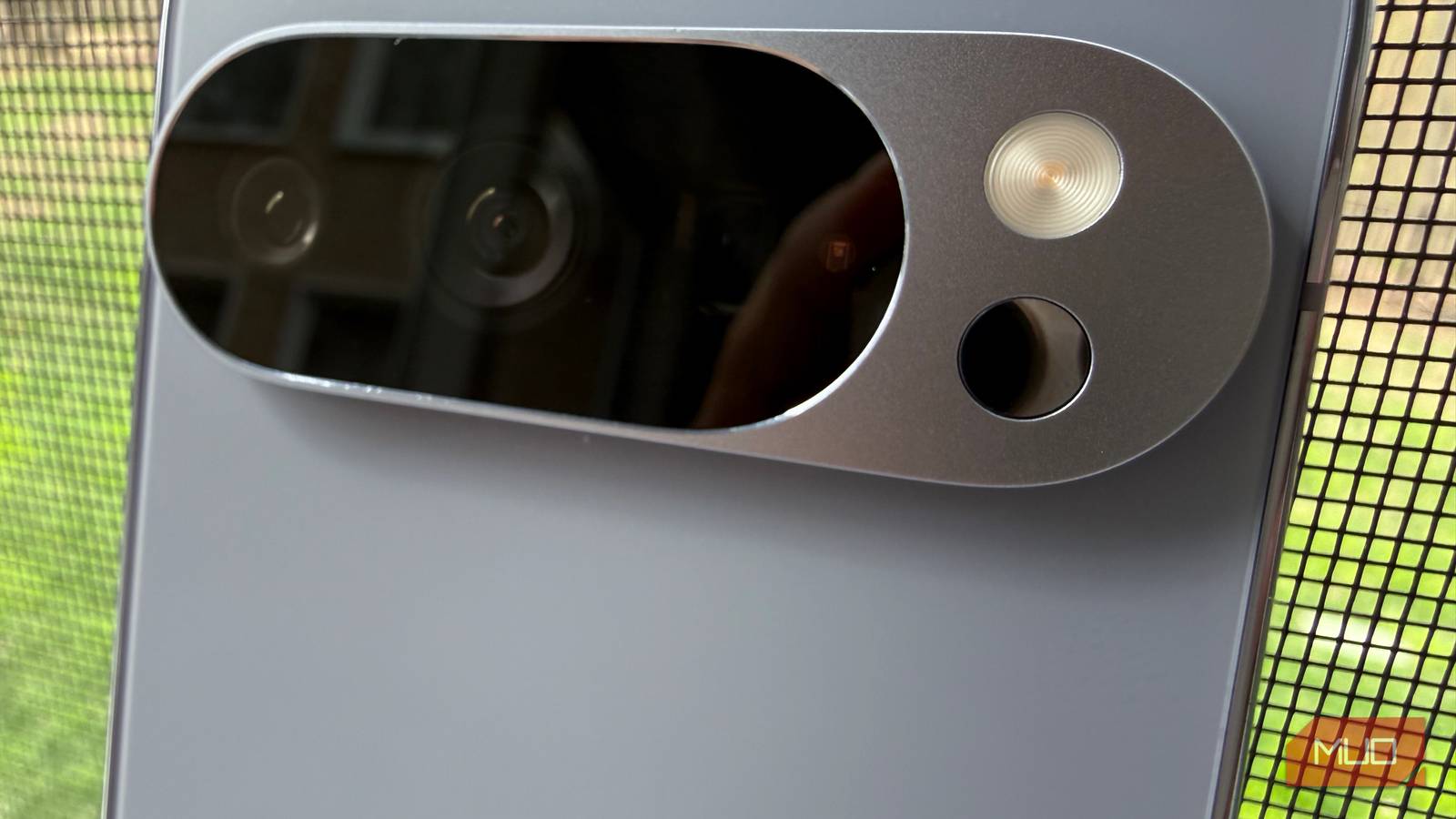
The Google Pixel has a sensor you probably have never used (and, in fact, there are several sensors on your phone that can trigger certain smart home automations). On the camera visor on the back, under the flash, you’ll find a small black dot which is actually an infrared thermometer, as long as you have a Pixel 8, Pixel 9 Pro, Pixel 9 Pro XL, Pixel 10 Pro, or Pixel 10 Pro XL. (And actually, the latest Pixels have several helpful features that are a bit hidden).
This sensor has an accompanying app called Thermometer, and it simply lets you take the temperature of objects (and includes a tutorial on best practices), but then also gives you the ability to save readings so that if you have someone in your house who is sick, you can monitor the progression of their fever.
At first, I ignored this sensor as a gimmick, but after thinking about how and why it’s actually very useful to have a temperature sensor on your phone, I reconsidered.

I stopped buying thermometers
The Pixel can take body temperature and is FDA-approved to do so

In 2024, Google got the thermometer sensor on its Pixel devices FDA De Novo cleared, which is for novel, non-medical devices that make certain claims. In particular, clinical trials found that Pixel’s temperature accuracy was ±0.3°C compared to an FDA-cleared temporal artery thermometer. I don’t know about you, but I’m tired of buying (and losing) pricey thermometers every time one of my kids gets sick. Being able to take a family member’s temperature with my phone is a huge time- and money-saver.
How to use the temperature sensor on Pixel
Just use the thermometer app
There is a special mode in the Thermometer app on Pixel that walks you through the process of taking your temperature, which requires you to begin at the center of your forehead, then sweep the phone to your temple, much like a temporal thermometer you might buy at the store. It takes about five seconds and includes audible spoken instructions so that you can take your own temperature without looking.
Your Pixel can be used like a thermal camera
Find air leaks and make your home more energy-efficient

Perhaps you don’t want to spend money on a thermal camera like I did (even one that connects to your phone), which can visually show you where hot or cold air is entering your house, so you can add insulation or make other tweaks to keep outside air out.
But using the thermometer on your Pixel can offer a similar benefit — a “poor man’s thermal” camera, if you will — by pointing your Pixel’s temperature sensor around windowsills and along the edges of doors and windows, especially at the bottom of doors. You can even scan the temperature of light switches, recessed lights, dryer vents, or attic hatches. Make sure you take multiple readings and average them, but if you find a temperature differential of 10–20 degrees from a nearby surface, you probably have an air leak and should take steps to insulate.
Check food surface temperature easily
Check beverage and cooking surface temperature, and more

You can use the thermometer on Pixel to measure the surface temperature of food, not the internal temperature. This is an important distinction because you cannot rely on your phone to determine whether your meat is cooked to a safe temperature; you’ll need an internal temperature probe.
But if you want to ensure that tea or a cup of hot chocolate won’t burn your spouse or child, you can certainly use your Pixel’s thermometer to check the temperature of what you’re about to serve (hint: consuming liquids at 200 degrees Fahrenheit or higher is dangerous). Along these same lines, if you have a baby, the temperature sensor on Pixel will let you easily check the temperature of the contents of a baby bottle.
Another great use of this sensor when preparing food is checking the temperature of a cooking surface, such as a pan or griddle, a pizza stone, or a grill grate. Often, these surfaces require a very specific temperature for searing, frying, or cooking, and having a thermometer on your phone lets you get very precise with achieving the ideal temperature.
Lastly, you can check the surface temperature of your refrigerator or freezer. Your fridge should be at 38°F, because even if it’s slightly warmer, it could cause your food to spoil very quickly. Checking the temperature of your refrigerator ensures you aren’t wasting money by having food go bad.
It’s not a scientific instrument
But most people don’t even know their Pixel can do this

While the infrared temperature sensor on the Pixel is not medical or scientific grade (though it’s great that it has De Novo clearance from the FDA), it’s super helpful in a pinch and when you need to check someone’s body temperature, reference how hot that cup of coffee is before you serve it, or even do some light home efficiency improvement by identifying some areas that might not be properly insulated.
Not only that, the temperature sensor is one of the few reasons to get a Pro Pixel, as the regular Pixel has almost achieved full parity with the Pros, except for a few features like the temperature sensor.

- Brand
-
Google
- SoC
-
Tensor G5
- Display
-
6.3″ Super Actua display
- RAM
-
16 GB
The Pixel 10 Pro is Google’s highest-end flagship smartphone. It features an improved rear camera system, the Tensor G5 chip, seven years of software updates, and a 6.3″ Super Actua display.
