
Close Menu
    Facebook X (Twitter) Instagram
    Wifi PortalWifi Portal
    • Blogging
    • SEO & Digital Marketing
    • WiFi / Internet & Networking
    • Cybersecurity
    • Tech Tools & Mobile / Apps
    • Privacy & Online Earning
    Facebook X (Twitter) Instagram
    Wifi PortalWifi Portal
    Home»Cybersecurity»Microsoft fixes Remote Desktop warnings displaying incorrectly
    Cybersecurity

    Microsoft fixes Remote Desktop warnings displaying incorrectly

    adminBy adminMay 1, 2026No Comments3 Mins Read
    Facebook Twitter LinkedIn Telegram Pinterest Tumblr Reddit WhatsApp Email
    Windows
    Share
    Facebook Twitter LinkedIn Pinterest Email

    Windows

    Microsoft has fixed a known issue causing newly introduced Windows security warnings to display incorrectly when opening Remote Desktop (.rdp) files.

    This known issue affects all supported Windows versions, including Windows 11 (KB5083768 & KB5083769), Windows 10 (KB5082200), and Windows Server (KB5082063), on devices with multiple monitors and different display scaling settings.

    Microsoft addressed the bug in the optional KB5083631 preview cumulative update for Windows 11, released on Thursday, along with 34 other changes.

    “This update addresses an issue that affects the Remote Desktop Connection security warning dialog. The dialog could render incorrectly in multi-monitor scenario when the monitors had different scaling set,” Microsoft said. “This might occur after installing the April 2026 (KB5083769) security update.”

    As Microsoft explained when it acknowledged the bug on Wednesday, the security warnings appearing when opening RDP files may not display correctly. On affected Windows systems, the buttons in the alert windows are misaligned or partially hidden, and the text is hard to read, making it difficult, and in some cases impossible, to interact with the security dialog.

    These warnings were introduced on Windows systems with the April 2026 cumulative updates to disable risky shared resources by default as a defense against phishing attacks that abuse Remote Desktop connection (.rdp) files.
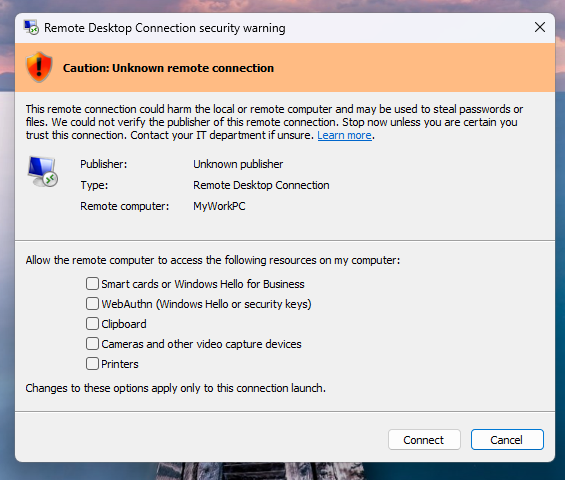
    Remote Desktop Connection security warning
    Remote Desktop Connection security warning (Microsoft)

    ​RDP files are commonly used to connect to remote systems in enterprise environments because they can be preconfigured to automatically redirect local resources to a remote host. However, threat actors have also increasingly abused them in phishing campaigns, including the Russian APT29 cyber-espionage group, which has used them to steal documents and credentials from victims’ devices remotely.

    After installing the April security updates, a one-time educational prompt will appear when opening an RDP file for the first time, warning about the associated risks.

    Afterward, a security dialog is displayed before any connection is made when opening RDP files, showing whether the file is signed by a verified publisher, the remote system’s address, and all local resource redirections (including drives, clipboard, or devices), with every option disabled by default.

    If RDP files are not digitally signed, Windows displays a “Caution: Unknown remote connection” warning, with the publisher labeled as unknown. However, if they are digitally signed, Windows will warn users to verify their legitimacy before connecting.

    According to user reports, the KB5083769 security update also breaks third-party backup apps from multiple vendors on Windows 11 24H2 / 25H2 systems due to a VSS (Volume Shadow Copy Service) timeout.

    Last month, Microsoft also released out-of-band (OOB) updates to fix multiple Windows Server issues that caused restart loops and update installation failures after installing the April 2026 security updates.


    article image

    AI chained four zero-days into one exploit that bypassed both renderer and OS sandboxes. A wave of new exploits is coming.

    At the Autonomous Validation Summit (May 12 & 14), see how autonomous, context-rich validation finds what’s exploitable, proves controls hold, and closes the remediation loop.

    Claim Your Spot

    desktop displaying fixes incorrectly Microsoft Remote warnings
    Share. Facebook Twitter Pinterest LinkedIn Tumblr Telegram Email
    Previous ArticleTwo US Security Experts Sentenced to Prison for Helping Ransomware Gang
    Next Article How to optimize for agentic search with Semrush
    admin
    • Website

    Related Posts

    Microsoft Advertising Launches Product Explorer

    June 15, 2026

    Microsoft Ads launches Product Explorer for catalog insights

    June 12, 2026

    How to estimate the traffic impact of SEO fixes

    June 12, 2026
    Add A Comment
    Leave A Reply Cancel Reply

    Search Blog
    About
    About

    At WifiPortal.tech, we share simple, easy-to-follow guides on cybersecurity, online privacy, and digital opportunities. Our goal is to help everyday users browse safely, protect personal data, and explore smart ways to earn online. Whether you’re new to the digital world or looking to strengthen your online knowledge, our content is here to keep you informed and secure.

    Trending Blogs

    ChatGPT Ads Manager Is Now Open to Everyone: Here’s How to React

    June 15, 2026

    What’s the Big Deal and How to Get Started

    June 15, 2026

    Microsoft Advertising Launches Product Explorer

    June 15, 2026

    Should You Even Try to Optimize for AI Overviews? [Study]

    June 15, 2026
    Categories
    • Blogging (96)
    • Cybersecurity (1,955)
    • Privacy & Online Earning (262)
    • SEO & Digital Marketing (1,489)
    • Tech Tools & Mobile / Apps (1,796)
    • WiFi / Internet & Networking (354)

    Subscribe to Updates

    Stay updated with the latest tips on cybersecurity, online privacy, and digital opportunities straight to your inbox.

    WifiPortal.tech is a blogging platform focused on cybersecurity, online privacy, and digital opportunities. We share easy-to-follow guides, tips, and resources to help you stay safe online and explore new ways of working in the digital world.

    Our Picks

    ChatGPT Ads Manager Is Now Open to Everyone: Here’s How to React

    June 15, 2026

    What’s the Big Deal and How to Get Started

    June 15, 2026

    Microsoft Advertising Launches Product Explorer

    June 15, 2026
    Most Popular
    • ChatGPT Ads Manager Is Now Open to Everyone: Here’s How to React
    • What’s the Big Deal and How to Get Started
    • Microsoft Advertising Launches Product Explorer
    • Should You Even Try to Optimize for AI Overviews? [Study]
    • How travel brands can earn AI recommendations
    • IBM sends signals with its $10 billion quantum pledge
    • How I Use My AI Marketing Assistant After 200+ Hours
    • Finding Client Opportunities In Competitor Feedback
    © 2026 WifiPortal.tech. Designed by WifiPortal.tech.
    • Home
    • About Us
    • Contact Us
    • Privacy Policy
    • Terms and Conditions
    • Disclaimer

    Type above and press Enter to search. Press Esc to cancel.