

I’ve been using Google Maps for years, but I was tired of the distractions. Google Maps has so many ads and pins, with labels galore and a map so detailed with points of interest that it’s distracting to the point of sometimes being overwhelming.
In recent years, Google Maps has been less about the actual map part and more about data and points of interest, which also happens to make it easier for Google to show you targeted ads based on all the data it collects around where you’ve been and what you’re searching for. I found a better solution that has many of the same benefits as Google Maps, but is built to be driving-focused with less distraction and a user interface designed around clarity, which is perfect for driving.

- OS
-
Android
- Subscription Price
-
$20
TomTom is a free navigation/maps app that focuses on a streamlined driving experience with minimal visuals and distractions. It’s ad-free, has live traffic, and is compatible with Android Auto and Apple CarPlay.
TomTom delivers
Ideal for minimalists and made for driving clarity
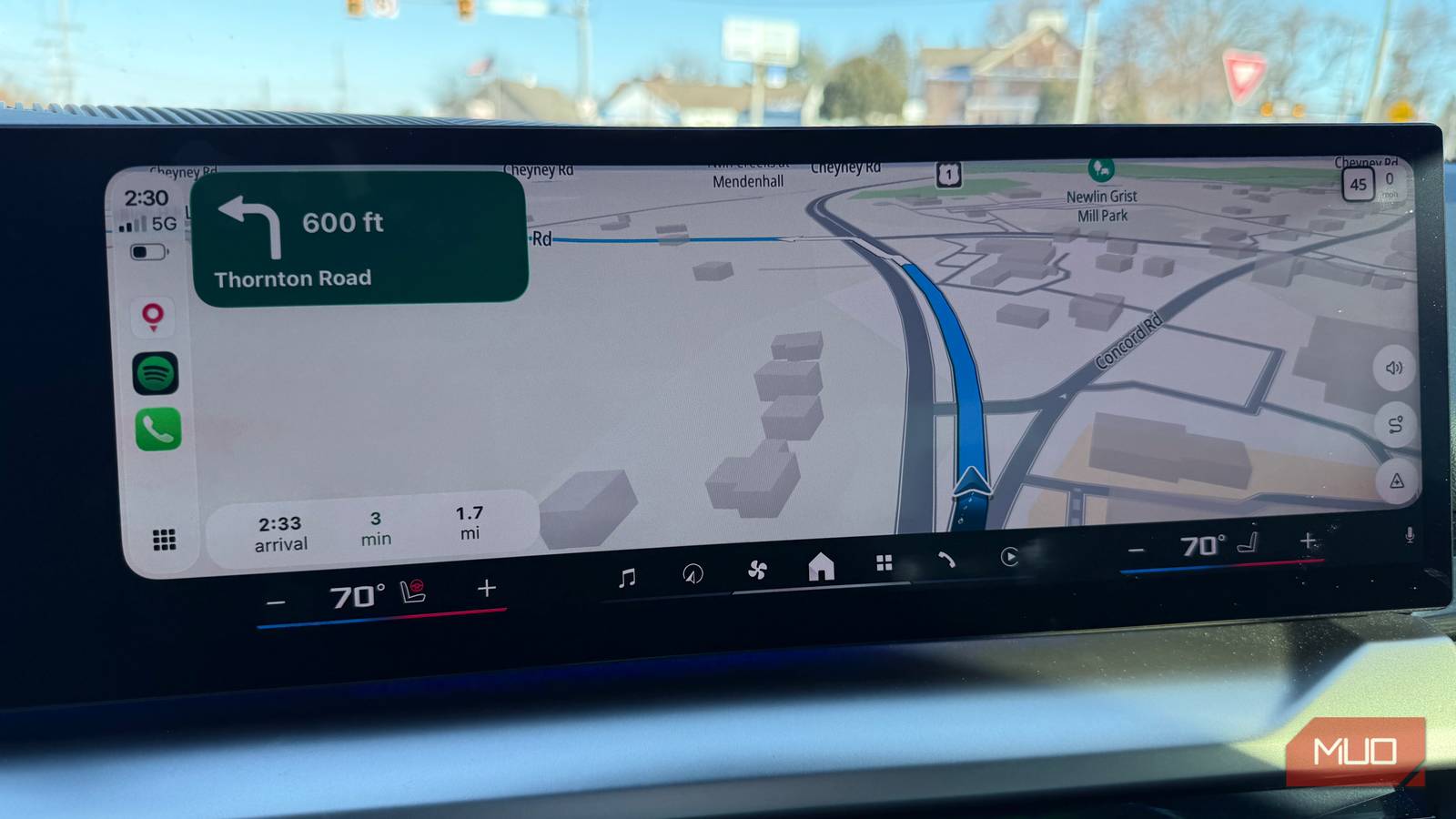
The first thing I noticed was how clean TomTom is. Unlike Google Maps, there aren’t ads everywhere with POI suggestions and map pins showing every coffee shop and store. Instead, TomTom has a beautiful, driver-focused UI with clear visuals, live, real-time traffic, crystal-clear headers at the top to show your next turn, and easy-to-see ETA info at the bottom. It shows your current speed in the corner next to the posted speed limit. There are only three buttons on the right: perspective, a toggle for spoken directions, and a button to add hazards like speed traps or accidents. It’s everything you need and nothing you don’t.
It’s beautiful in CarPlay and Android Auto
Built for driving
That minimalism translates beautifully if you’re using Android Auto or Apple CarPlay — I’ve never seen a cleaner map interface in my car than with TomTom. The touch targets are perfectly aligned with just the right amount of information density. There’s a clear focus on traffic and driving directions, with almost no distractions around POI or other extraneous details. In the upper right corner, you can quickly see your speed and the posted speed limit. In the bottom-left corner, you have your ETA display. To the right are three buttons for adjusting the route view, a toggle for spoken directions, and a way to add a hazard. There’s a search box that lets you type your destination or filter by POI category, like ATMs or gas stations. Everything is neat and organized and designed around clarity while driving.
I’ve never seen a cleaner map interface in my car than with TomTom.
What’s missing from TomTom
No Google enhancements, obviously

Frankly, there’s a lot missing from TomTom versus Google Maps, but I’m okay with that because when driving, I want to have the best driving interface possible, and TomTom is the best I’ve found. Specifically, Google Maps offers many benefits that only a first-party Google app can access, such as Gemini integration and search history and suggestions based on your previous use of Google products. In TomTom, there is no street view, no user reviews of places, no public transit, no augmented reality, and no “send to phone” integration. In summary, Google Maps is more like a concierge, helping you find places to go. TomTom is for people who already know where they are going and just want the best possible driving UI.
Even the settings in TomTom are very minimal, with only about a dozen options around hazard and speeding warnings, light and dark mode toggle, and units of measurement. Comparatively, Google Maps has a plethora of options — too many if you ask me — based on map scaling options, route options relating to tolls and highway preferences, and of course, the many options around Timeline, which tracks exactly where you go and when so that you can go back in time to see precisely where you went on a particular day.

8 Google Maps Features You’re Not Using—and You’re Missing Out
Google Maps is much more than you might think.
TomTom is my new go-to, but not for everything
I must admit, I’m not fully switching to TomTom. Google Maps is good at everything (also: check out this open source alternative), though admittedly it’s become very cluttered and way too ad-focused. When I’m driving, I don’t care about the location of every coffee shop and parking garage along the way.
Further, I don’t want my location data and my travel history to influence the ads I see, which happens when you use Google Maps. But certainly Google Maps is very useful when you’re trying to determine where to go, and you want the power of Google and reviews, plus the inclusion of all your past navigation history to help guide you (also, check out these underrated Google Maps features). But if you already know where you are going, this is where TomTom shines, as it beautifully gets you where you want to go with a simple and clean map experience that also translates beautifully to the bigger screen in your car via CarPlay or Android Auto. TomTom is my new go-to when driving.
