

Watching TV is a great way to wind down after a long day. I know it’s not out of the ordinary to look forward to relaxing and catching up on your shows or movies, but it still doesn’t mean it’s not enjoyable. Everyone needs some time to chill and some of my favorite times of day are right before bed because I’m watching something good and can drift into sleep afterward.
I have a Samsung Frame TV in my family room and it has been one of the best purchases I’ve made because of how easy it is to use. I’ve used different brands of TVs over the years, most with mixed results in terms of enjoyment. The features of the Samsung Tizen operating system have impressed me from the first day of using them and I’m not going back to a Google TV anytime soon.

I didn’t realize my smart TV could do this—until I found these apps
Your TV is capable of more than you think.
Samsung Tizen has a purposeful design
The interface is realistic and thought out
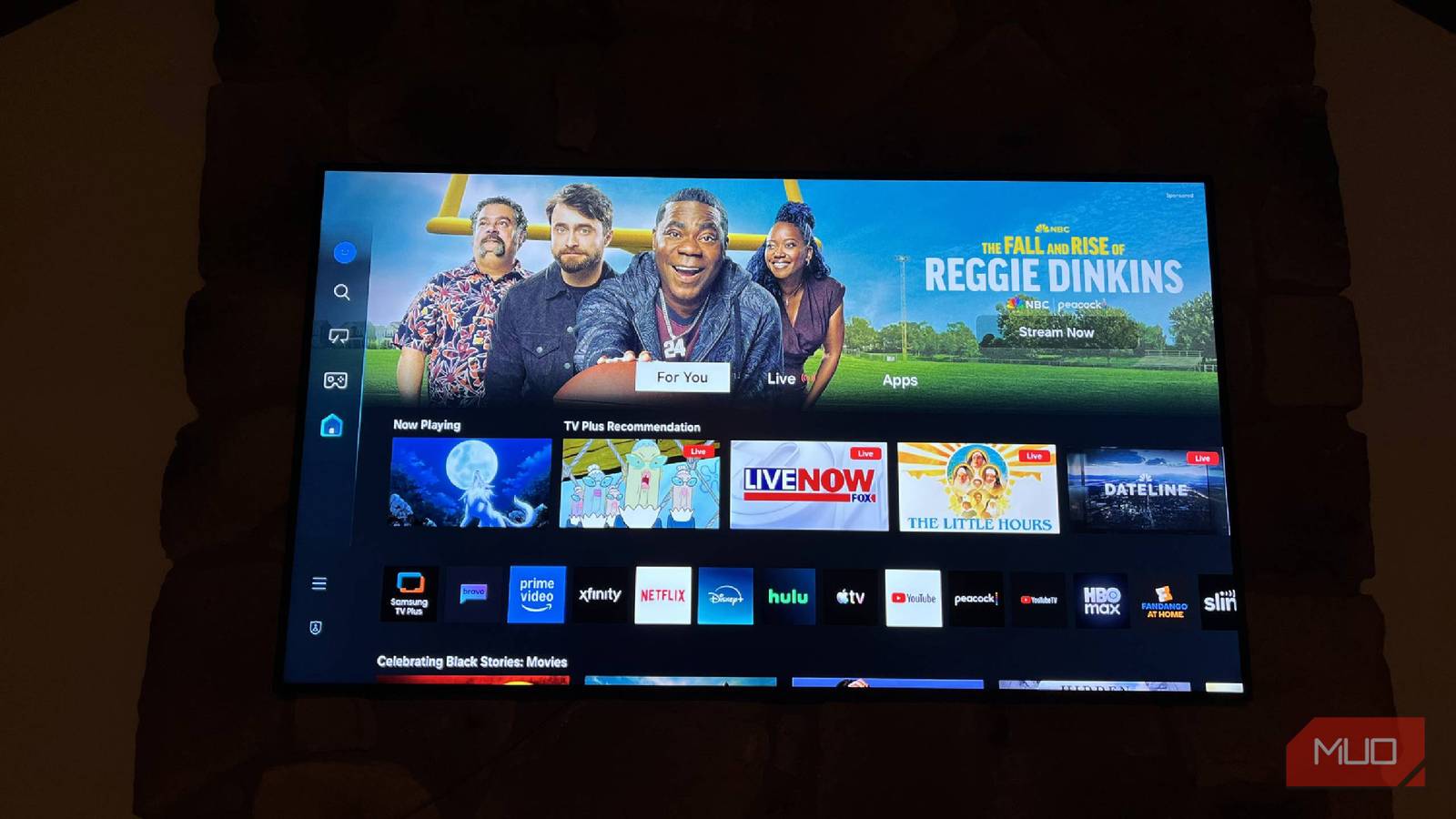
When you first turn on your Samsung TV, Tizen shows you all the options you have to entertain yourself. On the left side of the TV are the different menus you can access. It starts off with your main one, which is the TV and streaming content section. Whether you have cable, like me, who sometimes feels like a dinosaur for having it, or you watch everything on streaming services, this is where you come to find what you want.
Even if you haven’t used Tizen before, there are preloaded streaming apps, such as Netflix, Hulu, Prime Video, and more. This brings you to your favorite shows and movies right away, if you have an account with them. You can easily install new apps through the Samsung app store, which can be found in the apps dock. While Google TV offers more apps in the Google Play Store, I haven’t had access to an app I wanted to use on my Samsung TV yet.
As you scroll down the main interface, you’ll see suggestions from Samsung. One of the main ones is shows on Samsung TV Plus, which has over 350 live channels and even more on-demand shows and movies for you to stream. This is available for free on any Samsung TV or device from 2016 onward.
The more you interact with your smart TV, the better it will get to know you. While some people may not like the fact that their TV is tracking them, I think it enhances the experience, as I’ll get recommendations for shows and movies that I’m interested in, as they are based on my preferences already.
Tizen highlights collections of movies and TV shows based on what’s happening in the world as well, as a collection for Black History Month was available recently. One of my favorite features of Tizen is that you can jump back into whatever show or movie you were watching right from the main page. It lists all the shows or movies you’re watching across all different streaming platforms and lets you click your remote to jump back into them.
If you continue to scroll through the main interface, you’ll find other menus like sporting events you can watch and choices for new shows and movies that have just joined the operating system. It’s a good way to introduce yourself to some new titles without dealing with the bloat of Google TV’s interface
Multi View lets me watch two things at once
It’s a quick and easy integration

There are many different versions of the picture-in-picture setting that TVs can have these days. If you remember back in the days when everyone had cable, picture-in-picture would be a standard button on the remote and you’d be able to watch two things at once, one of them being in a smaller window than the other.
Tizen and Android TV OS both offer versions of it. On a Google TV, it’s called Dual View and on a Samsung, it’s called Multi View. You can get to this while you’re actively watching TV on a Google TV. But in Tizen, you go through the Settings menu where you’ll find ways to change the picture modes and such.
You can watch cable TV as well as a streaming app at the same time if you want, as you see above with cable TV on the right and Samsung TV Plus on the left. If you want to watch two shows that are on cable, you wouldn’t be able to do that on a Samsung TV.
You can get around this by either finding that show on a streaming platform, if possible, or by screen mirroring it from another device and using it as one of the views in Multi View.
On a Samsung TV, you can use different devices as part of the view, while in Google TV, it’s more focused on apps and streams. There are more source options available on a Samsung TV and you can even change the layout of the windows a little more easily, rotating them into different places on the screen and making one larger and the other an inset. While Google TV lets you do that as well, it doesn’t offer as much customization.
Smart home integration works better for me
Neither of these is perfect actually

After careful consideration years ago, we decided to use Amazon Alexa as our preferred smart home assistant. We have multiple Amazon speakers and a Ring security system that all work well through the Alexa app.
However, we recently purchased a Samsung washer and dryer that offers integration into the Samsung SmartThings ecosystem. This offers a cool feature that lets me send notifications to either my phone or another Samsung SmartThings device to let me know when a cycle has finished running.
This also opened me up to the integration possibilities between Samsung and Alexa. Not only can I have notifications for my Samsung washer show up on my Samsung TV, but I can also control my Samsung TV with my Alexa speakers, thanks to the SmartThings integration within the Alexa app. So I can turn on my TV using my Echo speakers or lower the volume. It’s nice not to be forced to have devices from the same smart home ecosystem and still have them work.
On the reverse side, I can install the Alexa app within Tizen and use the voice remote from the TV to control Alexa devices. This back-and-forth isn’t possible on a Google TV, as only Alexa devices can control a Google TV, not the other way around. It works well for my smart home.
Samsung Tizen has been a better fit for my life
Having a Samsung TV has shown me some great features that I didn’t know could make my smart home and life easier. Being able to use it for different streams of content and to control my smart home devices has made for an easy integration into my home. The interface being easy to navigate is also a plus. I’ve just felt more comfortable using Tizen than other operating systems.
