

Close Menu
    Facebook X (Twitter) Instagram
    Wifi PortalWifi Portal
    • Blogging
    • SEO & Digital Marketing
    • WiFi / Internet & Networking
    • Cybersecurity
    • Tech Tools & Mobile / Apps
    • Privacy & Online Earning
    Facebook X (Twitter) Instagram
    Wifi PortalWifi Portal
    Home»Cybersecurity»Cursor Automations turns code review and ops into background tasks
    Cybersecurity

    Cursor Automations turns code review and ops into background tasks

    adminBy adminMarch 7, 2026No Comments2 Mins Read
    Facebook Twitter LinkedIn Telegram Pinterest Tumblr Reddit WhatsApp Email
    Cursor Automations turns code review and ops into background tasks
    Share
    Facebook Twitter LinkedIn Pinterest Email

    Cursor Automations, the always-on agent platform from Cursor, is expanding with a new generation of autonomous systems that streamline code review, incident response, and other engineering workflows.

    The platform runs AI agents on schedules or in response to development events. These triggers include merged pull requests on GitHub, newly created issues in Linear, messages sent in Slack, incidents reported through PagerDuty, and custom webhook events. Cursor aims to help engineering teams keep up with the speed of software delivery by scaling code review, monitoring, and maintenance with autonomous agents.

    “Automations are great for reviewing changes. They can catch and fix everything from style nits and inconsistencies to security vulnerabilities and performance regressions,” the company said in its announcement.

    Three core automation systems

    Cursor identified three high-impact automation categories integrated in its engineering pipeline:

    Security review

    Triggered on every push to the main branch, this agent audits code changes for security issues, skips items already discussed in pull requests, and posts high-risk findings to Slack. Because the agent operates asynchronously, it does not delay developer workflows.

    Agentic codeowners

    This system assesses pull request risk based on blast radius, technical complexity, and infrastructure impact. Low-risk changes are approved automatically, while higher-risk updates prompt reviewer assignments based on contribution history. Decisions are summarized in Slack and logged to Notion via MCP integrations so teams can review and refine agent behavior over time.

    Incident response

    When PagerDuty detects an incident, an automation launches an agent that uses Datadog integrations to investigate logs and examine recent code changes. The agent notifies on-call engineers in Slack with monitoring details and proposes a fix through an automated pull request.
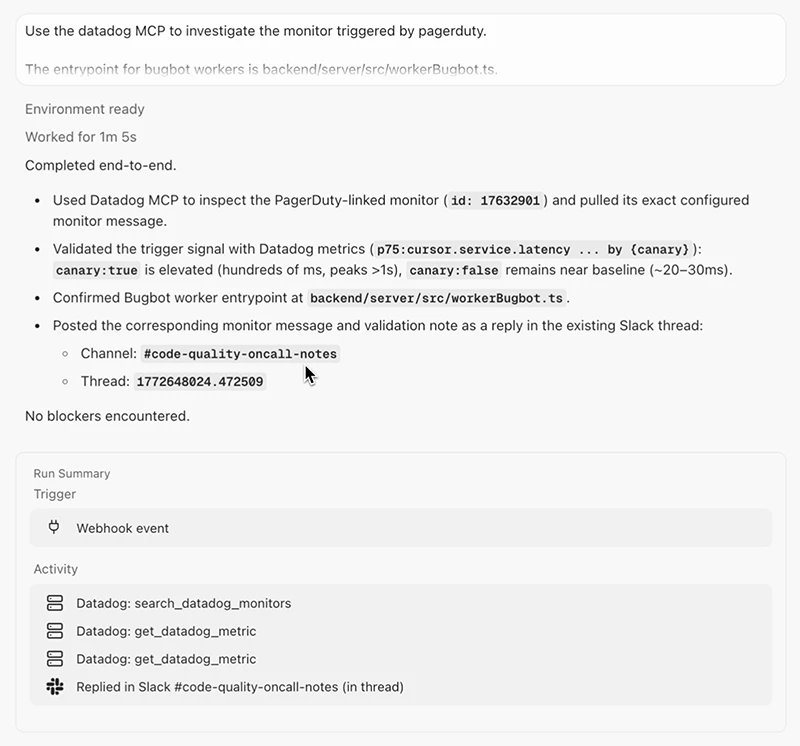
    Cursor Automations

    Routine workflow automations

    Cursor has also deployed agents for routine tasks and cross-tool coordination. Each morning, agents review recently merged code to identify areas lacking test coverage. Others triage bug reports by identifying duplicates, creating issues in Linear, investigating root causes, and posting summaries. Another automation publishes a weekly Slack digest of repository activity from the prior seven days.

    automations background Code cursor ops review Tasks Turns
    Share. Facebook Twitter Pinterest LinkedIn Tumblr Telegram Email
    Previous ArticleWhy a long HDMI cable is the best thing I’ve bought in months
    Next Article Google I/O 2026: How to Watch and What We Know so Far
    admin
    • Website

    Related Posts

    Phishing reclaims the top initial access spot, attackers experiment with AI tools

    April 22, 2026

    Microsoft releases emergency patches for critical ASP.NET flaw

    April 22, 2026

    Progress Patches Multiple Vulnerabilities in MOVEit WAF, LoadMaster

    April 22, 2026
    Add A Comment
    Leave A Reply Cancel Reply

    Search Blog
    About
    About

    At WifiPortal.tech, we share simple, easy-to-follow guides on cybersecurity, online privacy, and digital opportunities. Our goal is to help everyday users browse safely, protect personal data, and explore smart ways to earn online. Whether you’re new to the digital world or looking to strengthen your online knowledge, our content is here to keep you informed and secure.

    Trending Blogs

    Why Squarespace Blueprint AI Is Helpful if You Don’t Know Where To Start

    April 22, 2026

    Why ugly ads outperform polished creative and how to test them

    April 22, 2026

    How to Spot AI Audiobooks on Libby

    April 22, 2026

    10 Tactics That Actually Work

    April 22, 2026
    Categories
    • Blogging (67)
    • Cybersecurity (1,443)
    • Privacy & Online Earning (177)
    • SEO & Digital Marketing (879)
    • Tech Tools & Mobile / Apps (1,731)
    • WiFi / Internet & Networking (238)

    Subscribe to Updates

    Stay updated with the latest tips on cybersecurity, online privacy, and digital opportunities straight to your inbox.

    WifiPortal.tech is a blogging platform focused on cybersecurity, online privacy, and digital opportunities. We share easy-to-follow guides, tips, and resources to help you stay safe online and explore new ways of working in the digital world.

    Our Picks

    Why Squarespace Blueprint AI Is Helpful if You Don’t Know Where To Start

    April 22, 2026

    Why ugly ads outperform polished creative and how to test them

    April 22, 2026

    How to Spot AI Audiobooks on Libby

    April 22, 2026
    Most Popular
    • Why Squarespace Blueprint AI Is Helpful if You Don’t Know Where To Start
    • Why ugly ads outperform polished creative and how to test them
    • How to Spot AI Audiobooks on Libby
    • 10 Tactics That Actually Work
    • Most Pixel owners are ignoring one of the phone’s strangest built-in sensors
    • How to Build a WooCommerce Sales Funnel That Converts
    • Phishing reclaims the top initial access spot, attackers experiment with AI tools
    • What Multi-Location Brands Must Do
    © 2026 WifiPortal.tech. Designed by WifiPortal.tech.
    • Home
    • About Us
    • Contact Us
    • Privacy Policy
    • Terms and Conditions
    • Disclaimer

    Type above and press Enter to search. Press Esc to cancel.