

Your TV’s home screen shouldn’t feel like a billboard. And yet, that’s exactly what Android TV and Google TV often turn into. All you see is ads and random recommendations, which make it harder to get to the streaming apps you actually want to use.
Sure, you could use the Apps-Only Mode to cut down on the noise, but it’s not without its own limitations. A better solution is to use a third-party app like AT4K Launcher. It’s a free app that replaces the cluttered interface with a clean, app-first layout that makes navigation feel so much better. Now that I’ve used it for a week, my only regret is not discovering it sooner.

- OS
-
Android TV
- Pricing model
-
Free, Premium version available
AT4K Launcher brings order to chaos
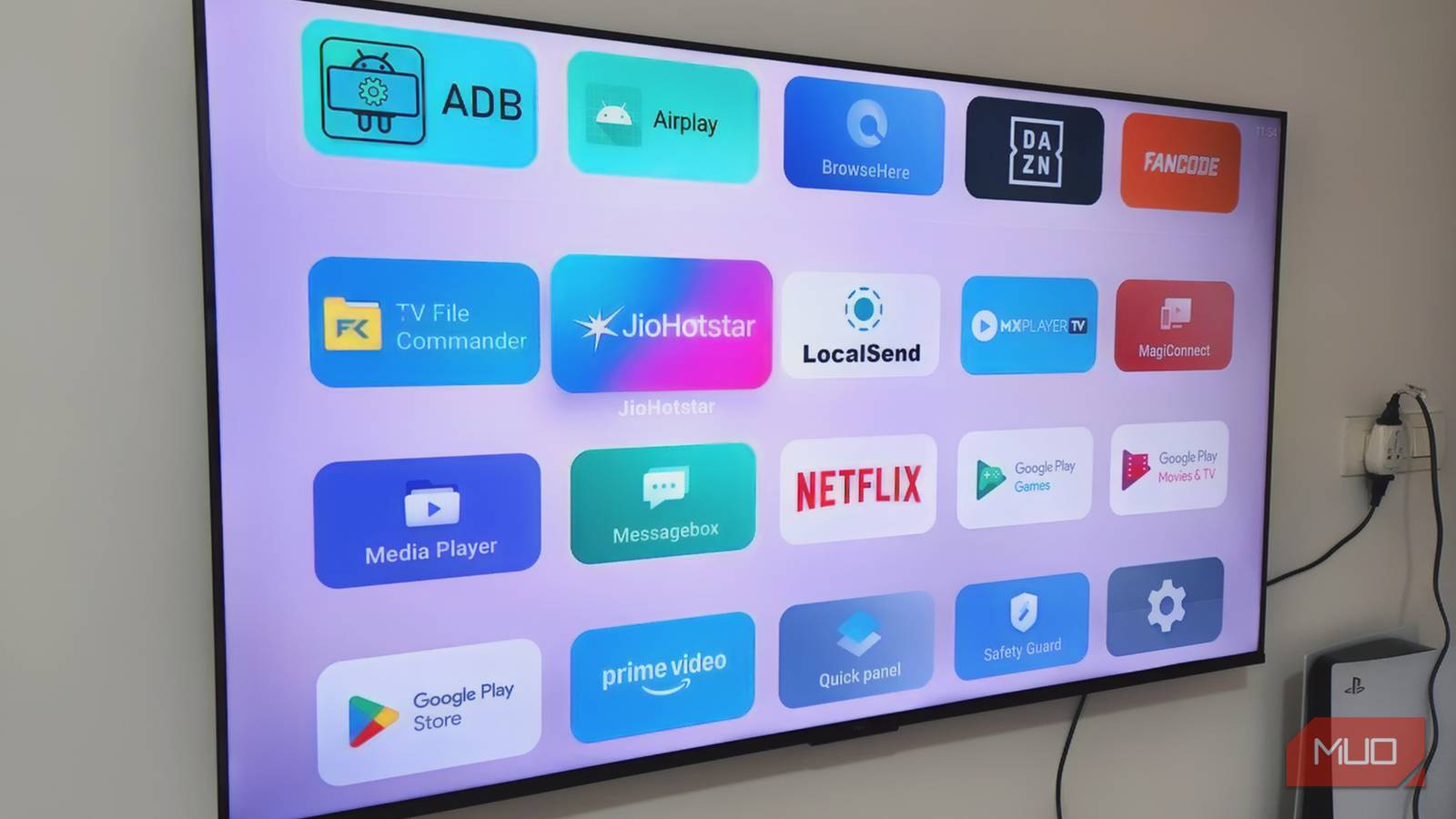
A simpler, Apple TV-style interface

The default launcher on Android TV or Google TV has a lot going for it. As soon as you land on it, you’re greeted with content recommendations right at the top. More often than not, these include sponsored, irrelevant suggestions that end up being more distracting than helpful.
Then there’s the Your apps section. This is supposed to be your control center, but the problem with this is how it’s laid out. You get a single horizontal strip, which means endless left and right scrolling just to find the app you want.
And below that, things get even noisier. Sections like Top-selling movies, Recommended videos, and Browse by genre keep stacking up. Personally, I find all of them useless for two reasons. First, they include content from services I don’t even subscribe to. And more importantly, they try to replicate discovery features that apps like Netflix, Prime Video, and Disney+ already do far better.
AT4K Launcher is a free app that solves all of these problems. It brings the Apple TV-style interface that shows a simplified app grid. This lets you view all the apps on your TV at a glance and move between them easily. And of course, you can arrange them however you like by long-pressing them.
At the top, you see a feature carousel that shows recommendations from the app you’ve highlighted. Since these come directly from the app itself, you’ll likely find them more useful. And if you don’t want them, it’s possible to turn the feature off entirely.
Customize it to make it truly yours
It doesn’t have to be boring
Being able to move apps around is fine, but what’s even better is organizing them into folders. AT4K makes this possible, so you can keep all your non-streaming TV apps separate from the ones you use daily. This is one of those features you don’t realize you need until you have it. Creating a folder is as easy as long-pressing an app and choosing Add to folder. And if there are apps you don’t want to see at all, you can hide them from the home screen.
Inside the Settings menu, you’ll find options to change the launcher theme and background. You can even use your own image or a video as a background to give your TV a more personalized feel. Dig into the Appearance tab and you’ll find even more control. You can hide featured cards from specific apps or enable a minimal status bar that only shows the time.
Some of these customization options are only available in the premium version, but the good news is that it’s a one-time purchase of $5, not a subscription. And even if you stick with the free version, AT4K Launcher is perfectly usable.

If your TV has Bluetooth, you need to install this free app
This app makes the TV experience so much smoother
Setting it as the default takes some work
Glad it’s a one-time thing
As good as the AT4K Launcher sounds, there’s one big catch. You can’t set it as the default launcher the same way you would on an Android phone. This means two things. First, you need to launch the app manually every time you turn on your TV. Second, pressing the home button on the remote will always take you to the Google TV launcher, not AT4K Launcher.
Thankfully, there’s a workaround. It’s possible to reconfigure your remote’s home button to open the AT4K launcher instead. This way, you only need to open the launcher when you first turn on your TV. To set this up, you need the tvQuickActions app. It’s a free app that can remap buttons on your TV remote. Once you’ve installed it, head to Settings > System > Accessibility and turn on tvQuickActions.
Finally, open the tvQuickActions app and set the Home button to launch AT4K Launcher. Optionally, to keep the default launcher accessible, you can set the Home button’s double press or long press to the Go To Home action. All this barely takes more than a couple of minutes.

- OS
-
Android TV
- Pricing model
-
Free, Pro version available
Your TV’s home screen is something that you see every time you turn it on or switch apps, so it matters more than you think. AT4K Launcher brings a sense of simplicity and calmness to the home screen. It’s not perfect, and yes, setting it takes time, but it’s still absolutely worth it.
