

Managing a home lab usually means juggling browser tabs. There’s the Proxmox web UI in one, your NAS dashboard in another, Home Assistant in a third, and maybe an SSH session or two for good measure. It works, but it’s scattered, and if you want to do something simple like restart a VM or check if your NAS is online, you’re reaching for your phone or walking over to a computer to check one of those many tabs. I wanted something different, something physical, always-on, and mounted where I could glance at it.
With all of that in mind, I built a home lab management dashboard on an Elecrow CrowPanel Advanced 10.1-inch ESP32-P4 display. It runs ESPHome, uses LVGL for the interface, and pulls all of its data from Home Assistant. Three pages give me NAS status and controls, Proxmox VM management, and a system overview panel with quick actions for things like backups and container updates.
All of this took me about a day to put together, mostly because I’d already gone through the pain of getting ESPHome running on the ESP32-P4 with the 7-inch version of this board. This is a very similar display in a lot of ways, just bigger. The YAML configuration is long (and available on GitHub!), but the result is a touchscreen control panel that does exactly what I need.
About this article: Elecrow sent us the Elecrow CrowPanel Advance ESP32-P4 10.1-inch display for the purposes of this article. The company had no input into this article.
The ESP32-P4 makes this kind of project possible
400MHz cores and a real display interface

If you’d told me a year ago that I’d be running a 1024×600 LVGL dashboard on a microcontroller, I’d have been skeptical. The ESP32-S3 can drive small displays well enough, but once you start pushing higher resolutions with complex UI layouts, you run into memory and rendering bottlenecks pretty quickly. The ESP32-P4 is a different class of chip entirely.
Espressif’s ESP32-P4 is a dual-core RISC-V processor running at up to 400MHz, paired with 32MB of PSRAM on the Elecrow board and a native MIPI DSI interface for driving displays. That last part is what really matters here. MIPI DSI is the same display protocol used in smartphones and tablets, and it means the P4 can push pixels to a 10.1-inch 1024×600 IPS panel without breaking a sweat. There’s no SPI bottleneck, nor any framebuffer hacks, as it’s just a high-bandwidth display connection that renders LVGL widgets smoothly.
The Elecrow CrowPanel Advanced 10.1-inch is the board I’m using, and it costs around $54. For that you get the ESP32-P4, the 10.1-inch IPS touchscreen with capacitive touch, an onboard ESP32-C6 for Wi-Fi 6 and Bluetooth 5.3, dual USB-C ports, a pair of dual speakers, a microphone, and a MIPI-CSI camera header. It’s more hardware than most people associate with the word “microcontroller,” but that’s kind of the point. The P4 sits in a strange middle ground between a traditional ESP32 and a single-board computer, and for a project like this, it’s in a sweet spot.
I’d previously built a Google Nest Hub-style smart display on the 7-inch variant of this board, and that project taught me a lot about the quirks of ESP32-P4 development. Back then, getting Wi-Fi working through the ESP32-C6 via ESP-Hosted was a real headache, with SDIO configuration issues that ate up hours of debugging. That problem has since been resolved, and getting online is now straightforward. Having that prior experience meant I could focus on the actual dashboard rather than spending time figuring out the hardware.
ESPHome and LVGL handle everything
No C++ required, just a long YAML file

ESPHome is the framework that makes this project accessible rather than painful. For the unfamiliar, ESPHome lets you configure ESP32 devices using YAML files instead of writing C++ code. You describe your hardware, define your sensors and UI elements, and ESPHome generates, compiles, and flashes the firmware for you. It has native support for the ESP32-P4’s MIPI DSI display interface, LVGL widgets, and Home Assistant integration, which are the three things this project depends on.
The UI is built entirely in LVGL, which is an open-source graphics library designed for embedded systems. In ESPHome, you define LVGL layouts directly in YAML, including pages, styles, buttons, labels, and their behaviors. My configuration defines a dark theme with card-based layouts, using a color scheme that’s easy to read at a distance. That is, a navy background with bright green, amber, and red status indicators. Buttons are swapped out based on the status of a VM; for example, if a VM is started, then the “stop” button will show instead of the “start” button.
Home Assistant ties everything together. Every sensor value on the display, whether it’s NAS CPU usage, Proxmox memory consumption, or VM status, comes from Home Assistant entities over the native API. When a value changes in Home Assistant, ESPHome updates the corresponding LVGL label in real time. The buttons work the same way in reverse; tapping “Restart NAS” on the touchscreen presses a button that routes to Home Assistant and handles the actual command. For script-based actions, the display itself doesn’t need to know how to SSH into my NAS or call the Proxmox API. It just needs to talk to Home Assistant, and Home Assistant handles the rest.
The ESP32-C6 handles Wi-Fi connectivity over SDIO, and once it’s configured, it’s stable. The touchscreen uses a GT911 controller over I2C, which ESPHome supports natively. I defined three fonts at different sizes, all pulled from Google Fonts, and the display is a custom definition with the init_sequence taken from Elecrow’s own C++ examples. All of this is in the YAML file, and none of it required much C++ at all.
Three pages of home lab control
NAS, Proxmox, and a pile of quick actions

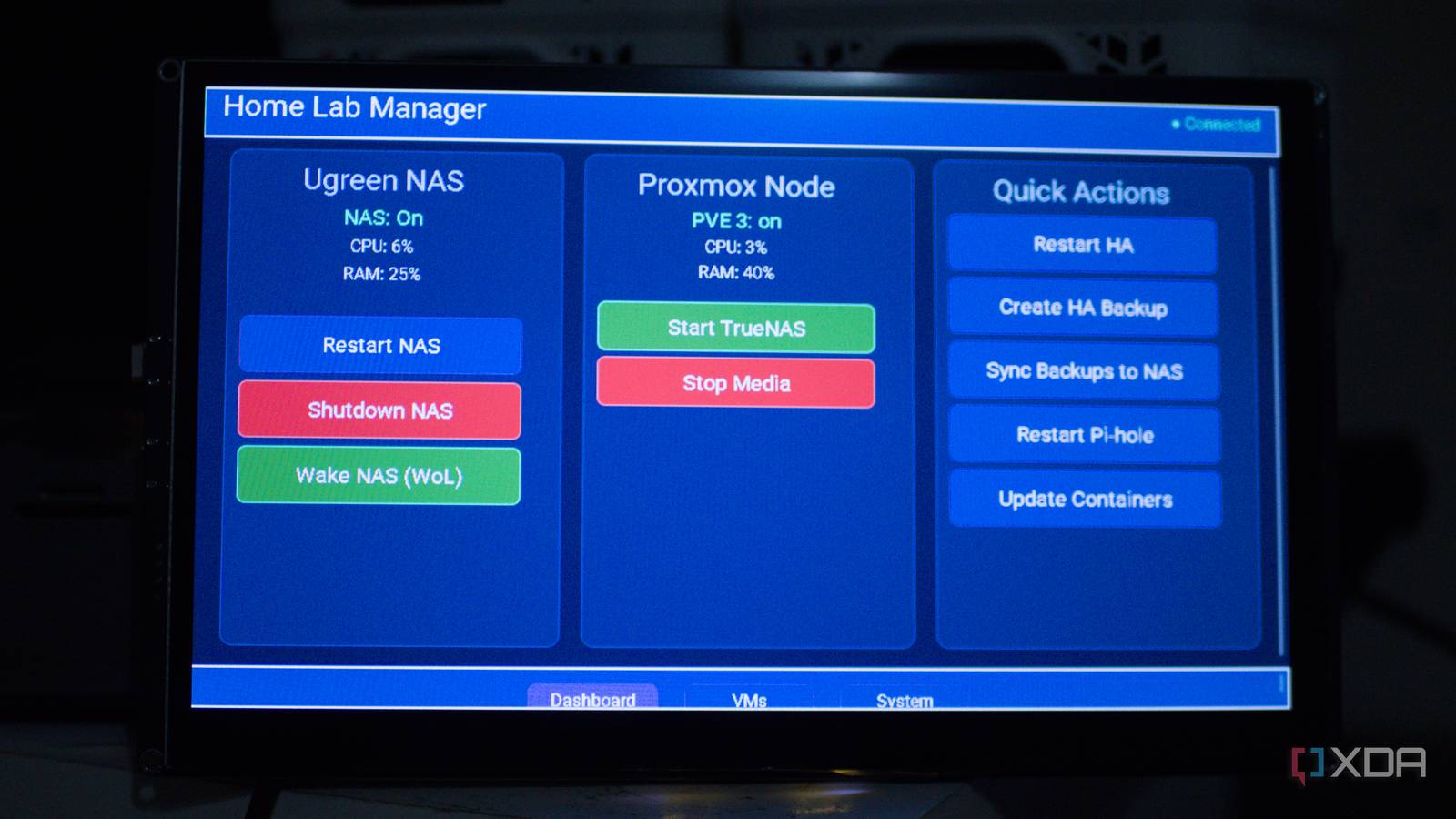
The dashboard is split across three pages with a navigation bar at the bottom of each. The main page shows three cards side by side: one for my Ugreen NAS, one for my primary Proxmox node, and one for quick actions.
The NAS card shows the current status with color-coded text, with green for online, red for offline. Below that, it displays live CPU and RAM usage pulled from Home Assistant sensors. Three buttons let me restart the NAS, shut it down, or send a Wake-on-LAN packet to bring it back up. When I tap “Restart NAS,” the status label immediately changes to “Restarting…” in amber, so I get visual feedback before the NAS actually responds. It’s a small touch, but it helps make all of it feel responsive. I’m using the Ugreen NAS and the Proxmox custom integrations to make these work.
The Proxmox card follows the same pattern: node status, CPU and RAM readouts, and buttons to start or stop a VM. The quick actions card is where I put everything that doesn’t belong to a specific server, like restarting Home Assistant, creating a backup, syncing backups to the NAS, restarting Pi-hole, and updating Docker containers. Each button calls a Home Assistant script, so adding new actions is as easy as creating a new script in HA and adding a button to the YAML.
The second page is dedicated to virtual machines. It shows a grid of VM cards, each with a status indicator and start/stop buttons. Right now I have three VMs configured in it: a dev server, a Docker host, and a media server. But the layout uses a wrapping flex row, so adding more just means duplicating a card block in the YAML. The third page shows system information for both the display itself and Home Assistant, with controls for restarting the display, restarting HA, and reloading automations.
Everything updates in real time. If I start a VM from the Proxmox web UI, the status on the display changes within seconds. If my NAS goes offline, the label turns red automatically. There’s no polling delay because ESPHome’s Home Assistant API uses a persistent connection with event-based updates.
There’s a lot of room to grow
The hardware can do a whole lot more

What I’ve built so far is a functional dashboard, but the CrowPanel Advanced has hardware I haven’t even touched yet. The MIPI-CSI camera header means I could add a camera feed or set up motion detection. The onboard microphone and speaker mean voice control is an option too. I’ve already run XiaoZhi, an open-source voice assistant platform, on the 7-inch version of this board, and there’s technically reason it couldn’t coexist alongside the dashboard. That would be a massive project, though.
On the software side, there’s plenty to expand. I could add monitoring for individual Docker containers, display network throughput graphs, or show storage pool usage from my NAS. ESPHome’s LVGL support includes charts and progress bars, so I could build those out without leaving YAML. I could also add a page for Home Assistant automations, giving me one-tap toggles for routines that I frequently enable or disable.
The P4’s integrated vector instructions mean it can handle on-device AI inference too, so the previously mentioned motion detection could work on-device through the camera. Elecrow sells a 2MP MIPI-CSI camera module for the board, and Espressif’s ESP-WHO framework already supports face detection on the P4. Whether any of that is practical for a home lab dashboard is certainly a question, but the hardware isn’t the bottleneck.
For now, though, I’m happy with what it does. It’s not replacing the Proxmox web UI or SSH for anything complicated, but for the everyday checks and quick actions that make up most of my interactions with my home lab, having a dedicated touchscreen panel beside me is genuinely more convenient than pulling out my phone. The whole project runs on a single YAML file, talks to Home Assistant, and costs very little to build yourself. That’s hard to argue with, and you can check out my YAML on GitHub to set it up or modify it yourself.
