

Close Menu
    Facebook X (Twitter) Instagram
    Wifi PortalWifi Portal
    • Blogging
    • SEO & Digital Marketing
    • WiFi / Internet & Networking
    • Cybersecurity
    • Tech Tools & Mobile / Apps
    • Privacy & Online Earning
    Facebook X (Twitter) Instagram
    Wifi PortalWifi Portal
    Home»Cybersecurity»Google slows Android sideloading to trip up scammers
    Cybersecurity

    Google slows Android sideloading to trip up scammers

    adminBy adminMarch 20, 2026No Comments2 Mins Read
    Facebook Twitter LinkedIn Telegram Pinterest Tumblr Reddit WhatsApp Email
    Google slows Android sideloading to trip up scammers
    Share
    Facebook Twitter LinkedIn Pinterest Email

    Google’s advanced flow for Android changes how apps from unverified developers are installed, adding steps to reduce scam-driven sideloading.

    The feature is aimed at experienced users and allows sideloading through a controlled, one-time setup. It addresses scam scenarios where attackers pressure individuals to install malicious software. In these cases, scammers often stay on the phone and guide victims step by step, pushing them to bypass security warnings and disable protections before they can pause or seek help.

    The advanced flow adds delays and verification steps intended to disrupt coercive pressure and give users time to make decisions.
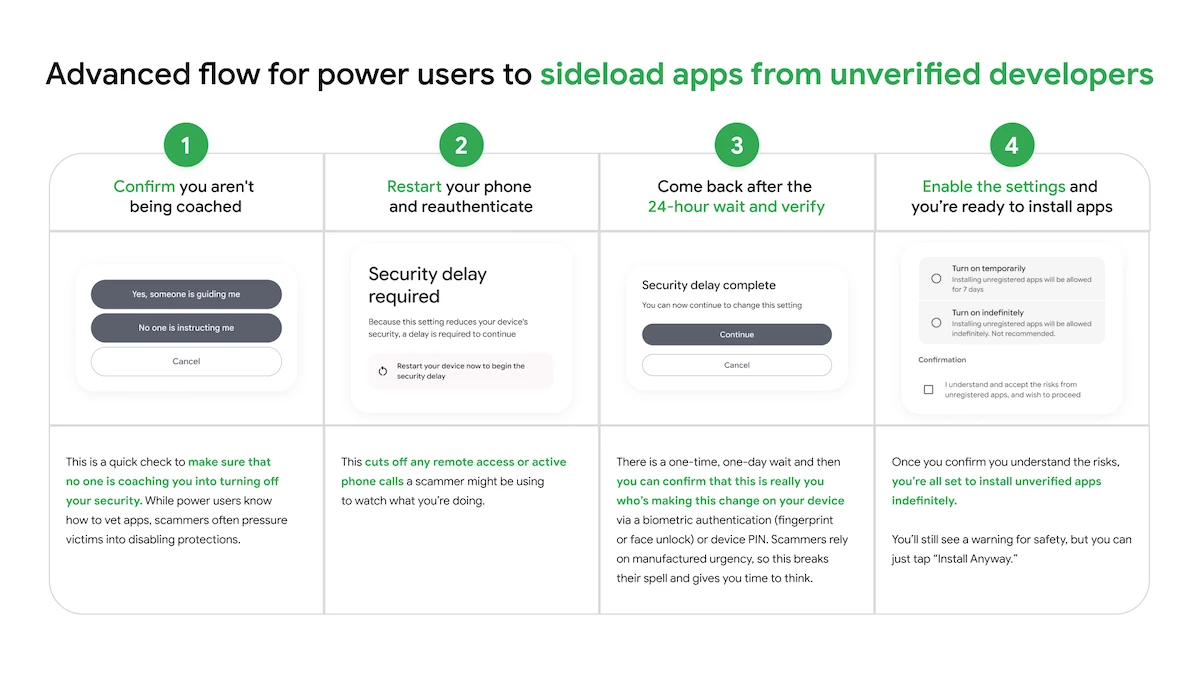
    Android sideloading steps

    Advanced flow for power users to sideload apps from unverified developers

    “We know a ‘one size fits all’ approach doesn’t work for our ecosystem. We want to ensure that identity verification isn’t a barrier to entry, so we’re providing different paths to fit specific needs,” Matthew Forsythe, Director Product Management, Android App Safety, explained.

    How the advanced flow works

    Start by enabling developer mode in system settings. This step requires deliberate action and reduces accidental triggers tied to scam tactics.

    The system then prompts a check to confirm that no one is guiding the process. This is intended to identify situations where a caller or message is influencing the user to disable protections.

    Next, restart the phone and reauthenticate. This step interrupts remote access or ongoing calls that could be used to monitor activity.

    After that, wait through a one-day delay before proceeding. Once the waiting period ends, confirm the action using biometric authentication or a device PIN. The delay slows decisions driven by urgency and allows time to reconsider.

    Once verification is complete, apps from unverified developers can be installed. Users can enable this access for a limited period, such as seven days, or leave it enabled without a set end. A warning appears to indicate the app’s source, with an option to continue the installation.

    Android Google Scammers sideloading slows trip
    Share. Facebook Twitter Pinterest LinkedIn Tumblr Telegram Email
    Previous ArticleDon’t blame your monitor until you’ve dialed in these 4 settings
    Next Article Aarke’s ‘stunning’ drip coffee maker looks better than ever, with a stylish new colorway that’ll add a splash of sophistication to your kitchen
    admin
    • Website

    Related Posts

    UAC-0247 Targets Ukrainian Clinics and Government in Data-Theft Malware Campaign

    April 16, 2026

    GitHub lays out copyright liability changes and upcoming DMCA review for developers

    April 16, 2026

    New AgingFly malware used in attacks on Ukraine govt, hospitals

    April 16, 2026
    Add A Comment
    Leave A Reply Cancel Reply

    Search Blog
    About
    About

    At WifiPortal.tech, we share simple, easy-to-follow guides on cybersecurity, online privacy, and digital opportunities. Our goal is to help everyday users browse safely, protect personal data, and explore smart ways to earn online. Whether you’re new to the digital world or looking to strengthen your online knowledge, our content is here to keep you informed and secure.

    Trending Blogs

    UAC-0247 Targets Ukrainian Clinics and Government in Data-Theft Malware Campaign

    April 16, 2026

    Why Your Search Data Doesn’t Agree (And What To Do About It)

    April 16, 2026

    Opera’s browsers just picked up a new AI feature that’s actually useful

    April 16, 2026

    GitHub lays out copyright liability changes and upcoming DMCA review for developers

    April 16, 2026
    Categories
    • Blogging (63)
    • Cybersecurity (1,342)
    • Privacy & Online Earning (168)
    • SEO & Digital Marketing (822)
    • Tech Tools & Mobile / Apps (1,604)
    • WiFi / Internet & Networking (225)

    Subscribe to Updates

    Stay updated with the latest tips on cybersecurity, online privacy, and digital opportunities straight to your inbox.

    WifiPortal.tech is a blogging platform focused on cybersecurity, online privacy, and digital opportunities. We share easy-to-follow guides, tips, and resources to help you stay safe online and explore new ways of working in the digital world.

    Our Picks

    UAC-0247 Targets Ukrainian Clinics and Government in Data-Theft Malware Campaign

    April 16, 2026

    Why Your Search Data Doesn’t Agree (And What To Do About It)

    April 16, 2026

    Opera’s browsers just picked up a new AI feature that’s actually useful

    April 16, 2026
    Most Popular
    • UAC-0247 Targets Ukrainian Clinics and Government in Data-Theft Malware Campaign
    • Why Your Search Data Doesn’t Agree (And What To Do About It)
    • Opera’s browsers just picked up a new AI feature that’s actually useful
    • GitHub lays out copyright liability changes and upcoming DMCA review for developers
    • Mi Browser 14.54.0-gn APK Download by Zhigu Corporation Limited
    • New AgingFly malware used in attacks on Ukraine govt, hospitals
    • Capsule Security Emerges From Stealth With $7 Million in Funding
    • NYT Strands hints and answers for Thursday, April 16 (game #774)
    © 2026 WifiPortal.tech. Designed by WifiPortal.tech.
    • Home
    • About Us
    • Contact Us
    • Privacy Policy
    • Terms and Conditions
    • Disclaimer

    Type above and press Enter to search. Press Esc to cancel.