


OpenAI is rolling out a major update to the Codex desktop app for users signed in with ChatGPT. Personalization features, including context-aware suggestions and memory, will roll out to Enterprise, Edu, and users in the EU and UK soon. Computer use is initially available on macOS and will expand to EU and UK users in the near future.
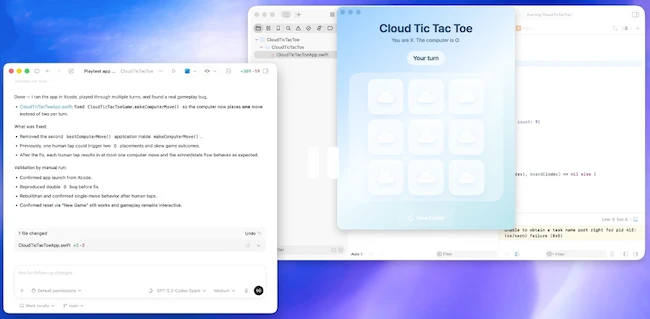
Screenshot of Codex computer use on Mac (Source: OpenAI)
The update expands Codex into a more capable assistant throughout the software development lifecycle. It can operate your computer alongside you, work with everyday apps and tools, generate images, remember preferences, learn from past actions, and take on ongoing or repeatable tasks.
Support for developer workflows has also improved. Codex can review pull requests, view multiple files and terminals, connect to remote devboxes via SSH, and use an in-app browser to iterate on frontend designs, apps, and games.
Background computer use
With background computer use, Codex can interact with all apps on your Mac by seeing, clicking, and typing with its own cursor. Multiple agents can run in parallel without interfering with your work in other apps. This supports frontend iteration, application testing, and workflows in software that does not expose an API.
Codex is beginning to work natively with the web. The in-app browser allows users to comment directly on pages to give precise instructions to the agent. OpenAI plans to expand this capability so Codex can control the browser beyond localhost web apps.
For visual workflows, Codex can generate and refine images using GPT-Image-1.5. Combined with screenshots and code, this supports the creation of product concepts, frontend designs, mockups, and game assets within a single workflow.
OpenAI is also introducing more than 90 additional plugins, combining skills, app integrations, and MCP servers. These expand Codex’s ability to gather context and take action across tools, including integrations such as Atlassian Rovo, CircleCI, GitLab Issues, and Microsoft tools.
GitHub and developer workflows
Codex supports addressing GitHub review comments, running multiple terminal tabs, and connecting to remote devboxes over SSH in alpha. It can open files in a sidebar with rich previews for PDFs, spreadsheets, slides, and documents. A summary pane tracks agent plans, sources, and artifacts.
“Together, these improvements make it faster to move across all the stages of the software development lifecycle between writing code, checking outputs, reviewing changes, and collaborating with the agent in one workspace,” OpenAI said.
Memory and long-running tasks
Automations support reusing existing conversation threads and preserve previously built context. Codex can schedule future work for itself and resume long-term potentially across days or weeks.
OpenAI is introducing a preview of memory that allows Codex to remember useful context from past interactions, including personal preferences, corrections, and information gathered over time.
“This helps future tasks complete faster and to a level of quality previously only possible through extensive custom instructions,” OpenAI explained.
Codex can also suggest what to work on next. Using context from projects, connected plugins, and memory, it can recommend how to start your workday or where to pick up on a previous project. It can surface open comments, pull context from tools such as Slack or Notion, and generate a prioritized list of actions.
