


If you’ve been hunting for vibe coding examples that go beyond chatbots and “summarize this PDF” demos, this is where you’ll find them; along with an honest account of what building agents actually looks like.
Everything below was built via Agent A by the Ahrefs team—plus a couple of examples I managed to vibe code myself.
Here’s what it takes to vibe code, and the nine prebuilt apps you can install today.
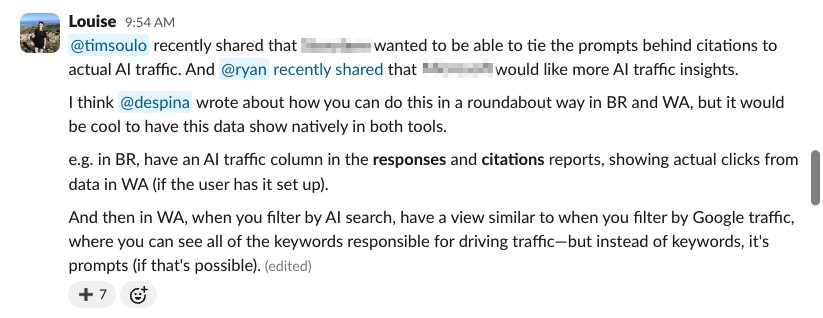
On Slack, we have a channel called Feature Suggestions where we drop ideas and wishlist tools.
I am a regular there.
Here I am asking whether it’s possible to tie prompts to actual AI traffic in Brand Radar and Web Analytics (the dev team must love me).
I’m a marketer with little to no coding experience—unless you count the HTML I copied into my MySpace page circa 2008.
I had been tinkering with Lovable when we first started dogfooding our own AI agent platform, so I’d already caught the vibe coding bug.
But Agent A felt like the first environment where I could try building my Big Ideas myself.
Just me, a chat box, and unrestricted access to Ahrefs data sitting underneath.
To answer my own Feature Suggestion: yes, I was able to tie AI prompts to real AI traffic.
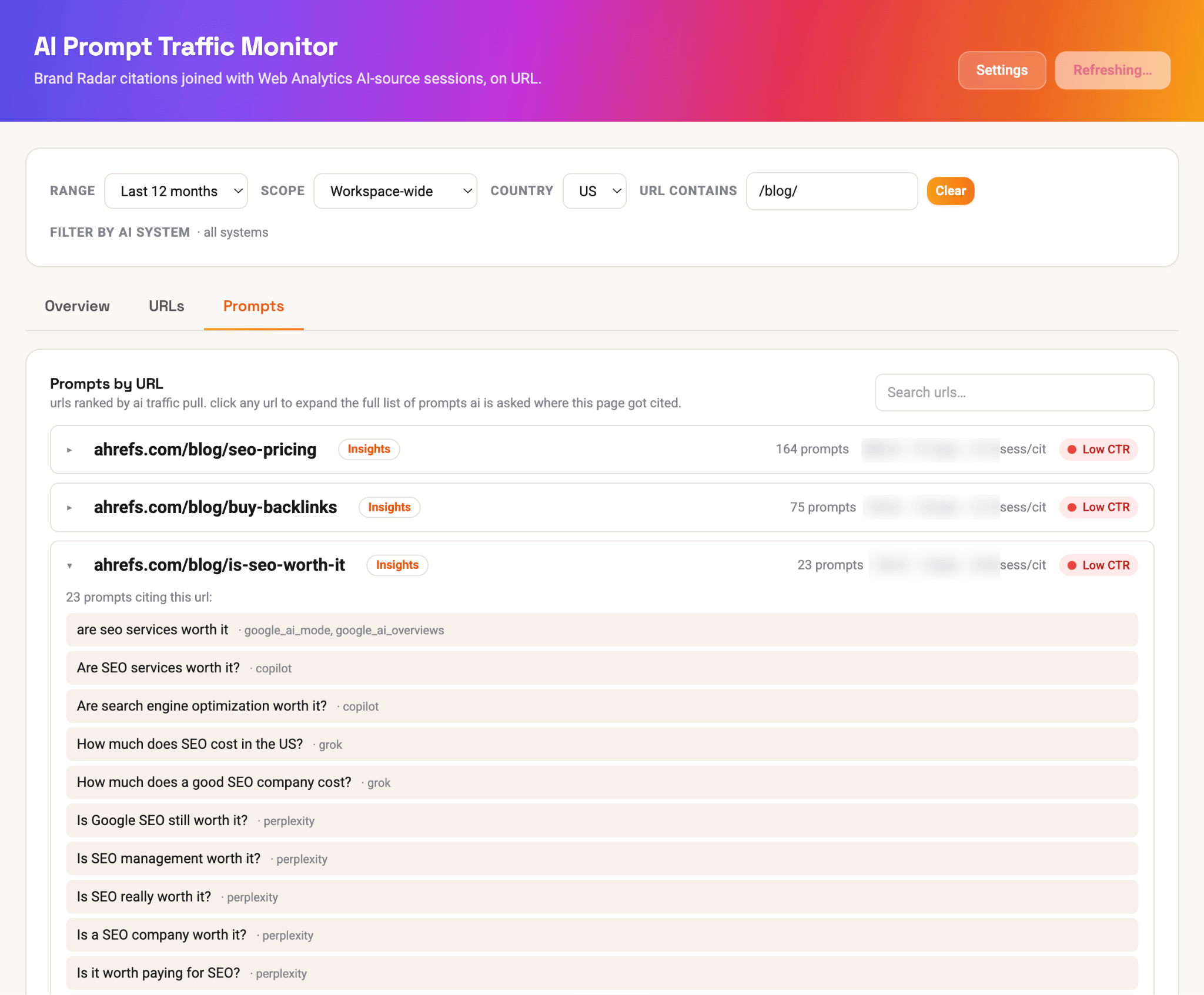
And I was also able to compare AI traffic and citation trends…
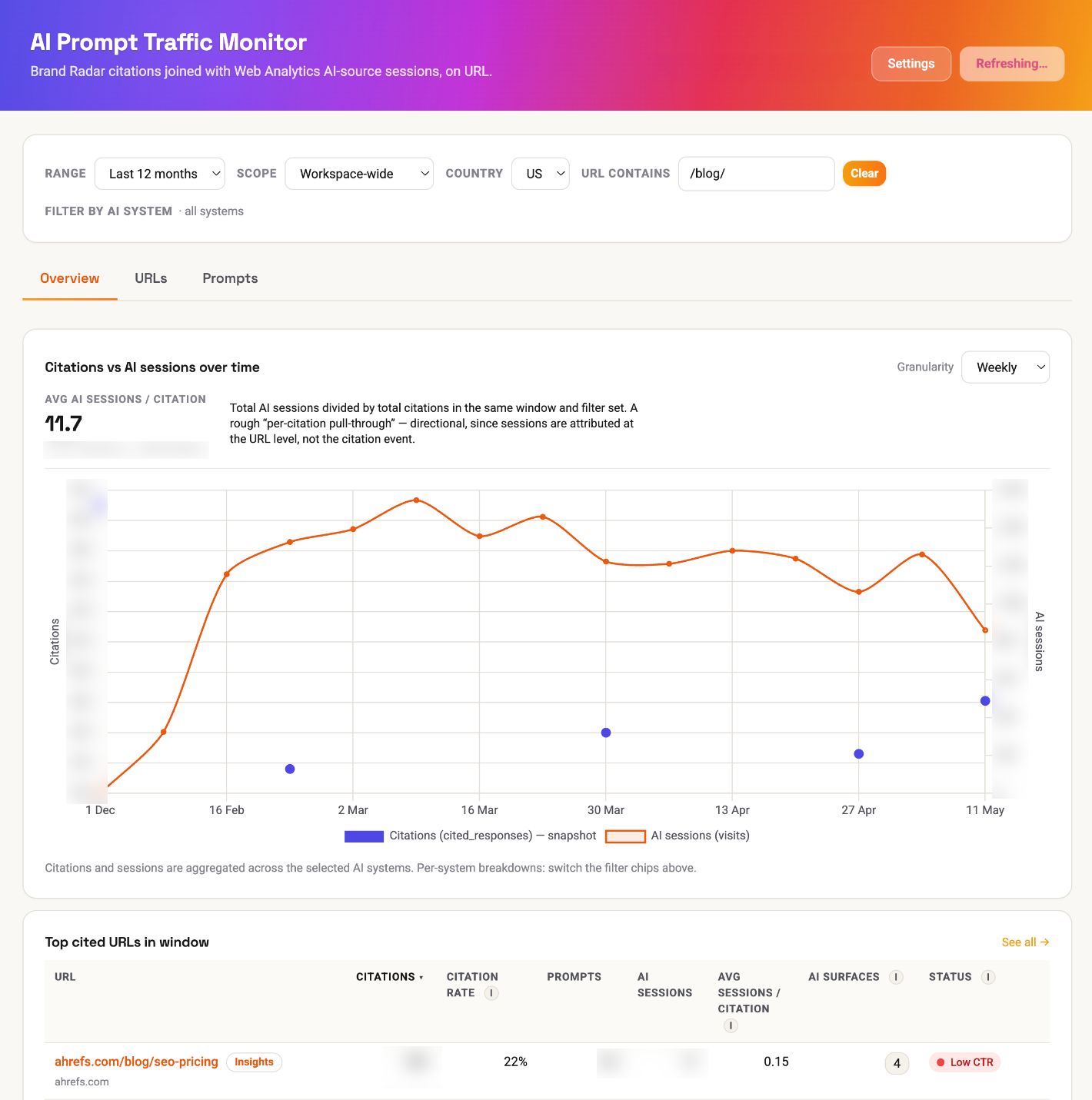
I built the core part of this app in literally 15 minutes, with this prompt…
I want to be able to tie the prompts behind Ahrefs' AI citations in Brand Radar to actual AI traffic, based on data in Web Analytics (e.g. the "AI search" filter). I want to be able to see this all in one dashboard, containing the percentage of all Ahrefs citations that are leading to actual traffic. I want the app to contain historical data, with a date picker, and traffic over time charts. I would also like to be able to separate all data out by all AI systems we track in Brand Radar.And if that isn’t proof that just about anyone can vibe code, I don’t know what is.
Vibe coding—building software by describing what you want in plain language—only works because a new wave of tools can turn those descriptions into useable apps.
Each one is suited to a different job and skill level; here’s how the main options compare.
Vibe coding apps
| Tool | Level | Best for |
|---|---|---|
| Any level | Describe what you want to build and Agent A plans the steps, writes the code, and connects the apps your project needs — like WordPress, Slack, or a Google Sheet — so data actually flows between them. It explains each step as it goes and checks with you before making changes, which makes it a gentle way in for beginners while still handling multi-part builds. | |
| Beginner | The easiest place to start. Type what you’re trying to make in plain English and it helps you shape the idea, write better prompts, and figure out what went wrong when an error pops up. | |
| Beginner | Tell it the app you want and it builds a working first version in minutes — no setup or technical decisions. Great for testing an idea before you invest real time. | |
| Beginner | Built for turning a description into a good-looking web page or app interface, then putting it online (a “deploy”) right from the same place. Strong pick when how it looks matters as much as what it does. | |
| Intermediate | A full coding workspace in your browser: you build it, run it, and deploy it (publish it live) from one tab. Beginner-friendly, with real tools underneath for when you want to dig deeper. | |
| Intermediate | Best when you want a finished app for web or phones without piecing services together. It leans on popular frameworks — the standard building blocks developers use — so your project stays easy to hand off later. | |
| Intermediate | Handy for bigger projects with lots of moving parts. It works inside a sandbox (a safe, walled-off copy), running several tasks at once so nothing touches your live project until you approve. | |
| Intermediate | For when you want hands-on control. It reads your repo (the folder of files your project lives in), explains its plan, and makes changes one step at a time — checking with you before each — so you’re never writing code from scratch. |
Agent A contains loads of plug-and-play apps, vibe-coded for you by the Ahrefs team.
Each one is a console application (a Flask app that lives in the right-hand panel of your workspace) wired to a specific marketing or SEO workflow.
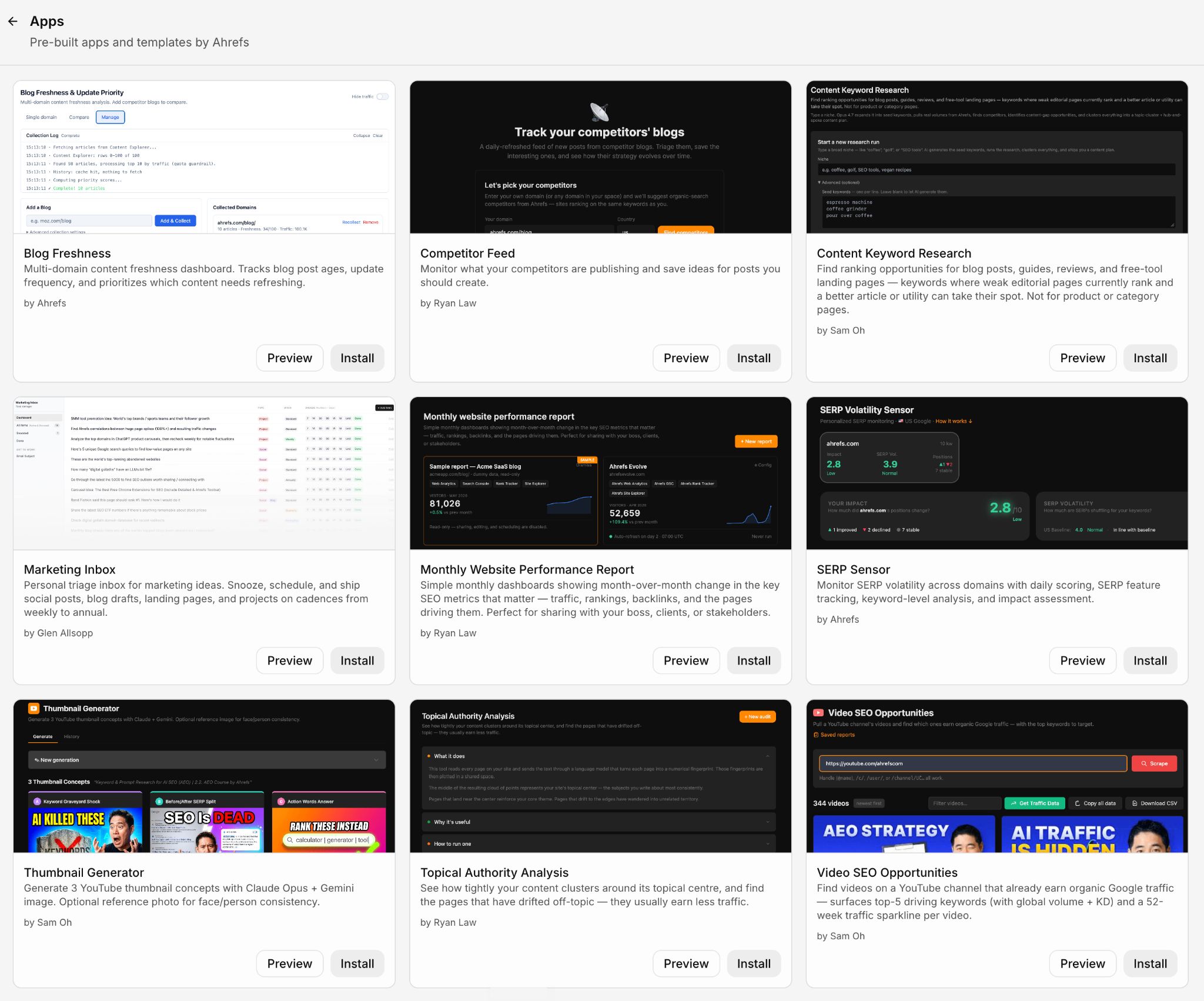
Below you can see what each of these vibe coding examples does, according to the marketer that shipped it.
This app shows you which blogs are quietly losing the most traffic, so you can prioritize updates that will plug that leaky bucket.
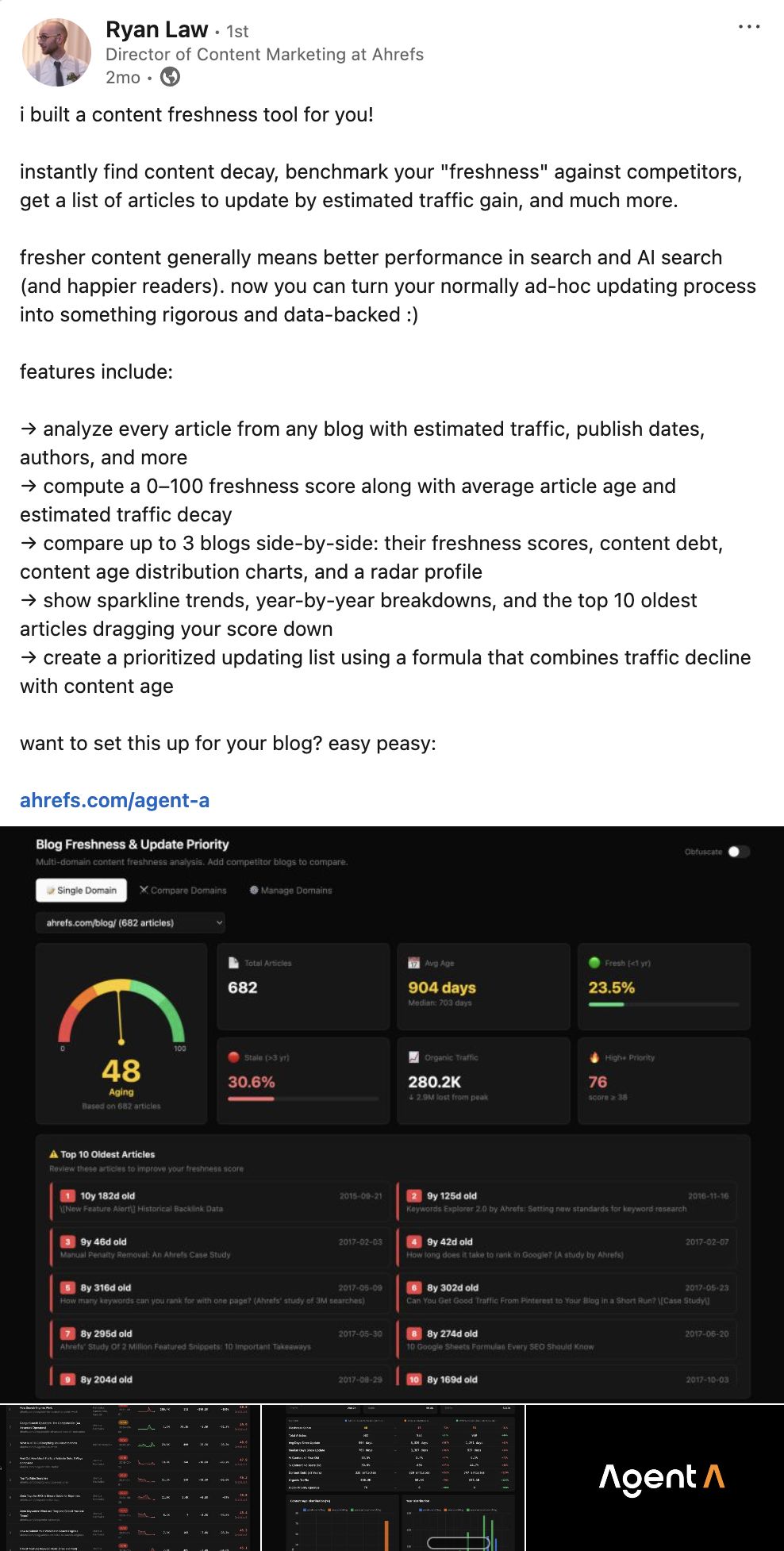
What it helps you do
Blog Freshness flags decaying content, so you can make a decision on next-steps:
- Track multiple blogs side-by-side on a single dashboard
- Get a 0–100 freshness score for any blog
- See which articles need an urgent refresh and which are still pulling their weight
- Drill into any blog for a full audit: average age, traffic decay, top 10 oldest articles
- Compare up to 3 blogs head-to-head against competitors
- Export a prioritised update list ranked by estimated traffic you can recover
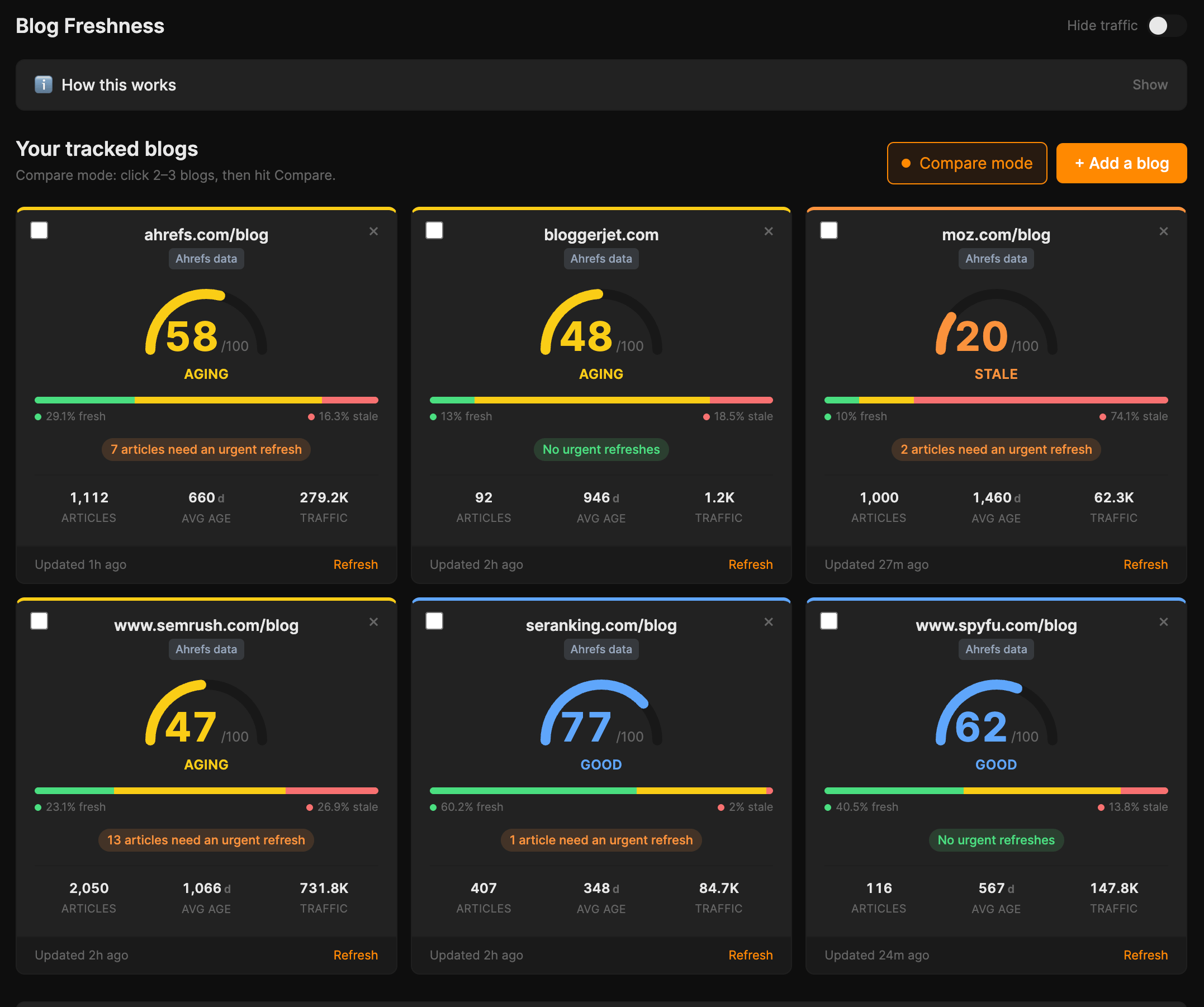
The dashboard view is where you start. Every blog you track gets a freshness score, a status (Aging / Stale / Good), and an “Average age” at a glance.
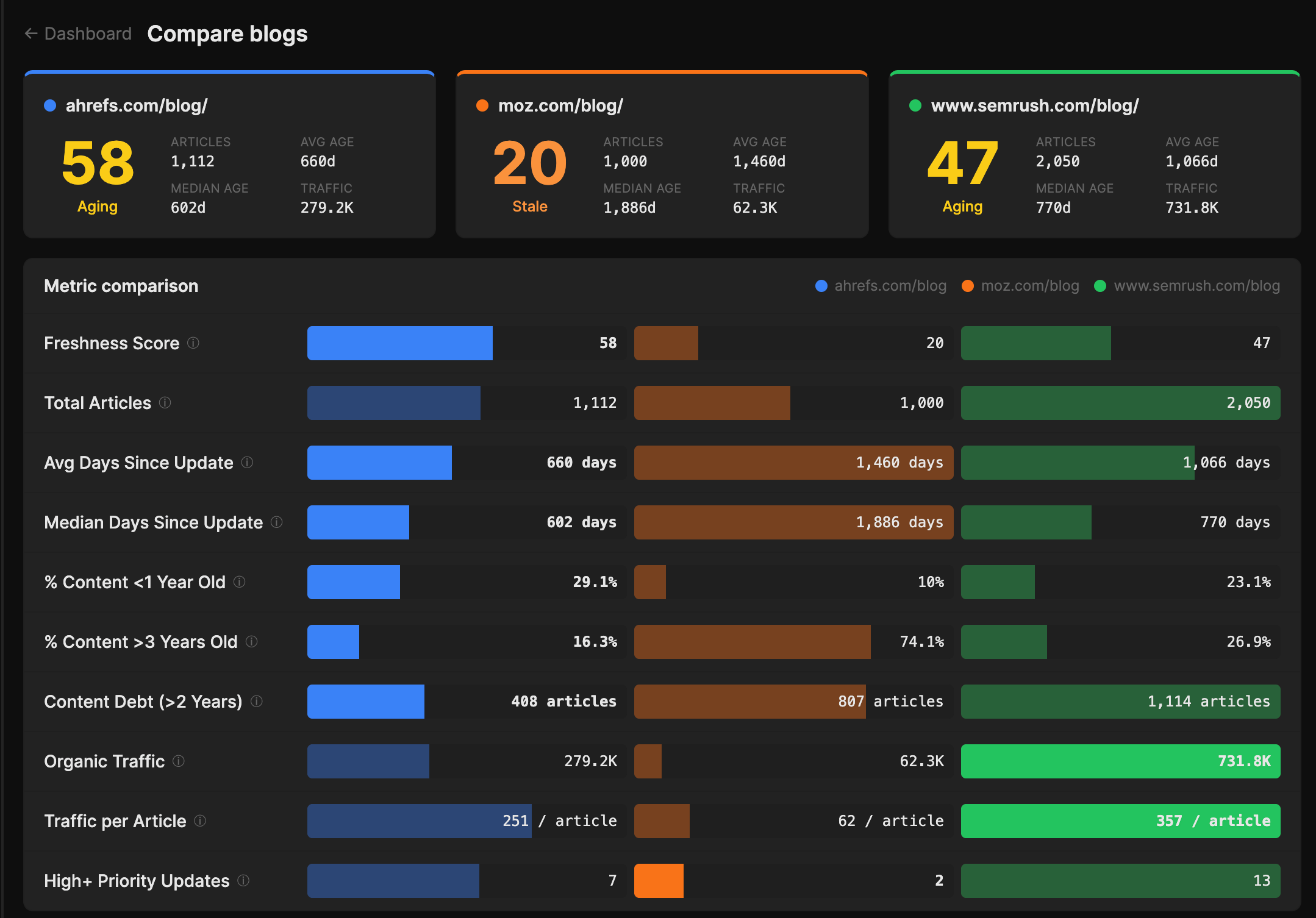
The “Compare blogs” view shows you your freshness profile benchmarked against your direct competitors, with metric-by-metric bars including “Total articles” and a “Traffic per article” stat.
For example, below we can see that Ahrefs publishes roughly half as much content as Moz, yet averages 251 visits per article, versus Moz’s 62.
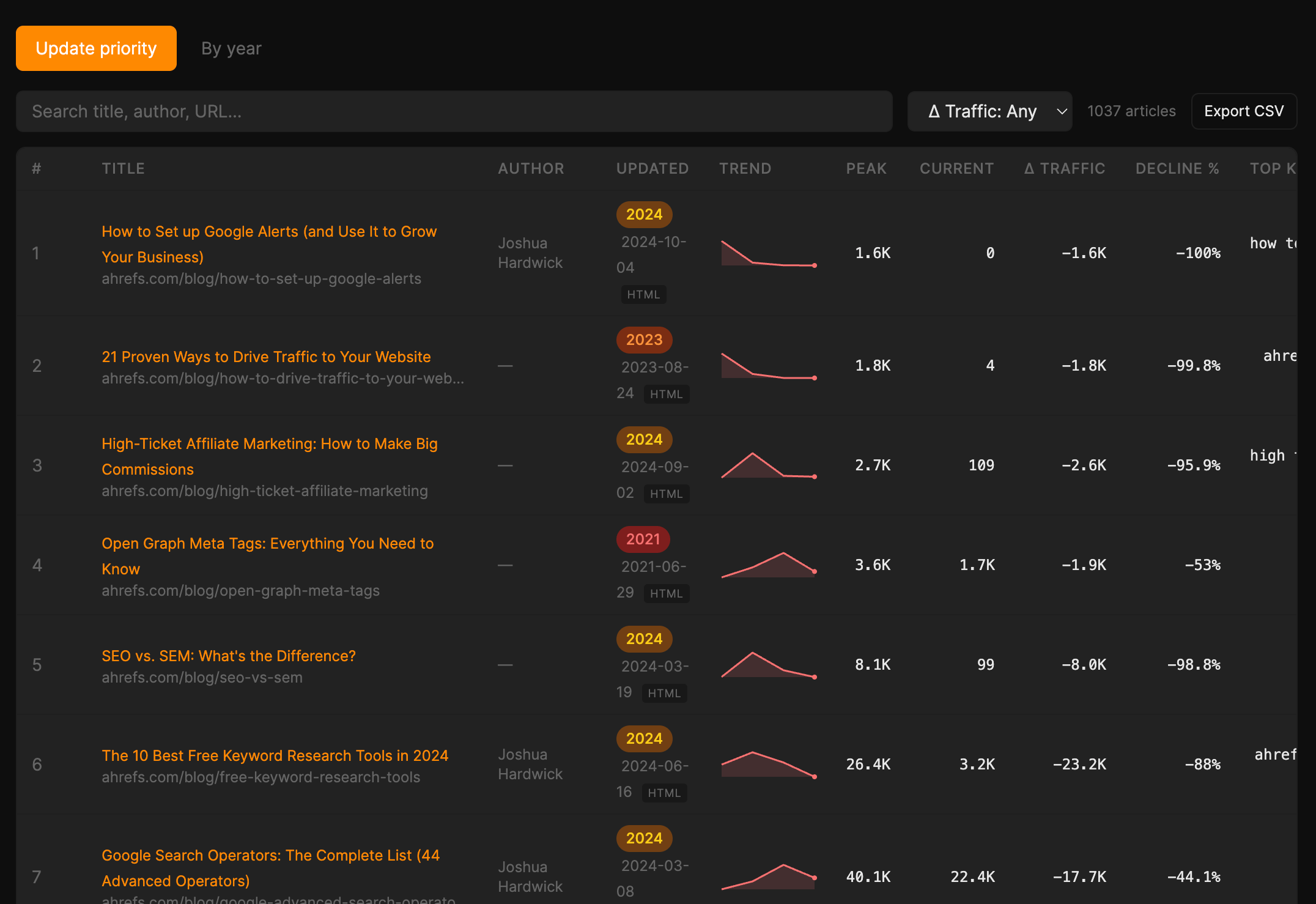
And the “Update priority” tab shows you every article you’ve ever published ranked by how much traffic you could plausibly win back if you refreshed it, so instead of staring at a CMS and deciding by gut, you get a queue to work through.
Why Ryan vibe coded it this way
Ryan is Director of Content at Ahrefs and has spent years watching content teams ask: “Which posts should I refresh first?”
It’s the million-dollar question, so he set out to answer it with an AI app built on Ahrefs’ organic traffic data.
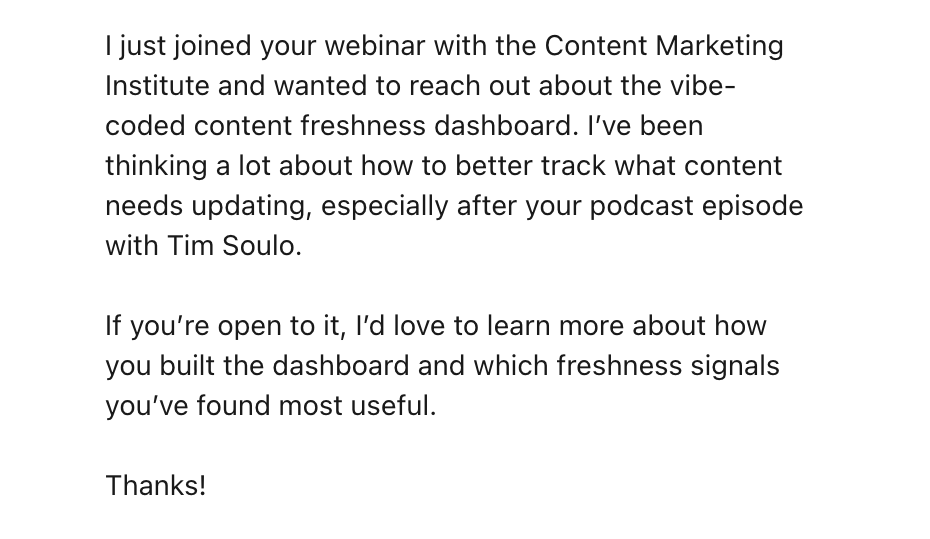
After briefly mentioning it in a Content Marketing Institute webinar, his DMs were flooded with messages like this…
And that is how Blog Freshness became one of the first plug-and-go apps in Agent A.
Install Blog Freshness in Agent A
This is the place where every “I should write about that” idea you have goes to live until it’s ready to actually become something.
What it helps you do
Marketing inbox is essentially a second brain for ideas:
- Capture any marketing idea—social post, blog draft, landing page, project—in one place
- Tag each idea by type so the inbox stays scannable
- Snooze items so the main view stays “clean” until they’re ready to act on
- Set cadences from weekly to annual for ideas that should resurface on a schedule
- Mark items done, kill them, or roll them forward when life gets in the way
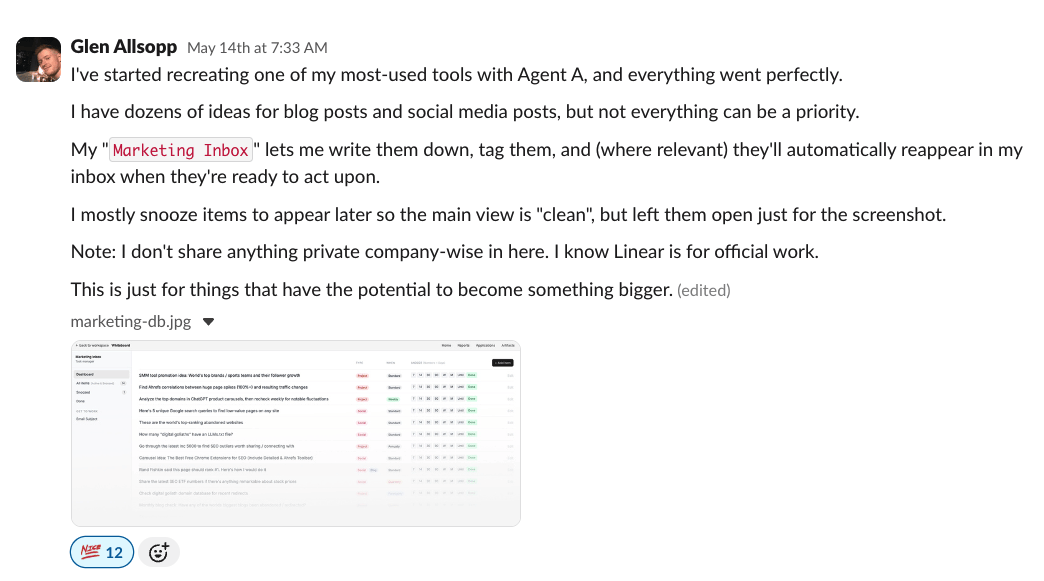
In Glen’s words:
I have dozens of ideas for blog posts and social media posts, but not everything can be a priority… My ‘Marketing Inbox’ lets me write them down, tag them, and (where relevant) they’ll automatically reappear in my inbox when they’re ready to act upon. I mostly snooze items to appear later so the main view is ‘clean’… This is just for things that have the potential to become something bigger.
Most ideas die in Notion pages or Slack DMs to ourselves. The Marketing Inbox is a forcing function: every idea either gets a cadence and a next action, or it gets killed.
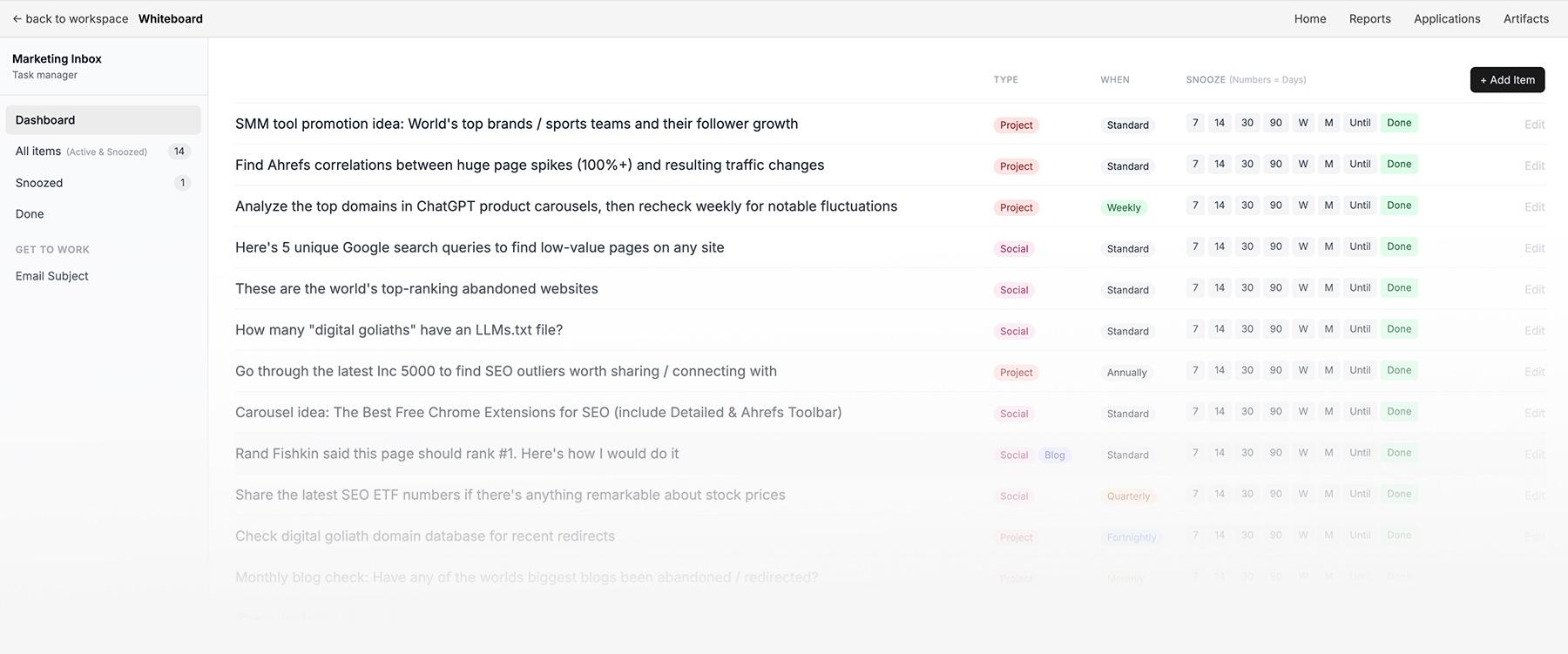
A great campaign idea in May might genuinely be the right thing to ship in November, so the inbox is built to keep that idea alive without cluttering up the present.
Why Glen vibe coded it this way
Glen Allsopp is a systems-based marketer. And in a systems-based world, ideas need a schedule, not a folder.
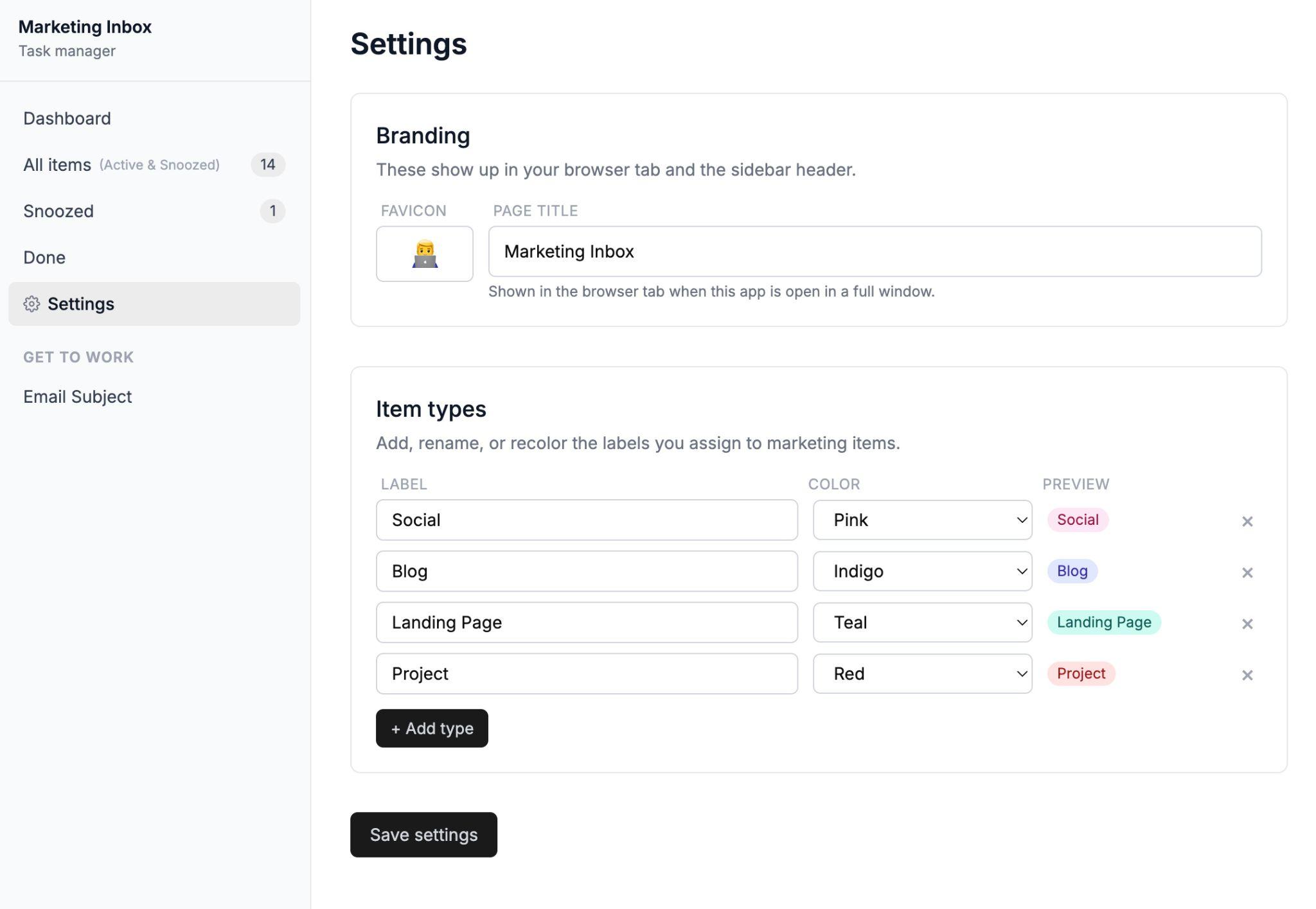
The fact that the default view is “clean”, with everything snoozed away until it’s ready, is a Glen signature.
Note to self: Glen must never. NEVER. See my gmail inbox.
Install Marketing Inbox in Agent A
This app does keyword research the way you’d do it if you had two weeks and unlimited patience—except it takes just 20 minutes.
What it helps you do
Content Keyword Research collapses the slow, monotonous parts of keyword research into one workflow:
- Type in a niche and walk away while the app does the keyword research
- Pull a vetted, clustered keyword list ranked by volume, KD, and traffic potential
- Make an instant Go / Maybe / Skip / No decision for every keyword
- Run a competitor gap analysis based on real editorial competitors, not just high-DR sites
- Visualize the topic as a hub-and-spoke internal linking map
- Generate a full content brief for any keyword in one click
In Sam’s words:
You type in a niche (e.g. ‘coffee’, ‘recipes’, ‘golf’, ‘ai marketing’) and ~20 min later you get a fully researched keyword list of vetted keywords, organized in clusters with the option to generate content briefs.”
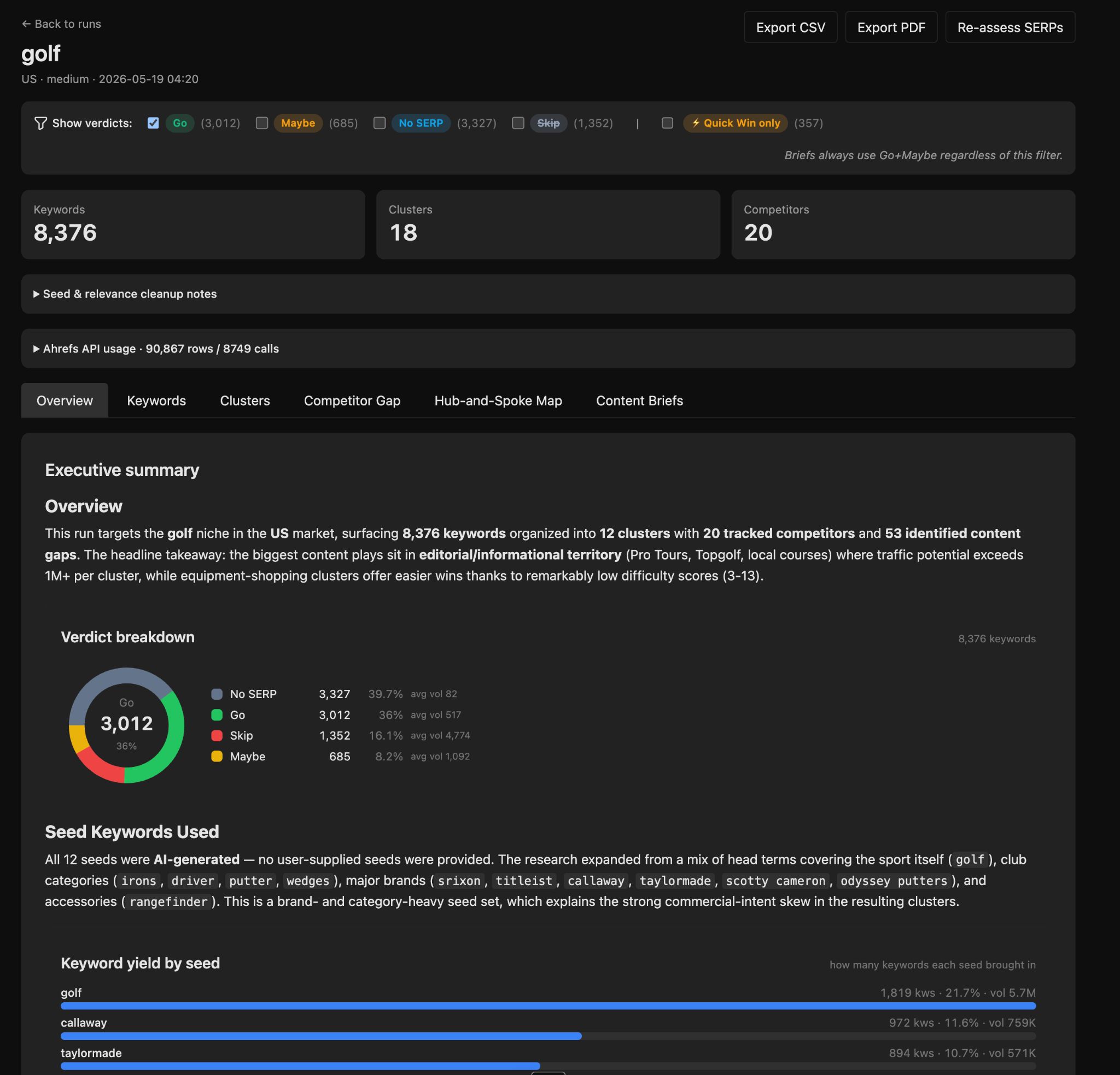
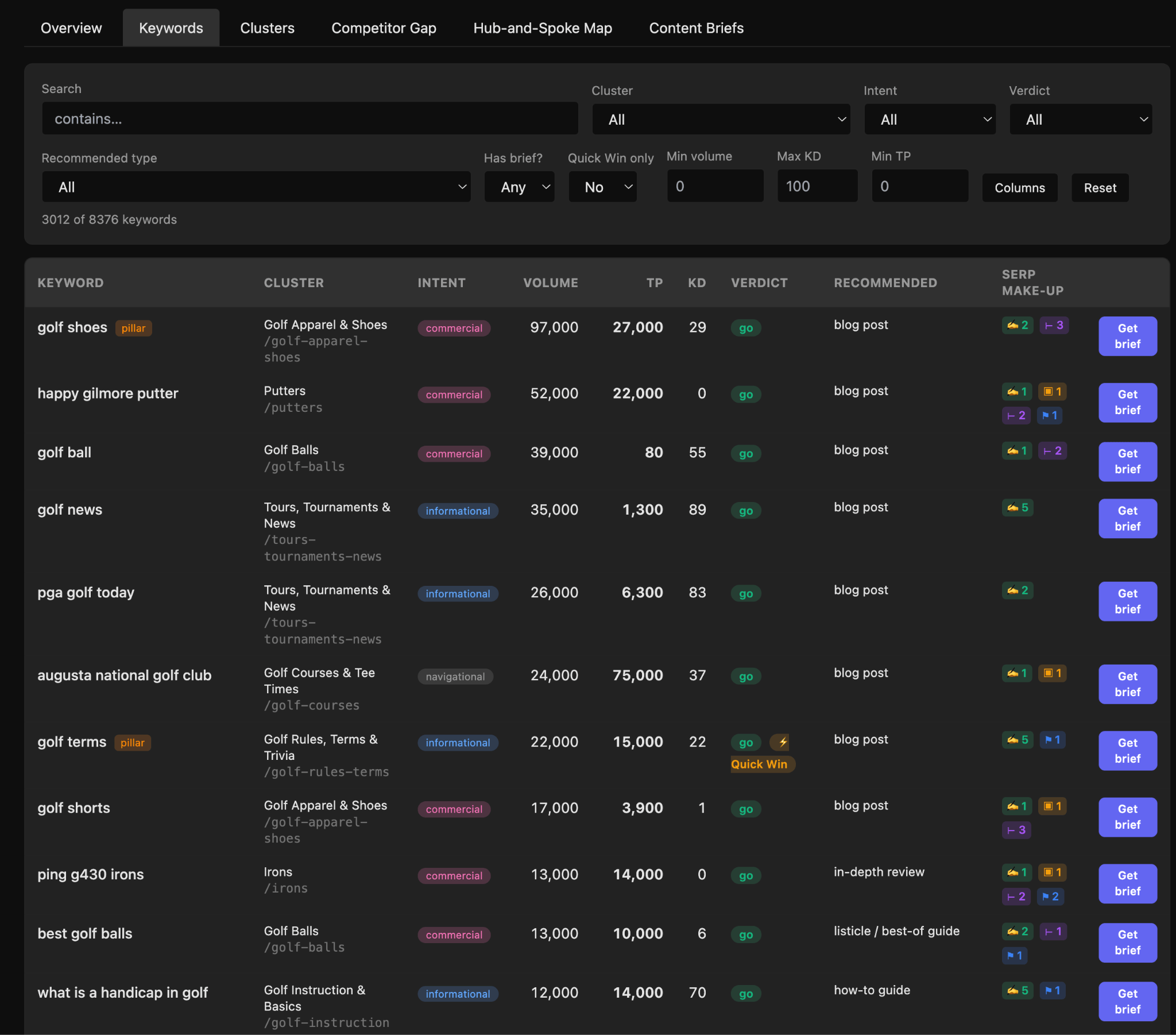
Every keyword gets a recommended format (listicle, how-to, in-depth review) and a one-click brief button.
The part of keyword research that used to mean opening 50 SERPs in 50 tabs to decide what each page should look like is handled for you in one view.
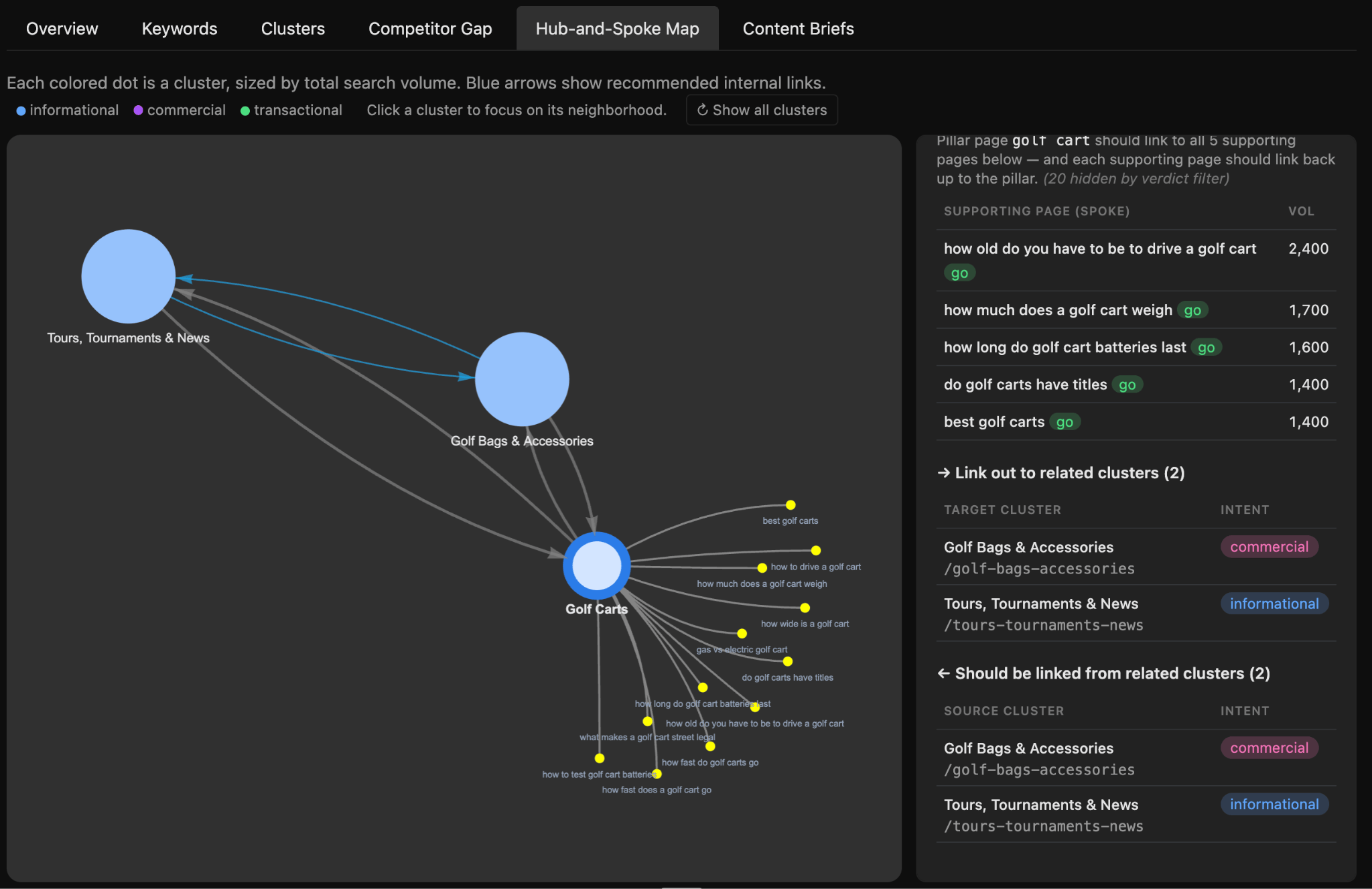
Of the nine apps, the “hub and spoke” map is the feature closest to the kind of tool I wanted to build myself when I first opened Agent A.
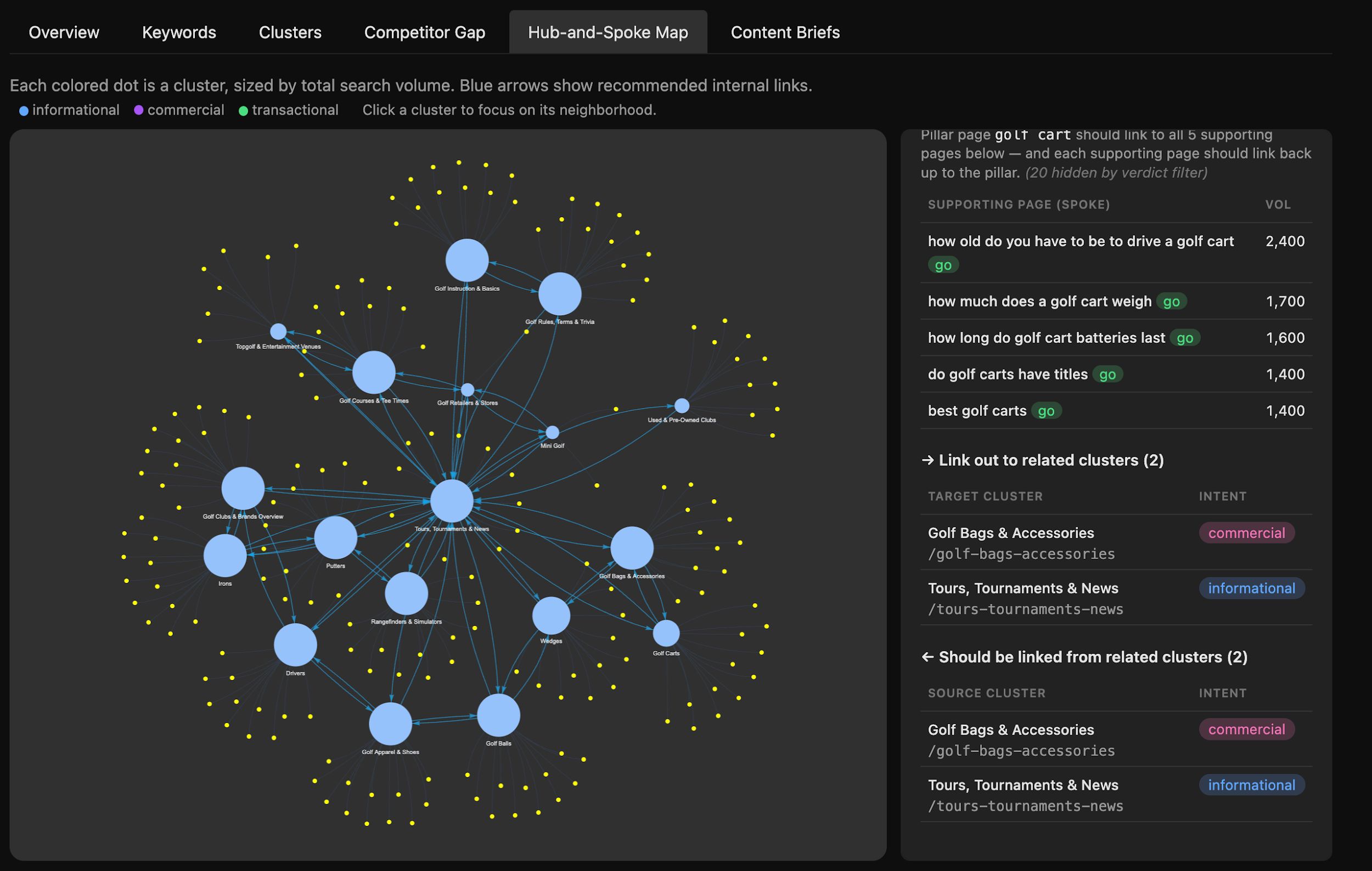
It visualizes every cluster as a node, sizes them by search volume, and draws the recommended internal linking arrows between them.
Click into one of Sam’s clusters and it tells you exactly which spoke pages should link to which pillar, and which neighbouring clusters this one belongs in conversation with.
Why Sam vibe coded it this way
Sam Oh has spent more time inside Ahrefs’ keyword tools than almost anyone; he’s the person you’ve watched explain them rigorously on Ahrefs’ YouTube channel .
This is him collapsing his own workflow of niche → vetted keywords → clusters → briefs → article into one app.
He’s also flagged the obvious next step—a content writer app that takes a brief and produces a draft. Watch this space.
Install Content Keyword Research in Agent A
This app turns the end-of-month reporting ritual into a single shareable dashboard, so you can stop screenshotting your way through your Monday morning.
What it helps you do
Monthly Website Performance Report packages the SEO metrics your manager or client actually wants to see, and delivers them as a link you can paste into Slack.
- Pull month-over-month change for traffic, rankings, and backlinks
- See exactly which pages drove the gain (or the loss)
- Share the dashboard link with a boss, client, or stakeholder without rebuilding the deck
- Re-run on a cadence so next month’s report is already half-done
Monthly reporting is the most universally disliked task in SEO. Everyone has to do it, almost no one enjoys it, and the people on the receiving end usually skim it.
Collapsing the build to a single dashboard means the report gets done faster and read more carefully, because there’s less noise to wade through.
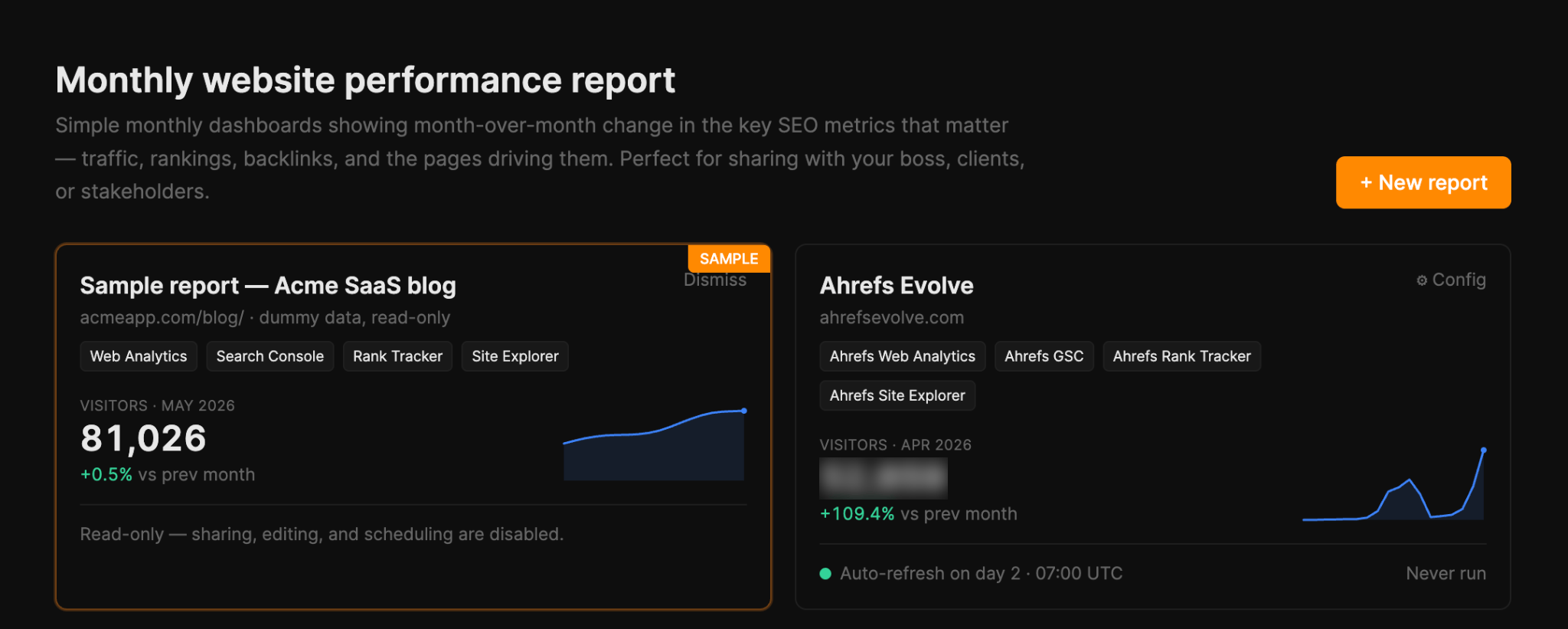
AI analysis adds context so the most important data stories get shared. Edit it, add context, or leave it as-is.
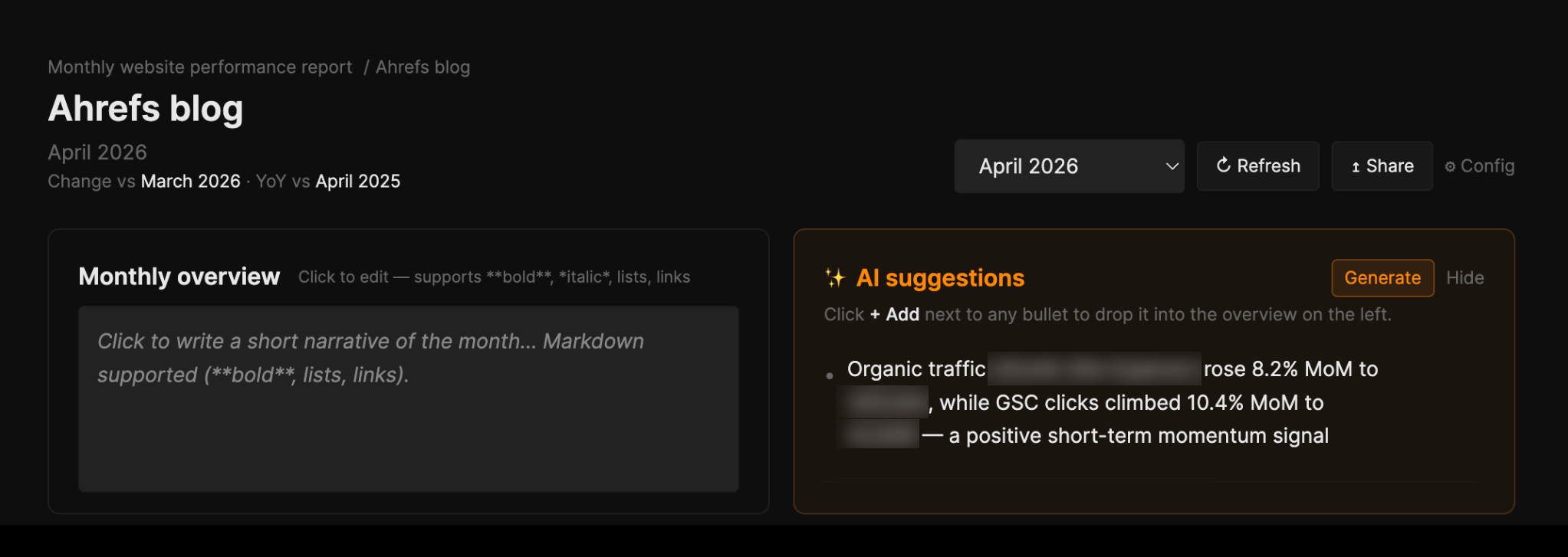
Then rearrange widgets to suit your workflow, and share the finished report via a public URL.
Why Ryan vibe coded it this way
It’s the same instinct as Blog Freshness—Ryan kept noticing manual, repetitive work content teams do and shipped the tool version of it.
He wanted to build something that automatically combines multiple data sources and generates talking points for you to share with your boss.
Install Monthly Website Performance Report in Agent A
This app tells you the day a SERP you care about shifts, instead of leaving you to find out three weeks later when somebody notices the traffic drop.
What it helps you do
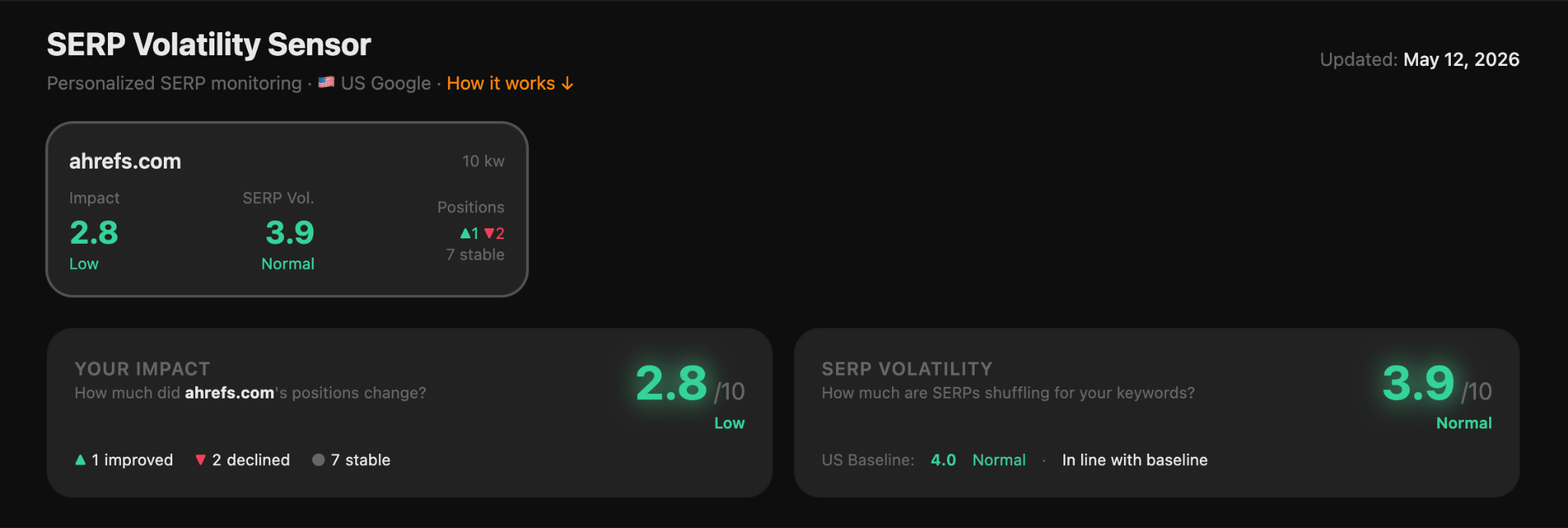
SERP Sensor is a daily early-warning system for the SERPs that actually matter to your business.
- Track SERP volatility across the domains and keywords you care about
- Get a daily volatility score for each tracked SERP
- See which of your keywords moved the most on any given day
- Add multiple domains to track competitors
- Catch new or disappearing SERP features on the results you rank for
Most SERP shifts get noticed weeks after the fact, when traffic has already cratered and the conversation is “why did this happen?” instead of “what do we do about it?”.
When you’re nudged the day a SERP moves, you can act while the result is still relevant; tweak a meta description, refresh an article, check whether an AI overview has muscled in on a term you own, and change tack.
Can you put volatility down to an algorithm update? A new competitor? A search intent shift or SERP layout change? That’s exactly what you can dig into with this app.
Why the Ryan vibe coded it this way
Ryan built this app because he realized that SERP volatility is one of those things you need to know about the day it happens, not when you next get round to checking.
Install SERP Sensor in Agent A
This app takes a video title and returns three thumbnail concepts in about a minute; ready to hand to a designer, or to use as a starting point if you’re the designer.
What it helps you do
Thumbnail Generator turns a half-finished idea into a creative brief.
- Generate three distinct thumbnail concepts from a single video title
- Read a “why this works” rationale for each concept
- Grab the underlying image prompt to hand straight to a designer
- Drop in an optional reference photo so the face stays consistent across concepts
- Re-run as many times as you need until one of the concepts clicks
In Sam’s words:
“Our team will be using this to generate concepts for inspiration and once locked in, send it to a designer. It might be useful for others who are making YouTube videos.”
What makes this better than asking an LLM for “a thumbnail idea” is that it always returns three concepts on different emotional registers.
For a video titled “Why I Switched from ChatGPT to Claude”, the three concepts below are: a reactive one (Keyword Graveyard Shock), an analytical one (Before / After SERP Split), and a calm-conclusive one (Action Words Answer).
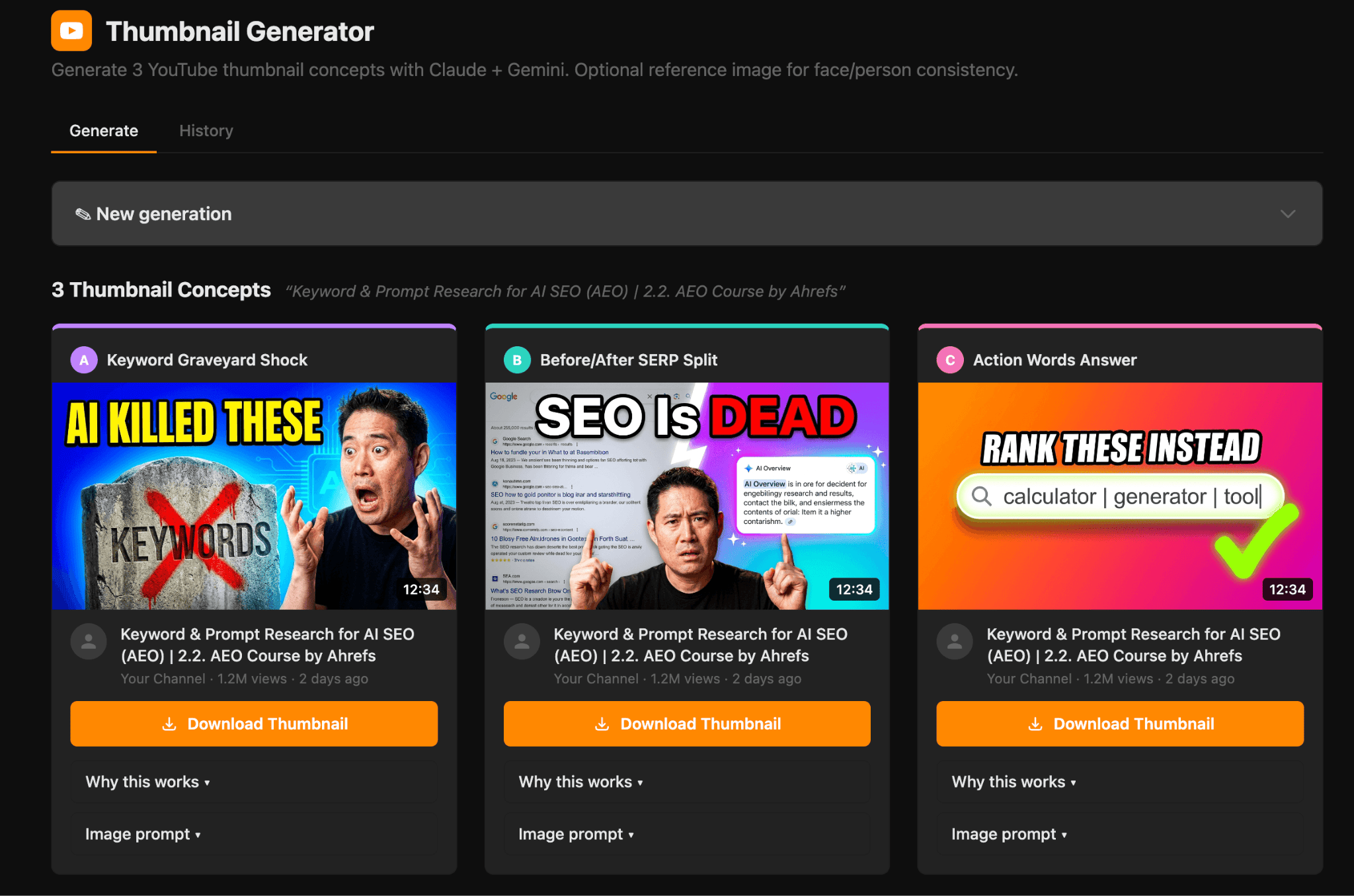
Thumbnails are the single biggest lever on YouTube CTR. They’re also the thing every creator I’ve ever spoken to procrastinates on the hardest.
This app is that removes the blank-page problem. You can outsource what can be a pretty tedious task to Agent A and it will come back with three different options in about as long as it takes to type the title.
Why Sam vibe coded it this way
Sam is the user as well as the builder.
He vibe coded the app he needed (which is just about the best way to create something), and now he’s sharing it with other YouTube creators to save them time too.
Install Thumbnail Generator in Agent A
This app takes the somewhat abstract concept of topical authority and puts an actual number on it for your site.
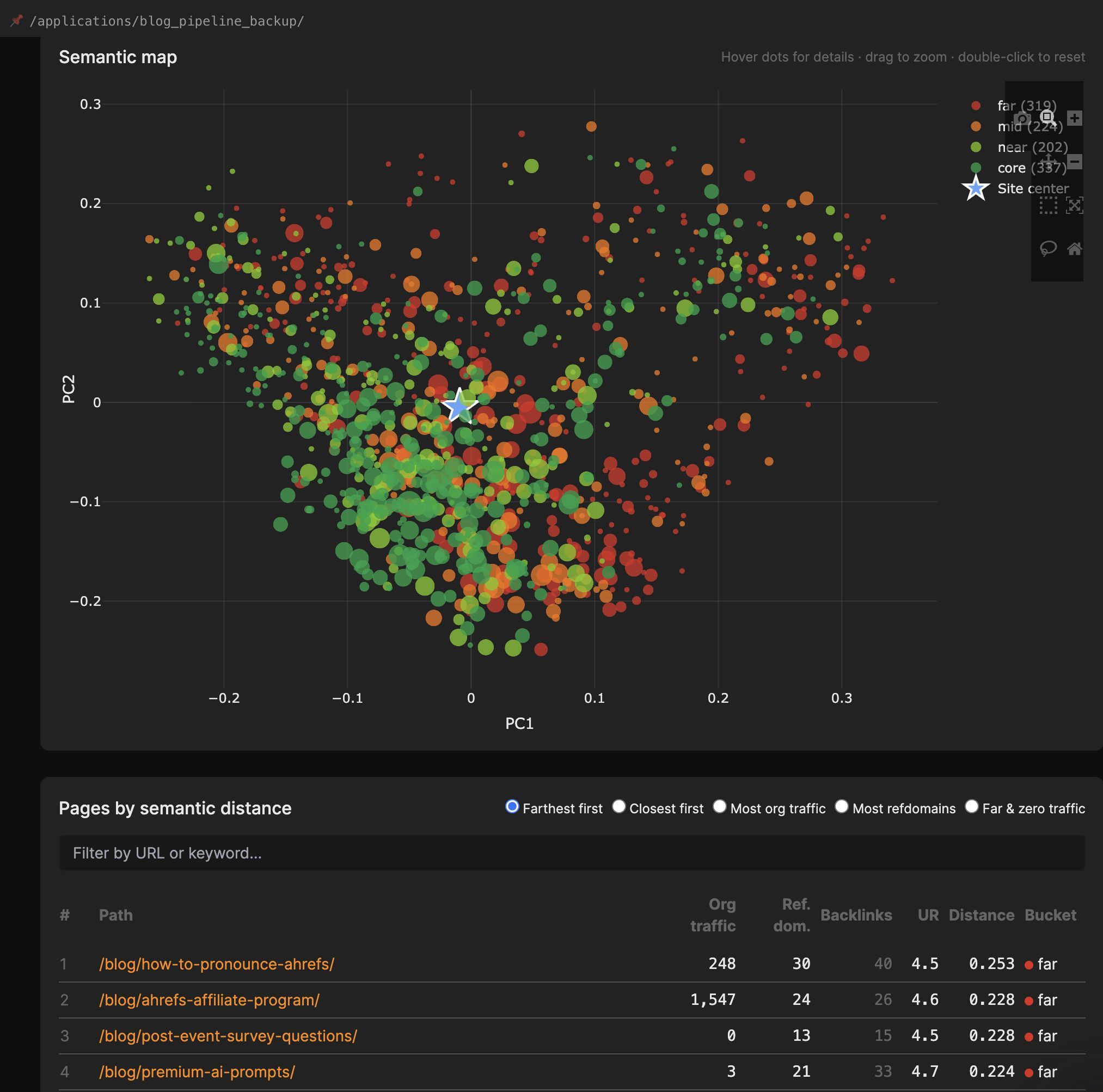
It generates a vector embedding for every page in a given scope, works out the average across them all to find your site’s centre, then measures the cosine distance between each page and that centre.
Pages that sit close are on-topic; the ones a long way out are the drifters.
What it helps you do
Topical Authority Analysis measures how semantically relevant your content is:
- Embed every page on your site to find its semantic centre
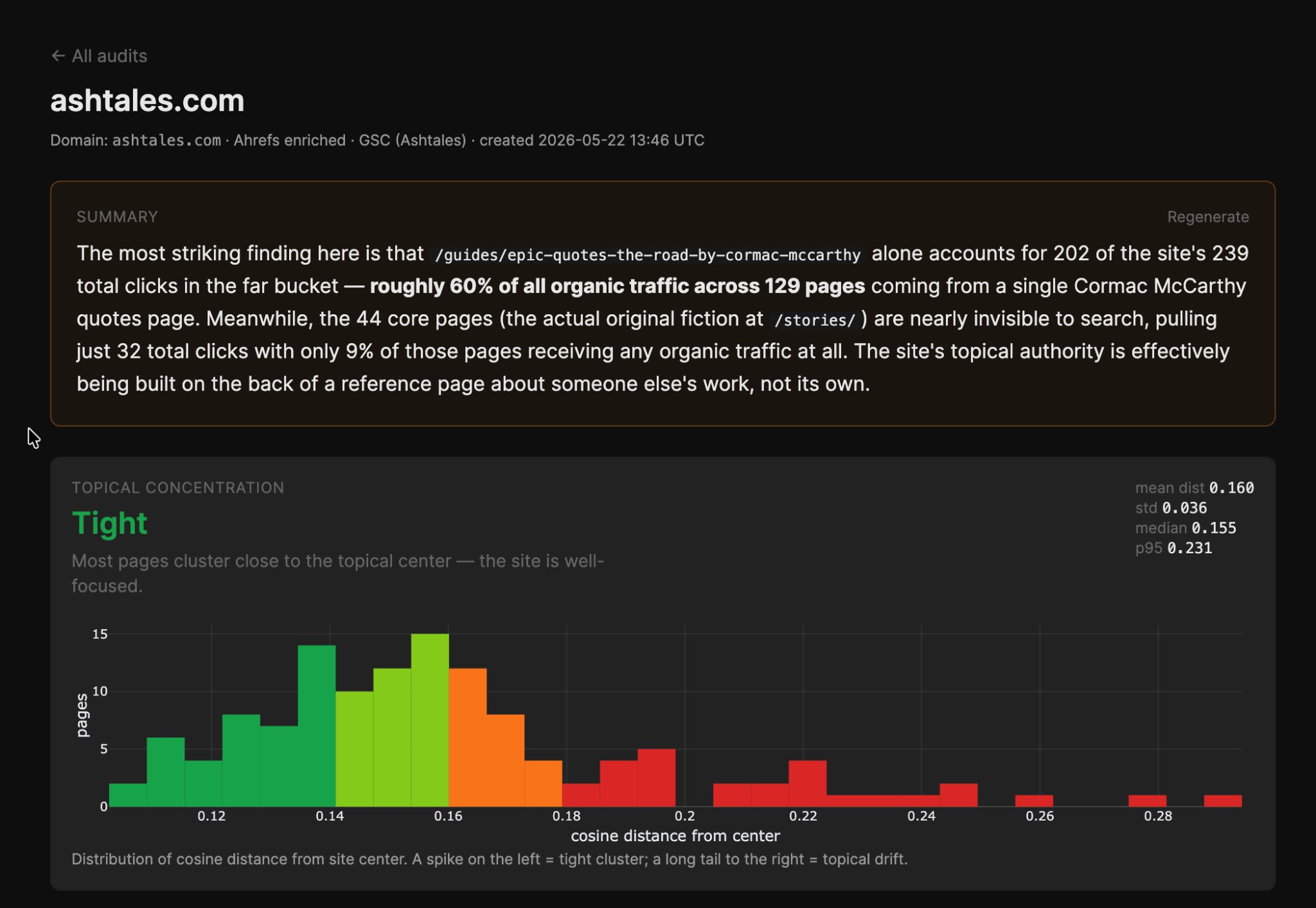
- See how tightly your content actually clusters around its core topic
- View GSC and Ahrefs traffic data of cluster content
- Spot natural topic clusters
- Get LLM-generated summaries of results
- Spot the pages that have drifted off-topic
- Decide page-by-page whether to merge, redirect, or rewrite
- Re-run after a content sprint to see whether the centre has tightened or loosened
It’s no secret that off-topic content can quietly drag down the rest of your site. We’ve seen countless core update casualties as a result of this.
You can write the best guide on the internet for your core topic, but if a section on your blog is wandering off into adjacent territory, search engines have a harder time deciding what your site is for.
This app makes that trade-off visible so you can do something about it: prune, merge, redirect, or leave it.
Why Ryan vibe coded it this way
Ryan was inspired by a LinkedIn post from Dan Hinckley of Go Fish Digital.
Hinckley had been running semantic content audits where he embedded every page on a site, averaged them into a single “site center”, and overlaid Search Console data on top.
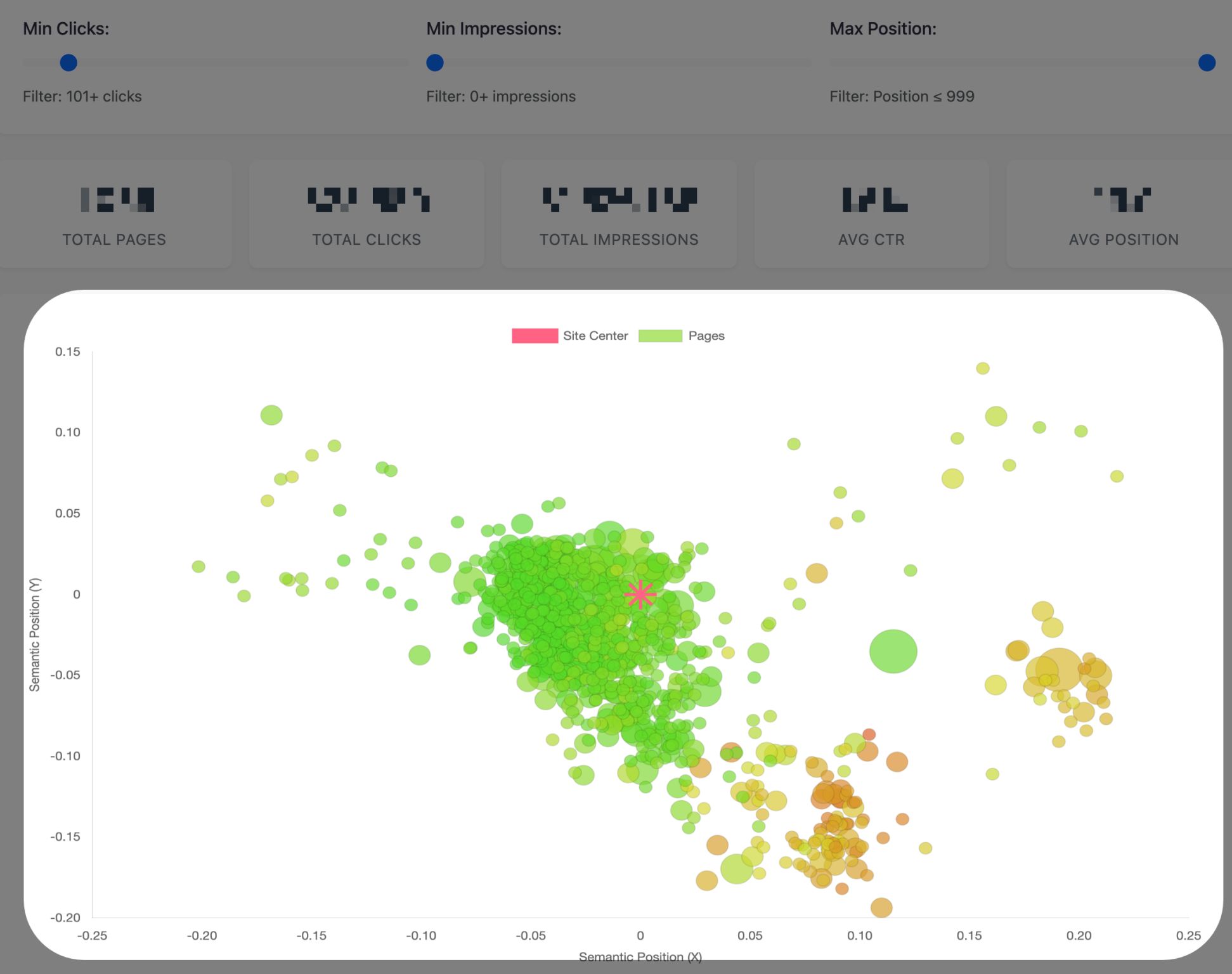
He kept finding the same thing: the pages sitting closest to that centre were the ones earning organic traffic, and the further out a page drifted, the less Google seemed to trust it.
Dan’s method worked, but it took internal tooling and a fair bit of embedding know-how to pull off.
Ryan built this app to put that workflow in reach of people who don’t have either.
Install Topical Authority Analysis in Agent A
This app tells you which of your YouTube videos are quietly winning Google search, and which keywords are doing the work.
What it helps you do
Video SEO Opportunities turns a YouTube channel into a Google-search content roadmap.
- Scan any YouTube channel for videos that already rank in Google search results
- See the top 5 keywords each ranking video is bringing traffic in for
- Pull global search volume and KD for every one of those keywords
- View a 52-week traffic sparkline per video to spot accelerators vs. decliners
- Decide which video topics are worth doubling down on
Most creators only think about YouTube search, but a percentage of every channel’s catalogue is quietly earning Google search traffic too—often for keywords the creator never deliberately targeted.
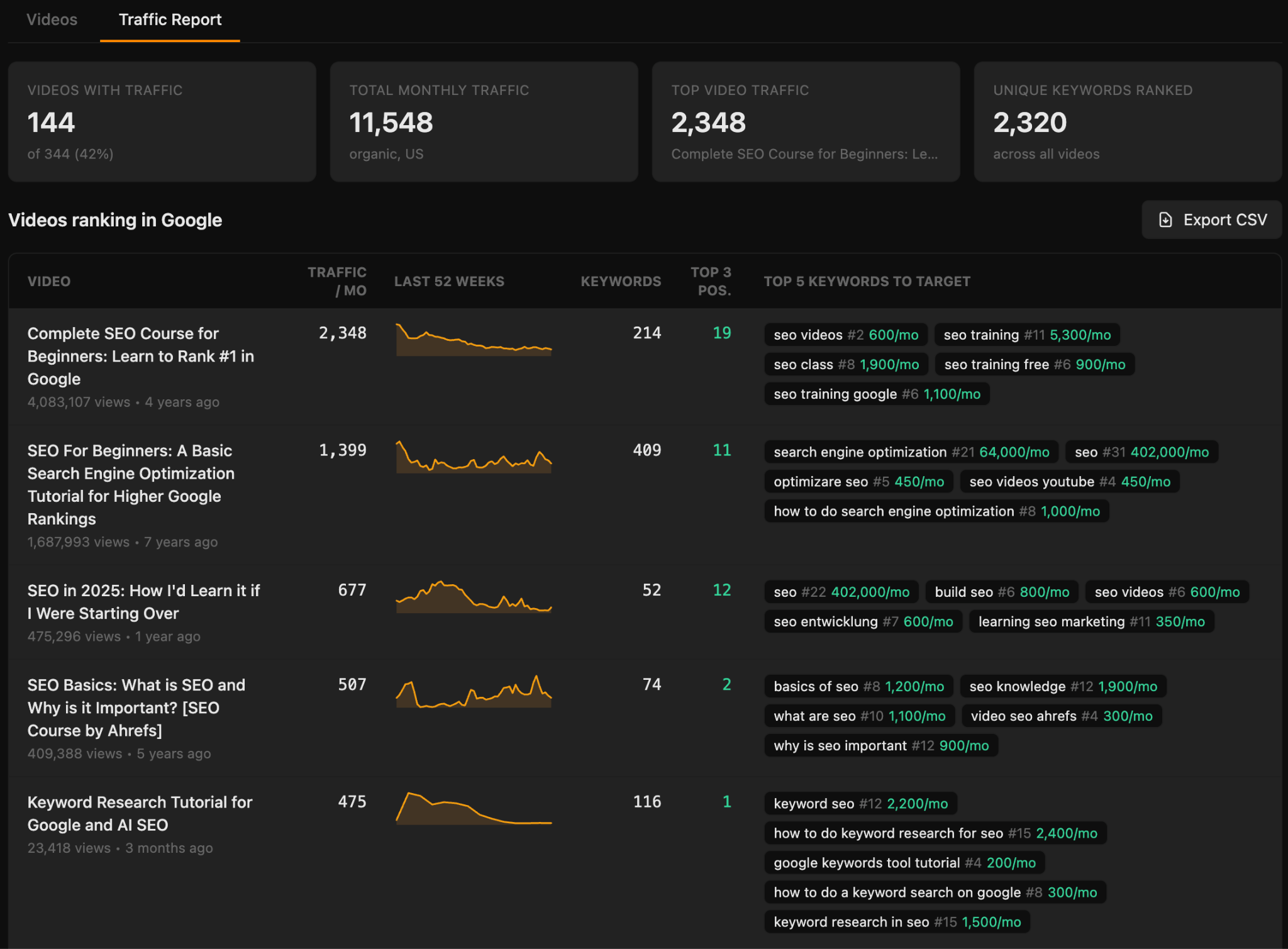
This app surfaces them and tells you what they’re ranking for, which turns your next planning meeting into a much shorter one: refresh the videos that are decaying, plan sequels to the ones that are growing, lean into the keywords nobody knew were working.
Why Sam vibe coded it this way
The Thumbnail Generator helps you ship a video. This one helps you decide which video to ship next.
Together, they’re the two halves of a YouTube content workflow—which is, again, Sam’s own workflow turned into software.
Install Video SEO Opportunities in Agent A
Most competitor monitoring is either a manual slog through other people’s blogs or a tool that fires alerts you never read.
This app is one you will use: a daily-refreshed feed of every new post your competitors publish, built so you can triage it in a few minutes rather than letting it pile up.
What it helps you do
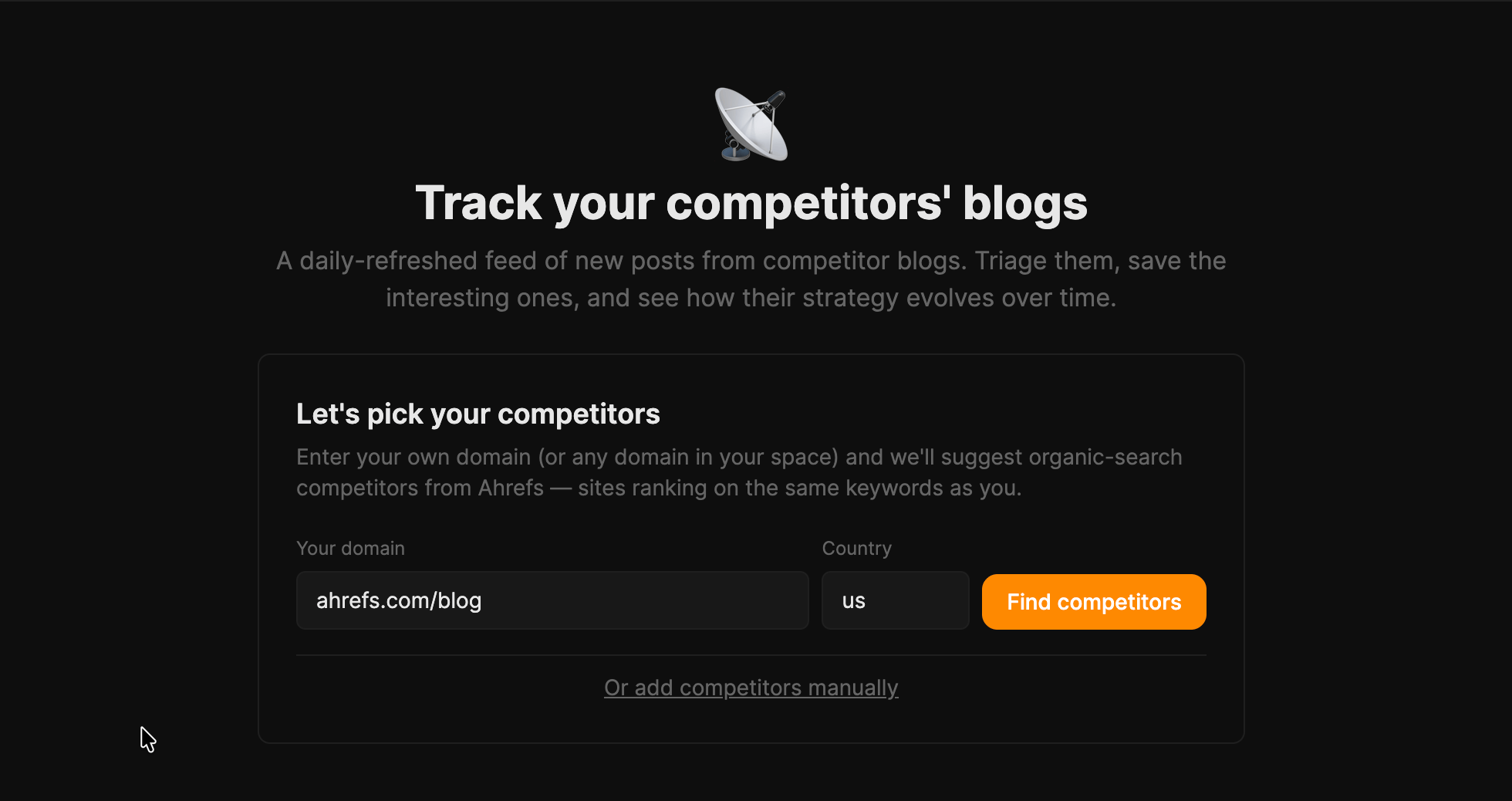
- Build your competitor list from Ahrefs’ organic-search suggestions, or add domains yourself
- Import new posts from competitor sitemaps automatically, every day
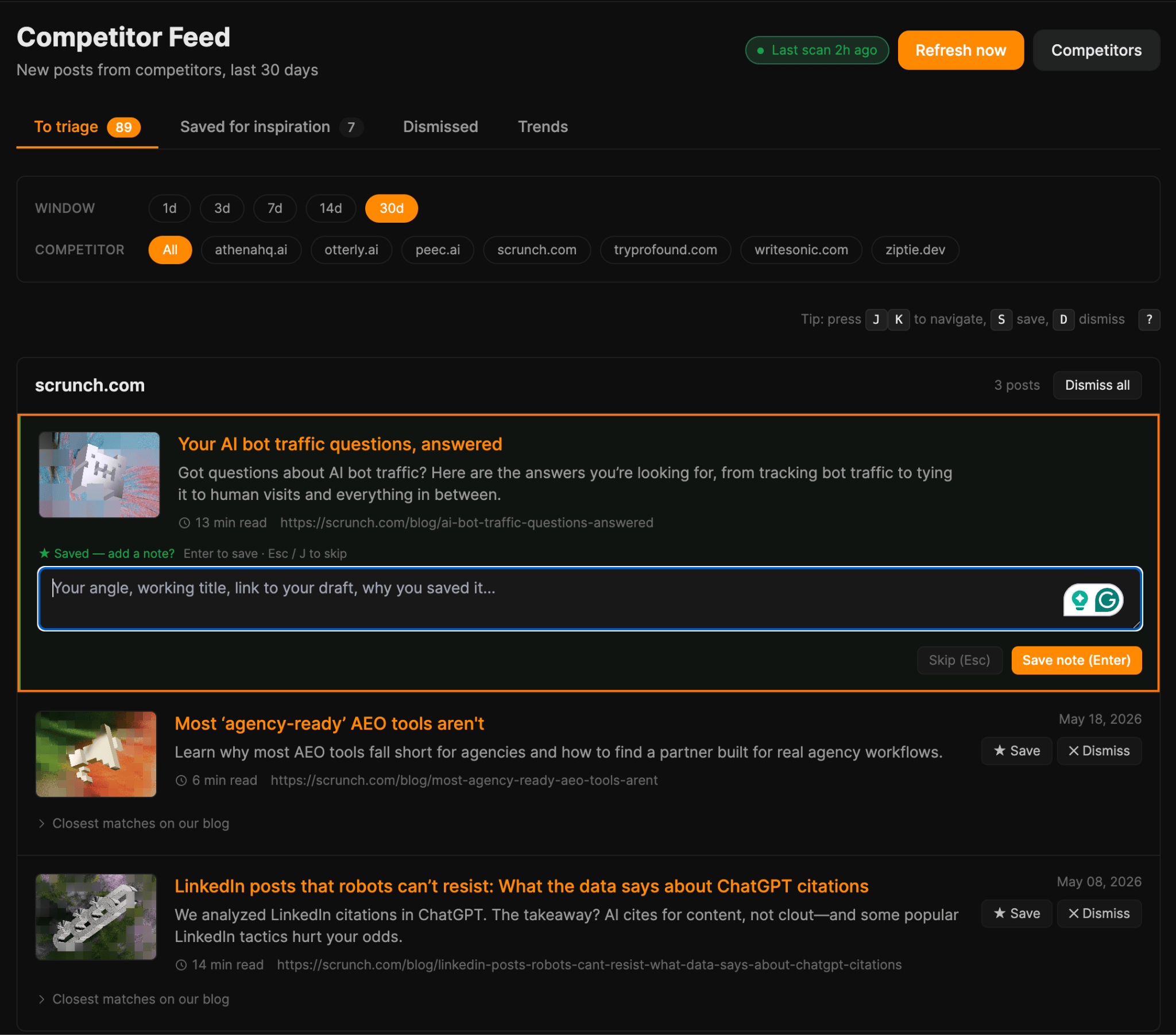
- Triage with hotkeys: J/K to move through the feed, S to save, D to dismiss
- Save the interesting ones with a note on your angle or why it caught your eye
- See the closest matches already on your own blog, so you know whether you’ve covered the topic
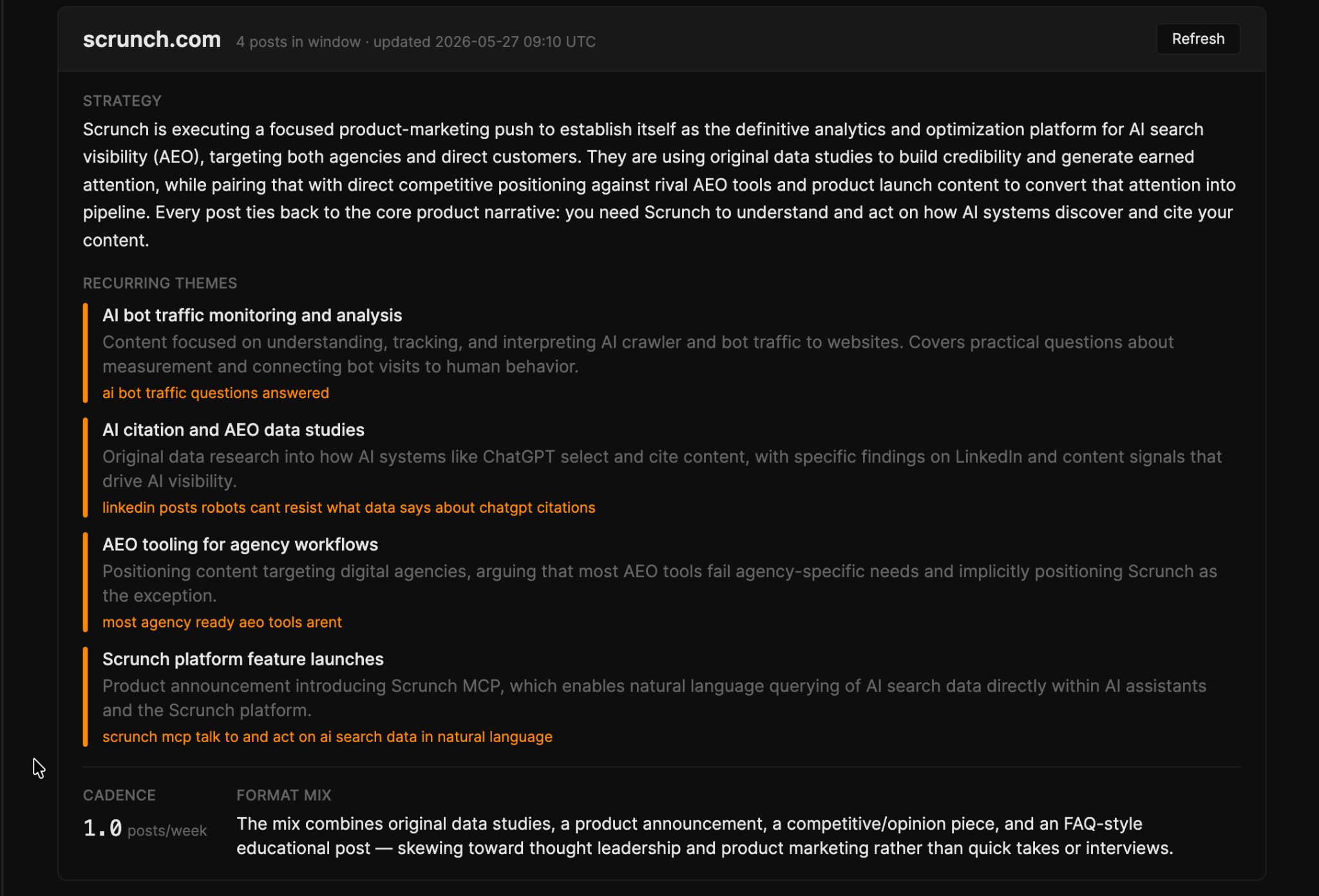
- Read a Trends summary per competitor
The triage view is where you’ll spend your time, with posts grouped by competitor and each carrying a “closest matches on our blog” drill-down so you can see whether a topic is new ground or old.
Rather than leaving you to infer a strategy from headlines, the Trends tab reads your rival’s last 30 days of output and writes up their overall play, the recurring themes, and how often they publish.
Why Ryan vibe coded it this way
Ryan built it because he was already doing this by hand, and realized it was the kind of job that never quite gets done.
He wanted the watching automated and the deciding kept human.
So the app runs the daily scan and hands you a queue of posts that spark ideas, with notes fields where you can bank the angle before it evaporates.
Install Competitor Feed in Agent A
Anyone can vibe code.
Use plug-and-go apps. The nine vibe coding examples in this post are ready to install and run, so you don’t need to build anything to get value. Connect Ahrefs, point each one at your domains, and get going.
Or build your own. The same agent behind these examples will make something bespoke if you describe what you want in plain English, even if you’ve never written a line of code.
Start with a real annoyance. The best vibe coding examples automate something you’re already doing by hand.
In-house SEO and content teams, and agencies juggling multiple clients will get the most out of vibe coding. The more sites you look after, the more these compound in your favour.
Want to try these nine apps yourself? They’re available in the Agent A app store inside any letaido.com workspace. Install with a button-click and the agent does the rest.
