

I love my homelab — but accessing it remotely from a hotel or café only gets me so far. That remote connection works fine for simpler tasks like checking dashboards, running scripts, waking up, or shutting down machines. But anything heavier — large file transfers, streaming, or running intensive workloads — quickly reveals public Wi-Fi’s limitations.
What I wanted was a self-contained homelab — an offline-capable setup that runs on a private network and is fully under my control. That’s what led me to turn the Raspberry Pi 4 and HP ProDesk 600 G6 mini PC into a homelab I can carry in my backpack.

9 Docker containers that run 24/7 on my $100 mini PC
Maximum value budget homelab.
The hardware I chose and why it works
Reliable setup with role separation

I deliberately chose a two-device setup, so I wouldn’t rely on a single machine for everything. The Pi lacks the muscle to handle serious workloads, but it makes up for that with its low power and always-on nature. My Pi 4 boots from a SATA SSD, and I carry a USB wireless adapter in case I can’t use the Ethernet cable.
Meanwhile, my HP ProDesk 600 G6 mini PC unleashes real computing power, powered by a 10th Gen Intel Core i5 CPU, 32GB of RAM, and a 1TB NVMe SSD. It’s slightly bigger and heavier than a typical NUC. Since I already had a mini PC, I preferred using it over buying a NUC.
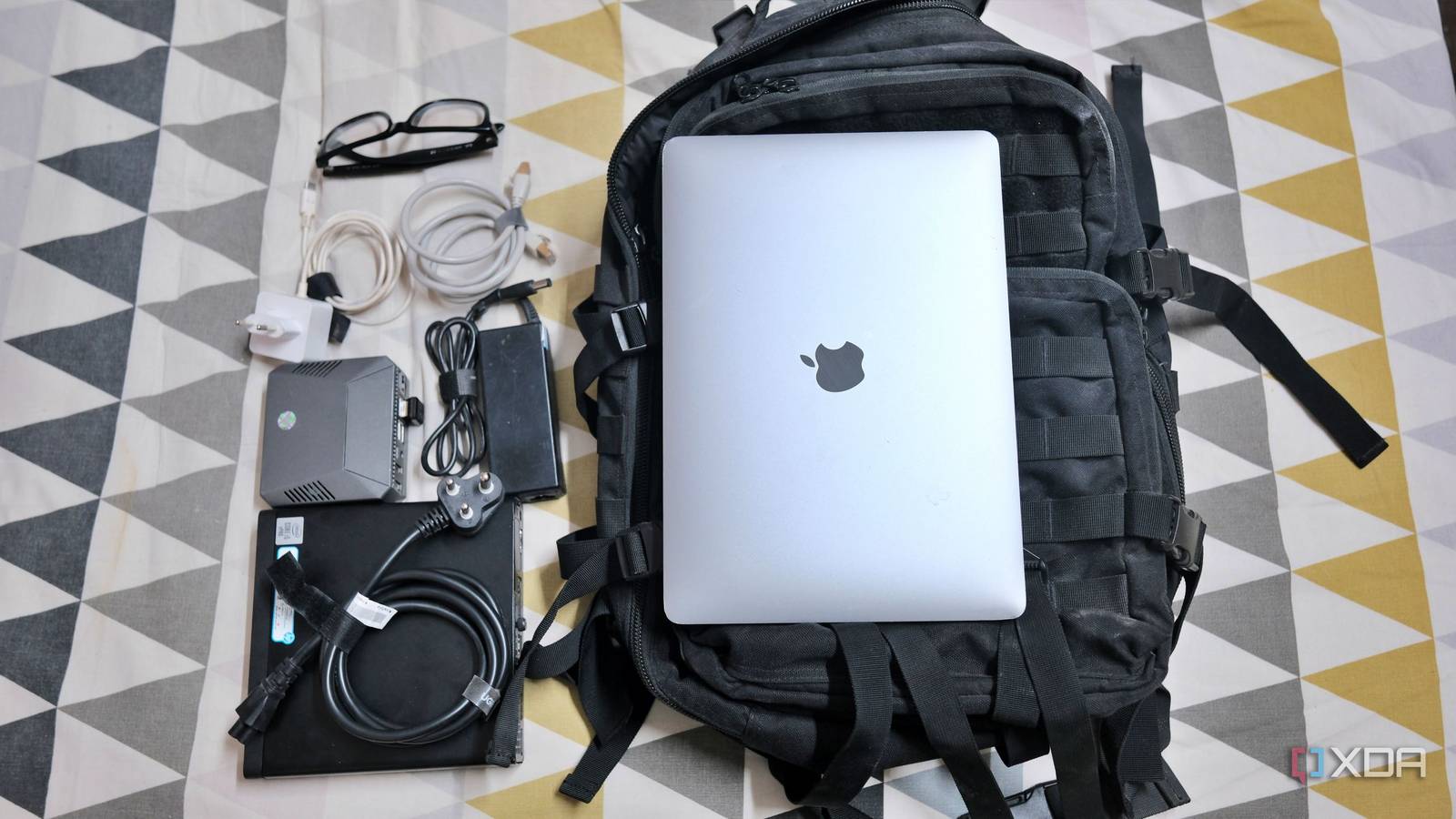
Along with the power cables, I also carry an Ethernet cable to use a reliable connection wherever possible. This setup fits in my regular backpack along with my M1 MacBook Air.

- Storage
-
MicroSD card slot
- CPU
-
Arm Cortex-a72 (quad-core, 1.8GHz)
- Memory
-
1GB, 2GB, 4GB, or 8GB of LPDDR4
- Operating System
-
Raspberry Pi (Official)
Splitting the workload between a Pi and a mini PC
Giving them a purpose

I keep the Pi reserved for tasks that benefit from low-power, always-on operation. So my Pi runs Pi-hole for tracker blocking and Tailscale for remote access to my Windows desktop. I turned the Pi into a travel router and installed RaspAP. To use its native ad-blocking feature, I imported the blocklists from my old Pi-Hole instance. I use it to connect to a hotel or public Wi-Fi and create my own private local network.
My mini PC carries the actual homelab: Proxmox for virtualization, a few VMs, LXC containers, Immich for managing photos, Jellyfin for streaming media, a file server, and Docker containers like Caddy, Redis, Jenkins, and others. The NVMe enables all VMs, LXCs, and containers to spin up quickly.
The network-specific Pi setup is lean, and the mini PC packs a punch. Both machines handle everything locally on the road, but I keep Tailscale installed to access my Windows 11 desktop at home anytime.
Fitting portable homelab into a backpack easily
No cable management
I use an Argon40 case for my Pi 4, which also fits in the SATA SSD. My mini PC has a 1-liter form factor, making it easy to stack the Pi on top. I’ve used only regular cables so far, which added bulk and made the setup look cluttered. I plan to buy shorter cables to reduce the weight for a compact setup.
Both devices fit easily in my 20-liter backpack. The MacBook, Pi 4, and mini PC weigh just under three kilograms. I tie the cables and power adapter together with Velcro strips to prevent them from tangling. Other than that, I don’t engage in any cable management tricks.
What I can do with both devices on the go
Familiar homelab setup

I use the Pi to create a private local network so that working on my mini PC makes me feel like I never left home. Also, Pi functions as a travel router with built-in ad-blocking and traffic-filtering features.
Meanwhile, I log in to desktop VMs or SSH into my mini PC from my MacBook Air to spin Docker containers to test and learn about them. A powerful mini PC with capable hardware at my disposal makes it easy for me to run software or deploy containers.
For that, I don’t need to expose anything to the internet; I just need an isolated environment to test apps and scripts. There’s no latency and no need to pay any cloud fees either.
When not working, I use Tailscale and Jellyfin to stream content from my desktop back home.
Compromises I learned to live with
Can’t ignore reality

Despite my best efforts with Velcro strips, I can’t ignore the cable clutter in my Pi and mini PC setup. I had to set up, configure, and test everything before relying on both devices on the road, so I wasn’t carrying dead weight.
The reality I can’t ignore is that my mini PC needs a wall socket to power itself. Though my Pi 4 can run on a power bank, I try not to carry one everywhere due to airline regulations on lithium batteries. So I need two wall sockets to run both the devices simultaneously.

Cheap mini PCs are the death knell for Raspberry Pis
With x86 mini PCs becoming more budget-friendly, I find it hard to recommend Raspberry Pi SBCs
Creating a portable homelab is rewarding
What started as an experiment has become indispensable. The Pi handles networking efficiently, the mini PC provides the computing power, and together they deliver a familiar homelab environment wherever I go.
All my services are fully isolated, and I don’t need to worry about VPN speeds or cloud dependencies. If you have a Pi and a mini PC sitting in a drawer, the barrier is lower than you’d expect. You don’t need new hardware to build your own setup. It just needs to be yours.
