


Close Menu
    Facebook X (Twitter) Instagram
    Wifi PortalWifi Portal
    • Blogging
    • SEO & Digital Marketing
    • WiFi / Internet & Networking
    • Cybersecurity
    • Tech Tools & Mobile / Apps
    • Privacy & Online Earning
    Facebook X (Twitter) Instagram
    Wifi PortalWifi Portal
    Home»Cybersecurity»OpenAI rolls out ChatGPT Library to store your personal files
    Cybersecurity

    OpenAI rolls out ChatGPT Library to store your personal files

    adminBy adminMarch 24, 2026No Comments2 Mins Read
    Facebook Twitter LinkedIn Telegram Pinterest Tumblr Reddit WhatsApp Email
    OpenAI
    Share
    Facebook Twitter LinkedIn Pinterest Email

    ChatGPT

    OpenAI is rolling out a new feature called ‘Library’ for ChatGPT, which allows you to store your personal files or images on OpenAI’s cloud storage.

    OpenAI says ChatGPT Library requires Plus, Pro, and Business. It’s rolling out to customers across the world except the European Economic Area, Switzerland, and the United Kingdom.

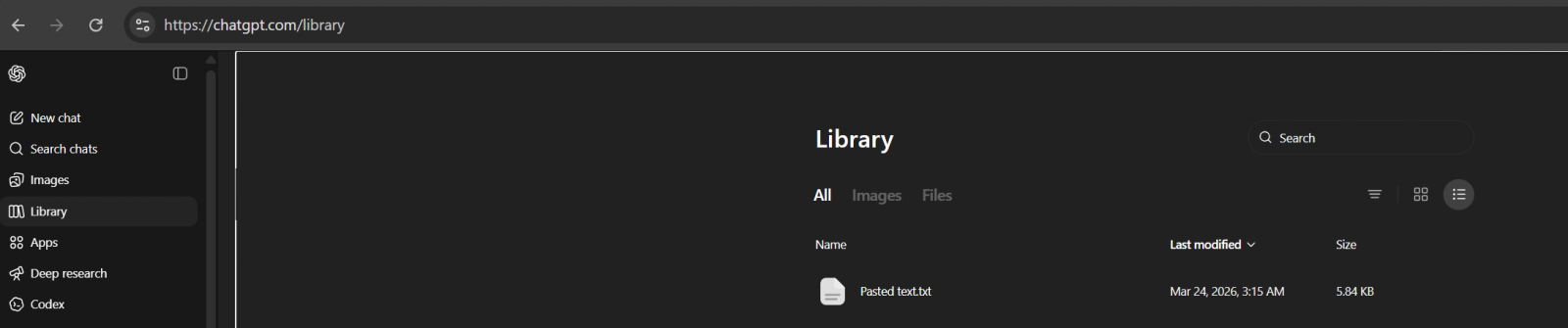
    I refreshed the ChatGPT web, and the Library automatically showed up on the sidebar.
    GPT
    ChatGPT Library

    To my surprise, it’s actually not empty, as ChatGPT has already saved some of the files I uploaded in the last two weeks.

    Turns out it’s an expected behaviour. By default, GPT will save your uploaded files in a dedicated, secure location, and they can be used for reference in a future chat.

    “ChatGPT automatically saves uploaded and created files, including files uploaded in chats (for example: documents, spreadsheets, presentations, and images) in a dedicated, secure location so they can be easily accessed later,” OpenAI noted in a document.

    On the other hand, if you use ChatGPT to generate AI images, they will continue to appear in the Images tab.

    The Library section only has files you uploaded, and you can upload files by following these steps:

    • Open the composer menu (the attachment/add button).
    • Select Add from library.
    • Choose the file you want to use.

    OpenAI says ChatGPT automatically saves uploaded and created files, including files uploaded in chats, in a dedicated, secure location so they can be easily accessed later. 

    This means files are saved to your account until you delete them manually, but deleting a chat containing a file does not delete those files saved to Library.

    To delete a file:

    • Select the file in the “Library” tab
    • Click Delete, or click the trash icon next to the file.  

    OpenAI will remove files from its servers within 30 days of deletion.

    It’s unclear why it takes nearly a month to purge files, but it is likely due to legal reasons.


    tines

    Malware is getting smarter. The Red Report 2026 reveals how new threats use math to detect sandboxes and hide in plain sight.

    Download our analysis of 1.1 million malicious samples to uncover the top 10 techniques and see if your security stack is blinded.

    ChatGPT Files Library OpenAI personal rolls Store
    Share. Facebook Twitter Pinterest LinkedIn Tumblr Telegram Email
    Previous ArticleGoogle Ads API to block duplicate Lookalike user lists
    Next Article Palo Alto updates security platform to discover AI agents
    admin
    • Website

    Related Posts

    How To See If Competitors Are Placing Ads In ChatGPT Answers

    May 28, 2026

    OpenAI confirms conversion-focused ads are coming to ChatGPT

    May 28, 2026

    OpenAI is preparing conversion-focused ads for ChatGPT

    May 26, 2026
    Add A Comment
    Leave A Reply Cancel Reply

    Search Blog
    About
    About

    At WifiPortal.tech, we share simple, easy-to-follow guides on cybersecurity, online privacy, and digital opportunities. Our goal is to help everyday users browse safely, protect personal data, and explore smart ways to earn online. Whether you’re new to the digital world or looking to strengthen your online knowledge, our content is here to keep you informed and secure.

    Trending Blogs

    The 50 Most-Cited Websites in Perplexity (June 2026)

    June 2, 2026

    FTC broadens Microsoft probe to cloud, AI, and software bundling

    June 2, 2026

    Google expands Data Manager API with GMP event ingestion

    June 2, 2026

    The 50 Most-Cited Websites in Copilot (June 2026)

    June 2, 2026
    Categories
    • Blogging (88)
    • Cybersecurity (1,955)
    • Privacy & Online Earning (230)
    • SEO & Digital Marketing (1,334)
    • Tech Tools & Mobile / Apps (1,796)
    • WiFi / Internet & Networking (323)

    Subscribe to Updates

    Stay updated with the latest tips on cybersecurity, online privacy, and digital opportunities straight to your inbox.

    WifiPortal.tech is a blogging platform focused on cybersecurity, online privacy, and digital opportunities. We share easy-to-follow guides, tips, and resources to help you stay safe online and explore new ways of working in the digital world.

    Our Picks

    The 50 Most-Cited Websites in Perplexity (June 2026)

    June 2, 2026

    FTC broadens Microsoft probe to cloud, AI, and software bundling

    June 2, 2026

    Google expands Data Manager API with GMP event ingestion

    June 2, 2026
    Most Popular
    • The 50 Most-Cited Websites in Perplexity (June 2026)
    • FTC broadens Microsoft probe to cloud, AI, and software bundling
    • Google expands Data Manager API with GMP event ingestion
    • The 50 Most-Cited Websites in Copilot (June 2026)
    • What Google’s New AI Guide Actually Debunks. And What It Doesn’t
    • Broadcom, Samsung team for wireless SoC
    • What it means for your marketing strategy in 2026
    • DV360 API Adds Demand Gen Support
    © 2026 WifiPortal.tech. Designed by WifiPortal.tech.
    • Home
    • About Us
    • Contact Us
    • Privacy Policy
    • Terms and Conditions
    • Disclaimer

    Type above and press Enter to search. Press Esc to cancel.