

I have a weird relationship with Spotify. I appreciate the convenience the music streaming platform offers, alongside its surprisingly competent AI DJ, but I’ve never been fond of the app’s UI, or the fact that it’s progressively getting more expensive every year.
With that in mind, I’ve been looking at various self-hosted alternatives to the streaming giant, and while I’m not ready to completely get rid of the streaming service yet, I think I’m finally on the right path — and with a little bit of extra work and fine-tuning, I can see myself canceling my Spotify subscription entirely for Feishin.

I’m back on Plex, and these are the 4 settings I changed right away
The home media server landscape has changed a lot since the last time I was immersed in it.
Feishin works with Jellyfin to stream your music on desktop
The open source app is surprisingly straightforward and intuitive

First off, it’s worth noting that I don’t have a massive library of modern MP3 files on my PC, given I’ve been using Spotify for well over a decade. That said, I have a treasure trove of mid-2000s and early 2010s music on an old WD Cloud drive I’ve been hanging on to for some reason. I collected it back in the day to burn to CDs (remember that smell?) and to throw onto various MP3 players and eventually an iPod Classic (I still miss that thing — it plummeted to its death on a tile floor in 2014).
With that in mind, in order to test the self-hosting music waters, I’ve uploaded roughly the 31GB of music to my Jellyfin server and connected it with Feishin, an open source music client. I’ll get into the Feishin setup process in detail later, but it’s overall surprisingly straightforward and only took a few minutes to get up and running. First, let’s outline some of the app’s key features.
The open source music streaming app offers a very Spotify-like experience
There’s even an Auto DJ feature that plays related tracks.

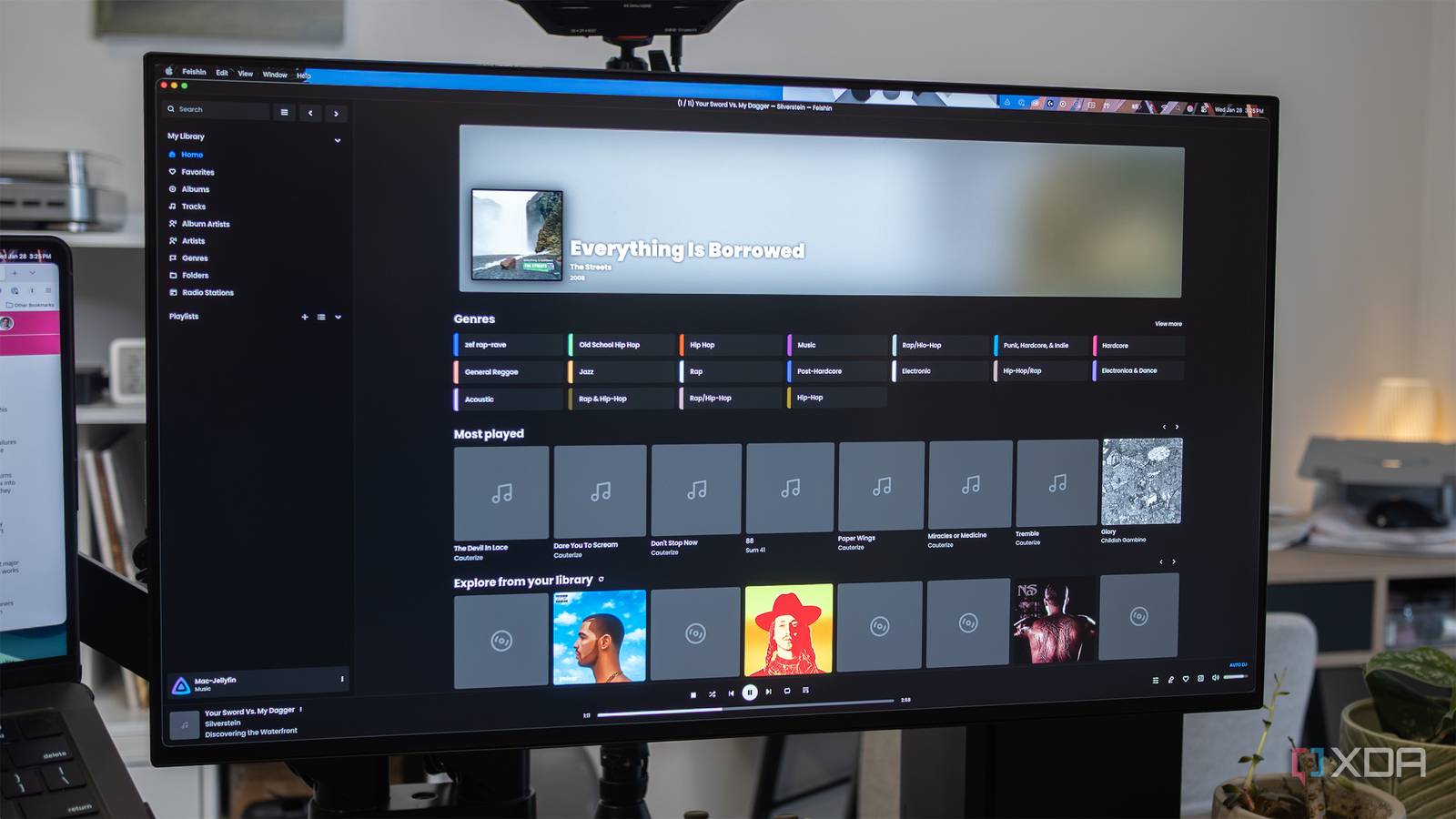
Feishin’s layout looks so much like Spotify that it’s a little off-putting at first, though thankfully, it’s far less busy and, of course, it doesn’t feature several annoying ads on every page. On the left side, you’ll see the My Library section with organization that includes Favorites, Tracks, Artists, Genres, and more, and underneath an option for custom playlists. The right side shows album art and a list of your most played songs. At the bottom is a very familiar-looking mini-player.
On a basic level, the experience Feishin offers is like a stripped-back Spotify that only features tracks you’ve added to it.
There’s even an Auto DJ option that automatically continues playback of similar tracks after your current song, album, or playlist is done. It’s not quite as good as Spotify and the streaming platform’s AI-powered DJ, but it gets the job done and is better at recommending songs than I expected. When you search for a band, you’ll also see your top five most listened to songs by that artist, alongside their bio, genre information, and more. Features like this aren’t important, but they’re a welcome touch that make Feishin feel more Spotify-like.
On a basic level, Feishin offers is like a stripped-back Spotify-like experience that only features tracks you’ve added to it, which is exactly what I’m looking for from a self-hosting music platform.

Out of HDMI Ports on your TV? Here’s a simple way to add more
HDMI switches have come a long way in the past few years and are often very reliable now.
How to setup your own version of Spotify with Feishin
If you already have a Jellyfin server running, it’s a breeze

Thankfully, I’m already hosting a Jellyfin server on my M4 Mac mini, but if you aren’t, you’ll need to get one up and running first. After that, download Feishin from GitHub for whatever platform you plan to use it on (you can install the app on multiple desktop devices). In my case, this is macOS, which means I needed to run a Terminal command to get around a macOS quarantine error (this only took a few seconds). There’s also a Windows 11 and Linux version of Feishin available on GitHub.
Next, I added my Jellyfin username, password, and my server’s IP address to Feishin’s login screen. After that, I was in — my entire high school and university downloaded music library suddenly appeared on my MacBook Pro’s screen.

It’s worth noting that, like a lot of open source apps, Feishin and Jellyfin are far from a perfect combination. One of the key problems I’ve encountered is that, due to the iPod-era meta naming scheme of my music library, Jellyfin hasn’t been able to pull art for every artist, which is undeniably a bit of a bummer (I’m still looking for a solution). Sometimes artist and album art can be very wrong, too. For example, instead of obscure Canadian pop-punk bank Cauterize, Jellyfin pulled in what seems to be a random Swedish metal band.
It sucks that I can’t cast music to my Sonos One speakers with the app, and that on-earbud controls like stopping, starting, and skipping tracks don’t work. There’s also no mobile app either, unfortunately. Again, there might be solutions to these issues, but I haven’t figured them out yet. Overall though, I’m impressed with Feishin, particularly with regard to how easy it is to set up.
Am I ready to ditch Spotify entirely yet? Not quite. I still need to acquire a lot more music and solve at least a few of the key issues I mentioned above, but now that I’ve played around with Feishin for a few days, I know for certain that I’m one step closer to canceling my Spotify subscription.

- Individual pricing
-
Free
- iOS compatible
-
Yes
- Android compatible
-
Yes
- Desktop compatible
-
Yes
