

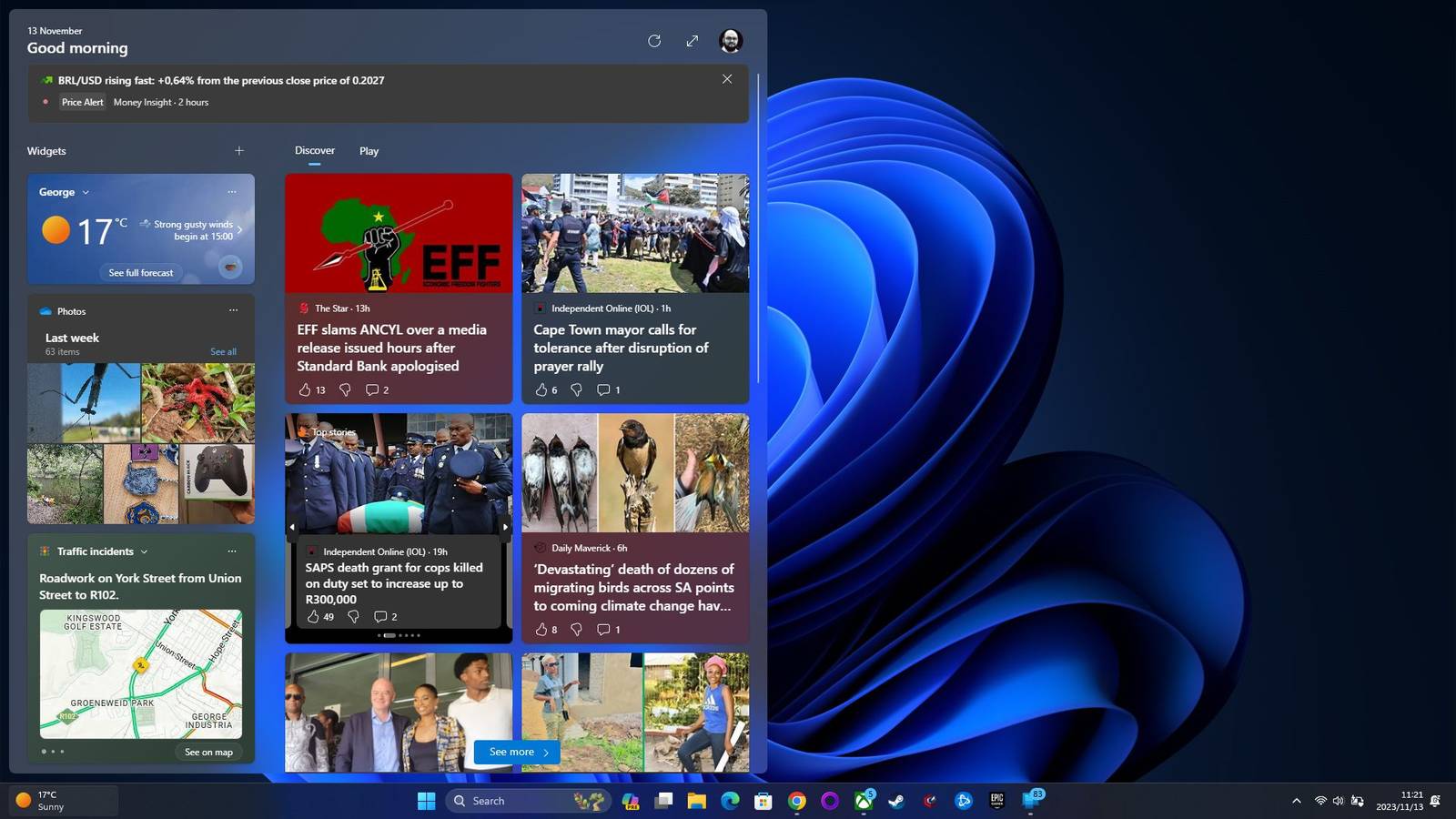
Microsoft has a really long and complicated history with things like desktop widgets and dynamic tiles. This feature, which the company keeps canceling, renaming, and then aggressively bringing back, has become a persistent, annoying part of the Windows environment. We really have to ask why this feature keeps coming back, even though users consistently ignore or outright reject it.
Is the desktop meant to be a tool for deep, focused creation where distractions are the worst thing, or is it just a starting point where distractions, ads, and malware are welcome? Every version of the widget has failed because the PC workflow is totally different from the mobile workflow, but for some reason, the concept always comes back.

Most people using a desktop treat their screen space like a serious workspace, not just a passive dashboard. This failure to understand how people actually work is the core, fatal flaw that has killed every widget attempt Microsoft has ever made, from the huge resource hog that was Active Desktop back in the 90s, right up to how Windows 11 handles them now, where you have to actively try to make it useful.
On your phone, you constantly go back to the home screen, so dynamic widgets are really useful for those quick checks. However, a PC desktop is just a starting point. The second you start tackling real work, those widgets instantly get buried under a mountain of browser tabs, spreadsheets, and maximized apps.
It doesn’t make much sense that Microsoft keeps pushing dynamic information onto the desktop environment when most users only see their wallpaper when they first log in or right before they shut the machine down. This insistence feels less like Microsoft listening to the user base and much more like its desperate, repeated attempt to jam the mobile and PC worlds together.
The company seems set on changing the operating system into an engagement platform, just like a smartphone, completely ignoring that a computer is designed primarily as a tool for deep focus and creation, not for passively consuming content.
This identity crisis was most painful during the terrible failure of Windows 8’s live tiles. Microsoft swapped out the practical, list-based start menu for a full-screen, tile-based interface that was built entirely for tablets. It was a jarring shift that put quick, glanceable data ahead of operability, forcing everyone using a mouse and keyboard into a user interface that was obviously built for swiping.
Even though live tiles flopped and Windows 7 gadgets were dumped because of security issues, Windows 11 keeps bringing the concept back. To me, it sounds like the triumph of hope over experience.

Joe Fedewa / How-To Geek
The whole journey of Windows widgets has been rough. It went straight from being a huge security risk to just aggressively trying to make money off of us. Back in the Windows Vista and Windows 7 days, gadgets were genuinely helpful; they gave you neat desktop tools for monitoring your system.
The current iteration has completely changed. They used to be a helpful desktop overlay, but now they feel more like a billboard advertising MSN and Bing and need to be uninstalled. Instead of giving you a clean interface for getting stuff done, the Windows 11 Widgets board dedicates most of the space (about two-thirds) to a section called My Feed, which is just full of algorithmic junk.
You get bombarded all the time with content nobody asked for, like random celebrity gossip, clips from news networks, and generally useless stock data. It turns what should be a useful system feature into a delivery service for ads and clickbait. This design choice completely destroys the tool’s usefulness, because all the actually helpful tools get shoved to the side just to make room for promoted content that serves Microsoft’s business goals instead of your actual workflow.
This setup looks like bloatware designed purely to lock you into the ecosystem. The widgets depend on background processes, specifically those Microsoft Edge WebView2 instances, and these processes can eat up hundreds of megabytes of memory even when you aren’t using the feature at all. Moreover, if you click a weather or news link in the widget panel, it frequently forces the content to open in Microsoft Edge.
It completely bypasses your preferred default browser just to push traffic to Bing and boost its ad revenue. Also, AI-driven feeds make these ethical issues even messier since they could introduce risks like hallucinations and clickbait.

Microsoft’s persistent attempt to add web-based applets right onto the Windows desktop has historically acted as a massive security liability. It essentially turns the operating system’s shell into a wide-open entry point for people trying to hack in. The worst case happened back in 2012 when Microsoft had to issue an emergency alert that basically killed the old Windows Desktop Gadgets platform on Vista and Windows 7.
These applets looked harmless; they gave you quick data like stock info, clocks, or weather forecasts. However, they were built using completely unprotected HTML, CSS, and JavaScript. This structure meant that dropping one onto your desktop was exactly the same as running a full web page with administrator-level rights, giving attackers a ridiculously simple remote code execution path.
The issue was so bad because it just bypassed all the standard security measures. Attackers could basically take over your entire system just by getting you to install a widget that had been compromised. You’d think Microsoft would realize that handing a tiny desktop app full user rights is like leaving the front door unlocked in a bad neighborhood, yet it let this flawed architecture stick around for years before it finally ditched it in 2012.
It’s time for Windows to throw in the towel on this one and keep widgets and apps for mobile devices, instead of ruining it every time widgets are introduced.
Microsoft keeps bringing back desktop widgets in this weird cycle, and it clearly shows the friction between what the company wants and what users actually find helpful. The real problem is that a major tech giant still doesn’t get the core purpose of its main operating system.
You need to see this constant reintroduction of widgets as an attempt to turn your focused PC environment into a dashboard that’s basically optimized for advertisements disguised as passive content. You should see any future attempt to innovate the desktop with new dynamic information as suspicious, but the best way to get around the new widget system is to ignore it entirely-again.
