

I love purging my Android phone of the various unused apps and services that accumulate over time.
I install a lot more apps than the average person, so I sweep my phone of unused apps at least once a month.
Then there are the files, duplicate photos, and data caches that take up storage and slow down my phone.
However, in my latest round of purging, I decided to go further than my usual cleanup steps and tackle my most hated app, AICore.
I’ve written before about how Google is cheating you with your Pixel’s storage, and it’s all thanks to the AICore app.
I’ve avoided uninstalling it before out of concern that it’ll impact my phone’s performance, but I finally took the plunge and discovered that it was a decision I should have made a long time ago.

The little-known Android app that freed up 10GB on my smartphone
How I reclaimed storage without deleting photos
A quick refresh on what AICore does
Crucial for AI, but irrelevant elsewhere
AICore is only found on devices that host AI models, the most common of which is Gemini Nano.
Gemini Nano lets Summarize in Recorder, Magic Compose, Pixel Studio, Call Notes, Pixel Screenshots, and other AI features work.
AICore keeps the AI model updated and allows it to communicate with other apps.
The problem with AICore is that it takes up a significant amount of storage space and has been linked to increased memory and battery usage.
While it is necessary to power some AI apps, it isn’t an essential service like other system apps.
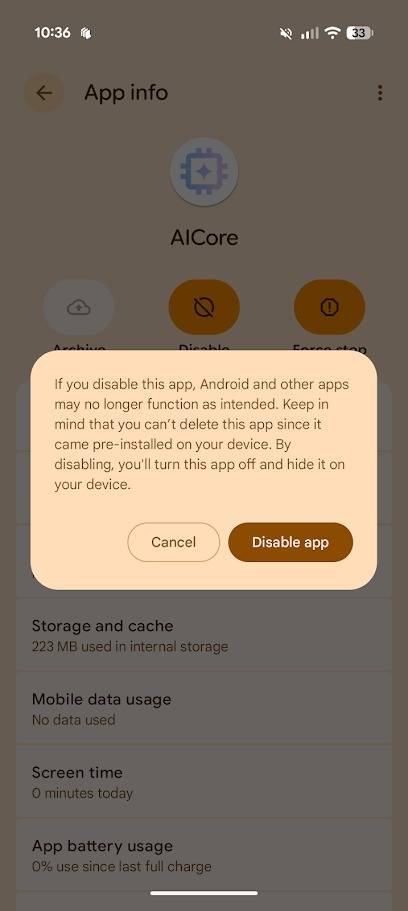
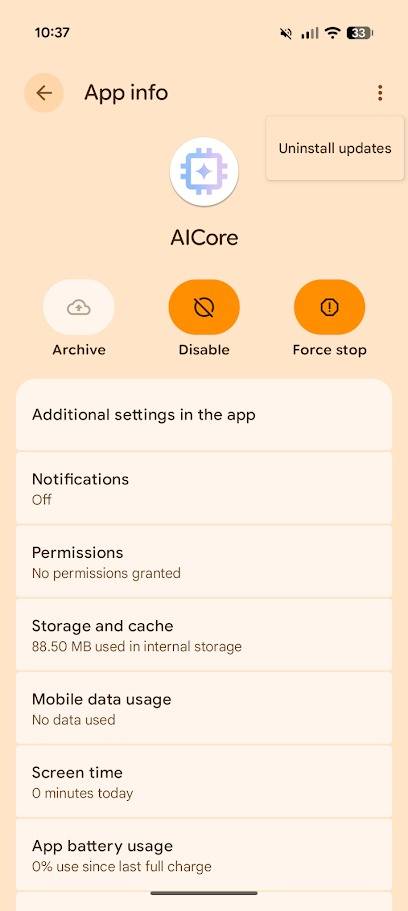
But as a system app, you can’t completely uninstall it. Instead, you can disable the app and uninstall all updates to reduce its storage use to an insignificant level.
Here’s how:
- Open the Settings app.
- Tap Apps.
- Tap See all apps.
- Tap AICore.
- Tap Disable.
- Tap the three-button menu in the upper-right corner of your screen.
-
Tap Uninstall updates from the drop-down menu.


After disabling AICore and uninstalling its updates, I took notes on how it impacted my phone over a week.
Spoiler: I won’t be reinstalling it.
The impact of uninstalling AICore is better than I could have expected
No more annoying AI notifications
To address the elephant in the room, I want to point out that uninstalling AI Core will not necessarily improve your phone’s performance and battery life.
I noticed no significant change in either over the course of a week, so if you’re trying to make your phone’s battery last longer, I recommend using other proven methods instead.
However, this doesn’t mean it wasn’t a pointless procedure.
Uninstalling AICore cleared 7GB of data from my phone’s storage. That’s a roughly 5.5% increase in storage space; a significant amount on a phone with just 128GB of storage.
Other people who have also uninstalled AICore have reported increases in battery life, but this isn’t a guaranteed bonus.
What you can be certain of is that you can reclaim a significant amount of storage space.

Uninstalling AICore also reduced the number of AI pop-ups on my phone.
Magic Cue didn’t annoy me with its irrelevant suggestions, Pixel Screenshots stopped alerting me, and Magic Compose stopped suggesting rewrites.
My Pixel 10 Pro wasn’t overly intrusive when it came to suggesting I use its AI features in the first place, but since I’ve removed AICore, I can almost believe I’m in a blessed alternate reality where LLMs were never invented.
If, like me, you avoid using AI features, you should uninstall AICore, as you will not lose anything you care about.
However, if you enjoy using tools like Pixel Screenshots, things are a little more complicated.
Uninstalling AICore doesn’t block you from accessing AI services, but you do have to make sacrifices
You’ll lose access to some apps entirely
After uninstalling AICore, I checked in with all the AI tools on my phone to see how they were faring.
Some, like Gemini, weren’t impacted at all, while others were crippled. Perhaps the most notable loss was Pixel Screenshots, which stopped working entirely after I uninstalled AICore.
Other apps, like Pixel Journal and Recorder, lost their AI features but still functioned otherwise.
Pixel Journal no longer analyzed my prompts and suggested future posts, and Recorder lost the ability to summarize my recordings.
However, the core Gemini app worked normally as it’s powered by Gemini 3 in the cloud, rather than Gemini Nano on the device.


What surprised me about this experiment is that I thought I would still be able to use AI tools as long as I was connected to the internet.
However, it appears that Google built these apps to exclusively use Gemini Nano. You cannot use Gemini in the cloud to power Pixel Screenshots or Recorder’s summaries.
AICore is crucial to powering AI apps, but you don’t need it to enjoy using your phone
I don’t recommend uninstalling system apps while clearing out your phone, as many are crucial to its core systems.
It’s why Google hides them from view; you don’t want to accidentally uninstall them.
AICore is an exception, as it’s only necessary for powering on-device AI models. As I learned, you can comfortably use your phone without it, and you’ll reap the benefits.
So, unless you regularly use your Android phone’s AI models, uninstall AICore to free up its storage and reduce bothersome AI notifications.
