


How much does Google Ads cost? It’s a question I hear all the time, especially from newcomers to paid search. After all, you’ll want to know whether you can afford it. The good news is, you can! The slightly less good news is, there’s no easy, one-size-fits-all answer. The clearest (and most infuriating) one I can provide is: it depends.
Luckily, there are some benchmarks I can use to guide your answer, but there are also plenty of factors that can mean your Google Ads cost will be lower (or higher) than these numbers.
But don’t worry. In this guide, I’m going to cover all of the variables involved in Google Ads pricing so you can understand how much Google Ads will cost for your business and how to set a realistic budget.
Contents
Typical Google Ads costs
Let’s start by reviewing some average Google Ads costs overall:
- The average cost per click in Google Ads in 2026 was $5.42.
- The average cost per lead in Google Ads in 2026 was $66.69.
- The average starting budget to cover Google Ads costs for SMBs is $1,000-$2,500 per month.
- Most new Google Ads campaigns can cost around $20-50 per day.
- Our study of over 15,000 Google Ads accounts found that 24% of accounts spend under $1K/month, 39% spend between $1K–$10K/month, and 37% spend over $10K/month.
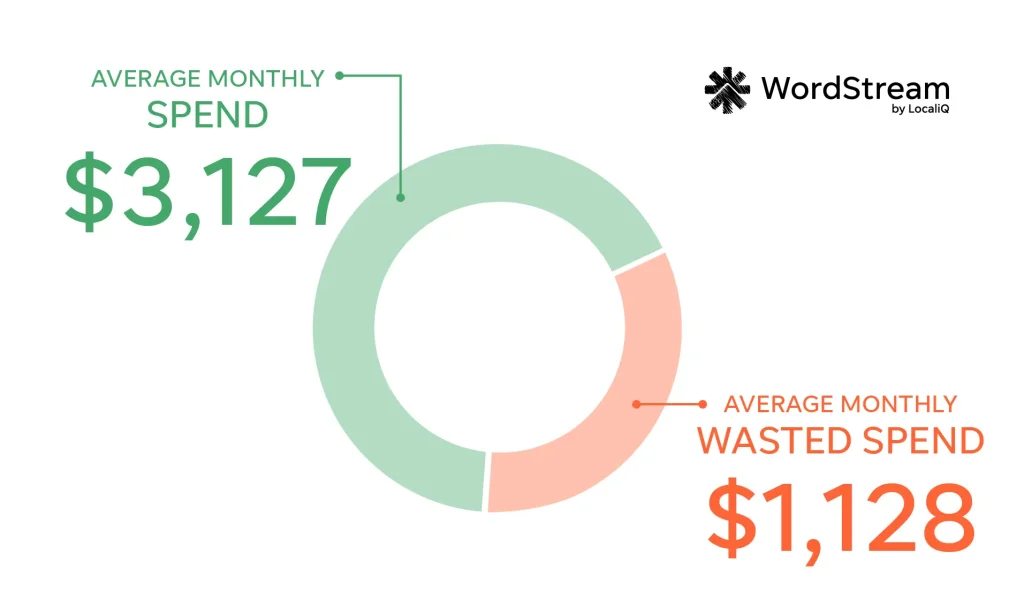
- The average Google Ads account spends $3,127.38 per month. Drill down deeper to see what the average Google Ads account spends specifically in your industry with this chart.
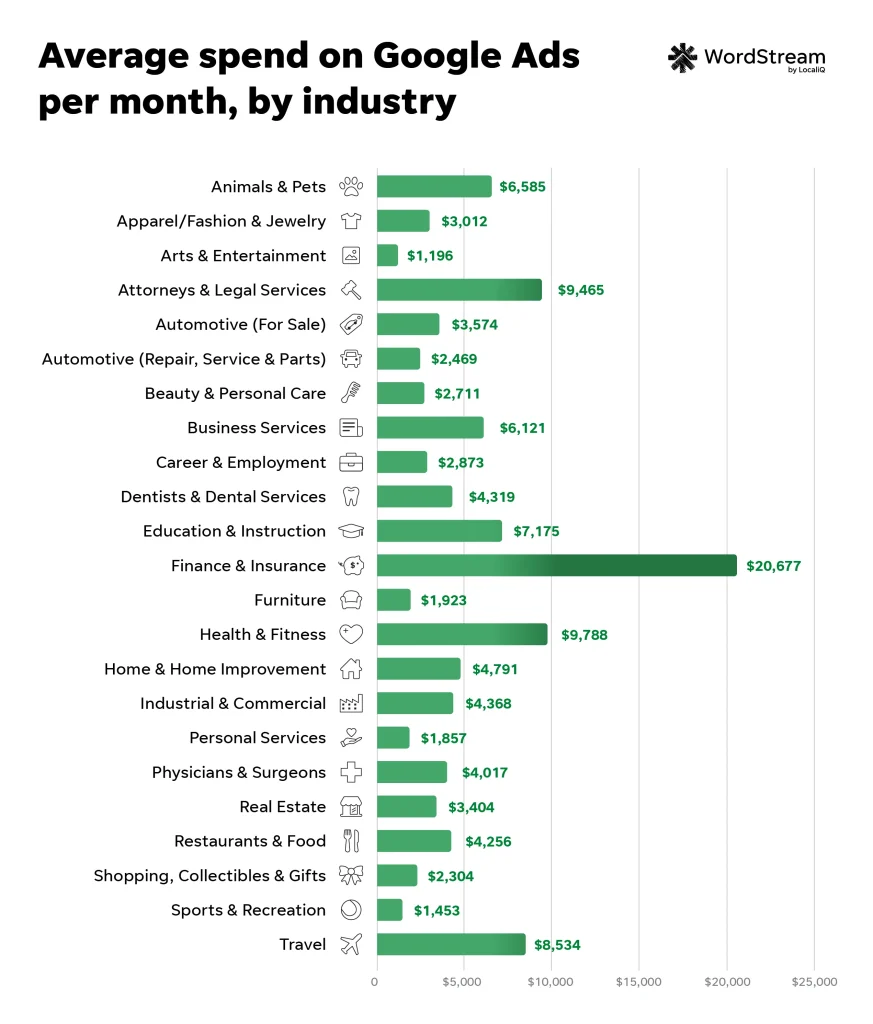
Google Ads pricing: How much does a typical click cost in Google Ads?
Now that you know how the Google Ads process works and how to set your budget, it makes sense for your next question to be, “How much does a typical click cost in Google Ads?” Unsurprisingly, the answer is complicated. But I’m going to break it down.
The key influence on pricing in Google Ads: keywords
In some ways, you can think of PPC advertising roughly along the same lines as traditional print advertising; you’d expect to spend more on a glossy full-page ad in a national magazine than you would for a classified ad in a local newspaper. In digital marketing, however, the pricing isn’t influenced by the format of the ad, but rather the intent of and competition for the keywords you’re bidding on. So you can expect to spend more on a high-intent keyword like “roof repair near me” than something lower intent like “how much does it cost to repair a roof.”
In super-competitive markets like legal and accounting, clicks can get much pricier. Keyword costs can also fluctuate, and I typically see changes in Google Ads costs across industries year over year. Let’s take a look at some CPC benchmarks year over year in Google Ads to give you an idea of how much click costs can fluctuate for your business.
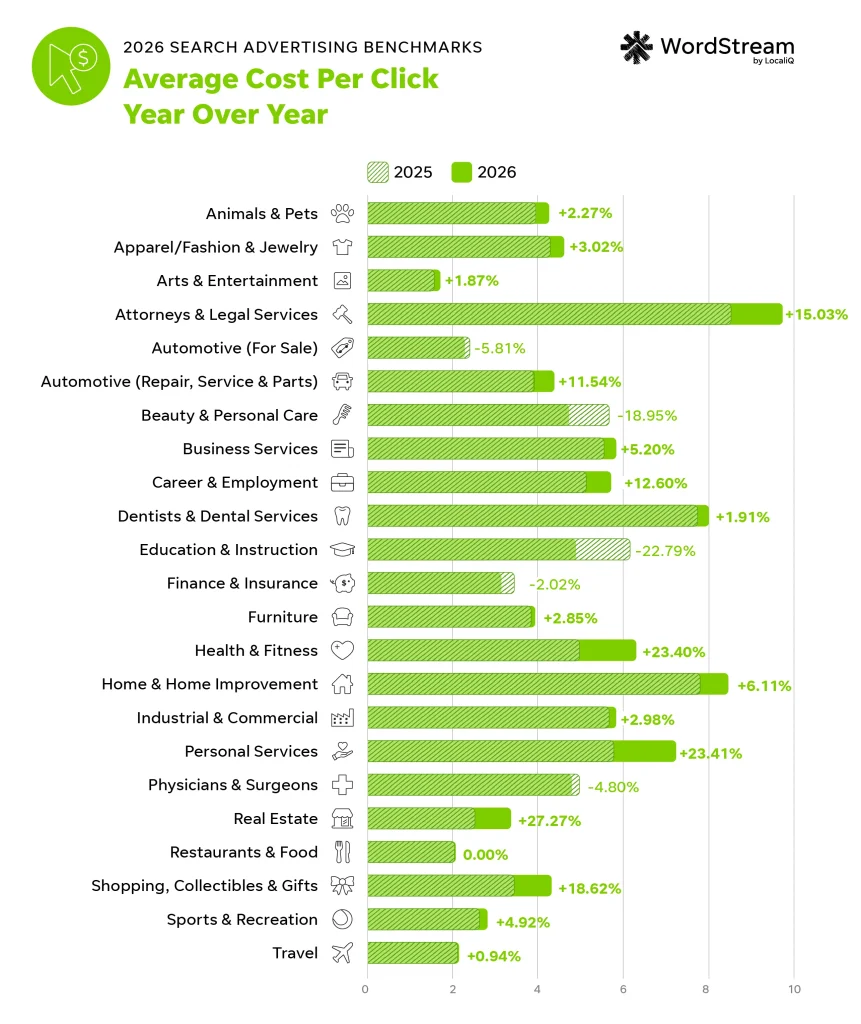
What is the average CPC in Google Ads?
If you take the average CPCs across all different types of businesses and keywords in the US, the overall average CPC in Google Ads is $5.42. That’s on the Search Network. On the Google Display network, clicks tend to be cheaper, averaging under $1.
What is the cost per click for long-tail keywords?
People sometimes like to point at the grand, show-stopping keyword categories above as a definitive example of how expensive Google Ads can be. The reality, however, is that these keyword categories only make up a small portion of total search volumes. Long-tail keywords actually account for the majority of web searches and are also often significantly cheaper than shorter keyword-rich queries and can have as much—if not more—commercial intent.
For example, if someone has an ant problem in their kitchen, “exterminator [their town],” is one search they might perform. “Exterminator” as a broad keyword will likely have a high search volume and may be pricey. But they might also search for “how to get rid of ants in the kitchen.” This is a long-tail keyword with potentially lower competition and associated costs. The intent may not be as strong, since they could be looking to DIY, but it’s still pretty strong, so they’ll likely be open to—or even click on—an ad for an exterminator.
This is the kind of opportunity that long-tail keyword targeting presents to advertisers. In addition to making up the vast majority of searches,
What are the most expensive keywords in Google Ads and Bing Ads?
As Google owns the largest paid search platform, I’ll focus on Google Ads first.
Listed below are the most expensive keyword categories in Google Ads, and the average cost-per-click of each. It’s worth noting that these are keyword categories, not actual keywords themselves—in some cases, the CPCs of keywords within each category may be higher than the averages stated:
| Business Category | Average CPC |
| Animals & Pets | $4.06 |
| Apparel / Fashion & Jewelry | $4.44 |
| Arts & Entertainment | $1.63 |
| Attorneys & Legal Services | $9.87 |
| Automotive — For Sale | $2.27 |
| Automotive — Repair, Service & Parts | $4.35 |
| Beauty & Personal Care | $4.62 |
| Business Services | $5.87 |
| Career & Employment | $5.81 |
| Dentists & Dental Services | $8.00 |
| Education & Instruction | $4.81 |
| Finance & Insurance | $3.39 |
| Furniture | $3.97 |
| Health & Fitness | $6.17 |
| Home & Home Improvement | $8.33 |
| Industrial & Commercial | $5.87 |
| Personal Services | $7.17 |
| Physicians & Surgeons | $4.76 |
| Real Estate | $3.22 |
| Restaurants & Food | $2.05 |
| Shopping, Collectibles & Gifts | $4.14 |
| Sports & Recreation | $2.77 |
| Travel | $2.14 |
Factors that impact Google Ads costs
As mentioned above (and precisely why I’ve written this guide), there is no simple or one-size-fits-all answer to the question of how much Google Ads will cost your business. Google Ads pricing varies depending on your industry, customer lifecycle, current trends, and how well you manage your account.
Industry
The biggest influence on Google Ads pricing is your industry. For example, the business services vertical (legal, accounting, real estate, etc.) is one of the more competitive verticals in Google Ads, which generally translates to higher costs per click (CPC) and costs per lead (CPL). This is due to the nature of the professional services industry: one new client could yield upwards of $1,000-10,000 depending on your business, so a CPC of $10 is a small price to pay for that client.
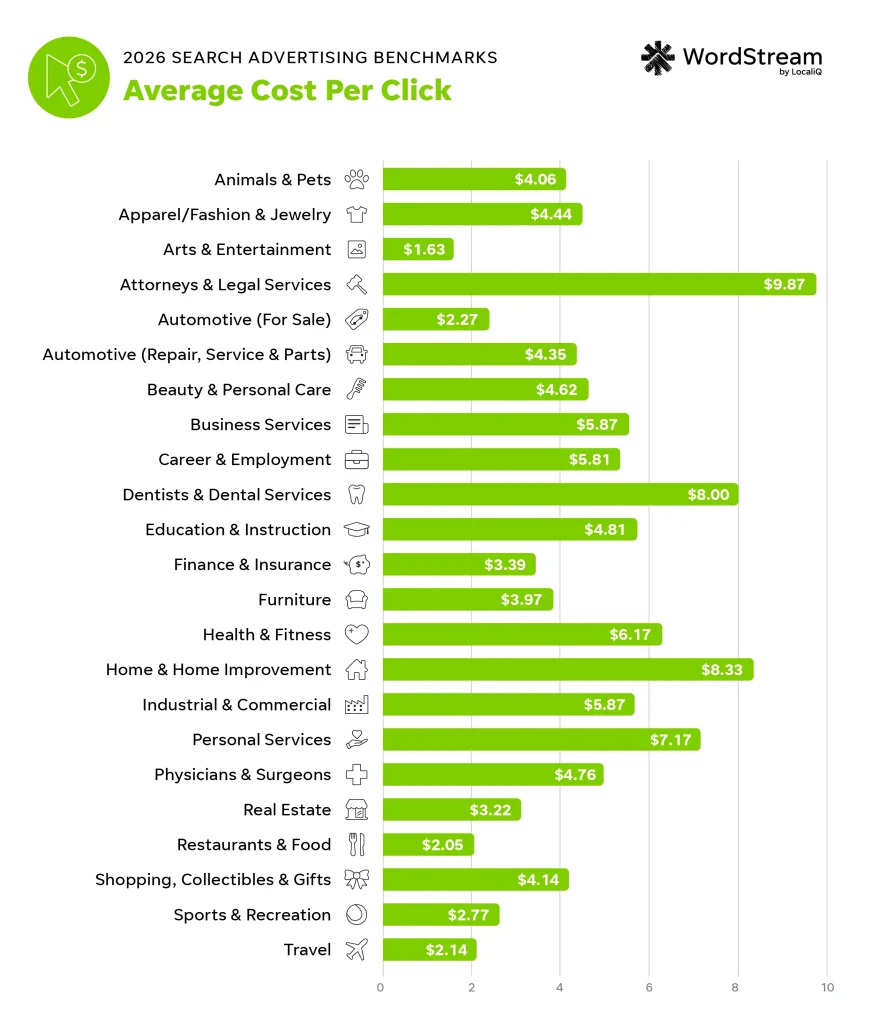
On the other hand, businesses in the arts and entertainment vertical have lower CPCs, but they need to reach a lot more customers to hit that $1,000 – $10,000 number.
⬇️ Download our latest Google Ads benchmarks here!
Customer lifecycle
You also have to take into account the lifecycle of your customer. For bigger ticket offerings, it takes longer for potential clients to move through the decision-making process, and your business needs to stay top-of-mind throughout that journey. This may involve multiple visits to your website, a content download or two, participation in a webinar, and more—before taking that final step.
Current trends
Neither consumer trends nor online advertising platforms are ever in a state of rest. It’s important to keep up with what’s going on in your industry and within your niche—sentimentally and empirically. Take COVID, for example. At the height of the pandemic, the average cost per click for the apparel industry was about $1.40. It dropped down to $0.70 in April when average conversion rates went up, and then ended up at $0.89 in May.
How well you manage your account
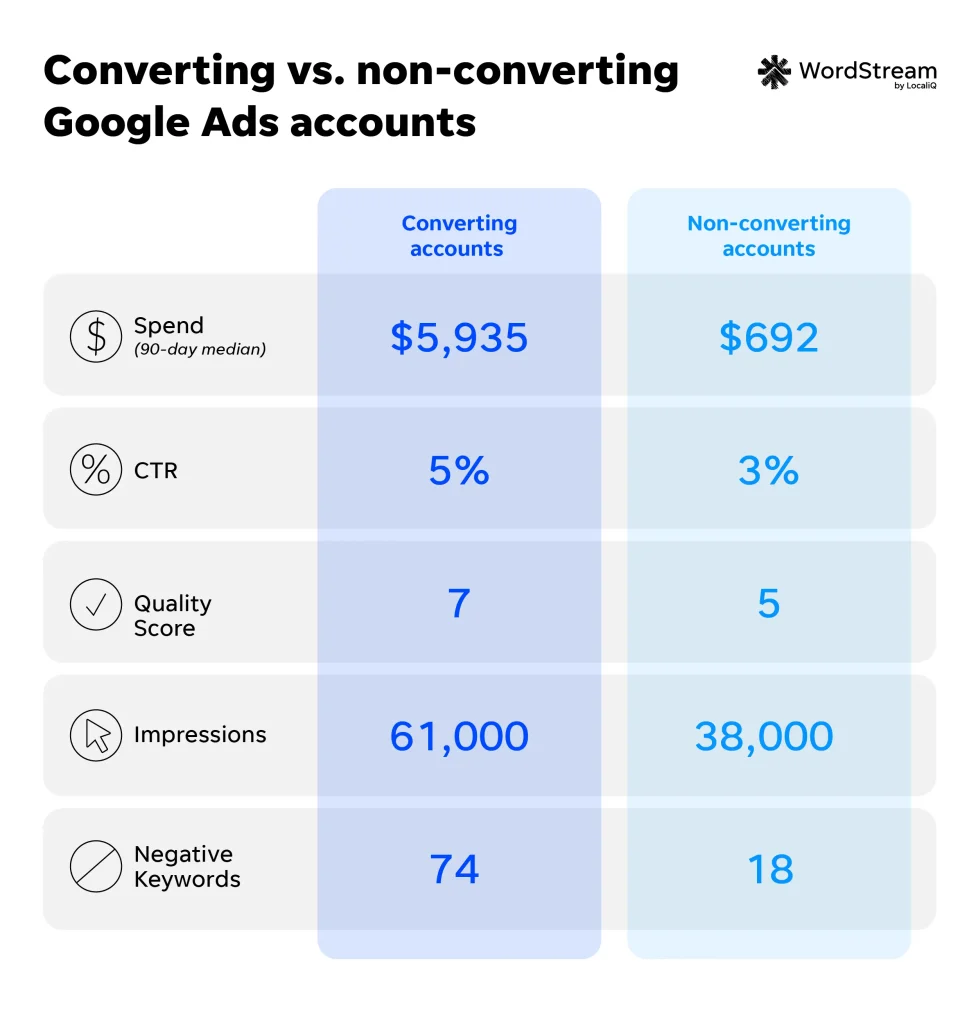
75% of businesses are satisfied with their search advertising results, and 46% say that this channel is the best source for getting new leads and customers. So sourcing a budget that’s competitive within your industry’s Google Ads costs can be well worth it. Of course, this all depends on how well you manage your account. You can’t just activate your ads and kick back. If you want to keep your Google Ads costs low and your returns high, you need to:
- Keep a proper Google Ads account structure.
- Report on your performance and make data-driven optimizations.
- Maintain your keyword lists.
- Perform regular account audits and more.
These best practices aren’t just going to improve your Google Ads costs, but they’ll also increase your conversion rates and PPC ROI. Google Ads accounts with higher conversion rates also have higher account activity rates.
💰 Are you spending too much with too little return in Google Ads? Find out instantly with our Google Ads Grader.
How does Google Ads determine cost per click?
The great part about Google Ads is that while it works as an auction, the winners aren’t chosen based on bid alone, and you don’t necessarily pay your maximum bid. How is this possible? Let’s take a quick run-through of how Google Ads determines the winners and what they pay per click.
Step #1: Quality Score
When someone searches on Google, Google looks to see if any advertisers are bidding on keywords relevant to that query. If yes, an auction is triggered, and Google enters all relevant ads into the auction. The first step in choosing a winner is to assign each ad a Quality Score. This is a number from 1-10 determined by the ad and landing page’s relevance to the keyword, expected click-through rate (which involves your historic performance), and landing page experience.
Step #2: Ad Rank
Google will then calculate each contending ad’s Ad Rank, which determines if and where your ad will be placed in the paid results section. Ad Rank is your Quality Score multiplied by your maximum bid (the most you’re willing to pay per click on your ad).
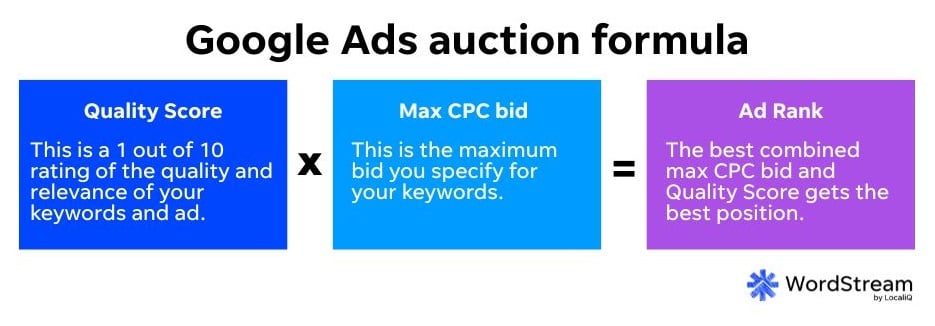
The ads with the highest Ad Rank scores are the ones that get shown.
Step #3: Cost per click
If your ad gets shown, you only pay if someone clicks on it. But as mentioned above, you don’t necessarily pay your maximum bid. The Google Ads cost-per-click formula is: the Ad Rank of the ad below yours divided by your Quality Score, plus one cent.
With this formula, an advertiser can pay less per click than another advertiser in the SERP and still be in a higher position due to a better Quality Score. This is why advertisers with a small budget can compete with big spenders on Google.
Additional variables in your Google Ads costs
There are several other variables that impact your Ad Rank—and ultimately, your ad spend—but maximum bid and Quality Score are the important ones to know. Here are some (but certainly not all) of the additional factors that influence your costs.
📙 Free guide >> 6 Easy Ways to Save Money on Google Ads NOW!
How does budgeting work with Google Ads costs?
Let’s move on to the next component of Google Ads cost: budgeting. All too often, advertisers see their Google Ads budget for the month get burned up in a matter of days, leading them to believe Google Ads is prohibitively expensive. This isn’t necessarily the case; more often than not, it’s the result of a misunderstanding of how Google Ads budgeting works. So let’s set the record straight. Here are the terms to know:
- Budget: How much you’re able to spend on Google Ads
- Bid: The most you’re willing to pay for a click on your ad.
- Spend: The amount Google takes out of your budget when an ad participates in an auction.
- Cost: The actual amount you pay for a click on your ad.
Daily budgets
When you set up a campaign in Google Ads, you will be asked to provide a daily budget. There is a shared budget feature, but if you’re just starting out, it’s best to give each campaign its own separate budget. But the daily budget you set does not mean Google will spend that exact amount each day. You’re giving Google a rough idea of what you’d like your daily spend to average out to at the end of the month—meaning it could exceed or fall short of that amount on any given day, which leads us to spending limits.

Spending limits
Technically, Google could spend up to 100% more of, or double, your budget—if it means more clicks or conversions. This means that if you set a daily average budget of $50, your daily spending limit is $100. You will never pay more in a day than your daily spending limit, and you will never pay more than a month than your monthly spending limit (your average daily budget x 30.4; although if you’re not paying for Google Ads with the invoice method, you can set a monthly spend limit at the account level).

How to determine your average daily budget
To calculate your average daily budget, simply take your budget for the month for that campaign and divide it by 30.4. What should your monthly budget be? This depends on:
- Your overall Google Ads budget.
- The average cost per click of the keywords you’re bidding on (which you can get with Google Keyword Planner or any other keyword research tool).
- The importance of that campaign relative to the others in your account.
For example, you may want to dedicate more budget to Campaign A, advertising your best-selling product, than to Campaign B, which promotes content to prospective customers at the top of the funnel.
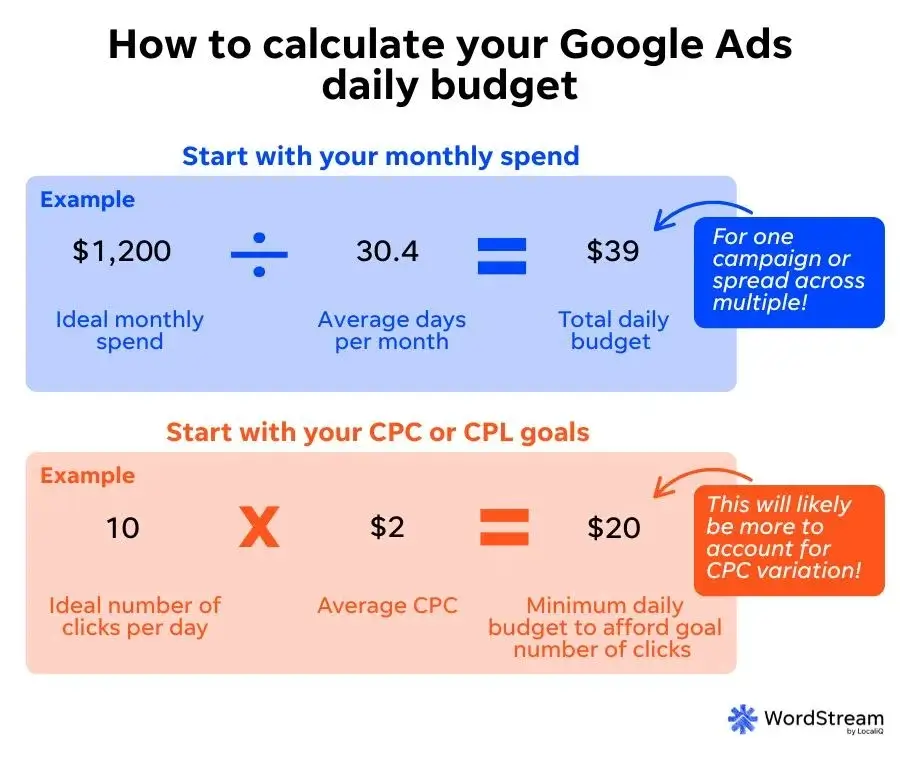
You can also plug different daily average budget numbers into the budget report mentioned above to see how it would impact your monthly spend.
The Google Ads budget report gives you visibility into how much of your budget it spent on any given day.
You can also play around with different daily budget adjustments to see how it will impact your monthly spend.
Bidding
As I’ve mentioned a few times already in this guide, how much you’ll pay for Google Ads also depends on your bid. This is the maximum amount you’re willing to pay for a click on your ad. Simple enough, right? Well, as is the theme with this post, no. A few things to know:
- Even though Quality Score helps you to pay less for higher positions, that doesn’t mean you can set your bids super low. You need to make sure your bids are high enough to compete.
- If you bid manually, you’ll set one maximum CPC per ad group, but you can set different bids for each keyword in that ad group.
- If you choose automated bidding, you can still set maximum bid limits for strategies like maximize clicks.
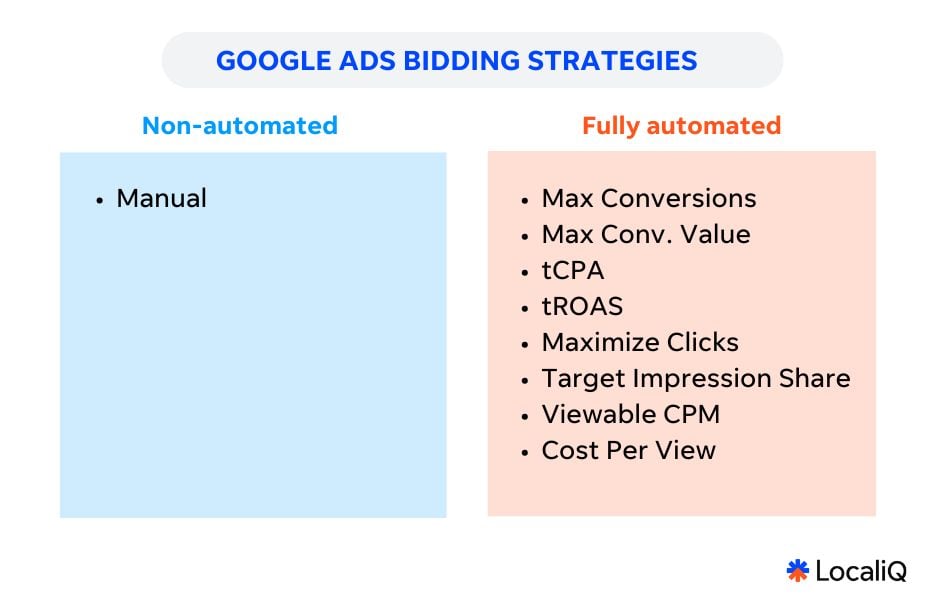
You can learn more about bidding in our guide to automated bidding strategies in Google.
Other Google Ads cost considerations
Just as there are factors that influence your Quality Score, which influences your Ad Rank, which influences your cost per click, there are factors that influence how your budget gets spent—which also play into how you can save money in Google Ads.
Ad scheduling
Also known as ad scheduling, dayparting is the practice of specifying when you want your ads to appear to prospective customers. Although your ads will still have to go through the ad auction process, you can tell Google when you want your ads to be displayed.

This is especially useful for local businesses that want to attract customers to a physical location through their ads. If you run a bakery that closes at 7 p.m., for example, you may not want your ads to be shown outside your normal business hours. Alternatively, you can specify that your ads run continually throughout the day, but allocate a greater portion of your daily budget for hours during which you want increased visibility.
Geotargeting
Just as you can allocate more of your Google Ads budget to certain times of day, you can also spend more of your budget on certain geographical areas. This technique is known as geo-targeting, or location targeting.
Geotargeting allows you to ensure your ads appear only for Google searchers in specific areas, which can be as large as a state or province, or as small as a three-block radius from your store.
Google Ads geotargeting can be an excellent way to capitalize on growing mobile traffic trends and on-the-go shopping habits of today’s consumers, and it might factor into how you allocate your daily ad budget. For example, you may want your ads to appear alongside relevant searches in a particular state, but you could also allocate more budget to searches conducted in a specific city or even neighborhood.
Device targeting
Long gone are the days when prospects searched exclusively from desktop browsers. Today, consumers are searching online across multiple devices (often at the same time), which means you need to pay attention to where your most valuable leads are coming from. This is where device targeting comes into play.
Let’s say that you want to appear on results across both desktop and mobile searches, but that mobile traffic is more valuable to you. If you’re using manual bidding, you could specify that a portion of your budget be used for desktop, but a greater portion be allocated to mobile devices. You may even want to devote more money to traffic coming from specific types of mobile devices, depending on what you’re advertising or your ad copy.
Setting a daily budget and understanding how it will be depleted are the most important aspects of budgeting for PPC, but it pays to be aware of how advanced targeting options can affect your Google Ads costs.
How much does the average business spend on leads from Google Ads?
Usually, once someone has asked about the average cost-per-click of a PPC ad, their next question will be how much “typical” businesses spend on Google Ads as part of their larger online marketing costs. While I covered that data above, I can tell you a little bit more about how much a “typical” business spends on paid search. First, we need to look at overall cost data by industry.
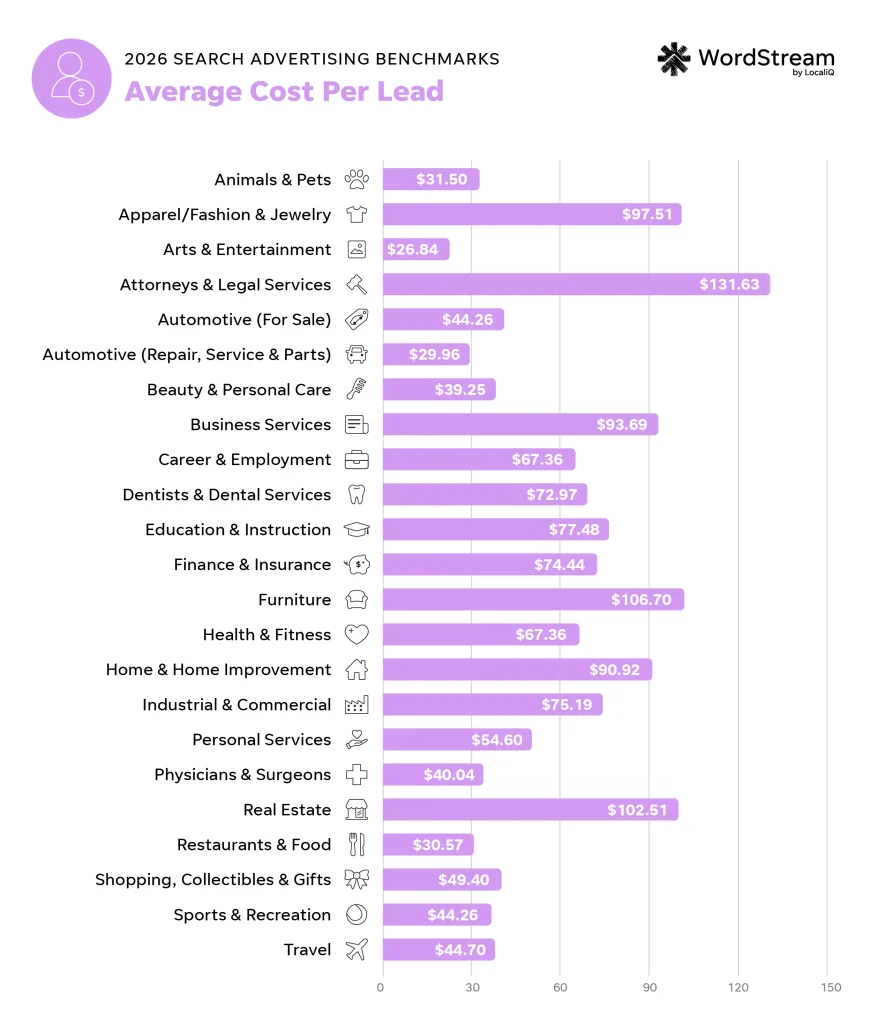
If you look at the average cost per lead data below, you’ll see that the top five most competitive terms are likely found in these industries:
- Attorneys & Legal Services
- Furniture
- Real Estate
- Apparel/Fashion & Jewelry
- Business Services
In our latest search advertising benchmarks report, we found these industries to have the highest average costs per click:
- Attorneys and legal services ($9.87)
- Home and home improvement ($8.33)
- Dentists and dental services ($8.00)
- Personal services ($7.17)
- Health and fitness ($6.17)
There’s also some overlap in the industries with the highest average cost per lead:
- Attorneys and legal services ($131.63)
- Furniture ($106.70)
- Real Estate ($102.51)
- Apparel, fashion, and jewelry ($97.51)
- Business Services ($93.69)
As you can see, companies in the business services and legal industries spend the most per month on Google Ads. Big brands in the industries above can spend $40 to $50 million a year, but this isn’t exactly relevant information to would-be advertisers who are still on the fence about Google Ads. And good news for you, you don’t need to spend millions on Google Ads to make it work for your business.
👀 Are you making any mistakes in Google Ads? Find out instantly with the Free Google Ads Performance Grader.
How much do small businesses spend on Google Ads?
As you might expect, the amount that small businesses spend on PPC varies widely. It can help to consider the typical SMB’s overall marketing budget.
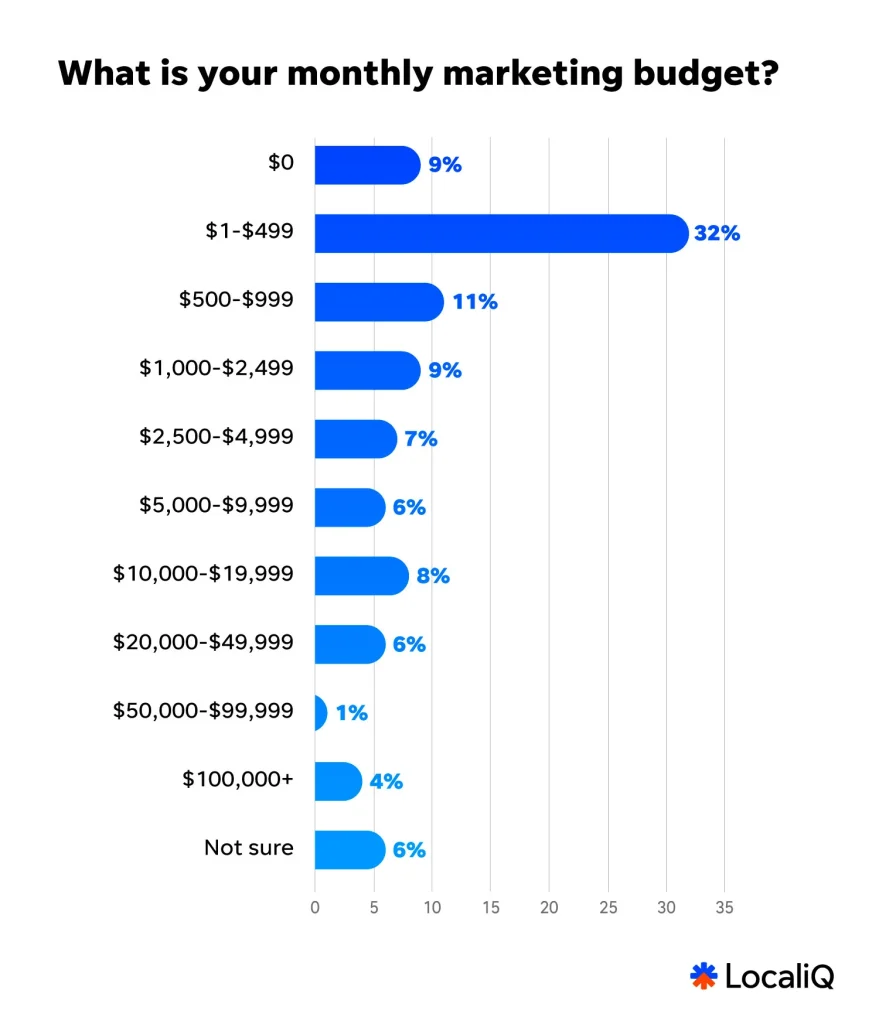
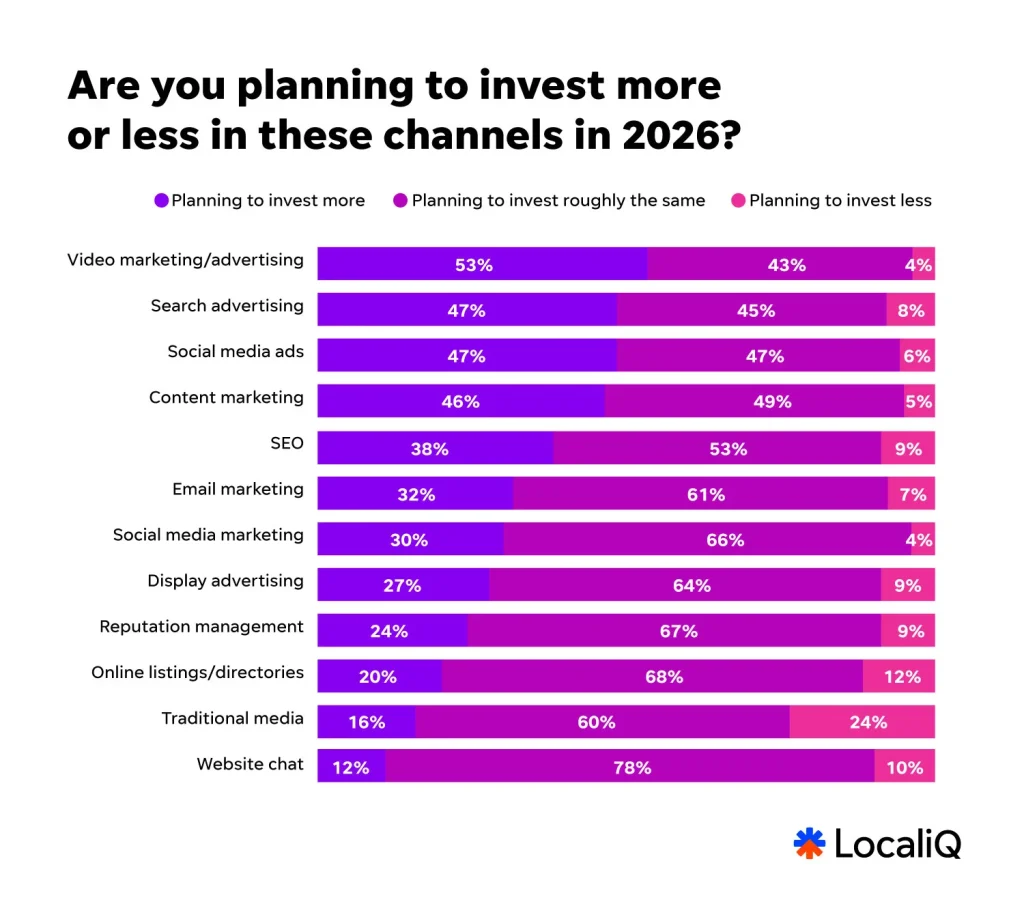
Next, nearly half of small businesses are planning to invest more in search ads in the coming year. So, it’s safe to assume that a considerable amount of the average SMB overall marketing budget is being put towards Google Ads.
What are other Google Ads costs to be aware of?
Your ad budget will always be the largest, most direct cost associated with your Google Ads campaigns. However, while your ad budget is important, it’s not necessarily the be-all and end-all of your paid search efforts. There are other potential costs you may have to consider, depending on your business, marketing goals, and individual situation, when evaluating whether your investment in Google ads is worth it for your business.
Marketing partner costs
Some small businesses opt to have an agency or a marketing partner handle their PPC work to save them the time and stress. This isn’t cheap, and even the smallest of boutique agencies will take a percentage of your ad spend, regardless of ROI. Google Ads management costs vary from one agency to another. Also, some agencies may guarantee a threshold ROI, whereas others won’t.
Even still, having a seasoned expert run your account can save you from costly errors and also help you yield the highest returns on your ad spend. To ensure you choose an agency, partner, or platform that is worth the investment, make sure you check off all your boxes when vetting them.
Obviously, it’s in the agency’s best interests to deliver results (to reduce churn and retain clients), but even if your ads don’t result in any conversions, you’ll still have to pony up and pay your agency unless it’s explicitly stated otherwise in your contract.
Wasted spend
Not all your Google Ads campaign budgets will be spent at 100% efficiency. The average Google Ads account sees $1,127.54 in wasted spend per month. That’s just the nature of how the Google Ads algorithm works, as not every single ad viewer will click and convert off your ads (I wish otherwise!). So, you’ll want your Google Ads budget to have wiggle room to account for potential wasted spend. Marketing partners help minimize wasted spend, or as I mentioned earlier, to cut down on wasted spend, you can tighten your account structure, routinely add negative keywords, or check out this search ads optimization checklist.
How much do Google Ads cost? Key takeaways
I’ve covered a lot in this guide, so let’s go over the key takeaways that you can use to orient yourself in terms of what you could spend in Google Ads:
- Before even getting into calculations, the cost of Google Ads for a business will depend on its industry, customer lifecycle, and current consumer trends.
- Google Ads is based on an auction system that rewards high-quality ads with lower costs and better ad placement.
- You can exercise tight control over how your Google Ads budget is spent using tactics like ad scheduling, geotargeting, and device targeting.
- The average cost per click in Google Ads is $5.42.
- The average cost per click on the Display Network is typically under $1.
Is the Google Ads price right for you?
As I’ve stated throughout, there are numerous factors that can have a significant impact on the cost of running a PPC campaign, but remember: almost any type of business can make Google Ads work for them and their budget!
Want more help managing your Google Ads costs? Check out these resources:
