


Microsoft plans to raise the quality bar of Windows 11 drivers, as drivers “sit at the heart of every Windows experience” and connect the OS to the “silicon, components, and peripherals.”
Before Microsoft shipped Windows 11, it frequently hosted WinHEC (Windows Hardware Engineering Conference), where Microsoft’s developers and OEM partners met to work on quality.
The last WinHEC was held in 2018, and Microsoft eventually stopped hosting those events, as it started to care less about Windows and more about its cloud business.
While the lack of an event doesn’t necessarily mean poor drivers, users have observed a decrease in quality, as monthly driver updates would frequently cause BSODs or artifacts in games.
“Of active driver families across the Windows install base. When drivers are high quality, customers experience reliable, secure, performant devices. When drivers fail, customers experience it as a device problem, regardless of where the root cause sits,” Microsoft argues in a blog post.
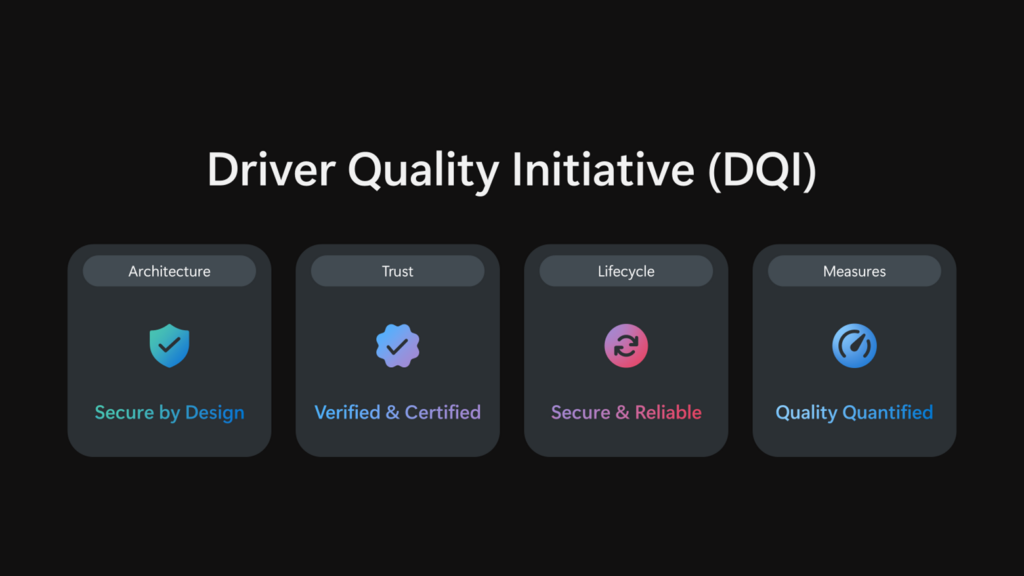
To address driver quality issues, Microsoft is introducing the Driver Quality Initiative, which builds on four pillars:
- Microsoft is pushing more third-party drivers to move out of kernel mode and into safer user-mode drivers or Microsoft’s own class drivers.
- Microsoft will verify partners more carefully, run more automated checks, and update Windows Hardware Compatibility Program requirements.
- Microsoft wants better Windows Update catalog hygiene, including removing outdated or low-quality drivers and using better data to investigate issues.
- Microsoft will also look at stability, features, performance, battery impact, and heat, so partners can improve the real Windows experience.
Microsoft says DQI is a partnership, and it will be working closely with its partners, including AMD and Intel.
AMD says driver quality is a shared commitment
At WinHEC 2026, AMD made an interesting comment that “higher-quality drivers” are not the responsibility of just one company.
“It’s a shared commitment,” says David Harmon, Director, Software Engineering, AMD. “Through our close collaboration with Microsoft, AMD is focused on building a culture of joint accountability to ensure security, stability, and predictable performance for our customers at scale.”
At WinHEC, Microsoft discussed how to raise the bar on Windows 11 quality and the future vision for Windows, and one of the major goals is to deliver “exceptional device experiences,” delivering best-in-class quality across media and display, camera, audio, connectivity, and peripherals.
It’s unclear when these driver changes will begin rolling out, but they will gradually be reflected in the coming months as Microsoft continues to work on major improvements to Windows.
Microsoft is reviving Windows 11
After months of criticism and failed attempts to push Copilot, Microsoft realized it was alienating Windows fans and is now trying to win them back
During the FY26 Q3 earnings call, Microsoft’s CEO Satya Nadella promised that the company is “doing the foundational work required to win back fans and strengthen engagement across Windows, Xbox, Bing, and Edge.”
“You see this in the work underway across our consumer products,” Nadella said. “With Windows, we recently announced performance improvements for lower memory devices, streamlined the Windows Update experience, and brought back focus to core features and fundamentals that matter most to our customers.”
As part of Windows 11’s quality improvements in 2026, Microsoft is also restoring the movable taskbar, adding a toggle to make the taskbar smaller, and I’m also told that it will improve taskbar resize controls with a Windows 10-like experience.
Other rumored features include a native Start menu, faster launch, reduced power consumption, a new performance mode, and more.

Automated pentesting tools deliver real value, but they were built to answer one question: can an attacker move through the network? They were not built to test whether your controls block threats, your detection rules fire, or your cloud configs hold.
This guide covers the 6 surfaces you actually need to validate.
