


What Is Network Automation?
Network Automation is the use of software and programmable tools to configure, manage, monitor, and operate a network with minimal manual intervention. This practice enables IT Operations teams to automate the deployment and configuration of network devices, such as a router or a switch, or network services such as routing protocols.
Thanks to network automation, IT teams spend less time on repetitive maintenance and can instead focus on strategic innovation. Network automation tools also enable network operators to improve consistency across environments, simplifying the expansion and scaling of network infrastructures.
Why Network Engineers Are Embracing Automation
Network engineers implement network automation to achieve faster deployment cycles and reduce human errors in manual configuration. In large-scale environments with numerous remote deployments, network automation software configures new devices through zero-touch provisioning and other configuration management routines. Automating routine tasks enables network teams mitigate operational overhead and manage increasing WAN complexity more effectively.
Common Use Cases for Network Automation
Automated Network Configuration Management
Automated network configuration management has become more accessible thanks to increased vendor support for Network Function Virtualization (NFV). Most network devices now support Zero-Touch Provisioning (ZTP), which automatically configures new hardware without time-consuming manual intervention.
Using standardized templates, network automation tools simplify configuration management when deploying new services and streamlining backup and restore operations. These tools also automate more advanced operations, including validating network changes and performing compliance audits, ensuring that network tasks execute in the correct sequence.
Automated Monitoring and Troubleshooting
The integration of network automation with network monitoring solutions can significantly reduce the mean time to resolution (MTTR) for network and application outages. For instance, by running continuous synthetic tests, automation tools verify the correct functioning of network services and applications. Thanks to real-time monitoring, automated alerts can trigger configuration changes to resolve failures.
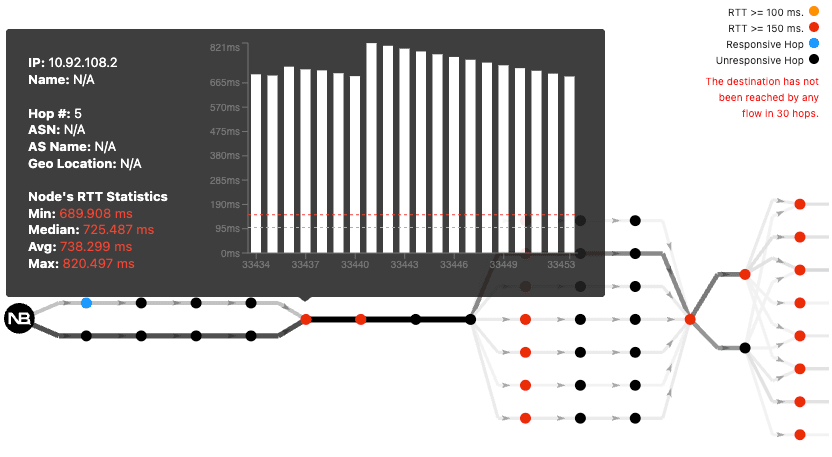
The previous screenshot displays a path analysis test that includes the status of each hop. Starting from the fifth hop, the response time increases to nearly 700 ms on average. A network automation solution could automate certain troubleshooting steps on managed nodes that lead to the proactive resolution of the high latency issue. In many cases, this level of automation may require integration with machine learning or AI-driven platforms.
Load Balancing and Traffic Optimization
Load balancing and traffic optimization are two similar examples of network automation. These capabilities are commonly found in SD-WAN optimization platforms, but can also expand to other environments, such as data center networks. In either case, by automating changes to routing protocols, QoS configurations, and load balancing policies, it’s possible to steer traffic to a specific destination through an optimal path. This failover automation offers quick response to issues, ensuring application performance and reliability.
Data Center Automation
Modern data centers are too dynamic for manual network management. Manual changes are one of the main causes of data center failures. As a result, network engineers increasingly rely on network automation to deploy and manage switch configuration at scale. Services like new application deployments or cloud resource provisioning can be completed in minutes rather than days.
Data center automation uses automation tools to streamline tasks like network configuration, provisioning, firmware updates, and configuration management. This is sometimes referred to as Infrastructure-as-Code (IaC), highlighting its programmatic interface. Terraform is a popular open-source Infrastructure-as-Code platform used to automate cloud and network deployments.
Automation is especially useful for zero-touch provisioning and standardized deployments in hybrid and edge networks. However, automated network functions still require visibility. Changes pushed automatically can introduce performance issues that are difficult to detect without monitoring tools.
Popular Network Automation Tools and Platforms
Network orchestration is recognized as the next evolution beyond task-level automation, helping organizations move from automating individual tasks to coordinating complete services. A network orchestration tool is necessary to automate complex processes that interact with multiple systems and devices. Orchestration ensures that all automated steps execute in the correct sequence, with proper error handling, validation, and rollback capabilities if something fails.
There are several key concepts to understand when working with network automation platforms.
Data Formats
A data format specifies the way that information is formatted and presented, so it can be transferred from one device to another. Examples of data formats include JSON, YAML, or XML. Tools like Ansible use human-readable YAML files to automate multi-vendor device configurations without the requirement of complex scripts.
Data Models
A data model is a method to describe an object. In the network automation world, data models describe devices, device resources, and services. A widely adopted data model for network automation is YANG (Yet-Another-Next-Generation), which was developed by the Internet Engineering Task Force (IETF).
Communication Protocols
There are two communication protocols developed by the IEFT to interact with network devices: NETCONF and RESTCONF. NETCONF was first formalized by RFC4741 in 2006, while RESTCONF was standardized in 2017 in RFC8040. There are many differences between the two protocols, one of which is that NETCONF only supports XML data format, while RESTCONF supports both XML and JSON. Also, RESTCONF is HTTP-based and makes it more appropriate for web-based network managers and applications. Standardized API Communication uses protocols like RESTCONF and NETCONF to interact with devices via structured data rather than traditional command-line interfaces.
Programming Languages
A programming language is defined as a set of instructions and rules that enable humans to interact and give instructions to computers by writing an application. One of the most versatile programming languages for network automation is Python, which is interpreted and object oriented. Python remains the primary language for custom automation, often supported by specialized frameworks for flexibility or multi-vendor API interaction. Python uses human-readable syntax and can rely on a vast amount of external Python libraries developed by a large community.
The Relationship Between Network Automation and Monitoring
When implementing automation it’s possible to cause network outages induced by software bugs, configuration errors, and other unexpected situations. As a result, it’s recommended to pair network automation with monitoring solutions that proactively detect degraded network conditions.
Network operations teams leverage tools that continuously test the entire network infrastructure. This ensures the detection of possible network issues that could be caused by automated deployments. NetBeez, for instance, provides the much-needed end-user visibility layer that traditional tools don’t offer. Thanks to its distributed monitoring agents, NetBeez can verify in real-time SLA performance from multiple points. By matching network automation with synthetic monitoring, network service availability improves.
Challenges and Risks of Network Automation
While network automation offers significant operational benefits, it also introduces new challenges that IT teams must manage carefully. Poorly tested automation scripts, incorrect configuration templates, or misconfigured policies can quickly impact large portions of the infrastructure.
One of the biggest risks is the speed at which problems can spread. A manual error may affect a single device, but an automated mistake can propagate across an entire data center within minutes. This makes configuration management, testing, and change validation critical components of any automation strategy. When implementing network automation, it’s important to start small and incrementally increase coverage.
Another challenge is visibility. Automation tools can deploy changes rapidly, but without proper monitoring tools, the network operations staff may struggle to identify how those changes affect application performance, connectivity, or user experience. Monitoring tools that verify network connectivity and application response times help teams detect issues before they impact end users.
Organizations must also address skill gaps and operational complexity. Successful adoption of network automation software often requires expertise in scripting, APIs, and infrastructure-as-code practices in addition to traditional networking knowledge.
To reduce risk, many IT teams start with smaller automation projects, validate changes continuously, and combine automation platforms with end-to-end network monitoring.
Best Practices for Successful Network Automation
Successful network automation requires more than simply deploying automation tools. Organizations must adopt structured processes that reduce risk, improve consistency, and maintain visibility across the infrastructure. By following a few best practices, network engineers can implement automation gradually while improving operational reliability.
Start with Repetitive Tasks
First of all, prioritize repetitive and time-consuming operational tasks. Activities such as device provisioning, configuration backups, VLAN deployments are ideal candidates for automation. Automating routine work allows IT teams to reduce manual effort and minimize human error.
Standardize Network Configuration
Second, standardize templates and reduce deployment complexity across distributed environments. Using predefined policies and naming conventions also improves scalability and helps ensure compliance with security and operational requirements.
Test Changes Before Production
Third, test automation workflows should be tested in lab or staging environments whenever possible. Pre-deployment validation helps identify configuration errors, compatibility issues, or unintended consequences before they impact users or critical applications.
Use Version Control and Documentation
Version control systems provide visibility into configuration changes and automation scripts over time. Maintaining proper documentation and tracking updates through platforms like Git improves collaboration, simplifies troubleshooting, and enables faster rollback procedures when issues occur. Documentation also helps network operations teams maintain consistency as automation initiatives grow.
Integrate Monitoring Tools
Automation without visibility can create operational blind spots. Integrating monitoring tools with network automation platforms allows teams to continuously verify network performance, application availability, and user experience after automated changes are deployed. Real-time monitoring and synthetic testing help detect issues quickly, ensuring that automation improves reliability rather than introducing new problems.
Network automation helps IT teams reduce manual work, improve configuration consistency, and scale modern network infrastructures more efficiently. As enterprise environments continue to grow in complexity, automation is becoming essential for faster and more reliable network operations.
However, automation also increases the need for visibility. NetBeez helps network operations teams validate automated changes by continuously monitoring network performance, connectivity, and end-user experience in real time. By combining network automation with proactive monitoring, organizations can reduce risk, detect issues faster, and build more resilient networks.
