
Close Menu
    Facebook X (Twitter) Instagram
    Wifi PortalWifi Portal
    • Blogging
    • SEO & Digital Marketing
    • WiFi / Internet & Networking
    • Cybersecurity
    • Tech Tools & Mobile / Apps
    • Privacy & Online Earning
    Facebook X (Twitter) Instagram
    Wifi PortalWifi Portal
    Home»Tech Tools & Mobile / Apps»3 hidden Android sensors you’ll actually want to try
    Tech Tools & Mobile / Apps

    3 hidden Android sensors you’ll actually want to try

    adminBy adminFebruary 14, 2026No Comments5 Mins Read
    Facebook Twitter LinkedIn Telegram Pinterest Tumblr Reddit WhatsApp Email
    3 hidden Android sensors you'll actually want to try
    Share
    Facebook Twitter LinkedIn Pinterest Email

    Modern smartphones are way more powerful than most of us realize, and they include a whole range of sensors that tend to go unnoticed.

    While a lot of these sensors are used to pull off basic functions like flipping your screen when you turn the phone around, there’s many more that you might never have even noticed.

    And here’s the thing — even the sensors that you know about can pull off double duty in ways that you probably didn’t think of.

    Top-down view of a smartphone displaying a bubble level app, surrounded by traditional hand tools like pliers, a measuring tape, and screwdrivers.

    How I use my phones hidden sensors to fix things around my house

    From leveling shelves to reducing eye strain, these clever tricks will make you see your device in a whole new light

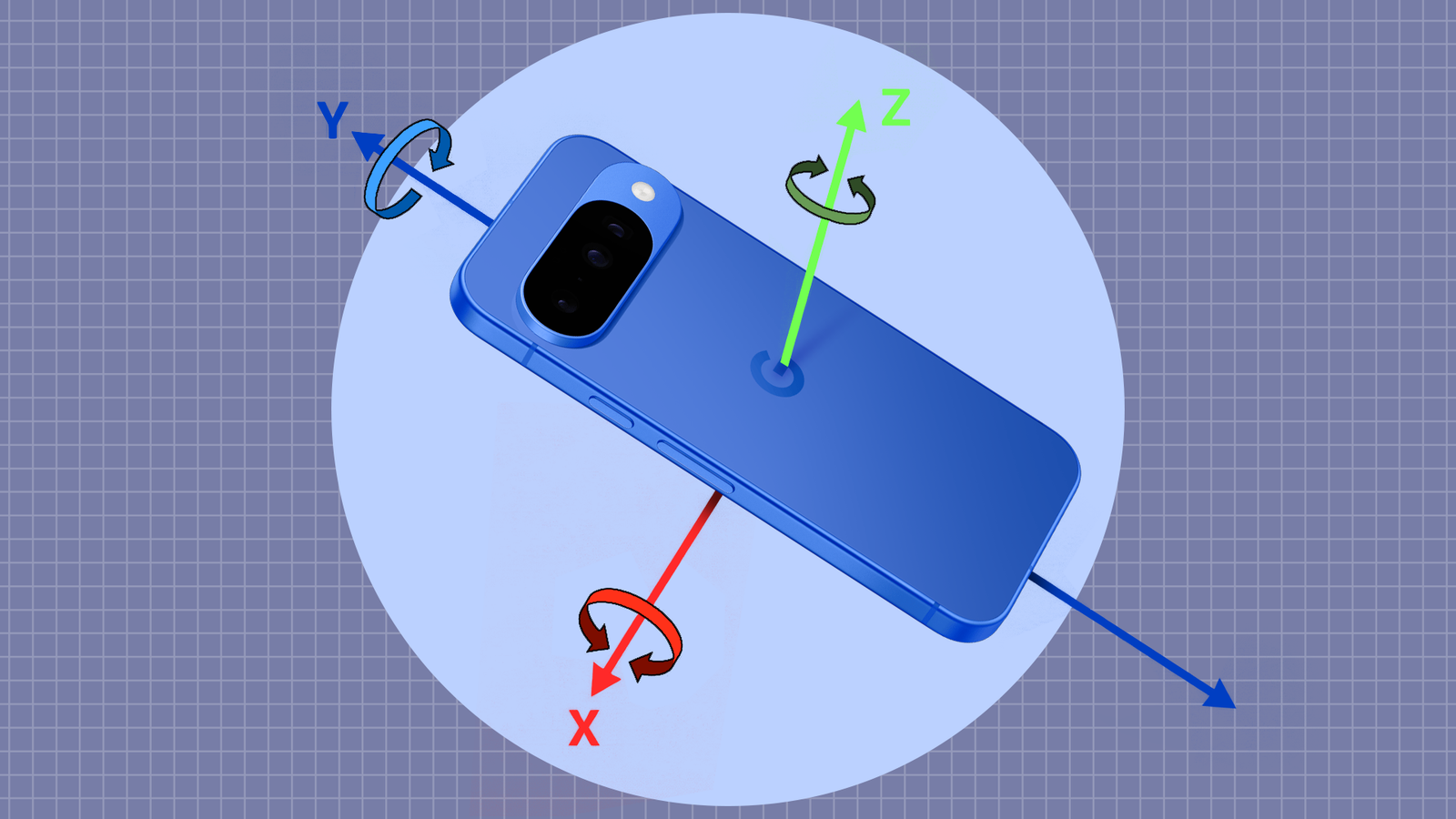
    Accelerometer & Gyroscope

    Replace the spirit level with what’s in your pocket already

    The sensors that I use the most are the ones that track motion and orientation on my phone.

    For the most part, accelerometers and gyroscopes built into your phone work in the background to figure out how the phone is positioned in space.

    You may have come across these sensors in action when using the screen rotation feature and step counting.

    However, these sensors can be genuinely useful in more ways than you’d expect.

    For example, if you’re hanging a poster or photograph on the wall, or need to adjust something that needs to sit straight, you can rest your phone directly on the surface.

    Using any of the many apps available on the Play Store, you can effectively turn your phone into a level tool.

    I don’t trust myself to get things right when hanging a heavy frame, but the numbers and, more specifically, the visual indications don’t lie.

    The tool replaced my spirit level for most everyday tasks. Sure, I own one, but I don’t want to go looking for it in my toolbox anytime I need one.

    My phone is always on hand and that convenience matters more than absolute precision for small jobs around the house.

    I just want things to look right, and using the accelerometer and gyroscope helps me from redoing the work later.

    Magnetometer

    Finding hidden metal and tracking interference

    Android sensor magnetometer

    The magnetometer built into your phone is used as part of the compass, and you’ve probably seen it in action in Google Maps.

    But that same sensor can be used for other purposes too. For example, if you’re drilling into a wall to mount something heavy, you can just slowly wave your phone across the surface of the wall and watch the magnetic readings.

    Sudden changes indicate metal behind the drywall, which could be the stud, a nail or a structural part of the wall.

    The magnetometer certainly isn’t going to replace a proper stud finder, and you shouldn’t use it for professional jobs or critical loads.

    Still, as a first pass, it works. It’s come in handy more than once to narrow down where I might want to punch a hole in the wall.

    Another interesting use I have for it is to detect speaker noise.

    I have a lot of electronics around my study and every so often, I can detect a low hum or buzzing noise from one of the speakers.

    That’s usually caused by interference from power adapters, chargers or just too many improperly shielded cables sitting too close to each other.

    When that happens, I open the sensor app and move my phone around the electronics. Spikes in the magnetic readings usually line up with the source of noise.

    Finding the hotspot is all I really need as I’ll use that to adjust the placement of any errant cables or power adapters placed too close to the speakers.

    This saves me a lot of time with pointless troubleshooting, and I can deal with the real cause immediately instead of swapping out cables or just blaming the speakers.

    Ambient light sensor

    Get real-time lux reading to dial-in ambient light

    Android sensor luminance sensor

    Another sensor that tends to be hidden away in plain sight is the ambient light sensor. Once again, you’ve seen it in action as it’s used to adjust the brightness levels of your screen.

    But with the right apps, you can expose the raw light values from the sensor, and it becomes far more interesting.

    You can use it to adjust desk lamps or lights to check lux levels in different positions. You can also use it to gauge the ambient light levels in a room.

    I prefer even lighting in my room and matching the intensity of light from different lamps as well as external lighting can be complicated.

    The light sensor’s values aren’t the most accurate, but more than suffice to help me dial in brightness levels to approximately the same figures.

    These sensors enable plenty of practical applications, but they won’t replace professional tools

    While we’re on the topic, it’s worth reiterating that these sensors won’t replace dedicated tools. The accuracy isn’t quite there.

    However, when the goal is to get use out of tools and sensors built into your phones, these use cases certainly cut it. And you can probably come up with additional uses for the sensors.

    All you have to do is to install one of the many apps that can read sensor data from your phone and put them to use.

    Android hidden sensors Youll
    Share. Facebook Twitter Pinterest LinkedIn Tumblr Telegram Email
    Previous ArticleResearchers Observe In-the-Wild Exploitation of BeyondTrust CVSS 9.9 Vulnerability
    Next Article IT bonuses reward network, security skills that can’t be automated
    admin
    • Website

    Related Posts

    The Ray-Ban Meta (Gen 1) smart glasses just scored a rare 25% discount at Amazon

    April 20, 2026

    The best robot vacuum in Australia: reliable, effective, effort-free automated cleaners

    April 20, 2026

    Monitor spec sheets hide the one thing that actually decides whether a display feels premium

    April 19, 2026
    Add A Comment
    Leave A Reply Cancel Reply

    Search Blog
    About
    About

    At WifiPortal.tech, we share simple, easy-to-follow guides on cybersecurity, online privacy, and digital opportunities. Our goal is to help everyday users browse safely, protect personal data, and explore smart ways to earn online. Whether you’re new to the digital world or looking to strengthen your online knowledge, our content is here to keep you informed and secure.

    Trending Blogs

    The Ray-Ban Meta (Gen 1) smart glasses just scored a rare 25% discount at Amazon

    April 20, 2026

    The best robot vacuum in Australia: reliable, effective, effort-free automated cleaners

    April 20, 2026

    Monitor spec sheets hide the one thing that actually decides whether a display feels premium

    April 19, 2026

    Apple account change alerts abused to send phishing emails

    April 19, 2026
    Categories
    • Blogging (65)
    • Cybersecurity (1,403)
    • Privacy & Online Earning (172)
    • SEO & Digital Marketing (850)
    • Tech Tools & Mobile / Apps (1,684)
    • WiFi / Internet & Networking (232)

    Subscribe to Updates

    Stay updated with the latest tips on cybersecurity, online privacy, and digital opportunities straight to your inbox.

    WifiPortal.tech is a blogging platform focused on cybersecurity, online privacy, and digital opportunities. We share easy-to-follow guides, tips, and resources to help you stay safe online and explore new ways of working in the digital world.

    Our Picks

    The Ray-Ban Meta (Gen 1) smart glasses just scored a rare 25% discount at Amazon

    April 20, 2026

    The best robot vacuum in Australia: reliable, effective, effort-free automated cleaners

    April 20, 2026

    Monitor spec sheets hide the one thing that actually decides whether a display feels premium

    April 19, 2026
    Most Popular
    • The Ray-Ban Meta (Gen 1) smart glasses just scored a rare 25% discount at Amazon
    • The best robot vacuum in Australia: reliable, effective, effort-free automated cleaners
    • Monitor spec sheets hide the one thing that actually decides whether a display feels premium
    • Apple account change alerts abused to send phishing emails
    • Apple AirPods Pro 3 review: A masterclass in sound, a lesson in lock-in
    • Samsung Galaxy S23 Ultra versus vivo X300 Ultra
    • Here’s How Netflix Plans to Add TikTok-Style Videos to Its Mobile App
    • Social media bans might steer kids into riskier corners of the internet
    © 2026 WifiPortal.tech. Designed by WifiPortal.tech.
    • Home
    • About Us
    • Contact Us
    • Privacy Policy
    • Terms and Conditions
    • Disclaimer

    Type above and press Enter to search. Press Esc to cancel.