
Close Menu
    Facebook X (Twitter) Instagram
    Wifi PortalWifi Portal
    • Blogging
    • SEO & Digital Marketing
    • WiFi / Internet & Networking
    • Cybersecurity
    • Tech Tools & Mobile / Apps
    • Privacy & Online Earning
    Facebook X (Twitter) Instagram
    Wifi PortalWifi Portal
    Home»Tech Tools & Mobile / Apps»This one change stopped Pixel’s At a Glance widget from fighting my wallpaper
    Tech Tools & Mobile / Apps

    This one change stopped Pixel’s At a Glance widget from fighting my wallpaper

    adminBy adminMarch 9, 2026No Comments3 Mins Read
    Facebook Twitter LinkedIn Telegram Pinterest Tumblr Reddit WhatsApp Email
    This one change stopped Pixel's At a Glance widget from fighting my wallpaper
    Share
    Facebook Twitter LinkedIn Pinterest Email

    Legibility has been the Achilles’ heel of the Google Pixel Launcher’s At a Glance widget for years now. Plus, the Pixel Launcher never gave users the option to get rid of the widget.

    Google solved the latter with Android 17’s first beta, and for me, Android 17’s latest Beta 2 seems to have finally put the legibility struggle to rest as well.

    The development comes soon after the widget gained dedicated Finance and Sports categories.

    Considering that more users are going to leverage the feature now because of the new categories, including soccer enthusiasts looking to track every FIFA World Cup game, it was only a matter of time before Google realized that a widget users can’t properly read is a widget they won’t use.

    The At a Glance widget’s text already uses dynamic coloring. This means that against light wallpapers, it uses a darker text color, and on darker wallpapers, it flips to a lighter shade.

    The problem mainly arises when you use “busy” or high-contrast wallpapers that have both dark and light colors around the string of At a Glance’s text.

    Screenshots highlighting At a Glance's text camouflaging with the wallpaper.

    The widget’s text would often disappear or be camouflaged within said wallpapers, forcing you to squint at the listed information.

    Google reportedly rolled out a fix for the issue with Android 16 QPR3, though the change didn’t make it out widely.

    That’s no longer the case with Android 17 Beta 2, which finally lets me toggle on a “high contrast background” for my At a Glance widget.

    Here’s how you can enable high contrast mode on Android 17 Beta 2

    When you enable high contrast mode, you’re free to use the wallpaper of your choice, regardless of how loud or contrasting it might be.

    For users with visual impairments, this is a big change that makes the At a Glance widget a lot more useful.

    Those who prefer the cleaner floating text look can leave their widget as is, while those that want a distraction-free home screen experience can get rid of the widget outright.

    1. Long tap the At a Glance widget on your Pixel’s home screen.
    2. Tap Settings.
    3. Toggle on High contrast background.
    4. Back out of the Settings menu, and you should see your At a Glance widget within a pill.

      Screenshots highlighting how to turn on at a glance's high contrast background mode.

    Follow the screenshots embedded above for visual cues.

    If you’re looking to get rid of the At a Glance widget, you can:

    1. Long tap the At a Glance widget on your Pixel’s home screen.
    2. Tap Settings.
    3. Toggle off Use At a Glance and Show on home screen.

      Screenshots highlighting how to remove the at a glance widget.

    Contrast that doesn’t completely kill the view

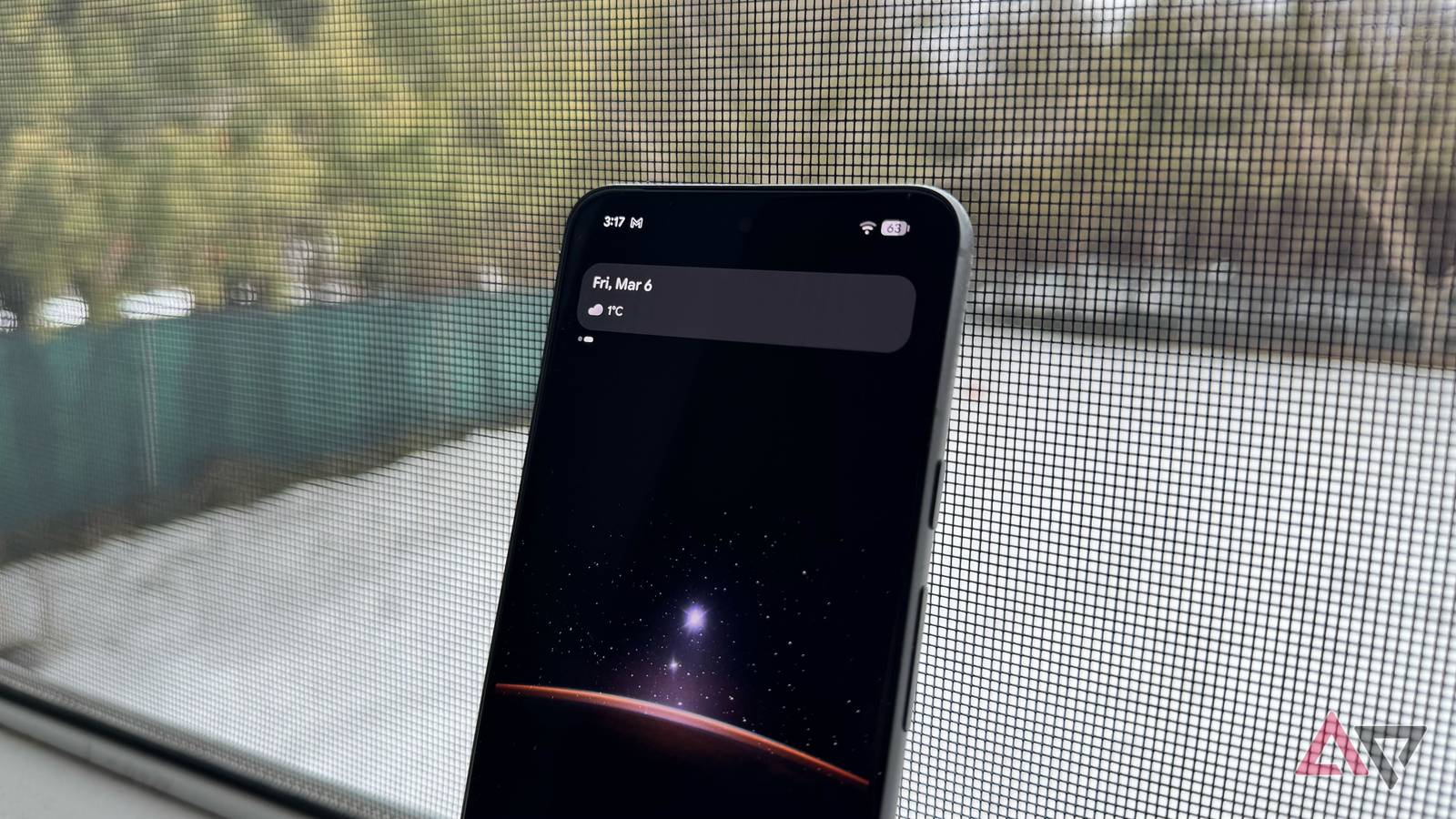
    An image highlighting the At a Glance widget with the contrasting pill.

    Google is solving the legibility issue by giving the At a Glance widget its own contrasting pill background.

    The translucent pill essentially creates contrast right behind the At a Glance widget’s text, allowing the text to pop, all while keeping the background wallpaper visible.

    Regardless of your wallpaper’s color, the pill backdrop always retains a dark hue with white text on top.

    Change Fighting Glance pixels stopped wallpaper widget
    Share. Facebook Twitter Pinterest LinkedIn Tumblr Telegram Email
    Previous ArticleGoogle’s Pixel cameras aren’t the best anymore, here’s the proof
    Next Article I turned my old Android phone into a universal remote for my entire smart home
    admin
    • Website

    Related Posts

    March’s free streaming lineup is so good it makes subscriptions feel optional

    March 12, 2026

    Adobe Photoshop: Photo Editor 1.3.0.2245 by Adobe

    March 12, 2026

    Which Samsung Galaxy S26 model should you buy?

    March 12, 2026
    Add A Comment
    Leave A Reply Cancel Reply

    Search Blog
    About
    About

    At WifiPortal.tech, we share simple, easy-to-follow guides on cybersecurity, online privacy, and digital opportunities. Our goal is to help everyday users browse safely, protect personal data, and explore smart ways to earn online. Whether you’re new to the digital world or looking to strengthen your online knowledge, our content is here to keep you informed and secure.

    Trending Blogs

    CISA orders feds to patch n8n RCE flaw exploited in attacks

    March 12, 2026

    March’s free streaming lineup is so good it makes subscriptions feel optional

    March 12, 2026

    Wiz Joins Google Cloud as Landmark Acquisition Closes

    March 12, 2026

    How to watch Netflix in China

    March 12, 2026
    Categories
    • Blogging (37)
    • Cybersecurity (730)
    • Privacy & Online Earning (112)
    • SEO & Digital Marketing (460)
    • Tech Tools & Mobile / Apps (897)
    • WiFi / Internet & Networking (121)

    Subscribe to Updates

    Stay updated with the latest tips on cybersecurity, online privacy, and digital opportunities straight to your inbox.

    WifiPortal.tech is a blogging platform focused on cybersecurity, online privacy, and digital opportunities. We share easy-to-follow guides, tips, and resources to help you stay safe online and explore new ways of working in the digital world.

    Our Picks

    CISA orders feds to patch n8n RCE flaw exploited in attacks

    March 12, 2026

    March’s free streaming lineup is so good it makes subscriptions feel optional

    March 12, 2026

    Wiz Joins Google Cloud as Landmark Acquisition Closes

    March 12, 2026
    Most Popular
    • CISA orders feds to patch n8n RCE flaw exploited in attacks
    • March’s free streaming lineup is so good it makes subscriptions feel optional
    • Wiz Joins Google Cloud as Landmark Acquisition Closes
    • How to watch Netflix in China
    • How To Prove PR Business Value With UTM Parameters & GA4
    • Adobe Photoshop: Photo Editor 1.3.0.2245 by Adobe
    • Which Samsung Galaxy S26 model should you buy?
    • Meta Disables 150K Accounts Linked to Southeast Asia Scam Centers in Global Crackdown
    © 2026 WifiPortal.tech. Designed by WifiPortal.tech.
    • Home
    • About Us
    • Contact Us
    • Privacy Policy
    • Terms and Conditions
    • Disclaimer

    Type above and press Enter to search. Press Esc to cancel.