

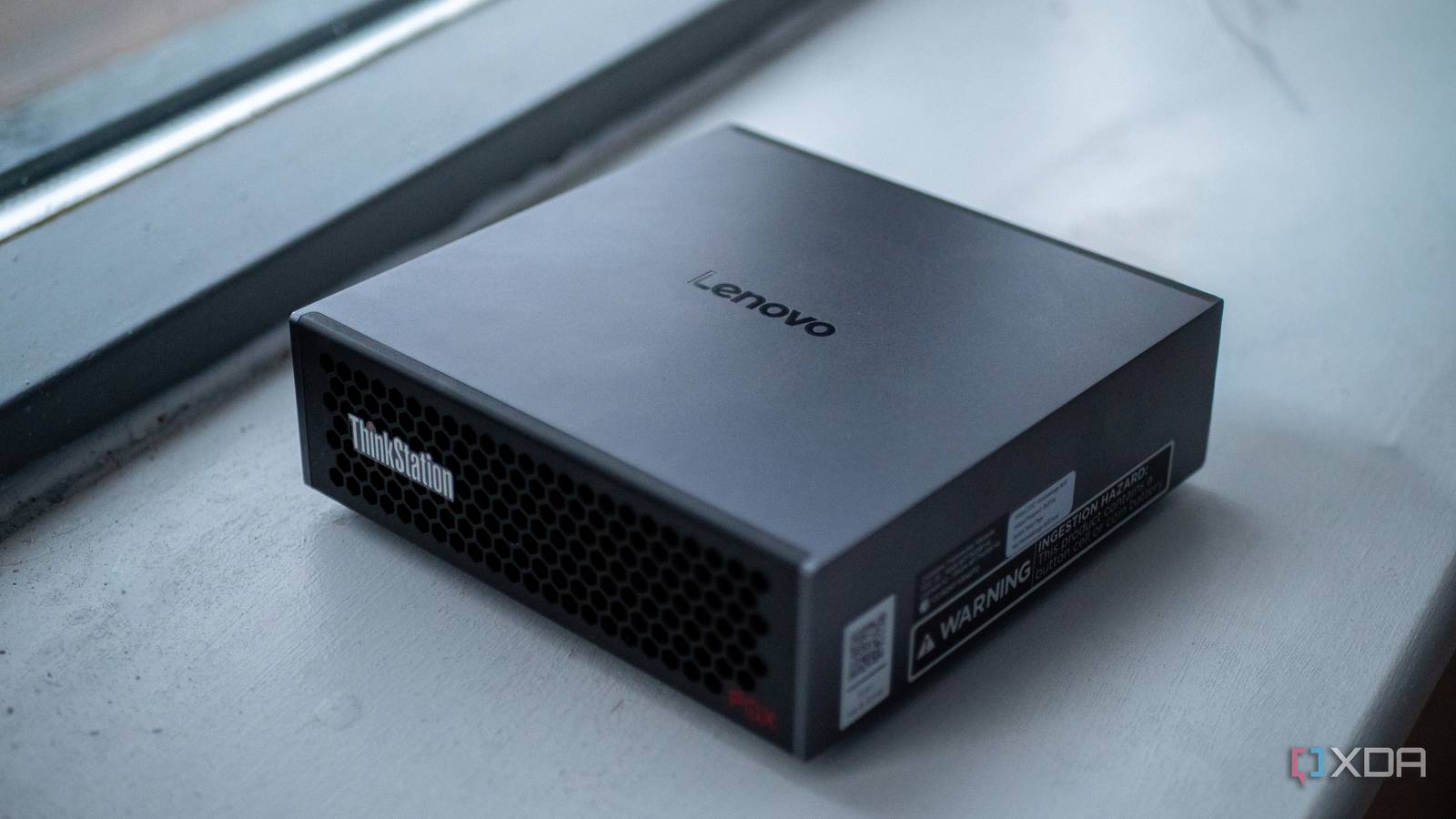
You can run local AI inference on, more or less, any machine that you have access to. From a modestly-specced laptop to a high-end gaming rig, both are capable of running AI in some way, shape, or form. In fact, you can even run AI models on something as simple as your smartphone. But what about purpose-built machines for local artificial intelligence, instead? That’s where the Lenovo Thinkstation PGX comes in, packing the Nvidia GB10 Grace Blackwell Superchip and 128GB of unified memory.
We’ll make one thing clear from the get-go: the Lenovo Thinkstation PGX isn’t faster than an individual Nvidia H100 or even the RTX 5090. Instead, it’s geared towards developers who want to prototype or build smaller models on a single machine, without a requirement for it to be quick. Its primary selling point is that it packs a lot of VRAM into one package, while also being built around the core of Nvidia’s ecosystem: CUDA.

- Brand
-
Lenovo
- Storage
-
1TB/4TB
- CPU
-
Nvidia GB10
- Memory
-
128 GB
- Operating System
-
DGX OS
- Ports
-
4x USB-C, HDMI, Ethernet, 2x QSFP
The Lenovo Thinkstation PGX is a mini PC powered by Nvidia’s GB10 Grace Blackwell Superchip. It has 128 GB of VRAM for local AI workloads, and can be used for quantization, fine-tuning and all things CUDA.
- Powerful
- Small
- Great developer tooling
- Tailored to a very specific workflow
About this review: Lenovo sent us the Thinkstation PGX for the purposes of this review. The company had no input into its contents.
The hardware inside the Thinkstation PGX
It’s basically a DGX Spark with a Lenovo logo

The Lenovo Thinkstation PGX is built around the Nvidia GB10 Grace Blackwell Superchip, and if that sounds familiar, it’s because this is the same silicon inside the Nvidia DGX Spark. In fact, the PGX is one of several OEM variants of the same reference design, alongside the Dell Pro Max AI, Asus Ascent GX10, and Acer Veriton GN100. The hardware is practically identical across all of them: same chip, same memory, same form factor. What differs is the branding, the support structure, and potentially the software that ships on the drive. In the case of the PGX, it runs Nvidia’s DGX OS, which is built on Ubuntu, with CUDA 13, cuDNN, TensorRT, and AI Workbench all pre-installed.
The GB10 itself is a system-on-a-chip that pairs a 20-core Arm CPU with a Blackwell-architecture GPU, connected to each other via NVLink-C2C. The CPU side is split into 10 high-performance Cortex-X925 cores and 10 efficiency-oriented Cortex-A725 cores, which is a heterogeneous big.LITTLE arrangement of core families that have been used in high-end smartphones, albeit in much smaller quantities.
On the GPU side, you’re looking at 6,144 CUDA cores, 192 fifth-generation Tensor Cores, and 48 fourth-generation RT cores. That CUDA core count matches the RTX 5070 on paper, though CUDA core counts are not directly comparable across architectures and don’t translate linearly to performance. Nvidia rates it at 1 petaflop of FP4 performance with sparsity, or 1,000 TOPS. There’s a bit more to that figure though, as it specifically refers to peak theoretical FP4 throughput that assumes structured sparsity.
What makes this chip interesting for AI isn’t the raw compute, though. It’s the memory. The PGX packs 128GB of LPDDR5X unified memory on a 256-bit bus, clocked at 273 GB/s of bandwidth. Both the CPU and GPU share that entire pool coherently, meaning there’s no copying data back and forth across a PCIe bus. When you load a 70-billion-parameter model, it sits in one unified address space that the GPU can access directly. On a traditional desktop workstation, your GPU has its own VRAM (32GB on an RTX 5090, for example), and anything that doesn’t fit has to spill into system RAM, which is dramatically slower.
The rest of the spec sheet is surprisingly well-rounded for a machine this small. And it is small: the PGX measures just 150mm in each direction with a height of just over 50mm. It also weighs 1.2kg, or 2.65lb, making it roughly the size and weight of a Mac Mini. Storage is a single NVMe M.2 slot, available in 1TB or 4TB configurations with self-encryption. The entire system draws a maximum of 240 watts from a USB-C power supply, and connectivity includes 10 Gigabit Ethernet, Wi-Fi 7, Bluetooth 5.3, three USB4 ports with DisplayPort 2.1 alt-mode, an HDMI 2.1a output, and, notably, dual QSFP ports via an integrated ConnectX-7 NIC. Those QSFP ports are there for a reason: you can link two PGX units together to pool their capabilities… sort of.
Linking two PGX systems together is possible
But not in the way you’re thinking

The dual QSFP ports on the ThinkStation PGX expose the onboard ConnectX-7 controller, enabling a direct 200 GbE connection between two systems. Nvidia provides official playbooks for wiring two Nvidia DGX Spark units together, configuring the network interfaces, setting up passwordless SSH, and validating connectivity before moving on to distributed workloads. Once connected, you can use libraries like NCCL to enable high-bandwidth GPU-to-GPU communication across nodes. This allows you to run distributed training jobs or multi-node inference setups where workloads are split between machines.
However, there are some caveats to that, and it’s not a shared memory pool between two devices in the way it may seem.
This setup doesn’t merge the two machines into a single, unified memory system. The problem is that the 128GB of LPDDR5X unified memory inside each PGX is coherent between its CPU and GPU via NVLink-C2C, but that coherence stops at the system boundary. The QSFP ports provide high-speed Ethernet but are not external NVLink memory fabric. This means you can run distributed workloads, and you can shard a large language model across nodes using tensor or pipeline parallelism in frameworks that support it. However, you can’t treat two 128GB systems as one transparent 256GB shared memory machine.
If you want to split a model across both systems, you’ll need a distributed framework (think Megatron-LM, DeepSpeed, or vLLM multi-node) that explicitly partitions the model and communicates activations over the network. That communication can be very fast over 200 GbE, but it’s still network traffic, not hardware-level memory pooling.
When we talk about pooling memory, this typically implies a single address space and automatic residency management across devices. What DGX Spark (and by extension PGX) enables is high-bandwidth distributed compute, which is powerful but still fundamentally different.
How it compares to Apple Silicon
Same concept, different priorities

It’s tempting to compare the PGX to a Mac Mini or Mac Studio, and at first glance, the comparison makes sense. Both use unified memory architectures where the CPU and GPU share the same memory pool. Both are small, quiet, and power-efficient, though the similarities are mostly surface-level.
The biggest difference is memory bandwidth, and it doesn’t favor the PGX. Apple’s M4 Max pushes around 546 GB/s, and the M4 Ultra hits roughly 800 GB/s. The PGX’s LPDDR5X tops out at 273 GB/s. For LLM inference, this matters a lot. When a model is generating tokens one at a time, the bottleneck is almost entirely memory bandwidth, as the GPU repeatedly streams model weights from memory during each decoding step, and more bandwidth means more tokens are generated per second. If you run the same quantized model on a Mac Studio and a PGX, the Mac will likely generate tokens faster in bandwidth-bound scenarios, purely because it can move data from memory to the compute units at a higher rate.
So why would you buy a PGX over a Mac? It seems like a strange choice to make, but there are two very important reasons for that.
The first important reason is the entire CUDA ecosystem, which we mentioned in the opening of this article. Nearly every AI framework, optimization library, and model deployment tool is built for Nvidia’s ecosystem first. vLLM, TensorRT, FlashInfer, and the Nvidia Container Toolkit all have one thing in common: none of these run on a Mac. Apple has MLX, and there’s Metal backend in llama.cpp, and both are capable at local inference. With that said, they represent a fraction of the tooling available on CUDA. If your workflow involves Docker containers from Nvidia’s registry, or you need production-grade serving with tool calling and prefix caching, your Mac simply won’t do it.
The second important reason is that the Tensor Cores are actually a big deal. While autoregressive decoding (generating tokens one by one) is bandwidth-bound, other workloads are compute-bound. Prompt processing on long contexts, fine-tuning with LoRA, and batch inference all lean harder on raw compute throughput, and the Blackwell Tensor Cores are purpose-built for that. Apple’s GPU cores are versatile, but they don’t have dedicated matrix multiplication hardware at the same scale.
All of this is to say that Apple Silicon gives you more bandwidth in a machine that also happens to be a great general-purpose computer. The PGX gives you less bandwidth but places you in the center of the Nvidia ecosystem that the entire AI industry is built on. Which one is better depends entirely on what you’re building.
Running massive local language models on the Thinkstation PGX
Qwen3-Coder-Next: 80b dense model

One of the first things I tested was serving Qwen3-Coder-Next, an 80-billion-parameter coding model, at FP8 precision using Nvidia’s own container infrastructure. Here’s what that looks like:
docker run --rm -it --gpus all --ipc=host --network host \
--ulimit memlock=-1 --ulimit stack=67108864 \
-v ~/.cache/huggingface:/root/.cache/huggingface \
nvcr.io/nvidia/vllm:26.01-py3 \
vllm serve "Qwen/Qwen3-Coder-Next-FP8" \
--served-model-name qwen3-coder-next --port 8000 --max-model-len 170000 --gpu-memory-utilization 0.90 \
--enable-auto-tool-choice --tool-call-parser qwen3_coder --attention-backend flashinfer --enable-prefix-caching \
--kv-cache-dtype fp8 --max-num-seqs 1
If you’re not familiar with any of this, here’s what’s going on. The command pulls a Docker container from Nvidia’s own registry and uses vLLM, a high-performance model serving framework, to host the model as an API endpoint on the local machine. At FP8, each of the model’s 80 billion parameters takes up one byte, so the weights alone occupy roughly 80GB of memory. On a consumer GPU with 24GB of VRAM, this model simply wouldn’t fit without aggressive quantization. However, the PGX’s 128GB of unified memory loads it comfortably with room to spare.
The –gpu-memory-utilization 0.90 flag tells vLLM it can use 90% of available memory, which leaves roughly 115GB for the model and its context window. That’s important, because –max-model-len 170000 sets a 170,000-token context window, and context windows are expensive. Every token the model processes needs to be stored in the KV cache, otherwise known as the context, and it’s essentially the model’s working memory of the conversation so far. That cache grows with every token, and at 170,000 tokens, it would be enormous at full precision. That’s why –kv-cache-dtype fp8 is there, because it stores the KV cache in FP8 instead of FP16. This alone roughly halves its memory footprint.
The rest is performance tuning. –attention-backend flashinfer uses a memory-efficient attention implementation that avoids materializing the full attention matrix, and –enable-prefix-caching means that if you send the same system prompt repeatedly, the model doesn’t waste time recomputing it. –enable-auto-tool-choice and –tool-call-parser qwen3_coder enable function calling, so the model can output structured tool calls for agentic coding workflows, like with Claude Code. Finally –max-num-seqs 1 limits the server to one request at a time, because this is a prototyping machine sitting on a desk, not a datacenter node handling dozens of concurrent users.
This is the workflow Nvidia is selling with the PGX. Pull a container from their registry, run one command, and you have an 80-billion-parameter model accessible on your local network with tool calling, long context, and optimizations. Everything just works because you’re inside their ecosystem, and you can use it with Claude Code, too.
To top it off, Qwen3-Coder-Next generates responses between 25 and 40 tokens per second in this configuration, making it a very usable and powerful local language model for code assistance.
Step-3.5-Flash: 196b MoE model

The vLLM command showcases the polished Nvidia-native path. This one tells a different story, using community-built tooling to demonstrate why the PGX’s unified memory architecture has broader utility beyond Nvidia’s own software stack. I first compiled their llama.cpp fork which has optimizations for this particular model, then I ran it using vLLM.
GGML_CUDA_ENABLE_UNIFIED_MEMORY=1 $HOME/llama.cpp/build-cuda/bin/llama-server \
-m $HOME/Step-3.5-Flash-GGUF-Q4_K_S/step3p5_flash_Q4_K_S-00001-of-00012.gguf \
-c 140000 \
-b 2048 \
-ub 1024 \
-ngl 999 \
-fa on \
-ctk q8_0 \
-ctv q8_0 \
--temp 1.0 \
--host 0.0.0.0 \
--port 8000
Step-3.5-Flash is a large model from StepFun, and here it’s been quantized to Q4_K_S, a 4-bit GGUF format. Even after quantization, it’s split across 12 shard files, which gives you an idea of its size. llama.cpp stitches those shards together automatically, but the model still needs a lot of memory, especially with the 140,000-token context window set by -c 140000.
The most important part of this entire command is the environment variable at the top: GGML_CUDA_ENABLE_UNIFIED_MEMORY=1. This tells llama.cpp’s CUDA backend to use unified memory, meaning that if the model and its KV cache don’t fit within a single GPU memory allocation, the system can transparently spill into the shared memory pool. On a normal desktop with a discrete GPU, “spilling” means falling back over PCIe into system RAM, which tanks performance. On the PGX, there is no PCIe bottleneck. The CPU and GPU share the same physical memory connected via NVLink-C2C, so the performance penalty of spilling is dramatically lower than falling back to system RAM over PCIe on a traditional desktop GPU. This is the benefit of unified memory, and the model can generate at roughly 20 tokens per second with a token latency of 50ms.
The -ngl 999 flag tells llama.cpp to offload all layers to the GPU. Combined with unified memory, the GPU handles all of the computation, and the memory system sorts out where the data physically lives. -fa on enables flash attention, which is necessary at these context lengths to avoid the full attention matrix from consuming more memory than the model itself. And like we did with Qwen, the KV cache is quantized. By using -ctk q8_0 and -ctv q8_0, we store the keys and values in 8-bit integer format, keeping the context window’s memory footprint manageable.
Next, we set -b 2048 and -ub 1024, which control how the model processes the initial prompt. When you feed it a long prompt, it processes tokens in batches of 2,048, with micro-batches of 1,024. This tunes throughput during the “prefill” phase, the part where the model reads your input, without overwhelming the system.
This example is a great way to demonstrate just how powerful and versatile the PGX is, as llama.cpp wasn’t built for the PGX specifically. It’s a community project that runs on everything from a Raspberry Pi to a server rack. But the unified memory flag, combined with the PGX’s NVLink-connected memory architecture, means it handles large quantized models with massive context windows in a way that wouldn’t be practical on a standard desktop. It runs at roughly 20 tokens per second, so while it’s not the fastest in the world, it’s certainly usable.
Fine-tuning a model on the Thinkstation PGX
Qwen2.5b LoRA

Running inference on large pre-trained models is one thing, but the PGX is also built for training workloads, specifically the kind of parameter-efficient fine-tuning that lets you adapt a foundation model to your own data without retraining the entire thing. To test this, I fine-tuned Qwen2.5-7B using LoRA on the Alpaca instruction-following dataset, using the same benchmarking harness I built for the Nvidia playbook scripts.
To do this, I load Qwen2.5-7B in bfloat16 precision, attach LoRA adapters the standard set of projection modules per block, like the model’s attention and MLP projection layers, and train on 5,000 samples from Alpaca for one epoch. LoRA, or Low-Rank Adaptation, works by freezing the original model weights and injecting small trainable matrices into specific layers. In this case, the adapters target all seven projection matrices in each transformer block: the query, key, value, and output projections in the attention mechanism, plus the gate, up, and down projections in the MLP. With a rank of 16 and an alpha of 32, the trainable parameter count is a small fraction of the full 7 billion, which is what makes this feasible on a single device. The full model sits in memory in bfloat16 while only the adapter weights receive gradient updates.
The training configuration uses a per-device batch size of four with four gradient accumulation steps, giving an effective batch size of 16. Sequences are capped at 1,024 tokens, and the learning rate is set to 2e-4, which is fairly standard for LoRA fine-tuning on a model of this size. The entire job runs inside Nvidia’s NGC PyTorch container, so CUDA, cuDNN, and all of the relevant libraries are already present, and I created a benchmark harness that monitors GPU utilization, memory, temperature, and power draw throughout.
Fine-tuning Qwen2.5-7b took just shy of 18 minutes to run, and at peak, it used 41.1 GB of memory, the GPU pulled 65.4W of power, and the highest temperature recorded was 77ºC. The fans definitely kicked in, but the Thinkstation PGX was incredibly quiet throughout the run. Power usage stayed stable, too, as did GPU clock speeds at 2.5 GHz, which means the system didn’t thermally throttle the GPU under these conditions.
Unlike autoregressive token generation, which is bottlenecked by memory bandwidth, fine-tuning involves dense matrix multiplications on every forward and backward pass. The Blackwell Tensor Cores are purpose-built for exactly this kind of sustained compute, and the unified memory architecture means the model, optimizer states, and gradient buffers all live in one coherent address space without the typical PCIe host-to-device bottleneck. On a traditional desktop with a discrete GPU, a 7-billion-parameter model in bfloat16 plus LoRA overhead would push up against the 24GB VRAM ceiling of a high-end consumer card. Here, it’s comfortably within the PGX’s 128GB pool.
The output is a set of LoRA adapter weights saved to disk, ready to be merged back into the base model or loaded on top of it at serving time. The entire workflow, from pulling the container to having a fine-tuned adapter, runs on-device without any additional hardware.
Quantizing a model on the Lenovo Thinkstation PGX
MedGemma-27b to NVFP4

Inference and fine-tuning are the glamorous workloads, but there’s a quieter step in the local AI pipeline that matters just as much: quantization. Before you can serve a large model efficiently, you often need to compress it first, converting its weights from higher-precision formats down to something that fits in memory and runs at acceptable speed. To test this on the PGX, I quantized MedGemma-27B to NVFP4 using Nvidia’s TensorRT Model Optimizer.
MedGemma-27B is Google’s medical domain model, and at full precision its weights occupy a substantial chunk of memory. NVFP4 is Nvidia’s 4-bit floating-point format, a hardware-native quantization scheme that the Blackwell Tensor Cores can accelerate directly. The process works by running calibration data through the model to determine optimal scaling factors, then repacking the weights into the lower-precision format. The output is a standard Hugging Face model directory, just significantly smaller, and ready to be used.
What makes this interesting on the PGX is watching how the system behaves under a workload that’s quite different from inference or training. Quantization is a batch process: the model loads into memory, calibration runs push the GPU hard for a sustained period, and then the compressed weights get written back to disk. There’s no interactive token generation, no gradient computation, just a long, steady compute job.
The entire run took 26 minutes, using 63.6 GB of memory and pulling 57.3W of power at peak. The Tensor Cores spent most of the run doing exactly what they’re designed for, which is dense matrix math at high throughput. Peak GPU temperature hit 74°C, and again, there were no signs of thermal throttling.
RAM usage was more interesting. The system idled at around 4.2GB, then peaked at 63.6GB, which is just over half of the available RAM pool of the PGX. That makes sense: the full-precision model needs to be resident in memory alongside the calibration buffers and the quantized output being assembled. On a desktop with a 24GB GPU, this job would require offloading significant portions to system RAM, slowing the whole process dramatically. On the PGX, it fits comfortably in the unified memory space with room to spare.
Should you buy a Lenovo Thinkstation PGX?
It’s for a very specific type of user

The Thinkstation PGX is a easy machine to recommend, but only to a very specific audience. If you’re an AI developer who needs to prototype, fine-tune, and serve models up to 200 billion parameters on a single device, and your workflow depends on CUDA, vLLM, TensorRT, or anything else in Nvidia’s ecosystem, the PGX does exactly what it promises. You pull a container, run a command, and a large model is serving on your local network with tool calling and a big token context window. For that specific use case, nothing else on the market offers the same combination of unified memory capacity, Nvidia software compatibility, and physical compactness.
But that audience is genuinely narrow. If you’re primarily doing local inference and don’t need the CUDA ecosystem, a Mac Studio with an M4 Max will typically generate tokens faster for a similar amount of money while also being a fully functional desktop computer. If you need serious training throughput, the PGX isn’t competing with even a single H100, and Nvidia will tell you that themselves. And if your models fit comfortably in 24GB of VRAM, a desktop with an RTX 5090 will outperform the PGX on raw speed while costing significantly less.
The PGX occupies a very specific gap: models too large for consumer VRAM, workflows too dependent on Nvidia tooling for Apple Silicon, and budgets or security requirements that rule out cloud compute. If that describes your situation, the Thinkstation PGX is arguably the most practical device you can put on a desk today. If it doesn’t, you probably already have a better option.
- Brand
-
Lenovo
- Storage
-
1TB/4TB
- CPU
-
Nvidia GB10
- Memory
-
128 GB
- Operating System
-
DGX OS
- Ports
-
4x USB-C, HDMI, Ethernet, 2x QSFP
The Lenovo Thinkstation PGX is a mini PC powered by Nvidia’s GB10 Grace Blackwell Superchip. It has 128 GB of VRAM for local AI workloads, and can be used for quantization, fine-tuning and all things CUDA.
- Powerful
- Small
- Great developer tooling
- Tailored to a very specific workflow
