

I have spent the last year in a constant cycle of cloud hopping. From Dropbox to the deep ecosystem of iCloud, the convenience of Google Drive, and the self-hosting capabilities of Nextcloud, I thought I had seen it all. But after dozens of installs and uninstalls, I found myself back where I started: OneDrive.
It wasn’t the Office integration or the storage price that pulled me back, though. It was one specific, high-stakes feature that the competition hasn’t quite replicated: Personal Vault.

5 open-source apps that are so good their premium versions are worth paying for
Not paywalled, just worth paying for.
What is Personal Vault, anyway?
The safe-within-a-safe

You can think of your standard cloud storage as a digital filing cabinet in your home office. It’s convenient, organized, and generally secure. But we all have those items — birth certificates, property deeds, or financial documents — that we wouldn’t just leave sitting in those standard folders.
Here is where Personal Vault comes into play. It is a specialized, protected area within OneDrive that requires a second key to open. Even if I’m already logged into my computer or my phone, I can’t just click on the Vault and see what’s inside.
It stays locked and invisible to the rest of the system until I prove, once again, who I am.
The beauty of this double-lock system is that it protects me from the scenarios I actually worry about. If I leave my laptop open at a coffee shop to grab a refill, or if I hand my phone to a friend to show them a vacation photo, I don’t have to panic.
They might have access to my general files and folders, but my most sensitive data is still sitting behind that second, biometric wall.
It’s the only feature I have found that treats my most private documents with the ‘extra-mile’ security they deserve, rather than just mixing them with my Office documents and random screenshots.
Excellent mobile and Windows integration
Direct-to-vault


Most high-security apps feel clunky, as if you are trying to break into your own data. But OneDrive has managed to bake this right into the tools I already use every day.
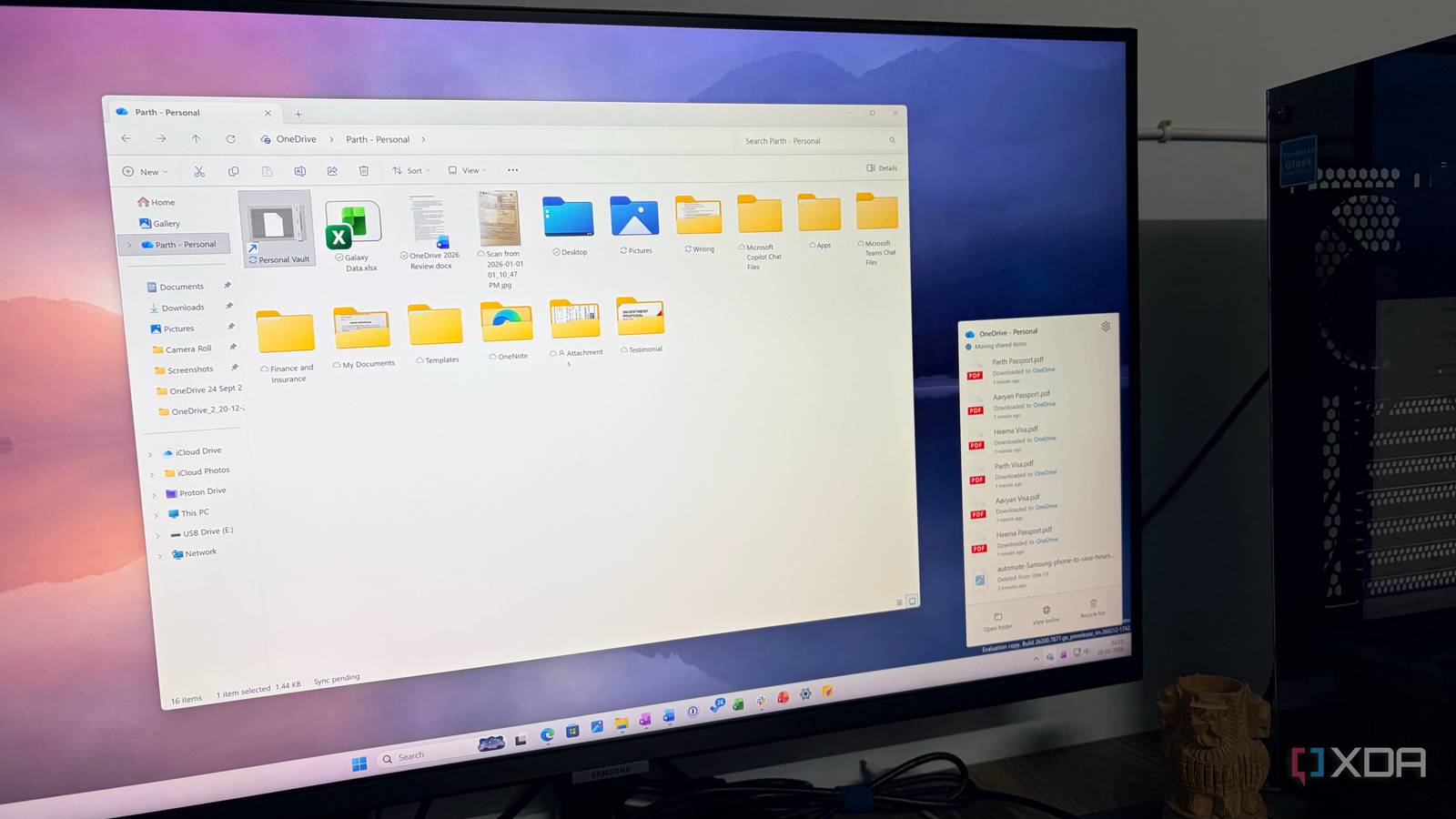
On my PC, the Vault doesn’t feel like a separate app; it’s just a folder in File Explorer with a little safe icon on it. When I need to drop in a sensitive PDF, I don’t have to open a browser or log into a portal. I just double-clicked that icon.
I can authenticate my identity with a PIN or Windows Hello and drag and drop a file normally. But here is the genius part: the moment I stop using it for a few minutes, it auto-locks.
The mobile integration is where this feature truly saved me from my own bad habits. We have all done it: taken a photo of a passport, a social security card, or a tax document, only for that sensitive image to sit in our standard Camera Roll alongside 500 photos of our lunch and our dog. That’s a massive security hole.
Instead, I can fire up Personal Vault in OneDrive, tap + at the bottom, and scan all the documents right into it. It’s protected by my phone’s biometrics from the second it’s captured.
I can even select images and videos from OneDrive gallery and move them into Personal Vault in no time. On Windows, my files in the vault are synced to a BitLocker-encrypted section of my hard drive.
Real-world use cases
There are many
Whenever I travel, I used to have this low-level anxiety about losing my physical wallet or passport. Now, the first thing I do is use the OneDrive mobile app to scan my passport, visa, and travel insurance directly into my Personal Vault.
Because it bypasses my phone’s camera roll, I don’t have to worry about a sensitive ID photo floating around in my general gallery. If I’m at a foreign check-in desk and need my details, I just use Face ID to open the Vault, and there they are.
I also moved my entire tax year folder into the Personal Vault. When I’m working with my accountant, I can pull up a sensitive PDF on my laptop via File Explorer, and as soon as I’m done and walk away, the vault auto-locks.
Aside from that, I have created an ‘Emergency’ folder that holds the master list of household utility accounts, a copy of the home deed, and recovery codes for my password manager.

I replaced cloud storage with a local NAS and learned this the hard way
Abandoning big tech for a local NAS might not be a smart choice
Ultimate cloud privacy win
For me, cloud storage shouldn’t just be a digital junk drawer; it should be a digital fortress as well. After bouncing between dozens of apps, I realized I didn’t need more space — I needed more trust.
Personal Vault provides that missing link and turns OneDrive from a basic utility into a secure home for my most sensitive life documents.
If you have been nervous about moving your tax returns or IDs to the cloud, give the vault a try. It might just be the last cloud switch you ever have to make.
