

If you live in China, or have ever visited the country, you will already be aware that you can’t access Google or its services. This is because of the stringent blocks implemented and enforced by the state (also known as the great firewall of China or GFW). The good news is that anybody can use a VPN to change their Google Play region. This will allow you to install blocked Google products on your device. In this guide we’ll show you how.
Why can’t I access Google Play Store in China?
The Chinese government has been restricting Google since 2010. This means if you try to download apps or music from the Google Play Store, search anything via Google, or even send an email through Gmail, you are likely to get an error message.
The government in China is extremely strict about what it allows citizens to access online, and it specifically blocks hundreds of Western services. For people who need Google for work (or pleasure), this can be a huge frustration.
How to unblock Google Play Store in China
To access the Google Play Store, follow these simple steps:
-
Subscribe to your preferred VPN for Google Play Store.
For help on picking one, you can’t go far wrong with our recommendations at the top of this page.
-
Download the VPN software and install it.
-
Select VPN obfuscation/stealth mode in Settings.
Obfuscation is essential to ensure that your VPN will work in China. Enabling this differs depending on the VPN you’re using. If you require assistance, contact your provider through the live chat on their website.
-
Connect to a server in Hong Kong, the USA, or elsewhere that does not censor the Google Play Store.
-
You should now be able to access the Google Play Store with no issues.
How to install Google Play Store services
If you live in China and don’t already have Google services installed on your phone, first thing you will need to do is install it.
-
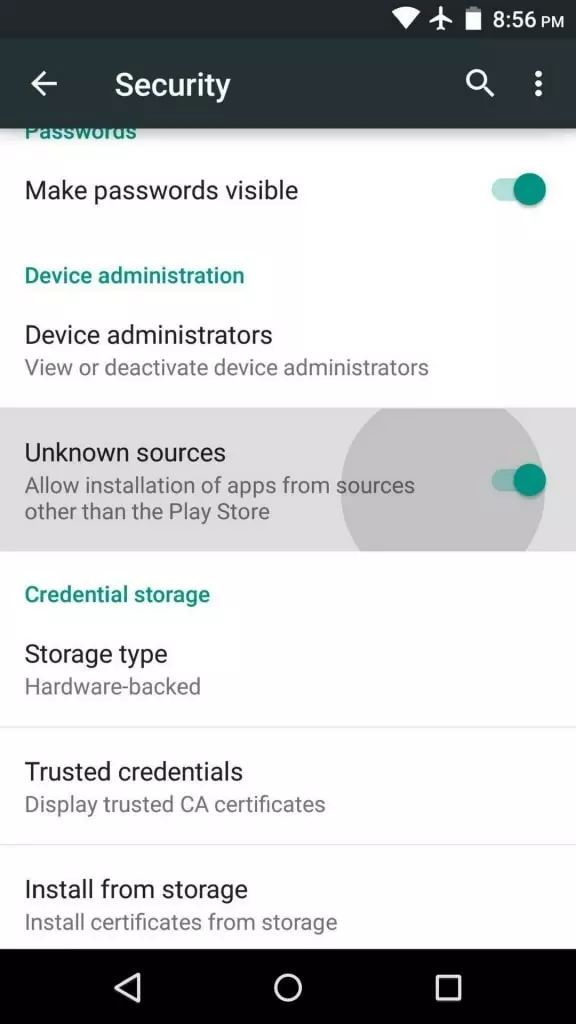
To start with you must enable unknown sources. To do this go to:
Settings > Security > Unknown Sources and turn it on.
-
Next, download the Google Framework Services app
To do so, follow the link – Google Services Framework – and continue with the steps below.
-
Download the Google Services Framework APK file to your device.
Please note: If you choose to download it to a PC, you will need to use USB, or an SD card to transfer the file to your Android device.
-
Install the file on your Android device.
To do this, run the APK file on your device.
-
Next, the app will prompt you and ask you to install Gmail & Google Play Store.
Allow the apps to install and accept any necessary permissions that pop up.
-
You should now have the apps on your device, and they will appear on your home screen.
No need to root
Common advice we often see if that you need to root your device to access Google products in China – this is not true. It is not necessary to root an Android device for you to install Google services.
Now, providing you’re connected to a VPN, you can now use the Play Store to download any apps you want.
Top tip: It’s worth checking that you aren’t getting any IP Leaks from your VPN with our VPN leak test tool. That way you can be sure that your VPN is working correctly and the Chinese government has no idea that you are accessing Google services.
How to get a VPN in China
To unblock the Google Play store (and any other website or service that is blocked by the Chinese government), you will require a VPN that works in China. Unfortunately, the government is now actively blocking hundreds of VPN services. This means getting hold of VPN software from inside China has become trickier.
Subscribe before you go to China
If you haven’t arrived in China yet, your best option is to get a VPN subscription before you travel there. This will allow you to connect to your VPN service as soon as you arrive (without the hassle of needing to get a VPN subscription inside the country).
I’m already in China
Since March 31, 2018, China has been strongly cracking down on international consumer VPN services by removing them from locally available app stores. It is also forcing ISPs to block VPN websites. As a result, you may need to use a proxy service to access some of the services on our 5 best VPNs for China list. Another option is to get the VPN software directly from the provider via email. Once you have the APK file you will then be able to sideload it using the method above.
For an in-depth look at accessing and using VPNs in China, you should check out our VPNs in China guide.
Image credits: dolphfyn/Shutterstock.com, Bloomicon/Shutterstock.com, Flat.Icon/Shutterstock.com
