


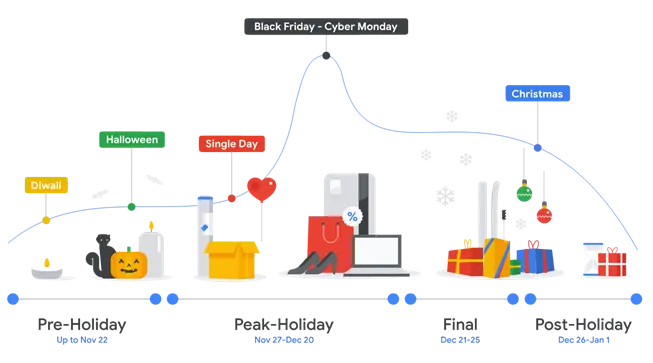
Digital advertising doesn’t happen in a vacuum. Your customers behave differently throughout the year—shopping spikes during the holidays, travel searches rise in the summer, and sales dip in slower seasons. That’s where seasonality adjustments in Google Ads come in.
Contents
What are seasonality adjustments in Google Ads?
Seasonality adjustments are a feature in Google Ads that allow advertisers to inform Google’s bidding algorithms about expected short-term changes in conversion rates. These adjustments help Smart Bidding strategies, like Target ROAS or Target CPA, react appropriately to temporary shifts in performance, without overcorrecting based on unusual spikes or dips.
Instead of waiting for the algorithm to “learn” from a sudden surge (like Black Friday), advertisers can proactively signal that performance will deviate from the norm—and that it’s only temporary.
💡Improve your Google Ads account fast when it matters most using our Free Google Ads Grader!
Why are Google Ads seasonality adjustments important?
Smart Bidding relies on historical data to predict how likely a click is to convert. But if conversion behavior is expected to change suddenly, the historical data can become misleading. Seasonality adjustments help mitigate this by allowing advertisers to input expected conversion rate changes, helping maintain bid efficiency through volatile periods.
Without seasonality adjustments, Google’s algorithm can fail to accommodate your trends. Here are the two ways that can happen:
Short-term spikes in performance
The first misstep could be not capitalizing on great trends. Without an understanding of an upcoming spike, Google may underbid during high-performing periods, missing out on valuable conversions and costing your company potential revenue.
But that’s just one part of the problem. After the spike ends, Google could overreact to the increase and overbid moving forward, thinking the high conversion rate was a new trend.
Short-term dips in performance
Seasonality isn’t just for when the market is really hot. It can also be for a cooler period.
I regularly work with B2B accounts, and there are three times during the year that stick out to me as times when things are almost categorically slow: spring break, the last couple of weeks of summer, and the week between Christmas and the New Year.
During each of these periods, it’s very common to see conversion rates drop and sales slow. If those dips and slowdowns are large enough (which we’ll talk about in the next section), then it’s in our best interest to add a seasonality adjustment so Google doesn’t fail to see the slowdown and overbid, then pull bids back so much that we miss out on the rebound.
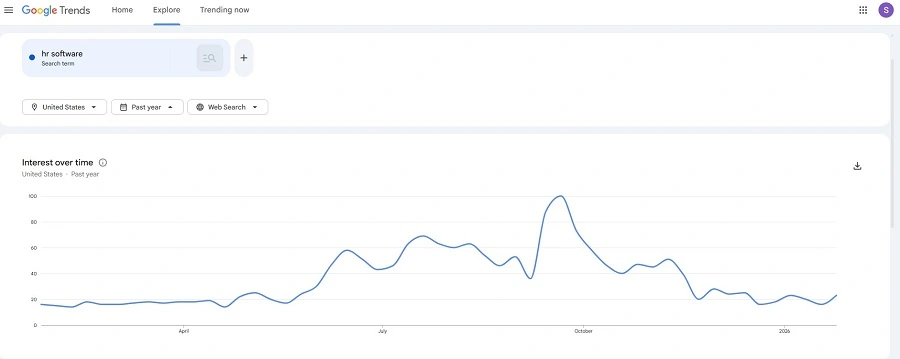
A keyword research tool, like Google Trends, could help you decide when seasonality adjustments would be most beneficial throughout the year.
🚨 Get the most up-to-date keyword data with our Free Keyword Tool!
When should you use seasonality adjustments?
Google recommends using them only for short-term events, typically between one and seven days, though you can set longer periods if necessary. Here are some ideal use cases:
- Holiday promotions (e.g., Black Friday, Cyber Monday)
- Limited-time offers (e.g., 48-hour sales)
- Product launches or restocks
- Seasonal events (e.g., tax season for financial services, back-to-school for retailers)
But don’t forget the downside as well. Most of the time, when people think of seasonality adjustments, they only focus on the good times. Here are some scenarios for when to ramp down the hype and expect lower returns:
- Holiday breaks (e.g. Christmas, spring breaks)
- Bad press (e.g., product recall) can bring lots of searches with low intent.
When not to use seasonality adjustments
Given how impactful seasonality adjustments can be, it can be tempting to use them frequently, but Google warns against this. They want you to only use these sparingly. Sometimes it’s just as important to know when not to use something as it is to use it.
Seasonality adjustments are not intended for long-term seasonal trends (like Q4 performance in retail) or permanent business changes (like a new pricing model or improved landing page).
Smart Bidding is already designed to adapt to these types of gradual shifts over time, so if you’re using any of the Smart Bidding strategies from Google, then they’re already taking this type of trend into account for you.
Using seasonality adjustments too often or inappropriately can actually make performance less stable by confusing the algorithm. Here are some scenarios when you should avoid using Seasonality Adjustments:
- Ongoing seasonal behavior (e.g., summer-long travel interest)
- Permanent conversion rate changes
- Unpredictable or uncertain events
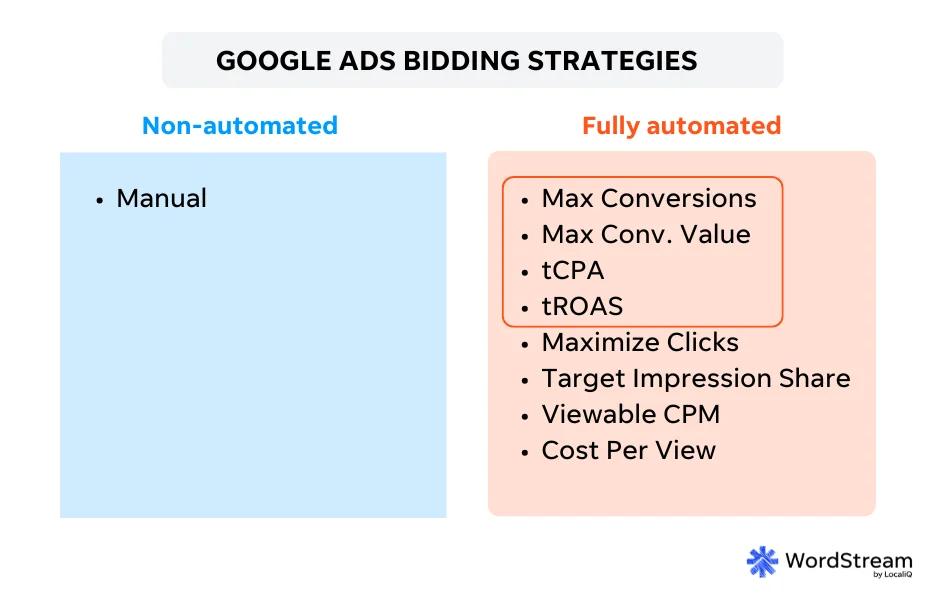
Seasonality adjustments work well in the short term with Google Ads Smart Bidding strategies (outlined in orange above), but they’re not necessary for long-term, gradual performance fluctuations since Smart Bidding already accounts for that.
📅 Pre-plan seasonality adjustments for your Google Ads campaigns using our free marketing calendar template!
How to set a seasonality adjustment in Google Ads
Setting up seasonality adjustments is fairly simple.
Start by heading into the main menu on the left, then navigating through these steps: Tools > budgets and bidding > adjustments > seasonal.
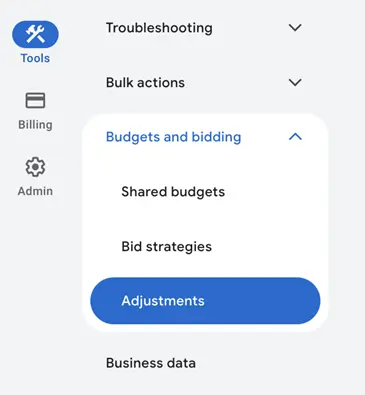
Once you’re there, click the blue plus button or +new seasonality adjustment.
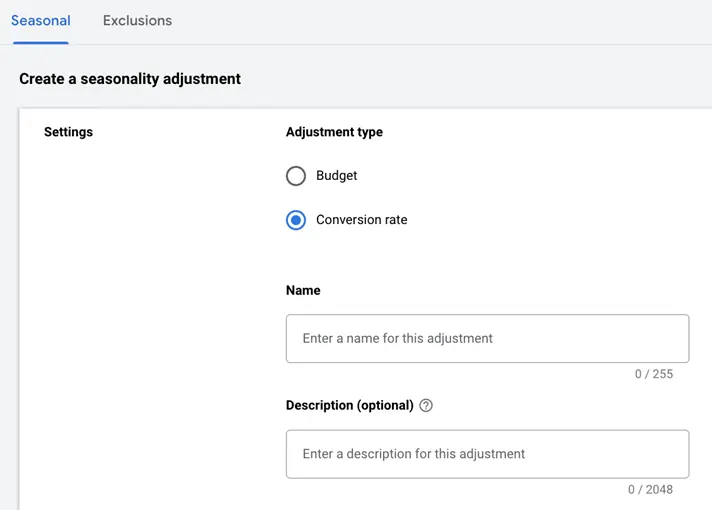
From there, select conversion rate, then give your adjustment a name along with a description if you like. Personally, I like to use the name field to tell me what event this is for and some sense of timing (e.g. Black Friday 2026), and then in the description, you can write out more notes if the name isn’t self-explanatory.
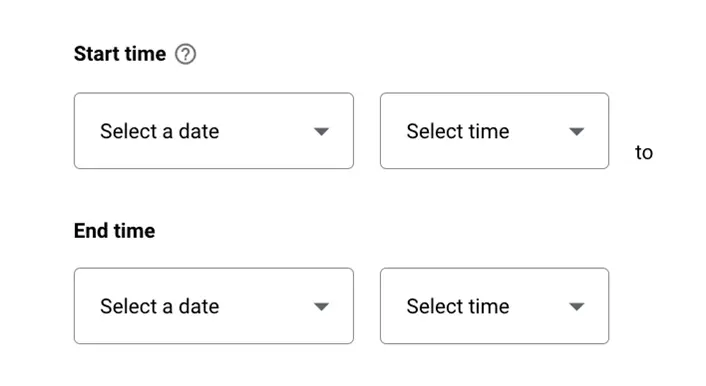
Next, you can choose the date range for this adjustment to affect. This will include a date and a time of day that is selected by the hour.
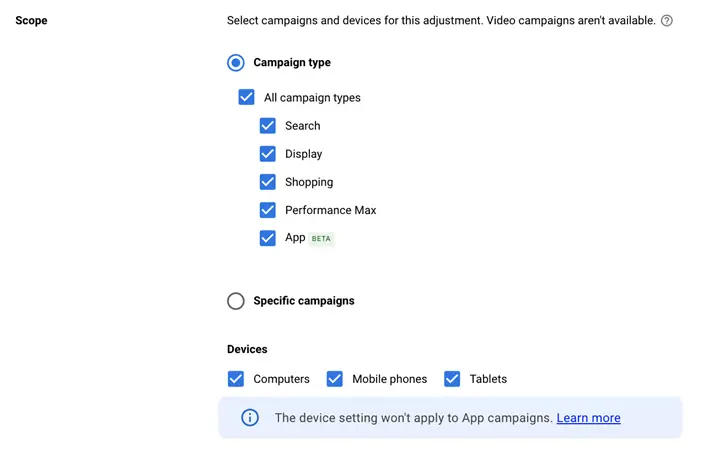
Then you get to choose the scope of the adjustment, including which campaign types and devices you want impacted, but you can also select individual campaigns to target while leaving all others out of the adjustment. This would be particularly impactful if you’re having a sale on a certain product or product line and expect large performance changes, but not the rest of your offerings, which will likely remain stable.
Finally, you can set the expected conversion rate change from your baseline. This will be represented as a percentage.
For the image below, this would indicate to Google that you expect your conversion rate to increase by 25% during a weekend sale. This is NOT saying that you expect your conversion rate to be 25% during your sale, only that the conversion rate will be 25% higher than normal.

Quick tips for using seasonality adjustments in Google Ads
Here are a couple of last thoughts about seasonality adjustments before I send you on your way:
- Test and review: After the event, check performance metrics to see if the adjustment helped and if your estimated performance change was correct. Use these insights for future campaigns.
- Don’t over-use: Let Smart Bidding handle most bidding optimization for you. Seasonality adjustments should only be used for clear, short-term changes.
- Communicate with stakeholders: If you’re working with a client or a larger marketing team, make sure everyone understands when and why you’re using an adjustment. These can be a good resource to check with to ensure your expected performance change is realistic.
⚡ Download our free, fool-proof guide to Smart Bidding to improve your approach to Google Ads bidding ASAP.
Try a Google Ads seasonality adjustment for your next timely push
Seasonality adjustments are a powerful tool for guiding Google Ads during predictable, short-term shifts in performance. When used strategically, they can help you make the most of high-impact events without disrupting long-term bidding efficiency. Use them wisely, sparingly, and always with a clear business case in mind, and you’ll keep your campaigns one step ahead of the calendar. For more ways to perfect your always-on marketing strategy, see how our solutions can boost your campaigns year-round.
