
Close Menu
    Facebook X (Twitter) Instagram
    Wifi PortalWifi Portal
    • Blogging
    • SEO & Digital Marketing
    • WiFi / Internet & Networking
    • Cybersecurity
    • Tech Tools & Mobile / Apps
    • Privacy & Online Earning
    Facebook X (Twitter) Instagram
    Wifi PortalWifi Portal
    Home»Tech Tools & Mobile / Apps»Give your Meta Quest a hand tracking upgrade with this hidden setting
    Tech Tools & Mobile / Apps

    Give your Meta Quest a hand tracking upgrade with this hidden setting

    adminBy adminMarch 5, 2026No Comments4 Mins Read
    Facebook Twitter LinkedIn Telegram Pinterest Tumblr Reddit WhatsApp Email
    Give your Meta Quest a hand tracking upgrade with this hidden setting
    Share
    Facebook Twitter LinkedIn Pinterest Email

    Meta Quest games that primarily use hand tracking are extremely cool, there’s no doubt about it. Being able to interact with a virtual world using your actual hands feels like something out of a sci-fi movie, but that sense of realism and interaction also means that inputs are a bit more restrictive than when using controllers with joysticks and buttons.

    That means when playing a game like Dimensional Double Shift, you can interact with the world and other players like never before. Still, it’s not as easy to perform system tasks like taking a screenshot, recording a video, or muting your microphone. Thankfully, there’s a solution for that, but it’s a bit hidden within the system menu.

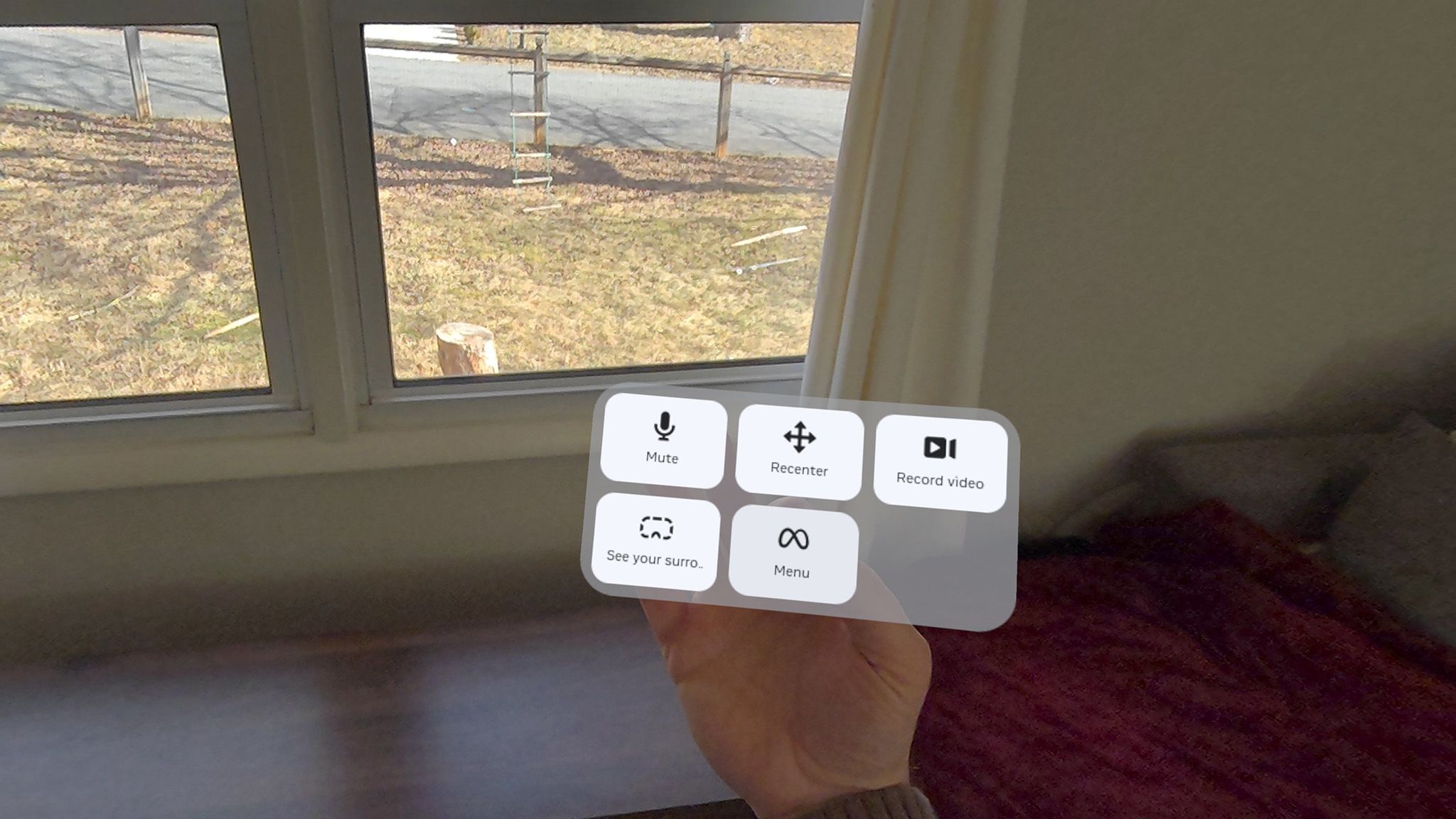
    It’s called Expanded Quick Actions, and it adds five buttons to the menu on your palm, allowing you to instantly mute your microphone (huzzah!), recenter your view, record a video, open the menu, and see your surroundings without having to remove your headset. The microphone mute is particularly helpful for me, as I’ve got a busy family and sometimes have to carry on a conversation while playing, something I don’t always care for the whole internet to hear.


    You may like

    Today’s best Meta Quest 3S and Meta Quest 3 deals

    How to enable Expanded Quick Actions

    Making a home pinch gesture using hand tracking on a Meta Quest 3

    (Image credit: Nicholas Sutrich / Android Central)

    On your Meta Quest headset, press the home button on the right controller or perform the home action with your hands by pinching your index and thumb together while your palm is facing you (as pictured above). This will bring up the Universal Menu Bar, which includes shortcuts to the app drawer, recent and pinned apps, and settings. Next, click on the Quick Settings panel, which is a button on the left side of the menu bar that shows the time, Wi-Fi status, and battery.

    After that, you’re going to want to click on Settings in the top right corner, then select Movement Tracking from the left-side menu. In this section, you’ll find the option for enabling hand tracking and Expanded Quick Actions. Ensure that hand tracking is enabled, then tap the Expanded Quick Actions toggle to enable it.

    Image 1 of 3

    How to enable Expanded Quick Actions on a Meta Quest 3
    (Image credit: Android Central)

    How to enable Expanded Quick Actions on a Meta Quest 3
    (Image credit: Android Central)

    How to enable Expanded Quick Actions on a Meta Quest 3
    (Image credit: Android Central)

    Now, when you face your palm toward you, pinch your index and thumb together and hold them for a second, and a more robust action menu will appear. This unlocks the aforementioned menu that contains mute, screen record, recenter, mixed reality, and home buttons. Expanded Quick Actions works on any Meta Quest headset, but it’s best on a Quest 3 or Quest 3S since those headsets feature full-color mixed reality vision.

    If you want to just go home, you can still quickly tap your index and thumb together to perform the home gesture. While you’re in this menu, feel free to tweak a few settings as you see fit. One that’s particularly useful is “double tap controllers for hand tracking,” which lets you instantly swap between controller-based and hand tracking methods without having to put the controllers down and wait for them to go to sleep.

    Get the latest news from Android Central, your trusted companion in the world of Android

    Hand tracking can’t be used everywhere, but I’ve found myself defaulting to it when putting my Quest on before I launch anything, and I often find myself working from my headset without using controllers at all. It’s genuinely impressive how far hand tracking has come along and how it’s legitimately a replacement for controllers in many situations, especially now when you can pull up quick menus with handy actions with just a pinch.

    Meta Quest 3 product render

    The Meta Quest 3 comes packed with impressive motion-tracked controllers and thousands of games made for the platform, but you can also put the controllers down and use your own hands to explore many games and experiences. What are you waiting for? VR is calling. Time to answer!

    give Hand hidden Meta Quest setting tracking upgrade
    Share. Facebook Twitter Pinterest LinkedIn Tumblr Telegram Email
    Previous ArticleNation-State iOS Exploit Kit ‘Coruna’ Found Powering Global Attacks
    Next Article Mail2Shell zero-click attack lets hackers hijack FreeScout mail servers
    admin
    • Website

    Related Posts

    Zank Remote – Android, Fire TV 20.3.0 APK Download by zank

    March 5, 2026

    Someone tried an entirely vibe-coded operating system, and it wasn’t great

    March 5, 2026

    Here’s your yearly reminder to sign up for free MLB TV if you’re with T-Mobile

    March 5, 2026
    Add A Comment
    Leave A Reply Cancel Reply

    Search Blog
    About
    About

    At WifiPortal.tech, we share simple, easy-to-follow guides on cybersecurity, online privacy, and digital opportunities. Our goal is to help everyday users browse safely, protect personal data, and explore smart ways to earn online. Whether you’re new to the digital world or looking to strengthen your online knowledge, our content is here to keep you informed and secure.

    Trending Blogs

    Beazley Exposure Management platform identifies external exposures and prioritizes cyber risk

    March 5, 2026

    Why Most Enterprise SEO Operating Models Are Structurally Broken

    March 5, 2026

    Zank Remote – Android, Fire TV 20.3.0 APK Download by zank

    March 5, 2026

    Mail2Shell zero-click attack lets hackers hijack FreeScout mail servers

    March 5, 2026
    Categories
    • Blogging (33)
    • Cybersecurity (611)
    • Privacy & Online Earning (91)
    • SEO & Digital Marketing (386)
    • Tech Tools & Mobile / Apps (748)
    • WiFi / Internet & Networking (108)

    Subscribe to Updates

    Stay updated with the latest tips on cybersecurity, online privacy, and digital opportunities straight to your inbox.

    WifiPortal.tech is a blogging platform focused on cybersecurity, online privacy, and digital opportunities. We share easy-to-follow guides, tips, and resources to help you stay safe online and explore new ways of working in the digital world.

    Our Picks

    Beazley Exposure Management platform identifies external exposures and prioritizes cyber risk

    March 5, 2026

    Why Most Enterprise SEO Operating Models Are Structurally Broken

    March 5, 2026

    Zank Remote – Android, Fire TV 20.3.0 APK Download by zank

    March 5, 2026
    Most Popular
    • Beazley Exposure Management platform identifies external exposures and prioritizes cyber risk
    • Why Most Enterprise SEO Operating Models Are Structurally Broken
    • Zank Remote – Android, Fire TV 20.3.0 APK Download by zank
    • Mail2Shell zero-click attack lets hackers hijack FreeScout mail servers
    • Give your Meta Quest a hand tracking upgrade with this hidden setting
    • Nation-State iOS Exploit Kit ‘Coruna’ Found Powering Global Attacks
    • Are your PPC ads still authentic in the age of AI creative?
    • Someone tried an entirely vibe-coded operating system, and it wasn’t great
    © 2026 WifiPortal.tech. Designed by WifiPortal.tech.
    • Home
    • About Us
    • Contact Us
    • Privacy Policy
    • Terms and Conditions
    • Disclaimer

    Type above and press Enter to search. Press Esc to cancel.