

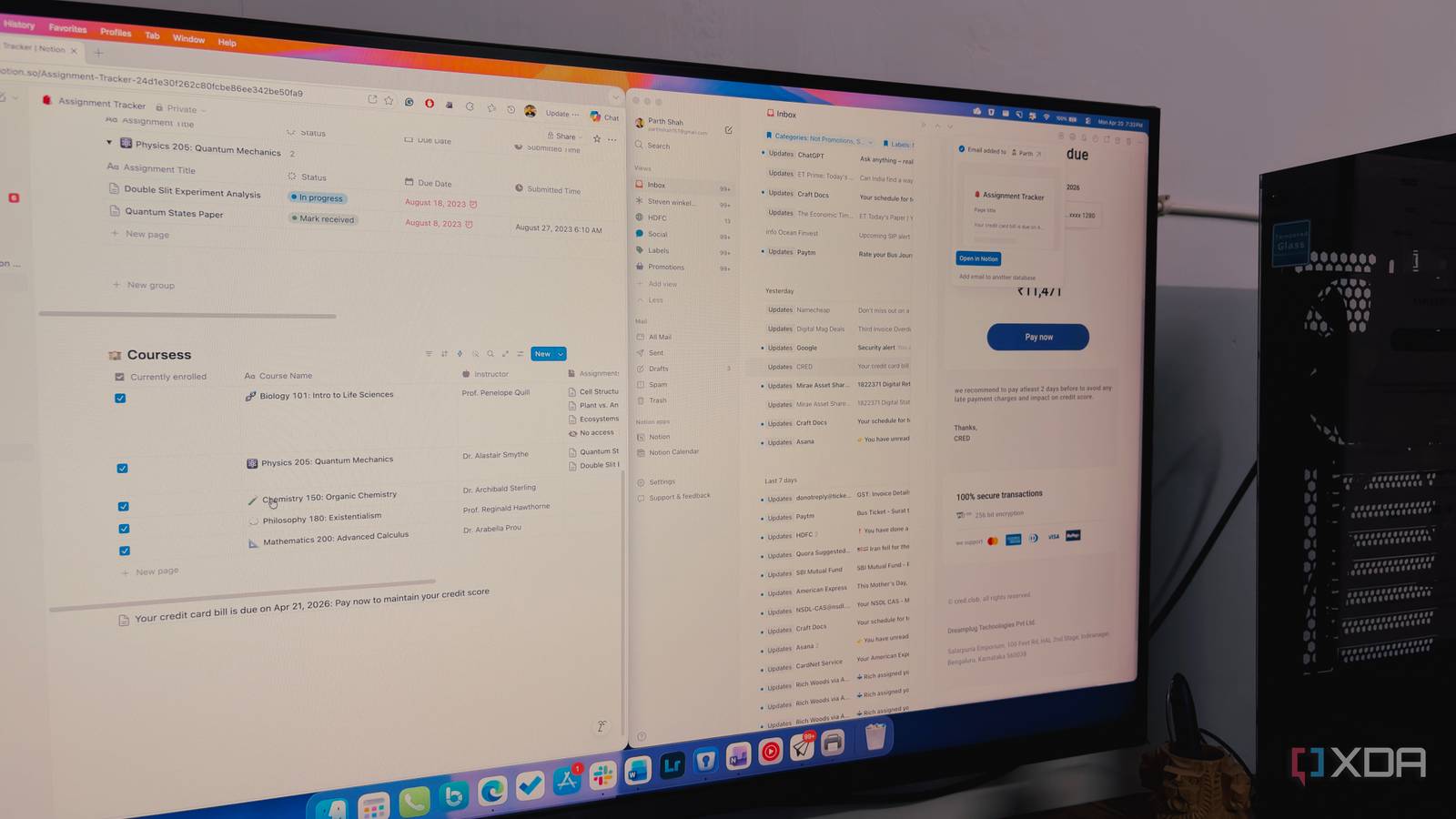
Managing a cluttered inbox is always a challenging task. While Notion Mail enters a crowded market of sleek interfaces and AI drafting tools, its most impressive feature isn’t how it helps you write emails, but how it treats them as structured data.
By introducing database routing, Notion has allowed you to bridge the gap between your email inbox and databases. It’s a shift that moves email away from your basic conversation and makes it a functional part of your existing Notion ecosystem.

I automatically turn my email receipts into Notion database entries and you should too
The workflow that changed my life
What is database routing in Notion?
Let’s go over the basics first

When Notion launched its email app, I was skeptical. But as I started digging into the architecture, I realized that Notion isn’t actually trying to build a better version of Gmail; they are building a better way to manage information.
The star of the show is a email-to-database linking feature. In simple terms, database routing is the ability to take an incoming email and, with a single click, transform it into a structured entry within any existing Notion database.
If an editor sends me a pitch or a client sends an invoice, that information is trapped in the mail app. To make it useful, I have to bridge the gap myself. Database routing removes that hassle entirely.
I can set up routes so that a specific email doesn’t just get archived; it gets sent to my ‘Article Tracker,’ ‘Finance Manager,’ or ‘Project Wiki’ database in Notion.
Before this integration, I had to open the email, highlight the text, hit Ctrl + C, switch tabs to Notion, find the right project page and database, create a new block, and hit Ctrl + V. Then I would go back to the email to grab the attachments.
By using database routing, that friction completely vanishes. Now, when I’m looking at an email, I’m not just looking at a message; I’m looking at a potential database record for one of my Notion pages.
And because it’s a native integration, I don’t have to worry about third-party automation like Zapier breaking or formatting the text incorrectly. I click a button, select a page, and get the job done.
For someone like me, who treats Notion as a digital binder for everything from tech analysis to manufacturing logs, this is a game-changer. I’m no longer jumping between apps to keep my workspace updated. Let’s check it in action.
Turning email into an input value
Huge productivity booster
The beauty of this is how frictionless the actual process is. You don’t need to be a power user or write a single line of Python to make this work.
When you open an email in Notion, you will notice the Notion icon at the top of the interface. When you click it, a menu pops up to select a page or database. It allows you to choose exactly where that information needs to go.
I have started applying this to a few core workflows that used to be a mess of tabs and manual entries.
For instance, when a digital receipt or a PDF invoice for a new piece of hardware arrives, I don’t just ‘Star’ it. I route it. It hands in my Finance database with the attachment, date, and other relevant details.
If an editor or a jewelry client sends over a list of revisions, I don’t leave it in the inbox to stress me out. I send it straight to my Project database. Suddenly, that email is no longer a message, it’s a task entry sitting right next to my draft and research notes.
As a tech writer, I get a lot of press releases and newsletters. If one captures a spark for a story, I route it to my Ideas board. These are just some of the examples I use this integration in my workflow. The possibilities are endless here.

5 reasons Outline is better than Notion for most people
Notion Mail is feature-packed
It doesn’t skip on the basics

Beyond the routing magic, Notion Mail is surprisingly feature-packed. I can create custom views based on my requirements like sender, priority, or even custom tags I have created.
There is even a deep integration with Notion Calendar where I can schedule without leaving the draft. If you are like me and used to Notion’s editor, you will feel right at home here.
I can type /, pulls up a menu of Snippets and use those templates for common replies. The entire interface is clean and beautiful and you won’t have a hard time getting started.
By combining these features, Notion Mail stops being just an email client and starts acting like a communication hub.
Build effective databases in Notion
The genius of Notion Mail isn’t in its novelty, but in its utility. While competitors are focused in an AI arms race to see who can summarize a thread the fastest, Notion has addressed one of the major pain points for existing users.
This single-click integration proves that the effective communication isn’t about reading and writing; it’s about moving information to where it matters most without the hassle of a manual transfer.
Read our dedicated post if you are still in two minds about switching from Gmail to Notion.
