



Microsoft is warning of threat actors increasingly abusing external Microsoft Teams collaboration and relying on legitimate tools for access and lateral movement on enterprise networks.
The hackers impersonate IT or helpdesk staff to contact employees through cross-tenant chats and trick them into providing remote access for data theft purposes.
Microsoft has observed multiple intrusions with a similar attack chain that used commercial remote management software, such as Quick Assist, and the Rclone utility to transfer files to an external cloud storage service.

The tech giant notes that follow-on malicious activity is hard to discern from normal operations because of the heavy use of legitimate applications and native administrative protocolos.
“Threat actors are increasingly abusing external Microsoft Teams collaboration to impersonate IT or helpdesk personnel and convince users to grant remote assistance access,” Microsoft says.
“From this initial foothold, attackers can leverage trusted tools and native administrative protocols to move laterally across the enterprise and stage sensitive data for exfiltration—often blending into routine IT support activity throughout the intrusion lifecycle,” the company added.
Multi-stage attack
In a recent report, Microsoft describes a nine-stage attack chain that begins with the threat actor contacting the target via an external Teams chat, posing as a member of the company’s IT staff and claiming they need to address an account issue or perform a security update.
The goal is to convince the target to start a remote support session, usually via Quick Assist, which gives the attacker direct control of the employee’s machine.
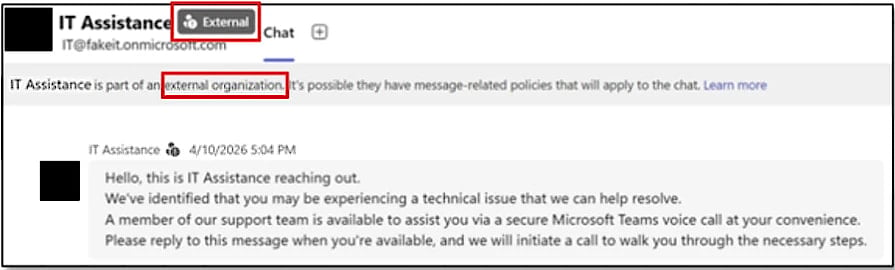
Source: Microsoft
From there, the attacker performs quick reconnaissance using Command Prompt and PowerShell, checking privileges, domain membership, and network reachability to evaluate the potential for lateral movement.
Then they drop a small payload bundle in user-writable locations such as ProgramData and execute the malicious code through a trusted, signed application (e.g., Autodesk, Adobe Acrobat/Reader, Windows Error Reporting, data loss prevention software) via DLL side-loading.
The HTTPS-based communication to the command-and-control (C2) established this way blends into normal outbound traffic, making it more difficult to detect.
With the infection established and persistence secured via Windows Registry modifications, the attacker proceeds to abuse Windows Remote Management (WinRM) to move laterally across the network, targeting domain-joined systems and high-value assets such as domain controllers.
They then deploy additional remote management software tools onto reachable systems and use Rclone or similar tools to collect and exfiltrate sensitive data to external cloud storage points.
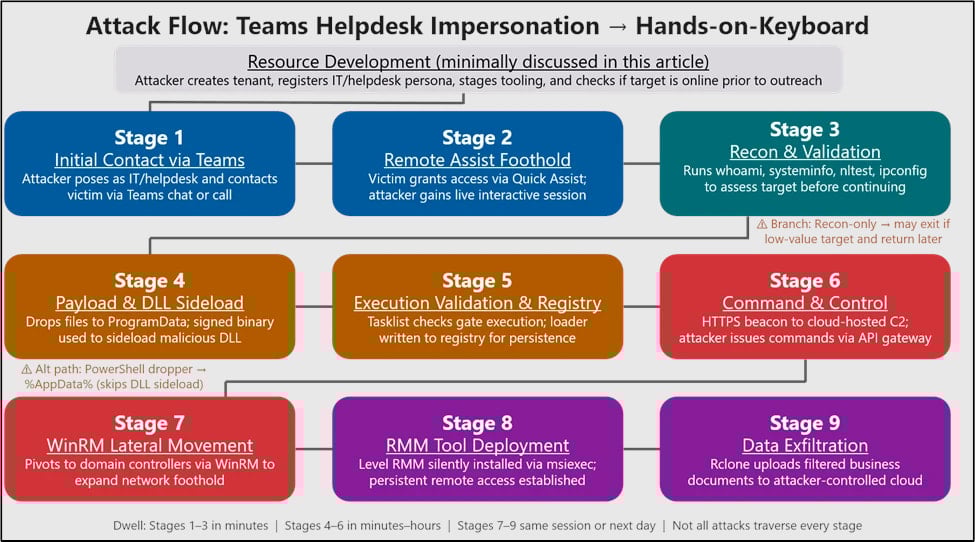
Source: Microsoft
Microsoft notes that this exfiltration step is rather targeted, employing filters to focus only on valuable information, reduce transfer volume, and improve operational stealth.
Microsoft reminds users to treat external Teams contacts as untrusted by default, and recommends that administrators restrict or closely monitor remote assistance tools, and limit WinRM usage to controlled systems.
Apart from this, the company draws attention to the Teams security warnings that explicitly flag communications from persons outside the organization and potential phishing attempts.

AI chained four zero-days into one exploit that bypassed both renderer and OS sandboxes. A wave of new exploits is coming.
At the Autonomous Validation Summit (May 12 & 14), see how autonomous, context-rich validation finds what’s exploitable, proves controls hold, and closes the remediation loop.
