

I’ve always struggled to enjoy Samsung’s One UI. While I’m continually impressed by the hardware in Samsung Galaxy phones, the software has always felt like a mixed bag.
Broad customization options jar with tools that clutter up your screen. Stylish apps live alongside frustrating bloatware. Handy tools like Now Bar live alongside useless tools like Now Brief.
While I have plenty of gripes about the software experience on my Google Pixel phone, it provides a more consistent experience overall.
However, a recent One UI update has made me jealous of Galaxy users for the first time in months.
One UI 8.5 launched alongside Samsung Galaxy S26 devices and is rolling out to older Galaxy devices through the beta program.
It’s packed with powerful upgrades, but it’s the Quick Settings customization options that caught my eye.
These changes, alongside the rest of One UI 8.5, have made me consider switching to Samsung for the first time in over a year.

The One UI 8.5 setting that finally fixed my Galaxy’s most annoying quirk
One UI 8.5 has a fix so good it feels like Samsung has been holding out on us

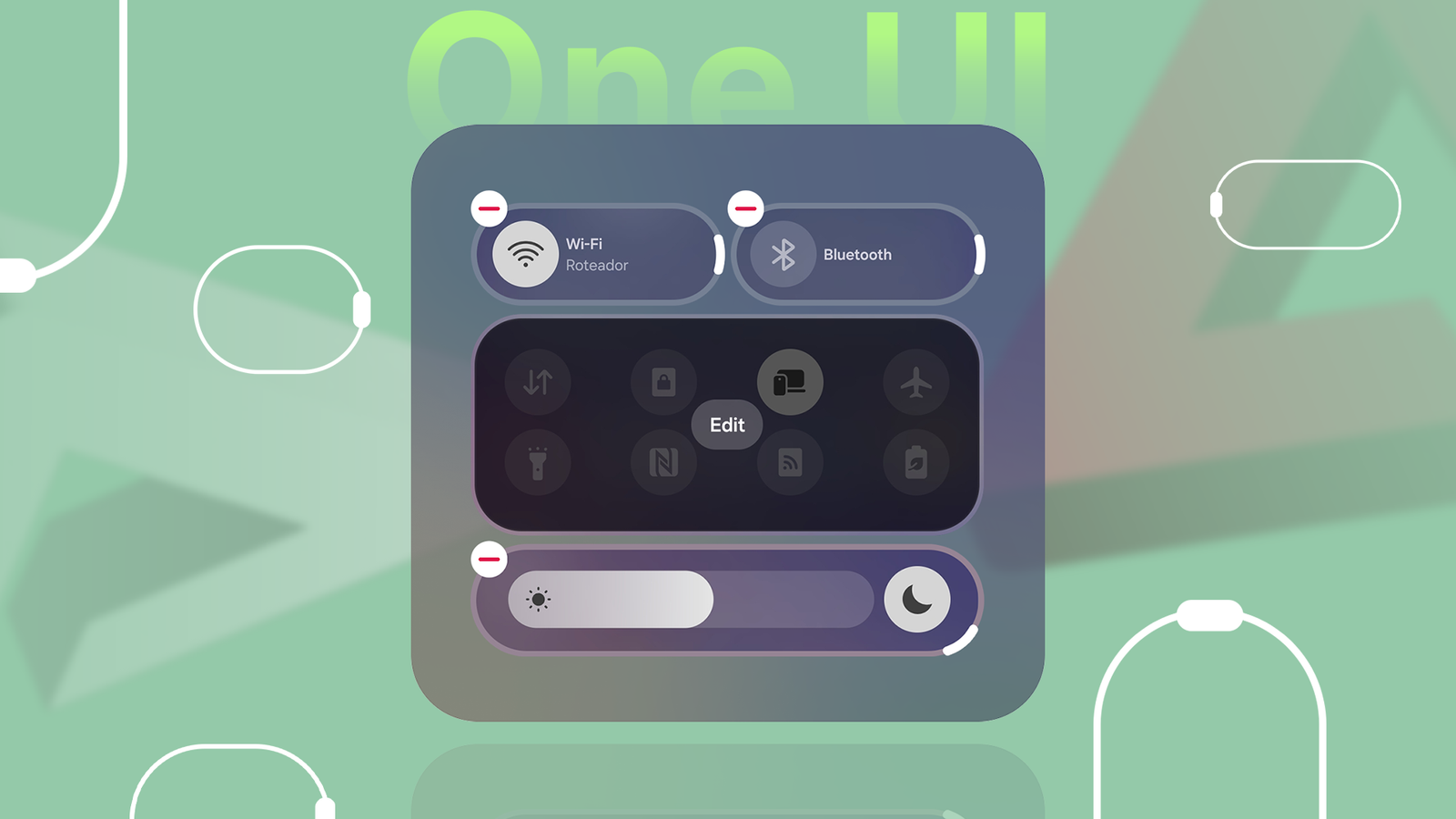
Through the QuickStar module in Good Lock, Galaxy owners running One UI 8.5 now have unprecedented control over their Quick Settings menu.
The update includes controls to adjust the size, orientation, and style of Quick Settings panels, as well as landscape orientation settings.
Changing the order of these panels is nothing new, but individual customization has always been limited. Indeed, it wasn’t until Android 16 that Google allowed us to resize each tile from 2×1 to 1×1. Useful, but limited.
One UI 8.5 takes this feature to the next level. One of the more noticeable changes is that you can rotate sliders, allowing you to adjust your phone’s brightness or volume vertically rather than horizontally.
If you don’t think this sounds useful, hold your phone and see how much of your screen you can reach with your thumb without moving your hand.
You’ll be able to tell that if your volume or brightness slider were vertical next to your thumb, it would be much easier to adjust.

Another major change is that you can now move individual tiles rather than panels.
This is more of a case of Samsung playing catch-up, but it’s still a relief to see that Galaxy users are getting this degree of customization.
What’s unique is that when you delete a tile, other tiles don’t shuffle in to fill a gap.
If you find your Quick Settings screen too cluttered to use, One UI 8.5 lets you leave gaps when you delete tiles or panels.
Finally, you can adjust the panel style to add a splash of color to your screen.
Reduced clutter, better utilities, and battery-friendly updates

One UI 8.5 is packed full of user-friendly options.
Simple changes like moving the search bar to the bottom will be welcomed by anyone using a Galaxy Ultra.
Other adjustments, like cleaning up the layout of the battery and weather widgets, are fantastic if, like me, you thought One UI was too cluttered.
It’s not all UI changes that One UI 8.5 brings to the table.
If you use other Samsung devices, their files are instantly available in the My Files app. Broader power-saving changes can improve your battery life, and partial-screen recording lets you choose which area of the screen to record.
Overall, One UI 8.5 takes a welcome step into improving the user experience rather than flogging useless features.
While it wouldn’t be a modern Android update without unhelpful AI tools (Photo Assist is the token slop in One UI 8.5), these are easily forgettable compared to the number of actually helpful features.
Is One UI 8.5 going to tempt me to switch to a Samsung device?
One UI 8.5 is the first update in a long time to make me check whether there are any hot deals on Galaxy phones right now.
But I still don’t think this update, impressive as it may be, will cause me to switch.
The problem is bloatware. I’m sick of the number of useless features and unwanted apps packed into Galaxy phones.
If these were an opt-in, I would be fine with them, but setting up a new Galaxy phone is a tedious exercise in cleaning out the junk. It’s like moving into a new house where the previous owners left all their broken furniture lying around.
Nevertheless, I think Samsung is making the right decisions.
The switch to Google Messages as the default messaging app is nearly complete, and the number of user-friendly changes in One UI 8.5 suggests that the era of shoving AI in our faces is winding down.
So if you have a Galaxy S26 or a phone eligible for the One UI 8.5 beta, I recommend exploring this update in full. It’ll be well worth your time. For me, though, I’ll be keeping my eye on Motorola.
