
Close Menu
    Facebook X (Twitter) Instagram
    Wifi PortalWifi Portal
    • Blogging
    • SEO & Digital Marketing
    • WiFi / Internet & Networking
    • Cybersecurity
    • Tech Tools & Mobile / Apps
    • Privacy & Online Earning
    Facebook X (Twitter) Instagram
    Wifi PortalWifi Portal
    Home»Cybersecurity»Microsoft fixes bug causing password sign-in option to disappear
    Cybersecurity

    Microsoft fixes bug causing password sign-in option to disappear

    adminBy adminFebruary 2, 2026No Comments3 Mins Read
    Facebook Twitter LinkedIn Telegram Pinterest Tumblr Reddit WhatsApp Email
    Windows 11
    Share
    Facebook Twitter LinkedIn Pinterest Email

    Windows 11

    Microsoft has fixed a known issue that was causing the password sign-in option to disappear from the lock screen options after installing Windows 11 updates released since August 2025.

    The password icon appears on the lock screen only if multiple sign-in options (e.g., PIN, password, security key, fingerprint) are available. However, if you use only a password, the icon may not appear because Windows 11 shows the password field by default.

    As Microsoft said when it acknowledged this bug in November, users with multiple sign-in options enabled may still not see the password icon if they installed the August 2025 KB5064081 non-security preview update or subsequent updates on Windows 11 24H2 or 25H2 systems.

    Wiz

    Despite this, affected users can still sign in with their password, as hovering over the space where the icon should appear reveals the hidden button.

    “If you hover over the space where the icon should appear, you’ll see that the password button is still available,” Microsoft explained at the time. “Select this placeholder to open the password text box and enter your password. After entering your password, you can sign in normally.”

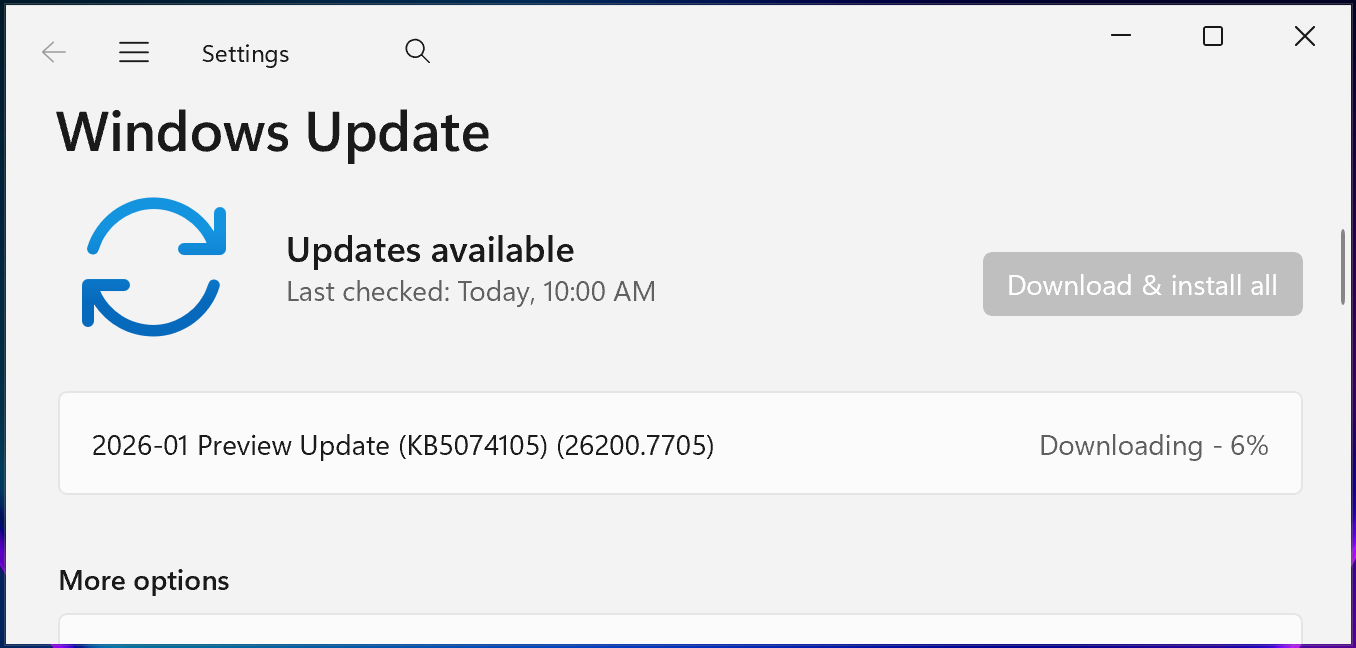
    Microsoft has now resolved this known issue in the January 2025 KB5074105 optional cumulative update for Windows 11 systems released on Thursday, January 29.

    You can install KB5074105 by opening Settings, clicking on Windows Update, selecting ‘Check for Updates,’ and then clicking the ‘Download and install’ link. You can also manually install this update after downloading it from the Microsoft Update Catalog.
    KB5074105 preview update
    KB5074105 preview update (BleepingComputer)

    ​KB5074105 includes 32 changes, including fixes for boot, sign-in, and activation issues. For instance, it fixed a bug that triggered iSCSI boot failures with an “Inaccessible Boot Device” error, and another that caused the system to hang during startup when Windows Boot Manager debugging is enabled.

    The same preview update addresses a known issue that caused Explorer.exe to hang during the first login when certain apps were configured as startup apps and fixes an issue in which Windows license migrations could fail during upgrades because the PC couldn’t register with the Windows Activation server for its digital license.

    In late September 2025, Microsoft fixed another known issue caused by the KB5064081 update that triggered playback interruptions, freezing, or black screens when playing DRM-protected video in Blu-ray/DVD/Digital TV apps.

    In the same month, it resolved other issues caused by the August 2025 Windows updates, including severe lag and stuttering affecting NDI streaming software on Windows 10 and Windows 11 devices, and app installation problems for non-admin Windows users due to unexpected User Account Control (UAC) prompts.


    tines

    Modern IT infrastructure moves faster than manual workflows can handle.

    In this new Tines guide, learn how your team can reduce hidden manual delays, improve reliability through automated response, and build and scale intelligent workflows on top of tools you already use.

    bug causing disappear fixes Microsoft option password signin
    Share. Facebook Twitter Pinterest LinkedIn Tumblr Telegram Email
    Previous Article15 Fixes To Improve Low Conversion Rates In Google Ads
    Next Article My Pick for 7 Best WooCommerce Filter Plugins to Boost UX & Conversions
    admin
    • Website

    Related Posts

    NIST to stop rating non-priority flaws due to volume increase

    April 19, 2026

    Week in review: Acrobat Reader flaw exploited, Claude Mythos offensive capabilities and limits

    April 19, 2026

    Recently leaked Windows zero-days now exploited in attacks

    April 19, 2026
    Add A Comment
    Leave A Reply Cancel Reply

    Search Blog
    About
    About

    At WifiPortal.tech, we share simple, easy-to-follow guides on cybersecurity, online privacy, and digital opportunities. Our goal is to help everyday users browse safely, protect personal data, and explore smart ways to earn online. Whether you’re new to the digital world or looking to strengthen your online knowledge, our content is here to keep you informed and secure.

    Trending Blogs

    NIST to stop rating non-priority flaws due to volume increase

    April 19, 2026

    Home Assistant’s intimidating reputation is completely undeserved once you survive the first week

    April 19, 2026

    The Complete Guide To Agentic Commerce

    April 19, 2026

    I’ve used Samsung Browser for years, but this is why I won’t go back to Chrome

    April 19, 2026
    Categories
    • Blogging (65)
    • Cybersecurity (1,399)
    • Privacy & Online Earning (172)
    • SEO & Digital Marketing (850)
    • Tech Tools & Mobile / Apps (1,674)
    • WiFi / Internet & Networking (232)

    Subscribe to Updates

    Stay updated with the latest tips on cybersecurity, online privacy, and digital opportunities straight to your inbox.

    WifiPortal.tech is a blogging platform focused on cybersecurity, online privacy, and digital opportunities. We share easy-to-follow guides, tips, and resources to help you stay safe online and explore new ways of working in the digital world.

    Our Picks

    NIST to stop rating non-priority flaws due to volume increase

    April 19, 2026

    Home Assistant’s intimidating reputation is completely undeserved once you survive the first week

    April 19, 2026

    The Complete Guide To Agentic Commerce

    April 19, 2026
    Most Popular
    • NIST to stop rating non-priority flaws due to volume increase
    • Home Assistant’s intimidating reputation is completely undeserved once you survive the first week
    • The Complete Guide To Agentic Commerce
    • I’ve used Samsung Browser for years, but this is why I won’t go back to Chrome
    • This $10 accessory has completely transformed my Pixel 10
    • Week in review: Acrobat Reader flaw exploited, Claude Mythos offensive capabilities and limits
    • If X Isn’t Working, It’s Not Just You
    • Recently leaked Windows zero-days now exploited in attacks
    © 2026 WifiPortal.tech. Designed by WifiPortal.tech.
    • Home
    • About Us
    • Contact Us
    • Privacy Policy
    • Terms and Conditions
    • Disclaimer

    Type above and press Enter to search. Press Esc to cancel.