



The traditional concept of a “secure perimeter” has effectively evaporated. As the workforce has transitioned from centralized offices to a hybrid model spanning kitchen tables, coffee shops, and co-working spaces, the old way of defending the network has become obsolete. Organizations can no longer rely on the assumption that anything inside the corporate network is “safe” and everything outside is “hostile.”
The move to Zero Trust isn’t just a passing trend, it’s a necessary evolution in security architecture. However, many organizations are finding that their current implementations are missing a critical component: the connection between identifying a user and authorizing their session.
Understanding Zero Trust
At its core, Zero Trust is a security framework built on the mantra: “Never trust, always verify.” It assumes that a breach is either imminent or has already occurred. Therefore, no user, device, or application is granted implicit trust based on its physical or network location.
Unlike legacy models that functioned like a castle moat, where once you crossed the drawbridge, you had free reign of the grounds, Zero Trust operates like a high-security facility where every single door requires a fresh badge swipe and a biometric scan. This granular level of verification is the only way to defend against modern, sophisticated cyber threats that specialize in lateral movement.
Where traditional authentication models fall-short
While most organizations have strengthened identity security by adopting multi-factor authentication (MFA) and conditional access policies, these measures alone are no longer enough.
Despite best efforts, breaches involving valid credentials continue to rise. The problem lies in a fundamental misunderstanding of what MFA does. While authentication verifies who a user is, it does not determine whether their access should be trusted at that specific moment.
Verizon’s Data Breach Investigation Report found stolen credentials are involved in 44.7% of breaches.
Effortlessly secure Active Directory with compliant password policies, blocking 4+ billion compromised passwords, boosting security, and slashing support hassles!
The identity-device gap
The “where” and “how” of access today are just as important as the “who.” Consider these common scenarios:
- A remote employee logging in from a personal, unpatched laptop.
- A third-party contractor using an endpoint that lacks up-to-date antivirus software.
- A user connecting via an unmanaged, public Wi-Fi network without using a VPN.
In these cases, the user might pass an MFA prompt perfectly. They are who they say they are. However, if that device is infected with malware, the “authenticated” session is now a direct pipeline for an attacker to enter your environment.
Token theft and session hijacking are invisible threats
Attackers know where MFA falls short, and they’ve adapted. They use infostealers, token theft, and session hijacking to steal the session cookie or token created after a successful MFA login. By loading that token into their own browser, they can bypass identity checks.
They don’t need to break in because the system already sees them as a legitimate, already authenticated user. If your security policy checks identity only at login and doesn’t verify device health, attackers can more easily expand their access and reach sensitive data.
The Role of Device Trust
Device trust is now crucial to securing the complete access journey. When access decisions depend on both identity and device health, authentication becomes contextual rather than static. A successful MFA prompt is no longer treated as the end of the security conversation. It is one signal among several.
Solutions such as Specops Device Trust embeds posture checks directly into the authentication workflow, allowing access to reflect the current state of the device, not just the user’s credentials. If the device drifts out of compliance, access can be restricted or re-evaluated without relying on a separate security tool to detect the issue later.
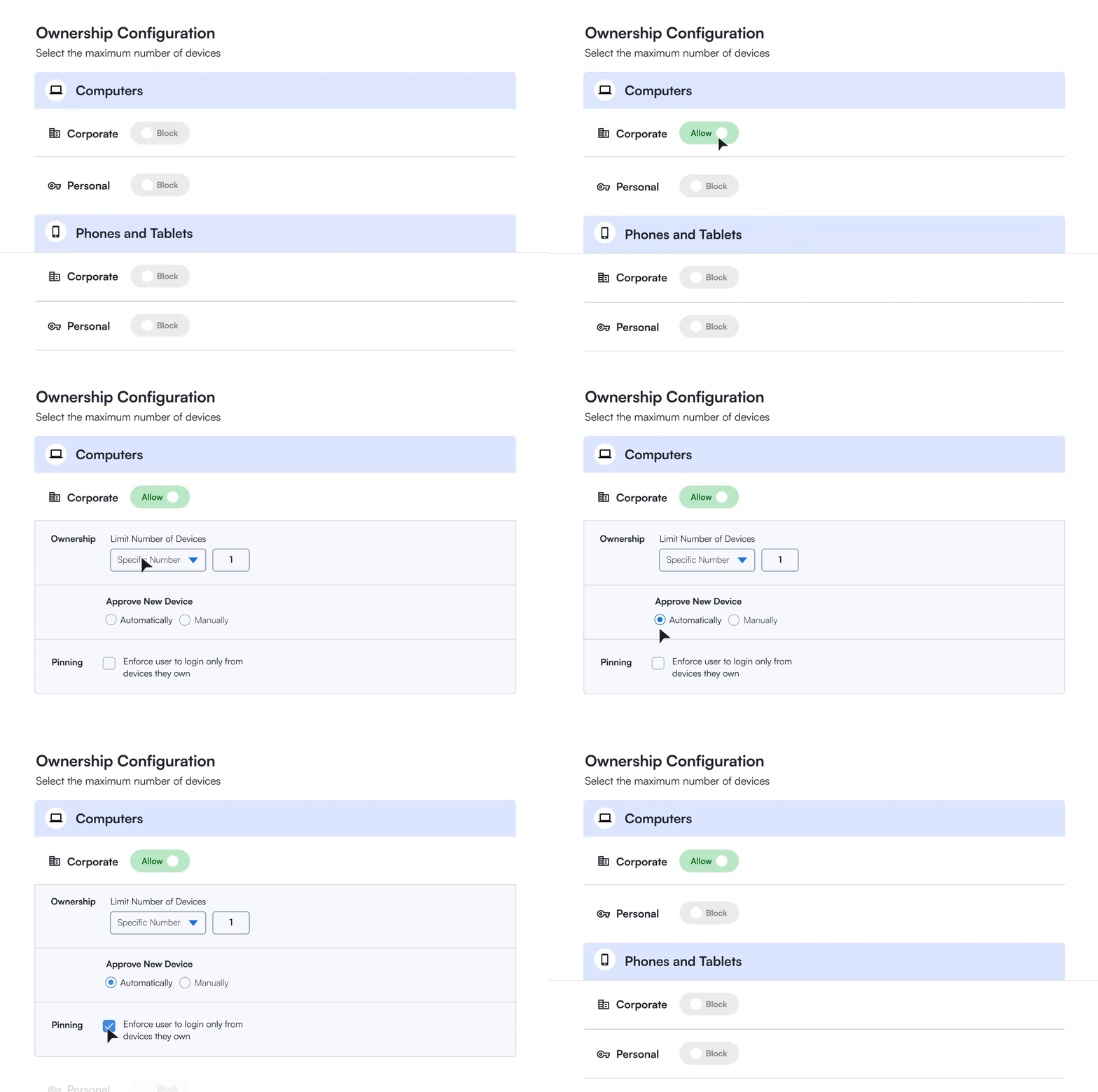
For organizations deploying Zero Trust, this adjustment corrects a structural gap. Identity confirms who is connecting, and device trust helps determine whether that connection should proceed. Without both elements working together, Zero Trust remains only partially implemented.
Continuous monitoring is key
Zero Trust is an ongoing effort. Real-time monitoring and analytics help security teams spot unusual activity and respond quickly to threats. With tools that show device health and compliance, organizations can keep strong protections in place, even as devices and conditions change.
For instance, if a user’s laptop becomes compromised mid-session or if a security feature is disabled to bypass a local restriction, the system must be capable of recognizing that change instantly.
Automating the validation of device posture means security teams can ensure that the “verify” part of “never trust, always verify” is happening in real-time. This level of oversight is essential for matching the speed and agility of current attack techniques.
Achieving True Zero Trust
Securing a hybrid workforce requires binding identity to a trusted device and continuously validating that trust throughout every session.
Specops’ Zero Trust access solution Specops Device Trust is built around that principle. It uses identity binding to ensure that access is tied not just to a user account, but to a specific, verified device. It evaluates device posture in real time and can enforce policy dynamically if risk changes during a session.
When issues are detected, built-in one-click remediation allows users to resolve compliance gaps without overwhelming IT teams. Grace periods and automated posture checks reduce friction while maintaining enforcement, so security does not come at the cost of productivity.
By combining phishing-resistant authentication with continuous device validation, organizations can make access decisions based on both who is connecting and the current state of the device they are using.
Zero Trust is not achieved through more authentication prompts. It’s achieved when identity and device trust work together to ensure that access is granted only when both remain secure.
Interested in seeing how continuously evaluated authentication could work in your organization?
Contact Specops today and learn how our Zero Trust access solution Specops Device Trust can help your organization secure your authentication lifecycle.
Sponsored and written by Specops Software.
