

The XIAO range of ESP32 chips recently got a new addition, with the ESP32-C5 entering the fray. It’s the first to support dual-band 2.4 GHz and 5 GHz Wi-Fi 6, along with Bluetooth 5 LE, Zigbee, and Thread. It’s a very “typical” XIAO ESP32 chip in the sense that it’s compact, has integrated battery management, and supports low power operation. Seeed Studio sent me one for review, alongside a selection of Grove sensors and an expansion board, so I built my own personal desk buddy just to see what it’s capable of.
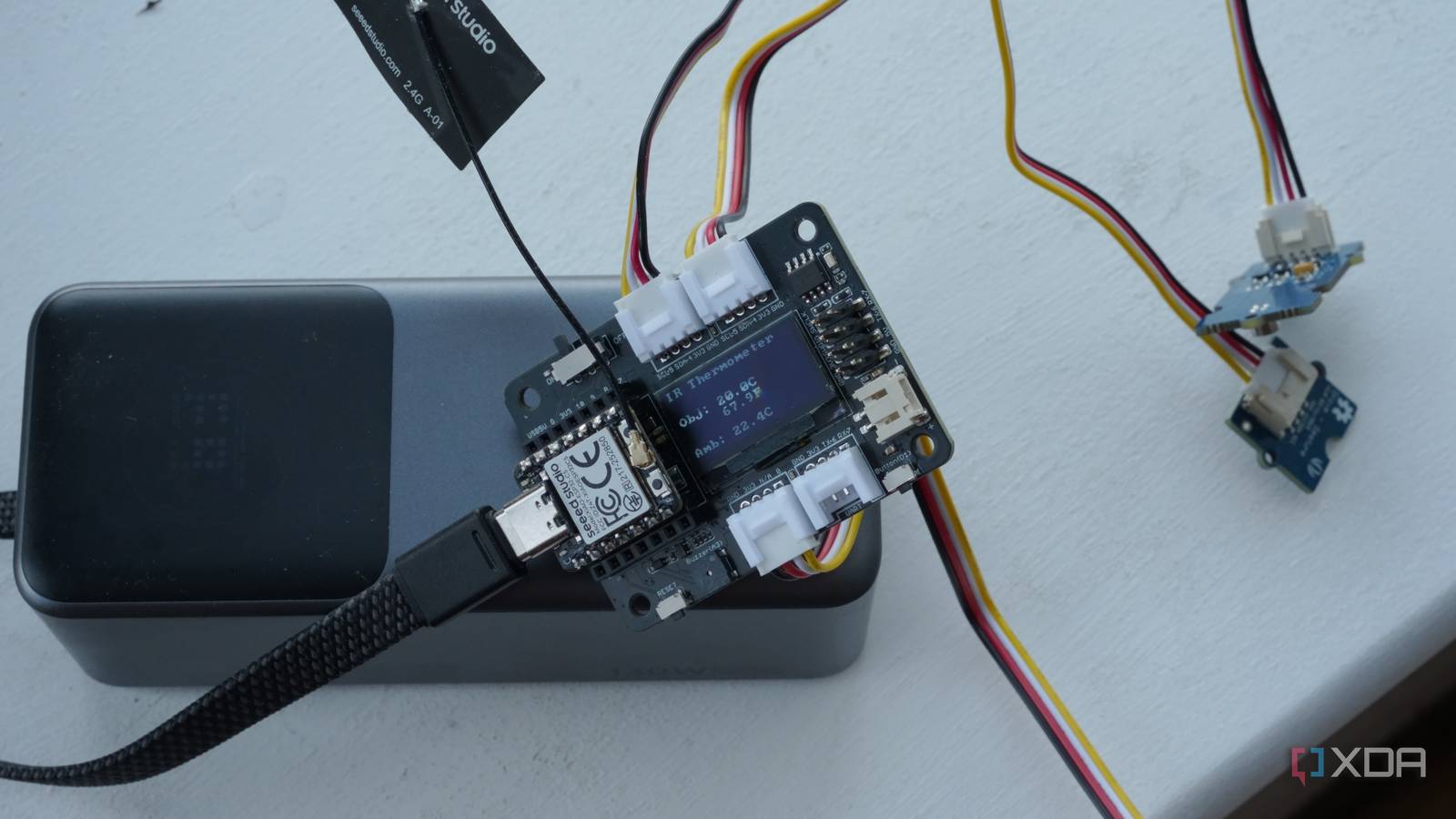
I received the following Grove sensors: a Digital Infrared Temperature Sensor, a Piezo Vibration Sensor, a Gesture Sensor (PAJ7620U2), and a Button. The temperature sensor can pick up both an ambient temperature and the temperature of anything that it’s pointed at, while the vibration sensor and the gesture sensor do exactly what they sound like. Finally, the button can be used for controlling the device thanks to the small OLED screen that the expansion board comes with. It’s a simple setup, but I got a lot of mileage out of it.
The C5 is a subtle upgrade, but it’s the right one
Wi-Fi 6 on a board the size of a thumb

If you’ve used any XIAO ESP32 board before, the C5 will feel immediately familiar. It’s the same tiny footprint, the same USB-C connector, the same set of GPIO pins broken out along the edges. Physically, there’s nothing here that screams “new generation.” But the differences are under the hood, and they matter more than you’d think.
The headline feature is dual-band Wi-Fi 6. For most ESP32 projects, 2.4 GHz Wi-Fi is fine, but if you’ve ever tried to run an ESP32 device in a home full of smart plugs, Zigbee coordinators, and Bluetooth peripherals all fighting over the same band, you’ll know how congested it gets. The C5 lets you hop onto 5 GHz instead, which in some cases can mean a noticeably more stable connection with fewer dropped packets. It’s running a 240 MHz RISC-V processor with 384 KB of SRAM, which is more than enough for sensor polling and a small web server.
The other thing worth mentioning is the protocol support. Zigbee and Thread are baked in, which means this board could theoretically act as a Matter bridge or a Thread border router down the line. I didn’t explore that for this project, but it’s nice to know the option is there. For under $7, that’s a lot of radios crammed into a board that’s barely bigger than my thumbnail.
Three sensors and one expansion board go a long way
Grove makes the hard part easy
The XIAO Expansion Board is what ties everything together here. It gives you an OLED screen, a microSD card slot, a buzzer, and a handful of Grove connectors, all without soldering anything. The Grove system is one of those things that sounds like a basic nice-to-have and nothing more… until you actually use it. Then you realize how much time it saves. Each sensor just clicks into a connector, and you’re done.
The two I2C ports on the expansion board handle the temperature sensor and the gesture sensor, while the button takes the digital slot. All three connected without any address conflicts, which is one of the benefits of having sensors that were designed to work together in the same ecosystem. I had two of the three working within the first hour, and the third, the gesture sensor, took a bit of work to get just right. The piezo vibration sensor is next on my list, connecting to the analog port, and I’m planning to use it as a way to turn on my PC with Wake-on-LAN when I slap my table.
The gesture sensor is the star of the show for me. It recognizes nine gestures, including left, right, up, down, and a few circular motions, and the recognition is surprisingly responsive. I was testing it to scroll through pages on the OLED display: a wave to the right cycles to the next screen, a wave to the left goes back. I ported the PAJ7620 Grove library to use ESPHome’s I2C instead of Arudino Wire, so it’s a current work-in-progress, but I like what it does so far, even though I want something better. I’m not quite sure what that “something better” is yet, but I’m testing a few different things, and it’ll likely involve a 3D printed case. I already printed the top part of this case from Seeed Studio to house it, but it was a bit of a struggle to fit the connectors in the side bay the way I’d like them to fit.
In the meantime, the button still has a role to play in page scrolling, and I could use it to toggle the display on and off when paired with the gesture sensor. Because, to be honest, waving my hand at the blank screen to wake it up felt a bit too much like talking to my cat when it’s ignoring me.
A desk buddy that earns its spot
It’s not flashy, but it’s mine

The end result of all of this is a small device sitting next to my monitor that rotates between a few screens: ambient and surface temperature readings and a general status page. None of this is particularly advanced, and I could probably achieve something similar with a store-bought gadget and an app. But that’s not really the point.
What I like about building something like this is the control. If I want to add a screen that shows my next calendar event, I can. If I want the buzzer to go off when the temperature in my office hits 28 degrees, that’s a few lines of code away. The OLED on the expansion board is small, only 0.96 inches, but it’s sharp enough for the kind of at-a-glance information I want from it. I’m not reading articles on this thing. I’m glancing over, seeing that my office is warm, and getting back to work.
The gesture control, though not perfected, is the part that makes it feel like more than just a sensor readout. Being able to wave through screens without picking anything up or reaching for a button makes the whole interaction feel passive, almost ambient. I caught myself waving to check the temperature page more often than I expected, which is either a sign that it’s well-designed or that I’m easily entertained. Probably both.
There are limitations, of course. The OLED is small enough that fitting more than a few lines of information on a single page requires some creative formatting. And while the C5’s Wi-Fi 6 support is great, I haven’t actually built any networked features that really benefit from it in this project yet. Right now, it’s entirely local, built through ESPHome. That’s fine for a desk buddy, but it means the dual-band connectivity is sitting there waiting for a future use case. Also, until I put it in a proper housing (the current housing still leaves trailing wires), it looks a little bit messy.
That’s the thing about projects like this, though. They’re never really finished. The XIAO ESP32-C5 has more than enough going on to keep me busy, and the Grove ecosystem means I can snap on a new sensor whenever I feel like expanding what this thing can do. For now, it sits on my desk, tells me the temperature, and I can wave at it like I’m conducting a very small orchestra. And that’s more than enough to keep me entertained.
