

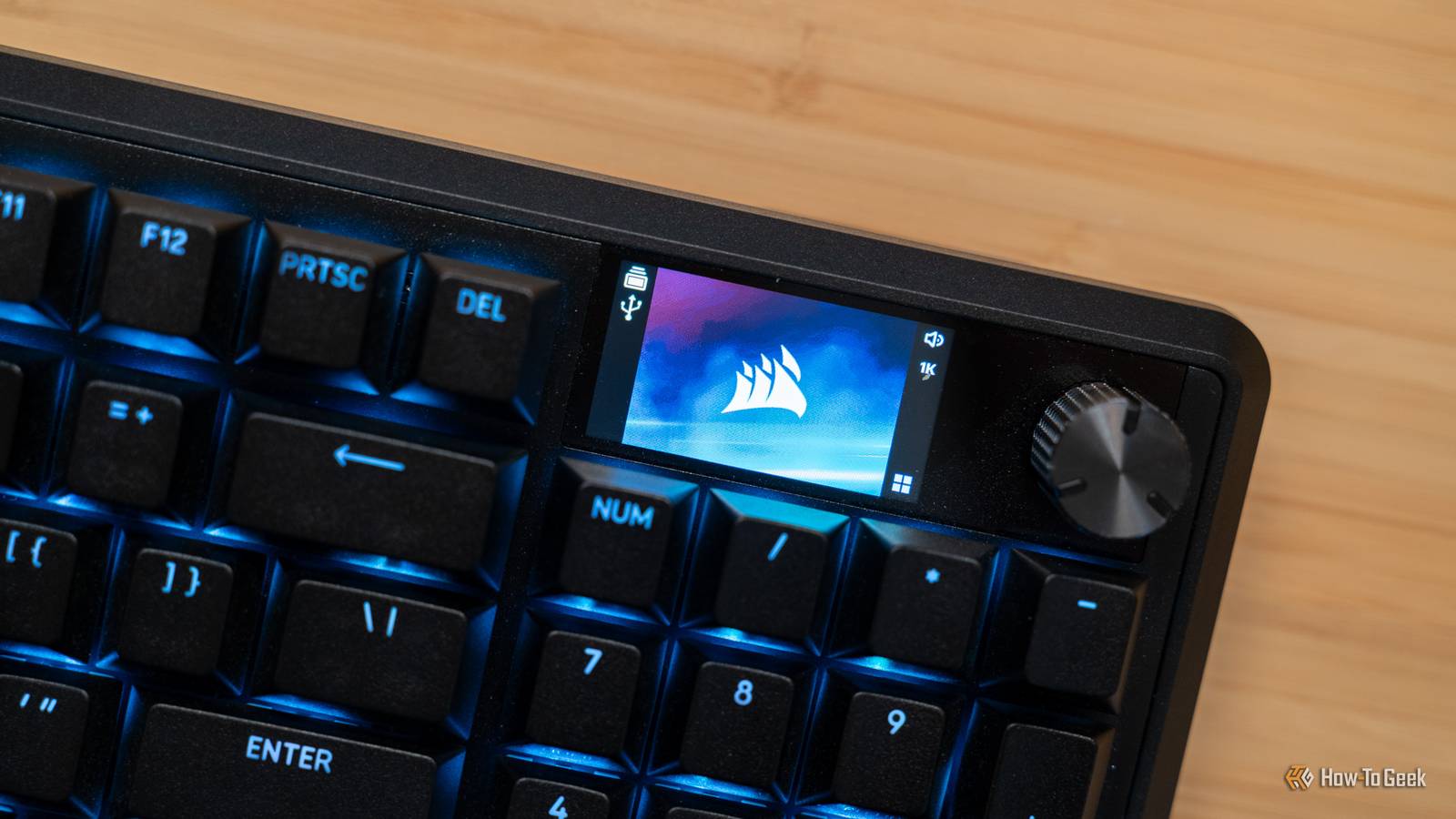
Corsair tried something new with their latest Vanguard Pro 96 keyboard, and I can’t say that I’m a fan. The built-in screen feels useless and like a value-add that doesn’t add any extra value. The rest of the keyboard though? I love it, and I think you will too.


8/10
- Brand
-
Corsair
- Wireless
-
No
- Backlight
-
Yes, RGB
- Media Controls
-
Yes, knob
The Corsair Vanguard Pro 96 keyboard comes with hot-swappable hall effect magnetic switches pre-installed. Offering multiple cable routing options on its underside, this premium keyboard is sure to take any setup to the next level. It also has a built-in Stream Deck on the side using the customizable G1-5 buttons.
- Great build quality
- Many cable routing options
- Keys feel good to type on and aren’t too loud
- Built-in Stream Deck functionality

How We Test and Review Products at How-To Geek
We go hands-on with every product to ensure it’s worth your time and money.
Price and availability
The Corsair Vanguard Pro 96 keyboard is available from Amazon, Best Buy, Micro Center, and directly from Corsair. It comes in one color and with only one set of pre-installed switches to choose from.l
- Brand
-
Corsair
- Wireless
-
No
- Backlight
-
Yes, RGB
- Media Controls
-
Yes, knob
- Num Pad
-
Yes
- Switch Type
-
Hall effect, magnetic
- Replaceable Keys
-
Yes
- Internal Sound Dampening
-
Yes
- Wrist rest
-
Yes
- Polling rate
-
Up to 8,000Hz
- Layout
-
96%
- Software Customization
-
Corsair Web Configurator
- Hot-swappable
-
yes
This keyboard has a premium build (with a price to match)
I love that more keyboards are embracing hot-swappable switches

The Corsair Vanguard Pro 96 keyboard is quite premium. It has a sleek aluminum frame and a hefty feel. It’s actually pretty heavy for a keyboard, coming in with a weight of nearly 2.5 pounds. The included wrist rest is also a nice touch, and I love that it magnetically attaches.
While this keyboard is wired only, Corsair actually built the underside to handle cable routing in a unique way. There are five different grooves on the bottom that allow you to route the cable out either side, directly out the back, or out the back left or right. Being able to route the cables in this way allows you to ensure that you can have a clean and tidy desk setup, having the cord go exactly where you need. There are also two feet if you want the keyboard to be tilted slightly.
On the connectivity side of things, the Vanguard Pro 96 features a USB 3.1 port and offers up to an 8,000Hz report rate so you can ensure that all of your keystrokes are tracked as fast as possible.
The switches are pretty unique, I think. They’re Corsair MGX V2, which are Corsair’s hall effect hyperdrive magnetic switches. The Vanguard Pro 96 is hot-swappable, but the switches do have to be “compatible magnetic switches,” which CORSAIR doesn’t go into great detail about.
However, on Corsair’s web configurator (the only way to customize this keyboard), there are a handful of Gateron switches listed for calibration, and you’re also able to enter your own maximum actuation distance for other switches for manual calibration.
A built-in Stream Deck offers customizability I didn’t know I needed
Why own a Stream Deck when you have this keyboard?

I have a Stream Deck on my desk, and have since it was released back in 2017. It’s a great device to use in a variety of ways, but one of the best parts of the Stream Deck is using it as a very advanced macro keypad.
With the Corsair Vanguard Pro 96, you don’t even need to own a Stream Deck to use one. The G keys on the side are Stream Deck compatible, giving you five fully customizable buttons that you can use for anything you want.
You could have G1 programmed to start or stop streaming OBS, while G2-4 were different scenes in OBS. G5 could be set to play a sound effect on the stream. This is just one example, but you could also set them up to launch apps for work, type a macro, control the volume of your microphone, and so much more.
Having the Vanguard Pro 96 on my desk meant I could rely less on my Stream Deck and more on the keyboard. Now, the Vanguard Pro 96 doesn’t have a built-in screen for the Stream Deck keys, but for just doing simple macros, that’s not a problem at all—at least, not in my setup.
What is the screen even for?
It offered so much potential…

One of the features I was most excited about with the Vanguard Pro 96 was the 1.9-inch 320×170 IPS screen at the top right of the keyboard. This display is actually really crisp. I’m very impressed by how good it looks. Simultaneously, I’m entirely unimpressed with the fact that it’s basically not even used outside displaying a picture or GIF.
This screen could have been used in many different ways, from integrating with the Stream Deck plugin to show content (like a playing song, weather, or other live information) or even just an onboard menu for the keyboard. It could have been used for something more than it has been.
The keyboard currently shows what poling rate you have it set to, as well as a few other settings (like a USB connection symbol, which doesn’t make sense because the keyboard is wired only).
Overall, Corsair could have done a MUCH better job with the screen on this keyboard. As it stands, it’s more distracting than anything else. I don’t want a graphic or moving image on my keyboard. Make the screen useful, or just leave it off next time.
Should you buy the Corsair Vanguard Pro 96?

I really like Corsair’s Vanguard Pro 96 mechanical keyboard. The hall effect switches feel good to type on, the 96% layout is actually really comfortable to use, and I love the Stream Deck integration.
My one complaint is the display, which is pretty minimal all things considered. With a $230 retail price tag, and frequent sales dropping it to $160, I’d say this keyboard is definitely worth it if you’re in the market for a new typing companion.
The 96% layout is honestly a great selling point. It’s more compact than a traditional keyboard without losing any of the core features that you likely rely on, like the 10-key, a full function row, and arrow keys.
The premium build is also a huge plus, especially with the cable routing it offers. My favorite feature remains the Stream Deck integration though, it’s just so seamless and such a great function, making this a feature-packed keyboard for any setup.
8/10
- Brand
-
Corsair
- Wireless
-
No
- Backlight
-
Yes, RGB
- Media Controls
-
Yes, knob
The Corsair Vanguard Pro 96 keyboard comes with hot-swappable hall effect magnetic switches pre-installed. Offering multiple cable routing options on its underside, this premium keyboard is sure to take any setup to the next level. It also has a built-in Stream Deck on the side using the customizable G1-5 buttons.
