
Close Menu
    Facebook X (Twitter) Instagram
    Wifi PortalWifi Portal
    • Blogging
    • SEO & Digital Marketing
    • WiFi / Internet & Networking
    • Cybersecurity
    • Tech Tools & Mobile / Apps
    • Privacy & Online Earning
    Facebook X (Twitter) Instagram
    Wifi PortalWifi Portal
    Home»Tech Tools & Mobile / Apps»Pixel Weather app update brings new redesigned icons
    Tech Tools & Mobile / Apps

    Pixel Weather app update brings new redesigned icons

    adminBy adminMarch 5, 2026No Comments2 Mins Read
    Facebook Twitter LinkedIn Telegram Pinterest Tumblr Reddit WhatsApp Email
    Pixel Weather app update brings new redesigned icons
    Share
    Facebook Twitter LinkedIn Pinterest Email

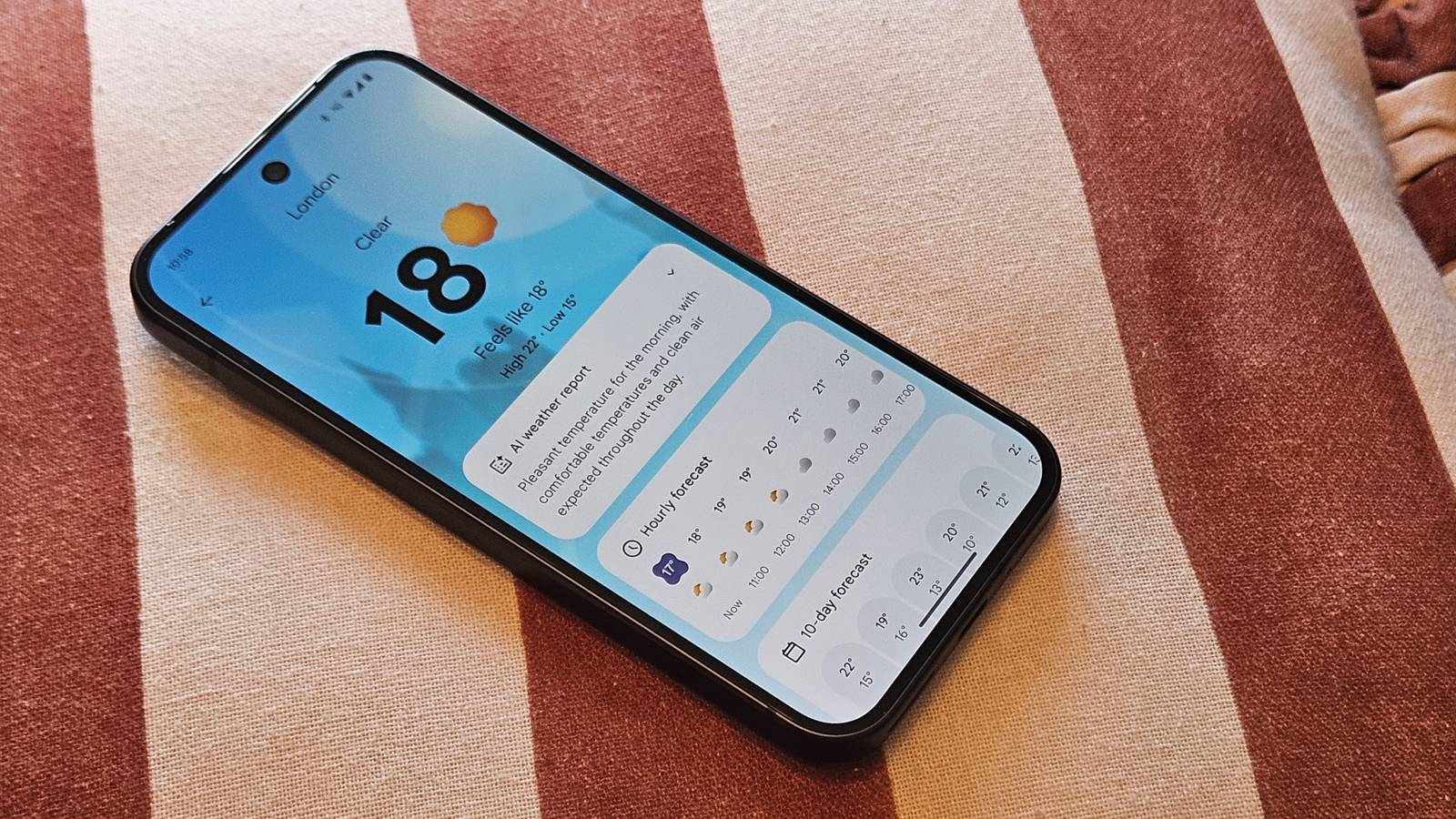
    Despite Google apps and services being in a relatively complete state after years of iteration, the brand is never truly done, making small tweaks here and there as it sees fit. For the most part, this is a good thing, because you never know how a small change can make a huge improvement.

    With that said, Google is now rolling out a new update to its Pixel Weather app, which gives the weather icons a small pop of color. The change was spotted by Android Authority, and makes them easier to read. There’s even an explanation for the change, with Google sharing that the new icons offer improved contrast and clarity.

    “They’re now more accessible, especially for those with low vision”

    New Accessible Weather Icons Pixel Weather Credit: Android Authority

    This new change will arrive in the latest version of the app, coming in as version 1.1.20251230.875325825. For the most part, things will stay the same when it comes to the shapes used to represent different states of the weather, but as stated before, the colors are now different, making it a lot easier to read.

    As you can expect, the improved contrast and clarity also shows up in other places in the app, including the Pixel Weather widget. Plus, there’s also a new feature that will let you arrange saved locations a lot easier, making it possible to move cities up or down, without having to drag each one around the screen.

    You can now give the Pixel Weather app an update to see if you’ll have access to these new changes. Although Google continues to improve the Pixel Weather app, we reported towards the end of last month that Google Weather for Android wasn’t going to be around anymore. For those that rely on the app, it’s a huge blow.

    However, it’s a change that we already knew was coming, but has started to roll out to more people recently. Despite the app’s demise, users can still gain access to the same information, but it will just be in a new location, with a redirect that will take users to Google Search with weather results. Again, for casual users, we don’t think this is going to be a big deal.

    WIth that said, things can always change, as we’ve seen with Google’s apps and services. One day Google’s working away making something its best, and another day it’s putting it to rest.

    app brings icons Pixel redesigned update Weather
    Share. Facebook Twitter Pinterest LinkedIn Tumblr Telegram Email
    Previous ArticleData center new builds diminish even as demand rises
    Next Article Russian Ransomware Operator Pleads Guilty in US
    admin
    • Website

    Related Posts

    This Bright and Powerful Blink Floodlight Camera Is Over Half Off Right Now

    April 20, 2026

    6 small home upgrades that actually add value when you sell

    April 20, 2026

    Google Play Store 50.9.24 APK Download by Google LLC

    April 20, 2026
    Add A Comment
    Leave A Reply Cancel Reply

    Search Blog
    About
    About

    At WifiPortal.tech, we share simple, easy-to-follow guides on cybersecurity, online privacy, and digital opportunities. Our goal is to help everyday users browse safely, protect personal data, and explore smart ways to earn online. Whether you’re new to the digital world or looking to strengthen your online knowledge, our content is here to keep you informed and secure.

    Trending Blogs

    The Internet Still Works: Reddit Empowers Community Moderation

    April 20, 2026

    This Bright and Powerful Blink Floodlight Camera Is Over Half Off Right Now

    April 20, 2026

    SGLang CVE-2026-5760 (CVSS 9.8) Enables RCE via Malicious GGUF Model Files

    April 20, 2026

    YouTube & Discover political ad rules updated

    April 20, 2026
    Categories
    • Blogging (66)
    • Cybersecurity (1,415)
    • Privacy & Online Earning (174)
    • SEO & Digital Marketing (859)
    • Tech Tools & Mobile / Apps (1,704)
    • WiFi / Internet & Networking (234)

    Subscribe to Updates

    Stay updated with the latest tips on cybersecurity, online privacy, and digital opportunities straight to your inbox.

    WifiPortal.tech is a blogging platform focused on cybersecurity, online privacy, and digital opportunities. We share easy-to-follow guides, tips, and resources to help you stay safe online and explore new ways of working in the digital world.

    Our Picks

    The Internet Still Works: Reddit Empowers Community Moderation

    April 20, 2026

    This Bright and Powerful Blink Floodlight Camera Is Over Half Off Right Now

    April 20, 2026

    SGLang CVE-2026-5760 (CVSS 9.8) Enables RCE via Malicious GGUF Model Files

    April 20, 2026
    Most Popular
    • The Internet Still Works: Reddit Empowers Community Moderation
    • This Bright and Powerful Blink Floodlight Camera Is Over Half Off Right Now
    • SGLang CVE-2026-5760 (CVSS 9.8) Enables RCE via Malicious GGUF Model Files
    • YouTube & Discover political ad rules updated
    • Vulnerability exploitation surges often precede disclosure, offering possible early warnings
    • 6 small home upgrades that actually add value when you sell
    • The Gentlemen ransomware now uses SystemBC for bot-powered attacks
    • How To Build AI Visibility In 90 Days [Webinar]
    © 2026 WifiPortal.tech. Designed by WifiPortal.tech.
    • Home
    • About Us
    • Contact Us
    • Privacy Policy
    • Terms and Conditions
    • Disclaimer

    Type above and press Enter to search. Press Esc to cancel.