

Synology has been the default recommendation in the NAS space for years, and for good reason. DSM is polished, the ecosystem is mature, and there’s a massive community behind it. But if you’ve been paying attention to Synology’s recent trajectory, you’ll know that the company has been making some questionable decisions. Drive restrictions, underwhelming hardware, price hikes, and the removal of features like hardware HEVC transcoding have left a lot of long-time users feeling like they’re paying more for less. And at the same time, competitors, like Ugreen, have been ramping up fast.
I’ve been testing the Ugreen NASync iDX6011 Pro for the past while, and it’s quickly becoming the clearest example of everything Synology is getting wrong right now. It’s not that Synology’s software is bad, because it isn’t. It’s that the hardware you’re getting for your money has stagnated, and companies like Ugreen are now shipping devices that make that gap impossible to ignore. The iDX6011 Pro is packed to the gills with hardware and features that Synology simply doesn’t offer at any price point, let alone a product that competes in the ultra high-end market of the iDX6011 Pro.
None of this is to say that UGOS Pro is perfect; it isn’t. There are rough edges, the software has room to grow, and the “Super Early Bird” price of $1,559 ensures that only those who really need this NAS will want to buy it. But when you look at what you actually get in the box, the argument for Synology gets a whole lot harder to make for a prosumer-level NAS. And it’s not just this NAS that proves it; the DXP4800 Plus and the DH4300 Plus are both great alternatives, too.


9/10
- CPU
-
Intel Core Ultra 7 255H
- Memory
-
64 GB DDR5
- Drive Bays
-
6
- Ports
-
2x Thunderbolt 4, 2x USB 3, 2x USB 2, 1x PCIe x8 expansion, x1 OCuLink, x1 8K HDMI, x1 SD 4.0
Ugreen’s NASync iDX 6011 Pro is the best and most powerful NAS from Ugreen yet. Featuring 64 GB of RAM, an Intel Core Ultra 7 255H, OCuLink, two 10 GbE ports, a display on the front, and a well-integrated local AI pipeline, it’s got everything you could ever need for managing your data.
- Incredible local AI pipeline
- Great build quality and hardware
- UGOS Pro has massively improved
About this article: Ugreen sent us the Ugreen iDX6011 Pro for the purposes of this article. The company had no input into its contents.
The hardware gap is getting embarrassing
It’s a lot of hardware… for a lot of money

Let’s start with the most obvious difference: the specs. The iDX6011 Pro ships with an Intel Core Ultra 7 255H, a 16-core, 16-thread processor that boosts up to 5.1 GHz and delivers a lot of AI computational prowess through its integrated NPU, and it comes paired with 64GB of LPDDR5X memory to hold those models. For context, Synology’s similarly positioned NAS devices ship with far weaker processors and a fraction of the RAM, and they’ll still charge you more for it.
On top of that, the iDX6011 Pro has dual 10GbE networking, dual Thunderbolt 4 ports, an internal PCIe Gen 4 x8 expansion slot, an OCuLink port, 8K HDMI output, two M.2 NVMe slots, and a dedicated 128GB system SSD, all alongside six SATA bays that support up to 196TB of raw storage. Try configuring anything close to that from Synology, and you’ll quickly run out of options, because they simply don’t offer hardware like this.
Synology’s 2025 series models have been criticized for shipping with weaker components than competitors at higher price points. US tariffs (which themselves are in limbo) pushed prices up even further, and Synology’s controversial attempt to lock users into proprietary drives didn’t exactly help their reputation either. They eventually walked that back after, presumably, sales took a hit, but the damage was done. When your competition is shipping Intel Core Ultra processors and 64GB of RAM, and you’re still pushing outdated silicon at inflated prices, people are going to notice.

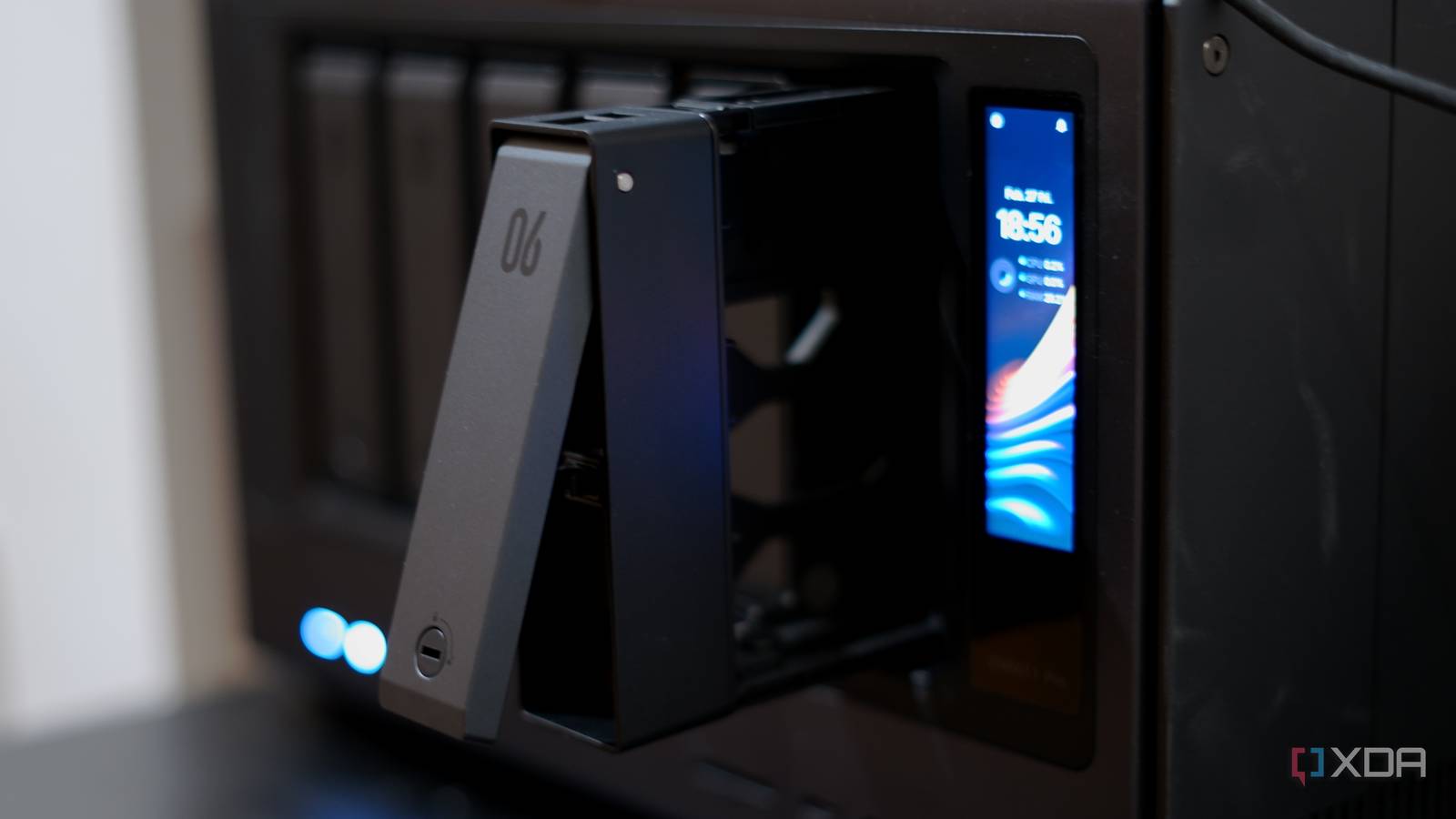
The star of the show, at least in a unique sense, is the 3.71-inch LCD display on the front of the unit. While it’s not going to replace the web interface, it’s more useful than I expected, and significantly beats the basic options you’ll find from competitors like Asustor. It shows CPU, GPU, and NPU load in real time, along with temperatures, network status, and drive health. It’s fully touch-operated, and makes it super easy to get an idea of what your system is doing at a glance. It’s the kind of feature that makes you wonder why more NAS devices don’t have one, and it’s a real nice-to-have if you want to just keep an eye on your system’s resources.
With most NAS units, you’ve always had to pull up a browser or the mobile app to check on things. It’s a small detail, sure, but it’s representative of the broader issue with Synology, too: Ugreen is willing to add convenience features, while Synology seems content to leave the hardware experience largely unchanged year after year. When you’re standing next to your server rack and just want a quick glance at thermals, pulling out your phone shouldn’t be the only option. I even built a small ESP32-based display to show me things exactly like this, because it’s so beneficial to have.
Local AI that’s actually worth using
A well-built, integrated AI system

This is where things get especially interesting, as the iDX6011 Pro runs local AI models out of the box, and the hardware actually backs it up. The NPU from the Core Ultra 7 gets put to work here, alongside the 64GB of RAM the machine comes with.
Ugreen ships the device with support for Qwen 3, a 4B parameter model running at full FP16 precision, as there’s no aggressive quantization needed when you have 64GB to play with. The model weights alone are about 8.2GB, and it runs at roughly 8 tokens per second using around 12GB of memory. There’s also Uliya-v 2b, a lighter vision-language model that manages 16 tokens per second on just 1.5GB of memory. Uliya handles image search and recognition, and it can even be used to control Docker containers through natural language commands.
What I found interesting while digging through the system is how the inference stack is put together. Ugreen is running a modified version of Ollama compiled with Intel IPEX (Intel Extension for PyTorch) and SYCL, which means the LLM inference is offloaded to the integrated Intel Arc GPU rather than running purely on CPU. The runner process loads the full Qwen 3 model into GPU memory with all layers offloaded, a 32K context window, and 16 threads for any CPU-side work. They’ve also bundled architecture-specific GGML backends for practically everything, so the CPU fallback path is well-optimized too. It’s not something most users will ever see or care about, but it shows that Ugreen put genuine engineering effort into the AI pipeline rather than just slapping Ollama on top and calling it a day.

But the real surprise is what Uliya can actually do. It’s not just a chatbot that answers questions, but a full NAS management assistant with tool-calling capabilities wired into nearly every part of the system. Under the hood, the AI Console uses MCP (Model Context Protocol) to dispatch actions across UGOS’s built-in apps. That means you can ask Uliya to search for and play a movie from your media library, find photos by describing what’s in them, search for songs or albums and set a sleep timer, search for Docker images and containers, adjust fan speeds, switch between power efficiency profiles, query device and user info, and more. Each of these integrations has its own set of well-structured tool definitions, so the model knows exactly what parameters each action expects and how to call them. It’s a genuinely useful layer on top of the NAS rather than a gimmick, and the fact that it all runs locally through Qwen 3 means none of your queries or file contents leave the device.
Interestingly, while digging through the firmware I also found tool definitions for capabilities that aren’t live yet, like file management operations (search, open, close files, grant permissions, empty the recycle bin) and app management (search, install, update, and uninstall apps from the App Center). They’re defined in the system config alongside the working tools but aren’t exposed to the model at runtime. These haven’t been announced as features that it’s capable of, so it may either be an early look into the future, or something that was tested and eventually shelved. If they land, Uliya will go from being a convenient shortcut for hardware settings and media playback to something closer to a complete natural language interface for the entire NAS.
Behind the chat interface there’s also a full RAG (retrieval-augmented generation) pipeline. The system runs an OpenVINO-based embedding model and a separate reranker model, about 1.4GB of weights total, backed by a Postgres database for vector storage and knowledge indexing. When you ask the AI Console a question about your documents, it’s not just throwing your files at the LLM raw. It’s embedding them, retrieving relevant chunks, reranking for relevance, and then feeding context to Qwen. That’s a proper enterprise-style RAG architecture running on a NAS.

The photo AI side is equally ambitious in scope, even if I haven’t fully exercised it yet. UGOS defines ten separate model classes for photo management: blur detection, scene and object recognition, face recognition, similar/duplicate photo detection, NSFW content filtering, OCR text extraction, pet breed recognition (39 cat and dog breeds), text-to-image search (think CLIP-style “find me photos of a sunset over water”), a parent image recognition model that ties several of those together, and even an offline model training package that lets you train custom classifiers on your own photo library. These models are downloaded on demand, and they all run through OpenVINO and ONNX Runtime, targeting the NPU and GPU for acceleration.
There’s also a voice memo app that ties the speech-to-text model into the LLM pipeline, and it can transcribe meeting or call recordings and then use Qwen to generate summaries, meeting minutes, or mind maps from the transcription. It’s a surprisingly complete workflow for something running entirely on a NAS.
What I do appreciate is that Ugreen also supports plugging in an OpenAI API key, so if you’d rather lean on cloud models like ChatGPT or Gemini for certain tasks, you can do that too. It’s a practical approach, as you can use local processing for privacy-sensitive tasks, with the option to offload to more capable cloud models when you need them.
All told, the AI Console takes up about 14GB of disk space, which is a meaningful chunk but not unreasonable given what you’re getting. The whole stack, consisting of Ollama with IPEX, OpenVINO 2025.01, the RAG pipeline, the embedding and reranker models, and the LLM weights, all runs locally with no cloud dependency for the core functionality. For a NAS, that’s a pretty bold bet, and it’s one that the Core Ultra 7 and 64GB of RAM actually make viable. Synology has nothing remotely comparable.
Ugreen’s display poses an interesting challenge
Can we make it work on other operating systems?

As I’ve mentioned in the past, my Ugreen DXP4800 Plus is already running Proxmox instead of UGOS, but with this device, switching means forfeiting the display on the front. As a result, I’ve been poking around the iDX6011 Pro’s internals to see how feasible it would be to do the same here. Specifically, I wanted to know: can you keep that front panel display working if you ditch UGOS?
The short answer is yes, mostly. The long answer involves a lot of reading kernel logs and digging through sysfs.
The display itself is a 258×960 eDP panel, driven by Intel’s i915 graphics driver, with the majority of code being written in LVGL. It shows up as eDP-1 and mostly works on any standard Linux distribution without any custom panel driver or firmware. If you boot Proxmox and install Xorg, the screen lights up, and the kernel picks it up without complaint. That’s the easy part.
The backlight is where it gets more involved. Brightness isn’t handled by the usual ACPI backlight interface that laptops use. Instead, it’s controlled by an ITE IT5570 embedded controller through direct port I/O, which uses legacy ISA-style commands. On UGOS, a custom kernel module handles this, along with fan control, watchdog timers, and a few other EC functions. Without that module loaded, the backlight stays at whatever state the BIOS left it in.
I’ve already built a small display application that runs on the iDX6011 Pro’s screen acting as a drop-in replacement that can re-use the pipelines already constructed by Ugreen. Right now it shows system stats like CPU load, memory usage, and temperatures, and it’s rendered on the eDP panel. It’s basic, but it proves the concept: the display hardware is controllable, it just needs the right underlying back-end to prop it up. The touchscreen is next up on my list to get working, but the kernel module required to use it will require reverse engineering to get up and running correctly. Then, when I’m ready, I’ll rebuild the entire underlying pipeline so it can be deployed and used on any device, not just UGOS.
The possibilities here are pretty wide open. You could build a dashboard that shows VM status and resource allocation from Proxmox’s API. You could display ZFS pool health, scrub progress, or snapshot counts. With the touchscreen working, you could even have interactive controls; tap to restart a container, swipe through VMs, that sort of thing. The panel is small, but 258×960 is enough real estate for a useful at-a-glance interface, especially in portrait orientation. If you wanted to limit what you install on the Proxmox host, you could even pass the display through to a VM and control it from there, polling metrics from the host and reporting them that way.
What I find encouraging about all of this is that the hardware isn’t locked down. The display, the backlight, the EC, and the LEDs are all accessible through standard Linux interfaces or well-documented protocols. Ugreen isn’t going out of their way to prevent you from running your own OS, and the hardware choices they’ve made (Intel GPU, standard I2C buses, ACPI-enumerated devices) mean the community can fill in the gaps where UGOS-specific drivers are needed. Comparing that to some vendors who actively fight against third-party firmware, it’s a welcome change.
“But isn’t Ugreen spying on me?”
You can find the answer yourself in minutes

I see this question come up every time Ugreen is mentioned, so I figured I’d actually check rather than speculate, just like I did with the DXP4800 Plus. With SSH root access enabled, it takes about thirty seconds to see exactly what the NAS is doing on the network.
Running ss -tunp, which shows every active network connection along with the process responsible, revealed exactly five connections: two nginx sessions serving the web UI to my browser, my SSH session, and two internal localhost connections between system services. That’s it. Zero connections to any external IP address. There wasn’t anything phoning home, nor were there any telemetry endpoints or mystery connections to Chinese servers. Even when downloading the 5.5GB Nvidia Toolkit and launching applications on the NAS, the only external connections are the ones you’d expect, namely Cloudflare CDN for the payload and Ugreen’s app server for the package metadata.
Every internal service, like Postgres, Redis, Ollama, the RAG pipeline, and the MCP server, binds exclusively to 127.0.0.1. The only things exposed to the network are the web UI (nginx), SSH, and dnsmasq for the virtual bridge networks. The cron jobs are all standard Debian housekeeping, with nothing custom from Ugreen.
The one thing I did notice is that the DNS configuration includes 114.114.114.114 as a fallback resolver. That’s a Chinese public DNS service run by ChinaNet, and it’s not unusual for a Chinese-manufactured device to ship with it as a default. In practice, your local resolver and gateway are listed first, so most queries will never reach it, but if you’d prefer not to have it there at all, it’s a one-line edit in /etc/resolv.conf. Easy to change, and the fact that it’s not hidden or obfuscated is the point.
What matters most here is that Ugreen gives you full root access over SSH. You can inspect every running process, every open socket, every network connection, and every cron job. That level of transparency makes the “are they spying” question something you can answer for yourself quite quickly rather than relying on trust.
This is not a casual NAS
A lot of money for a lot of NAS

Let’s be clear about what the iDX6011 Pro is: this is not a casual home NAS. It’s a lot of machine, and the $1559 “Super Early Bird” price reflects that. If all you need is a box to back up your photos and run a Plex server, this is massively overkill, and Ugreen’s own DH4300 Plus will do that job for a fraction of the cost. But if you’re the kind of person who wants a NAS that doubles as a legitimate compute platform, with the horsepower for local AI, 10-gig networking, Thunderbolt connectivity, and the expandability to grow with you, there’s nothing else on the market that comes close to what you’re getting here. It justifies that price tag if you will actually make use of every feature, but most people will probably benefit from building their own NAS instead.
UGOS Pro still isn’t DSM. It’s getting better with every update, but Synology has had decades to build out their ecosystem, and that kind of software maturity doesn’t happen overnight. There are still moments where you’ll hit a rough edge or wish a feature was more fleshed out. But honestly, the gap is narrowing faster than I expected, and with things like the AI Console and its MCP-based tool calling, Ugreen is building capabilities that Synology hasn’t even attempted yet. When I first reviewed the DXP4800 Plus, I found myself greatly frustrated with UGOS. Now, just two years later, UGOS is in fantastic shape.
Ugreen is in a funny place, because a few years ago they were primarily known for cables and USB hubs. Now they’re shipping NAS devices with Intel Core Ultra processors, 64GB of RAM, local LLM inference with GPU offloading, a full RAG pipeline, and an AI assistant that can manage your system through natural language. You can disagree about whether the execution is perfect today, but the ambition is hard to argue with, and the thing is, the execution is phenomenal.
That’s really the core of the Synology problem. It’s not that DSM got worse. It’s that the hardware value proposition has stagnated while competitors started shipping devices that make the gap painfully obvious. When you can get dual 10GbE, Thunderbolt 4, an NPU, and 64GB of RAM from Ugreen, and Synology is still asking premium prices for last-generation silicon with fewer features, the default recommendation starts to shift. Synology still has the edge in software polish and ecosystem depth, but that edge is worth less every year if the hardware underneath it can’t keep up.
If you’re in the market for a high-end NAS and you haven’t looked beyond Synology yet, you owe it to yourself to at least consider the competition. The landscape has changed, and the iDX6011 Pro is the strongest proof of that so far.
