

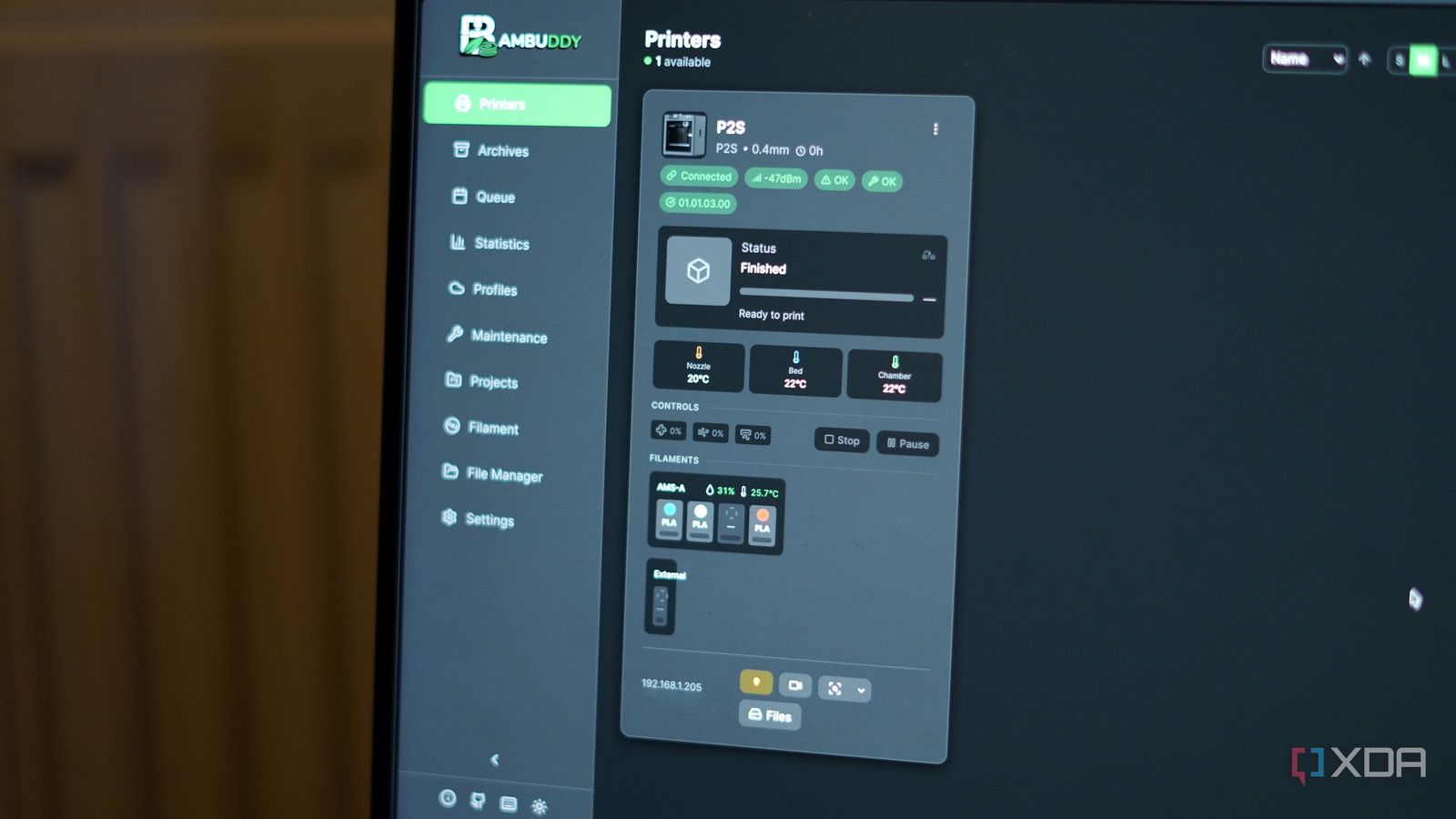
Bambu Lab makes some of the best consumer 3D printers on the market, but its software story has always been a bit of a mess. Bambu Handy, the official companion app, requires a cloud connection at all times and can’t be used in LAN mode at all. If you’re someone who wants local control of your printer, and a lot of Bambu Lab owners do, then you’re left with Bambu Studio and other desktop-based alternatives. I picked up my Bambu Lab P2S back in December, and while I’ve loved it, the cloud-focused nature of it has been both a blessing and a curse.
That’s where Bambuddy comes in. It’s a free, open-source, self-hosted companion app for Bambu Lab printers that does most of what the official Bambu apps do and then some, all without ever touching Bambu’s cloud. I’ve been flip-flopping between it and the cloud for controlling my Bambu Lab P2S over the past week, and every time I moved to Bambuddy, the experience was great. I wasn’t sure if I could give up on Bambu Handy, hence the switching back and forth, but I’ve finally decided to go all-in.
As for the reasons, well, there are a few. Most notably, it’s connected to Spoolman for filament tracking, which is incredibly useful, and I recently configured Telegram notifications that can keep me updated on every print in a way that Bambu Handy simply can’t. In future, I could pair it with a power monitoring smart plug for even more control as well, thanks to its native Home Assistant integration. It’s not a perfect application by any stretch (marred by its share of growing pains), but it fills a gap that Bambu Lab has seemingly had no interest in addressing aside from its local-control-focused Farm Manager application.
I should be clear though: using Bambuddy means giving up Bambu Handy entirely. Bambuddy requires your printer to be in LAN Developer Mode, which disables cloud connectivity and, by extension, the official companion app. For me, that trade-off was worth it. For others, it might not be, and that’s a completely fair position to take.
One dashboard to manage everything
Printers, filament, queues, and more

The best way to describe Bambuddy is as a self-hosted command center for your Bambu Lab printer. Once you connect it over your local network, you get real-time monitoring of your print progress, AMS status, temperatures, and even a live camera feed, all in a single web interface. It runs in Docker, so if you’re already self-hosting anything at all, spinning it up takes a matter of minutes.
What impressed me most is just how much is packed in here. There’s a print queue with drag-and-drop ordering, scheduled prints for specific times, automatic archiving of every 3MF file you send to the printer, and even a built-in timelapse editor. You can track maintenance intervals, monitor humidity and temperature history in your AMS, and manage your printer’s onboard storage through a file manager that even renders STL previews. I was able to preview a model directly in the browser, rotate it around, and send it to the slicer without ever leaving the Bambuddy interface.
On top of that, it supports multi-printer setups right out of the box, which is something Bambu Handy doesn’t really do well at all. If you’re running a small print farm or even just have two printers in different rooms, Bambuddy gives you one place to see everything at a glance.
The feature that impressed me the most, though, was Bambuddy’s Virtual Printer system. It emulates a Bambu Lab printer on your network so that Bambu Studio or OrcaSlicer can discover it and send prints to it directly. From your slicer’s perspective, it looks like just another printer sitting on your LAN.
You can configure it in different modes depending on your workflow. Archive mode saves incoming files without printing them, which is great if you want to build up a library. Queue mode slots them into the print queue automatically. And the newer Proxy mode, which was added in version 0.1.7, acts as a secure relay between your slicer and your actual printer and can be used alongside Virtual Printer, meaning you can print remotely with ease. It uses encrypted control channels, though the developer recommends pairing it with something like Tailscale or WireGuard for full end-to-end encryption.
Using these features made me realize just how far behind Bambu Studio is in some ways, and it also makes me wonder why the company hasn’t built something like Bambuddy natively. The ability to send a print from your slicer to a locally managed queue, with filament validation and per-printer AMS mapping, is exactly the sort of thing that power users have been asking for.
Spoolman and Telegram make it feel complete
Filament tracking and notifications

I linked Bambuddy to my Spoolman instance, and filament tracking just works. It syncs with your spools, shows fill levels per slot in the AMS view, and logs per-print filament usage automatically. If you’re someone who tracks their filament consumption, and you probably should be, this integration alone makes Bambuddy worth setting up.
Notifications are another highlight. Bambuddy supports WhatsApp, Telegram, Discord, email, Pushover, ntfy, and custom webhooks. I set up Telegram notifications and I can get messages when anything goes wrong, when a print finishes, or even just updates throughout the print, complete with a picture of what it looked like at that point in time. You can configure quiet hours, set up a daily digest, and even customize the message templates to include filament usage details. It’s far more flexible than anything Bambu Handy offers, which basically just sends a push notification through Bambu’s cloud with no real customization.
For me, the combination of Spoolman integration and Telegram alerts turns Bambuddy into a tool that someone can rely on daily. In my case, I can start a print, walk away, and know that I’ll get updates throughout, including when it’s done, complete with a photo from the printer’s camera.
It hasn’t been without controversy
Security issues and community scrutiny

Unfortunately, it hasn’t been all perfect for Bambuddy, and I’d be doing you a disservice if I didn’t mention the bumps along the way. Bambuddy is a young project, and it’s moved fast, arguably too fast for its own good.
In December 2025, version 0.1.5 shipped with anonymous telemetry enabled by default, requiring users to opt out rather than opt in. For a tool that positions itself as a privacy-respecting alternative to Bambu’s cloud, that decision bothered many users. The option to disable it was there from the start, but the principle of the thing matters, especially when your entire pitch is built on local control and data ownership.
More seriously, in February 2026, a security researcher disclosed CVE-2026-25505, a critical vulnerability affecting all versions prior to 0.1.7. The issue was twofold: a hardcoded JWT secret key that was visible in the public source code, and most of API endpoints lacked proper authentication middleware. An attacker who knew the publicly visible JWT secret could gain full access to the application.
To the developer’s credit, a patch arrived within 24 hours of disclosure, and the advisory was published transparently through GitHub’s security advisory system. But the nature of the vulnerability, a hardcoded secret with a TODO comment left in production code, did raise some eyebrows. To give you an idea just how bad it was, here’s the culprit:
SECRET_KEY = "bambuddy-secret-key-change-in-production" # TODO: Move to settings/env
These oversights are major, and in a project that handles printer access and network-connected hardware, they’re a pretty big deal and important to keep in mind.
Since the fix, the project has continued to ship updates at a rapid pace, with roughly one substantial release per week, and security seems to be in a much better place now. But if you’re planning to expose Bambuddy through a reverse proxy or on a shared network, it’s worth keeping an eye on the project’s security advisories going forward.
There’s a trade-off, but a great upside
No Bambu Handy means no cloud fallback

The elephant in the room is that running Bambuddy requires LAN Developer Mode, and enabling that means losing access to Bambu Handy and Bambu’s cloud print features. For someone who relies on starting prints remotely through Bambu’s app while away from home, that’s a meaningful loss. Bambuddy’s Proxy mode can fill that gap if you set it up, but it still does require substantially more effort than just opening an app on your phone.
There’s also the matter of maturity. Bambuddy has been in active development for only a few months, and while the pace of improvement has been impressive, it’s still in the 0.2.x range. Bugs can and will happen, and it’s a project where you should be comfortable with the occasional rough edge. Especially if you’re coming from the (admittedly limited) experience of Bambu Handy.
With that said, what Bambuddy offers in return is something Bambu Lab has shown no interest in building: a self-hosted management platform that respects your data and gives you full local control of your printer. The statistics dashboard alone, which tracks filament usage, print costs, energy consumption, and monthly trends, tells me more about my printing habits than Bambu’s entire software suite ever has.
Bambuddy is the companion app that Bambu Lab should have built from day one. It’s not without its flaws, and its early security missteps are worth remembering, but the project is moving in the right direction. If you own a Bambu Lab printer and you’re even slightly inclined toward self-hosting, this should be at the top of your list. And in my case, I’m not going back to Bambu’s cloud any time soon.
