

Most local AI users assume that a bigger model is always better than smaller models. It is always expected that more parameters equal smarter outputs. I also had similar assumptions. For a long time, 7B models felt like entry-level, and I thought of upgrading to a larger model.
The assumptions collapsed when I started testing both smaller and larger models in real-world projects. I pushed each model and compared how they performed under actual development pressure. Larger models didn’t always fix the workflow bottlenecks, though. The issues I observed were not about intelligence; they were about system design.
Bigger models didn’t fix my workflow — better engineering did.

Here’s how I get the most out of my self-hosted LLM, especially when limited by VRAM
Don’t have an RTX 5090? No problem!
Bigger models feel like the obvious upgrade
More parameters, fewer guarantees

It is almost instinctive for new users to assume that 7B models are limited in their capabilities and upgrading to a 13B model is a safer choice. For heavier workloads, 70B models start to feel like the future-proof option. And why do new users think that? They tend to follow a simple formula: if the parameter count is bigger, the reasoning must be better.
These formulas and assumptions often come from leaderboards, massive multitask language understanding (MMLU) scores, and community comparisons, which are focused on raw numbers. Online forums like Reddit and Discord servers also contribute to this. I’ve visited many of them, and the repeated response to almost any query is the same: “Your model is limited.” “Just use a bigger model.”
There is an underlying belief among new local AI users that if output quality drops, the model must not be smart enough. After testing across real projects, I got a clear idea that assumptions don’t hold up. Model intelligence alone doesn’t contribute to the workflow design. Raw capability doesn’t automatically lead to practical efficiency. And a bigger context window doesn’t mean better reasoning.
The upgrade feels like a requirement until you try running those larger models locally every day.
Running larger local models isn’t free
VRAM, watts, and slower feedback loops

Running larger models locally comes with hidden costs too. It changes how your system behaves. You start to notice subtle differences, and under heavier loads, you can observe the behavior changes.
On my own PC (Ryzen 7 7700x + RTX 4070 Ti), the difference is easy to observe. When it’s idle, the system is quiet, cool, and responsive. Running a 7B model causes short GPU spikes and quick inferences, and the system stabilizes almost immediately. And with a larger 13B or 27B model like CodeLlama or Gemma, the system goes through sustained GPU load, higher VRAM usage, and noticeable overall strain.
The model is ultimately limited by VRAM; larger models consume significantly more VRAM. Optimization and quantization help, but they don’t significantly improve the performance or eliminate the pressure on the hardware. When the model occupies most of the VRAM, background apps which I keep running, like Wallpaper Engine, compete for memory.
Other contributing factors are power, thermals, and noise. While running large models, GPU usage often climbs close to 100%, resulting in more power consumption. The system tries to maintain thermals by ramping up the GPU and system fans aggressively, resulting in more noise.
In practice, most 7B model fits comfortably; 13B starts tightening the headroom, and 32B or 70B models become specialized hardware territory.
Scaling up isn’t silent or invisible; it changes the physical environment. And when larger models take longer to respond, those extra seconds add up and break the momentum.
7B models are faster than people admit
Speed beats marginal intelligence gains

7B models are often assumed to be basic or slow thinkers. In practice, they are fast collaborators and optimized for real work. The speed of the model also depends on how you tend to use it. Most developers like me don’t always require extreme intelligence; we need fast iterations on code blocks.
With sufficient hardware, a 7B model can generate tokens faster, resulting in low latency, shorter wait times, and more prompts per hour. This helps maintain the cognitive flow with more experimentation and reduces context switching. For 80% of my tasks, the 7B model is sufficient, and the gap in reasoning often isn’t decisive. A better workflow design compensates for the smaller model size.
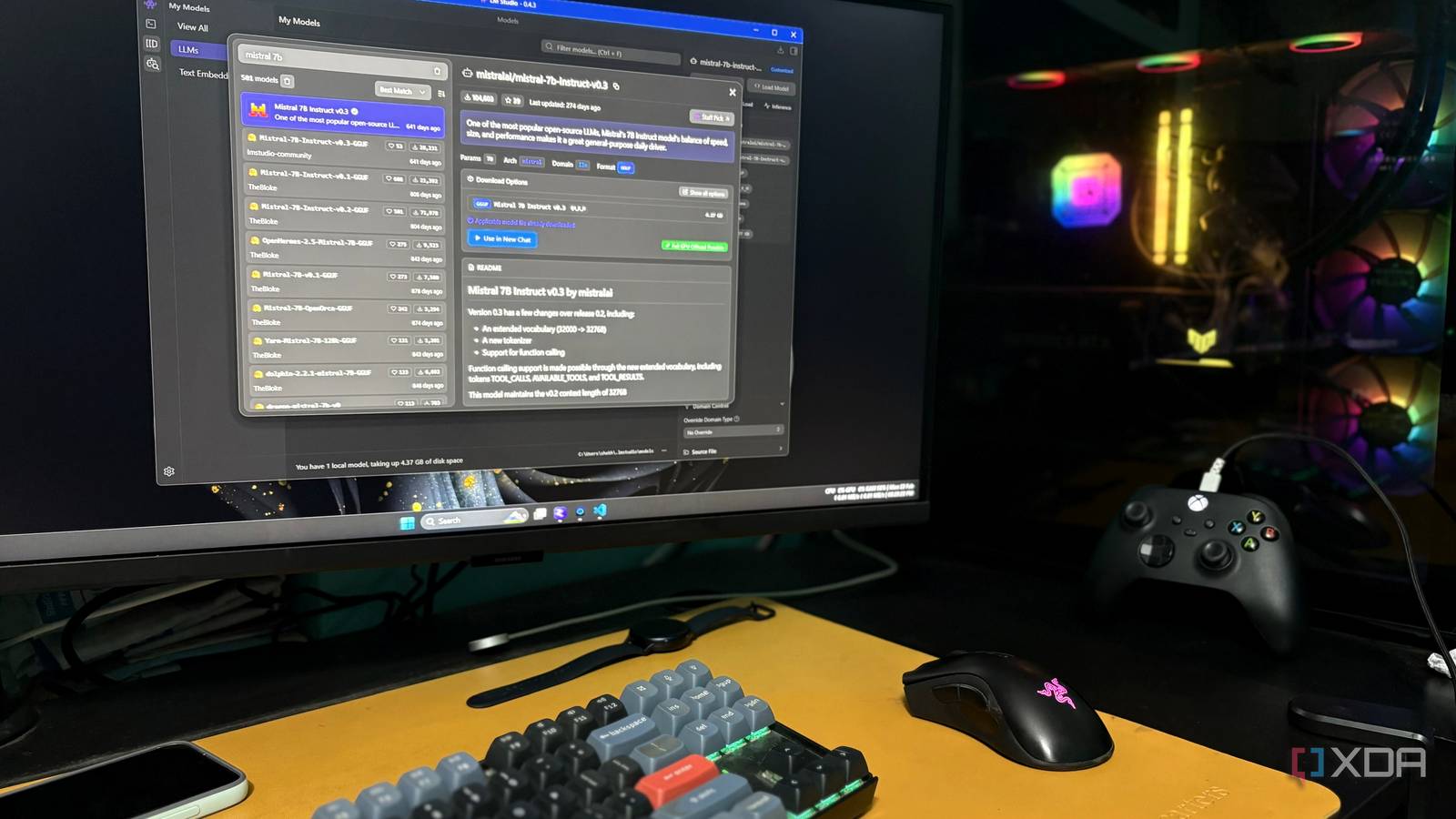
In my last local project, I used a 7B model (mistral_7b_instruct_v0.3), and it could handle almost all tasks reliably. It delivered stable output with fast responses, and its behavior was predictable, as I was aware of the load I was putting on it. That project helped me understand that productivity compounds with speed, and more iterations are better than fewer “perfect” outputs.
Speed gave me leverage. Structure gave me confidence and consistency.
I optimized the pipeline instead of the model
Chunking and prompt discipline changed everything
In my last project, I built a fully local app using the mistral_7b_instruct_v0.3 model running on top of LM Studio to review the code and generate structured output for bugs, vulnerabilities, performance optimization, and security audits.
While developing it, I reached a point where I was reviewing 2000–3000 lines of code at once. It took longer to process, and the output became flattened. At that time, I thought of upgrading the model, but instead I took a different approach. I examined how the model was being used and realized the bottleneck wasn’t intelligence; it was the structure.
I was dumping an entire 3000-line file into the model and expecting an optimal output. Every model has limits. It was trying to process thousands of lines (approximately 8000 tokens, including input, preset system prompt, and output) in a single pass. That was the issue. I solved it by breaking the file into logical sections, keeping the context alive, and reducing the cognitive load on the model.
Instead of processing all tokens at once, the model processed manageable sections one at a time. Each output was stored and, at the end, merged into a final structured result. This improved the clarity, and the reasoning became sharper. And suddenly, the same 7B model felt more capable.
Large models can compensate for poor structure. Smaller models force you to build better systems.
Bigger models still have their place
They shine at scale, not daily tasks

This does not mean that larger models lack value. They are powerful and extremely capable in the right context. For example, in my case, if I decide to upgrade the app to handle entire directories or introduce a “Fix-It” feature, then a larger 13B or 27B model would likely excel in those scenarios.
Scaling becomes a requirement when multi-file reasoning across large codebases is critical or long-context architecture planning is involved in the project. Large models reduce the need for strict structuring because they can process more context at once.
In case your environment already has sufficient headroom, like high VRAM GPUs (or multi-GPU setups) or dedicated inference machines, the trade-offs shrink significantly.
But for day-to-day local development, consistency and iteration speed matter more than raw scale.

I served a 200 billion parameter LLM from a Lenovo workstation the size of a Mac Mini
This mini PC is small and ridiculously powerful.
For local development, consistency wins
For local day-to-day development, momentum is everything. Every extra second of latency and every unstable output adds friction and breaks rhythm. A well-optimized and structured 7B model delivers the kind of consistency that often matters more than raw compute power, making it more valuable than peak capability in practical workflows.
Larger models optimize for capability; smaller models optimize for efficiency. And for local development, efficiency wins more often than people admit.
