
Close Menu
    Facebook X (Twitter) Instagram
    Wifi PortalWifi Portal
    • Blogging
    • SEO & Digital Marketing
    • WiFi / Internet & Networking
    • Cybersecurity
    • Tech Tools & Mobile / Apps
    • Privacy & Online Earning
    Facebook X (Twitter) Instagram
    Wifi PortalWifi Portal
    Home»Cybersecurity»Fake Zoom meeting leads to silent install of surveillance software
    Cybersecurity

    Fake Zoom meeting leads to silent install of surveillance software

    adminBy adminFebruary 26, 2026No Comments3 Mins Read
    Facebook Twitter LinkedIn Telegram Pinterest Tumblr Reddit WhatsApp Email
    Fake Zoom meeting leads to silent install of surveillance software
    Share
    Facebook Twitter LinkedIn Pinterest Email

    Malwarebytes researchers have uncovered a fake (but convincing) Zoom meeting page that downloads surveillance software on Windows computers and tricks users into running it.

    According to Microsoft MVP Steven Lim, the page has claimed nearly 1,500 victims in 12 days.

    The trick

    Potential victims likely visit the page (at uswebzoomus[.]com/zoom/) after getting a meeting invite/link via email or text.

    The page is made to look like a Zoom waiting room and, once a visitor interacts with it, three scripted fake participants appear to join the call, one by one.

    “Their conversation audio loops on repeat in the background. A permanent ‘Network Issue’ warning is displayed over the main video tile,” Malwarebytes researcher Stefan Dasic explained.

    “The choppy audio and lagging video are entirely deliberate, and they serve a specific psychological purpose. A visitor sitting through a broken call will naturally assume something is wrong with the app. When an ‘Update Available’ prompt appears moments later, it feels like the fix.”

    The prompt, which cannot be closed, shows a counter that goes from five to zero. When the countdown ends, the page switches to what looks like the Microsoft Store showing “Zoom Workplace” mid-installation, and the browser downloads a file (a Windows installer) without asking for permission.
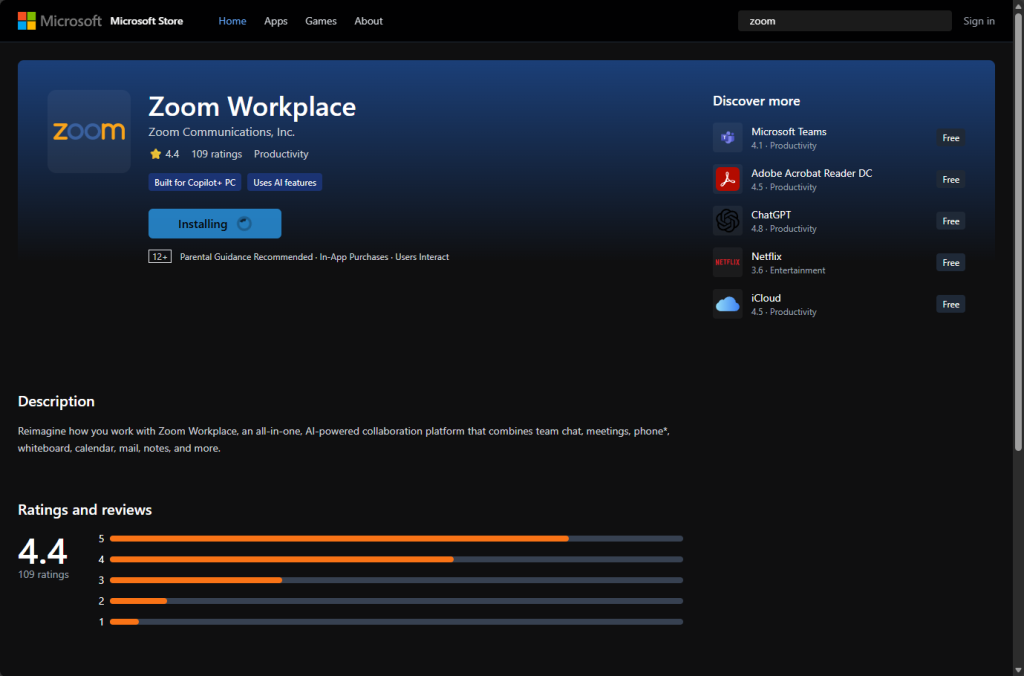
    Fake Zoom meeting

    Fake Microsoft Store front (Source: Malwarebytes)

    The file is named zoom_agent_x64_s-i(__941afee582cc71135202939296679e229dd7cced) (1).msi, but it’s a installer for Teramind, which is legitimate monitoring and user-activity tracking software that businesses use to oversee how company devices and accounts are used.

    The software is capable of taking screeshots, logging keystrokes, capture clipboard contents, and more.

    Covert installation and presence

    The installer is pre-configured to report to an attacker-controlled Teramind account and to install the software without any visible indication that the process is happening.

    Once installed, the software’s presence is practically invisible to the user: it doesn’t show in the list of installed programs, there’s no icon in the taskbar, and no entry in the system tray.

    The attacker went to great lengths to avoid the installer to be spotted and analyzed. Once the monitoring agent is installed and running, the installer will delete the temporary files and folders it created and used.

    “The attackers did not write custom malware. They deployed a professionally developed commercial product that is designed to run reliably and persist through restarts. That makes it more durable than many traditional malware strains,” Dasic pointed out, and said that traditional antivirus tools may not flag the software.

    “Based on my DefenderXDR FileProfile analysis, this [threat] was first detected on 11 Feb 2026 on MDE platform and it’s global prevalence as of now is 1437 and Microsoft Defender is NOT flagging this file according to VirusTotal,” Lim noted on Tuesday.

    At the time of writing, VirusTotal shows that zero security vendors detect this Teramind installer as malicious.

    What to do?

    It’s currently unknown whether this campaign is targeting employees or consumers, or both.

    Employees who have visited the fake Zoom meeting page and have been tricked into running the malicious installer should report the potential compromise to their organization’s IT/Sec team, Dasic advised.

    Consumers who have fallen prey to this campaign should consider their device compromised and search for the tell-tale installation folder (C:\ProgramData\{4CEC2908-5CE4-48F0-A717-8FC833D8017A}) and hidden running services, and proceed to change passwords for important accounts from a different, clean device.

    Subscribe to our breaking news e-mail alert to never miss out on the latest breaches, vulnerabilities and cybersecurity threats. Subscribe here!

    Fake install Leads meeting Silent software Surveillance zoom
    Share. Facebook Twitter Pinterest LinkedIn Tumblr Telegram Email
    Previous ArticleHow to Pick Your Password Manager
    Next Article Everything coming to HBO Max in March
    admin
    • Website

    Related Posts

    How Pirated Software Turns Helpful Employees Into Malware Delivery Agents

    March 4, 2026

    Fake Laravel Packages on Packagist Deploy RAT on Windows, macOS, and Linux

    March 4, 2026

    The vulnerability that turns your AI agent against you

    March 4, 2026
    Add A Comment
    Leave A Reply Cancel Reply

    Search Blog
    About
    About

    At WifiPortal.tech, we share simple, easy-to-follow guides on cybersecurity, online privacy, and digital opportunities. Our goal is to help everyday users browse safely, protect personal data, and explore smart ways to earn online. Whether you’re new to the digital world or looking to strengthen your online knowledge, our content is here to keep you informed and secure.

    Trending Blogs

    I tested XGIMI’s MemoMind One and they prove smart glasses don’t need a camera to be good

    March 4, 2026

    How Pirated Software Turns Helpful Employees Into Malware Delivery Agents

    March 4, 2026

    Inside Chrome 146’s agent-ready web preview

    March 4, 2026

    How I Created a Donor Leaderboard in WordPress & Got More Donations

    March 4, 2026
    Categories
    • Blogging (33)
    • Cybersecurity (596)
    • Privacy & Online Earning (88)
    • SEO & Digital Marketing (375)
    • Tech Tools & Mobile / Apps (732)
    • WiFi / Internet & Networking (106)

    Subscribe to Updates

    Stay updated with the latest tips on cybersecurity, online privacy, and digital opportunities straight to your inbox.

    WifiPortal.tech is a blogging platform focused on cybersecurity, online privacy, and digital opportunities. We share easy-to-follow guides, tips, and resources to help you stay safe online and explore new ways of working in the digital world.

    Our Picks

    I tested XGIMI’s MemoMind One and they prove smart glasses don’t need a camera to be good

    March 4, 2026

    How Pirated Software Turns Helpful Employees Into Malware Delivery Agents

    March 4, 2026

    Inside Chrome 146’s agent-ready web preview

    March 4, 2026
    Most Popular
    • I tested XGIMI’s MemoMind One and they prove smart glasses don’t need a camera to be good
    • How Pirated Software Turns Helpful Employees Into Malware Delivery Agents
    • Inside Chrome 146’s agent-ready web preview
    • How I Created a Donor Leaderboard in WordPress & Got More Donations
    • I have tried dozens of cloud storage apps, but I keep coming back to OneDrive due to this privacy feature
    • Fake Laravel Packages on Packagist Deploy RAT on Windows, macOS, and Linux
    • How to Focus on Topics (Not Keywords) in Your SEO Strategy
    • The Galaxy S26 Ultra makes it clear this feature isn’t coming back
    © 2026 WifiPortal.tech. Designed by WifiPortal.tech.
    • Home
    • About Us
    • Contact Us
    • Privacy Policy
    • Terms and Conditions
    • Disclaimer

    Type above and press Enter to search. Press Esc to cancel.