


Agentic marketing is marketing work executed by an AI agent: an artificial intelligence system that takes a goal, picks the steps, runs the tools, checks its own output, and keeps going until the job is done.
You give it a goal like “plan the launch campaign for our new feature,” and it runs the whole job. It pulls competitor positioning, drafts the landing copy, writes the announcement emails, builds a sales-enablement one-pager, files the assets in Notion, and opens a Linear ticket for the team to review. You come back to a finished package, not a checklist.
This article gets you caught up on agentic AI in marketing, shows you how marketers, including us, are using it right now, and points to the use cases worth copying this week.
What is Agent A?
Agent A is a marketing agent from Ahrefs—an AI assistant with direct access to the full Ahrefs dataset that can carry out marketing tasks autonomously, rather than just answer questions.
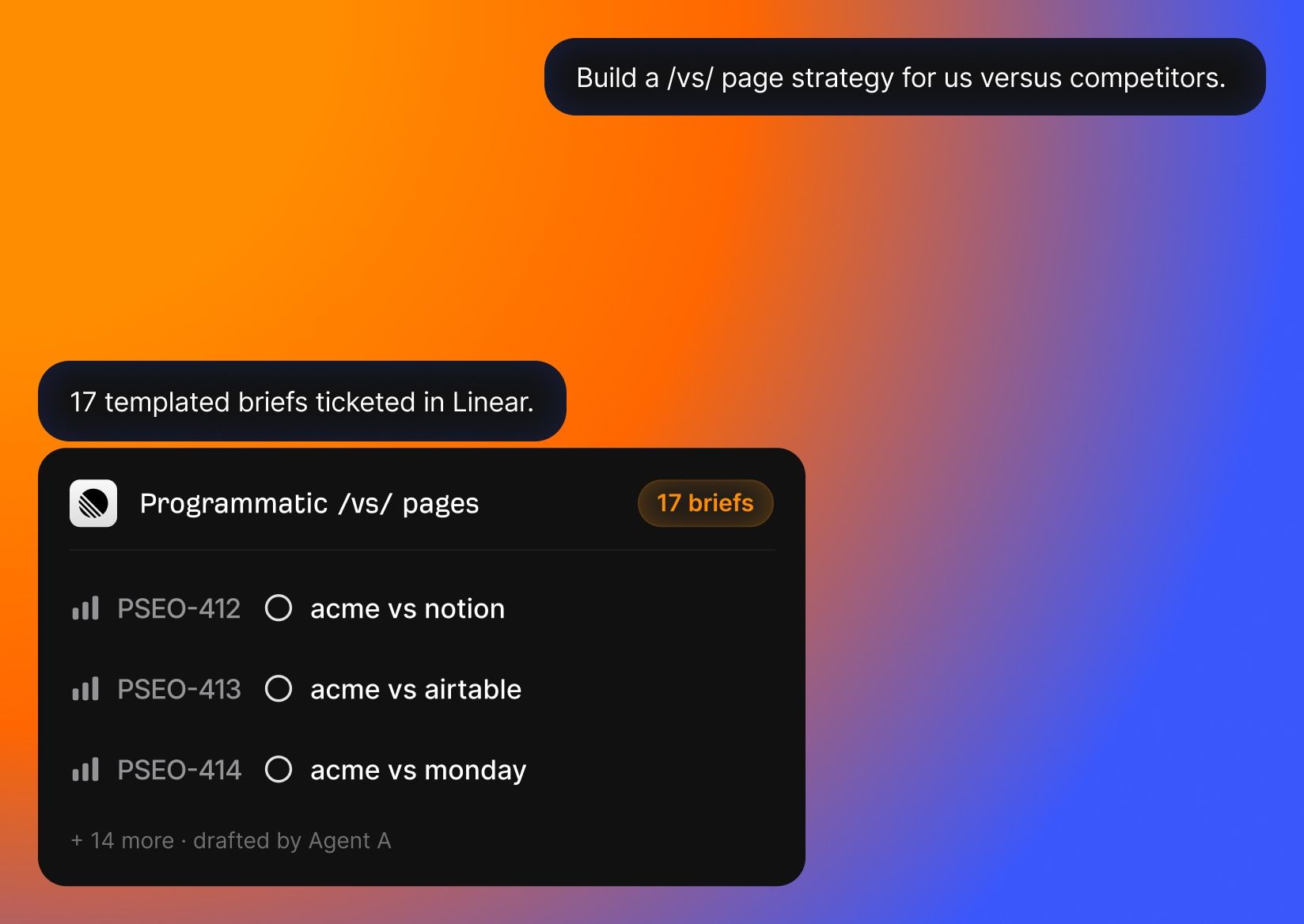
Agent A includes:
- Unrestricted access to Ahrefs endpoints. Every endpoint we use to build Ahrefs is available, including many you cannot reach via API or MCP.
- Serious tech stack underneath. Postgres for state, Flask for UIs, an OpenRouter proxy with 300+ models, web fetch with full-page parsing, PDFs, OCR, scheduled jobs.
- Native connectors to marketing tools. Slack, HubSpot, GitHub, Notion, Linear, Mailchimp, Resend, SendGrid, Stripe, Gong, WordPress, Airtable, Apify, and even Semrush.
- Expert skill library. The Ahrefs team has contributed pre-built marketing skills and applications that encode how we actually work.
Before we get practical, here’s the quick grounding: where agentic AI actually stands today, the few kinds of “agent” worth telling apart, and the words you’ll need to follow any conversation about them.
Agentic AI gets searched 122,000 times per month, and running agents now costs cents
Search volume for “agentic AI” in the US went from 1,450 searches a month in May 2023 to 122,175 in May 2026, an 84× jump in three years, according to Ahrefs’ Keywords Explorer. The term “what is agentic AI” now pulls around 14,000 monthly searches and barely existed before late 2023.
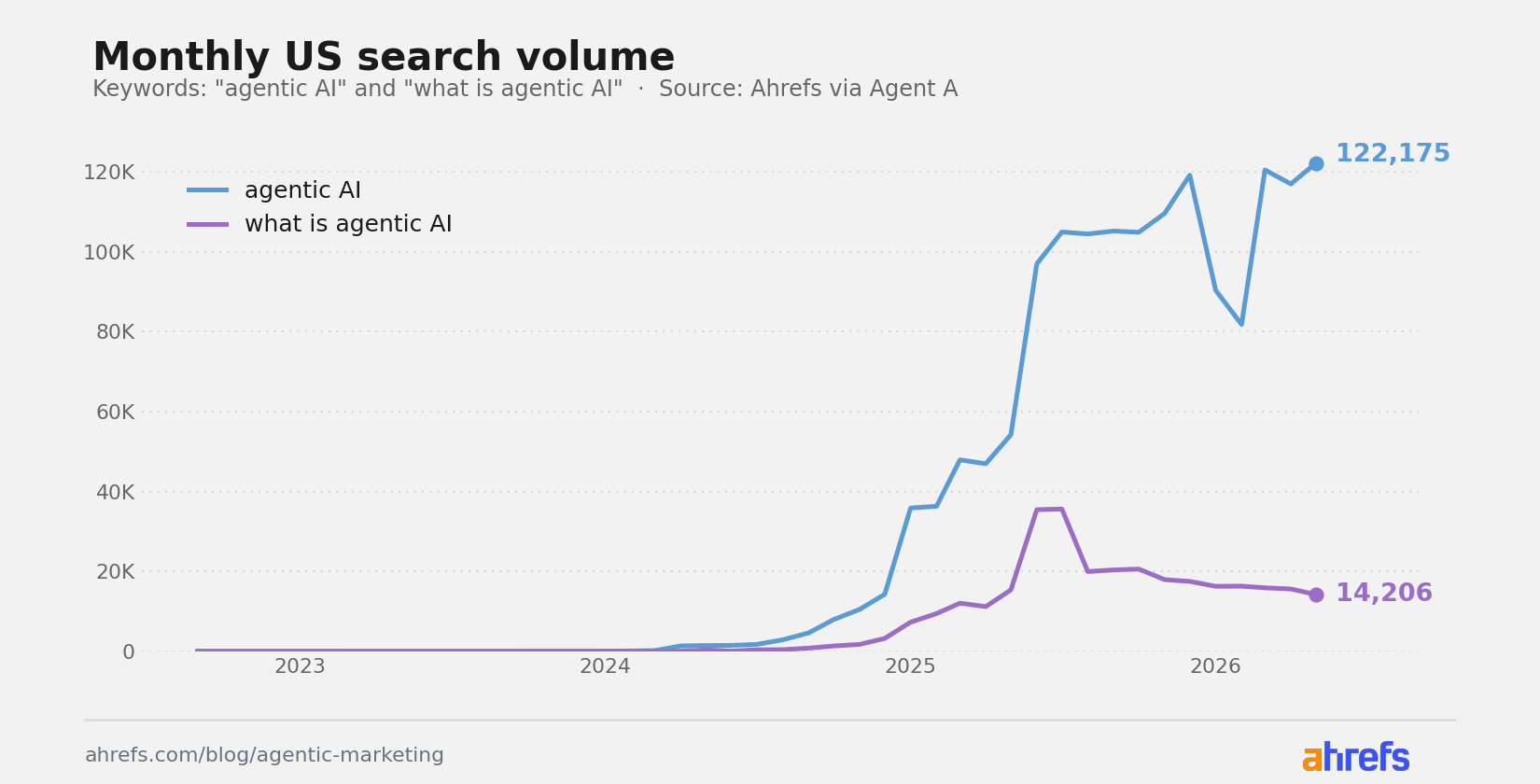
By the way, all data and graphs were prepared fully by Agent A; I just said what I needed for this article.
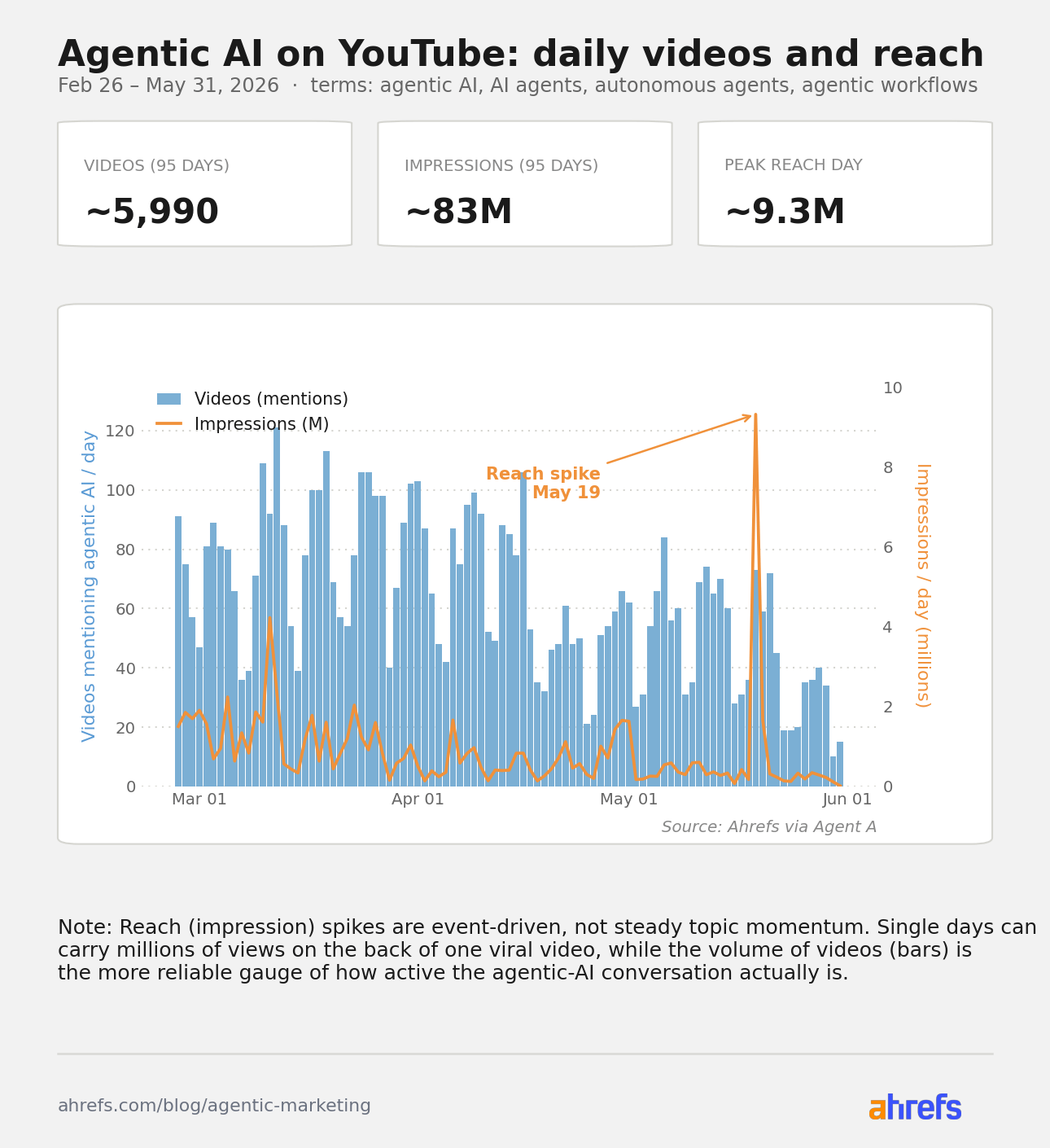
On top of that, YouTube is full of working examples you can copy in days, no special skills required: data analytics setups, custom internal tools, even solo businesses run on teams of AI agents. In the past three months alone, roughly 6000 YouTube videos mentioned agentic AI, earning around 83 million impressions.
We recently started experimenting with agentic marketing at Ahrefs, and it quickly became a big part of how we work.
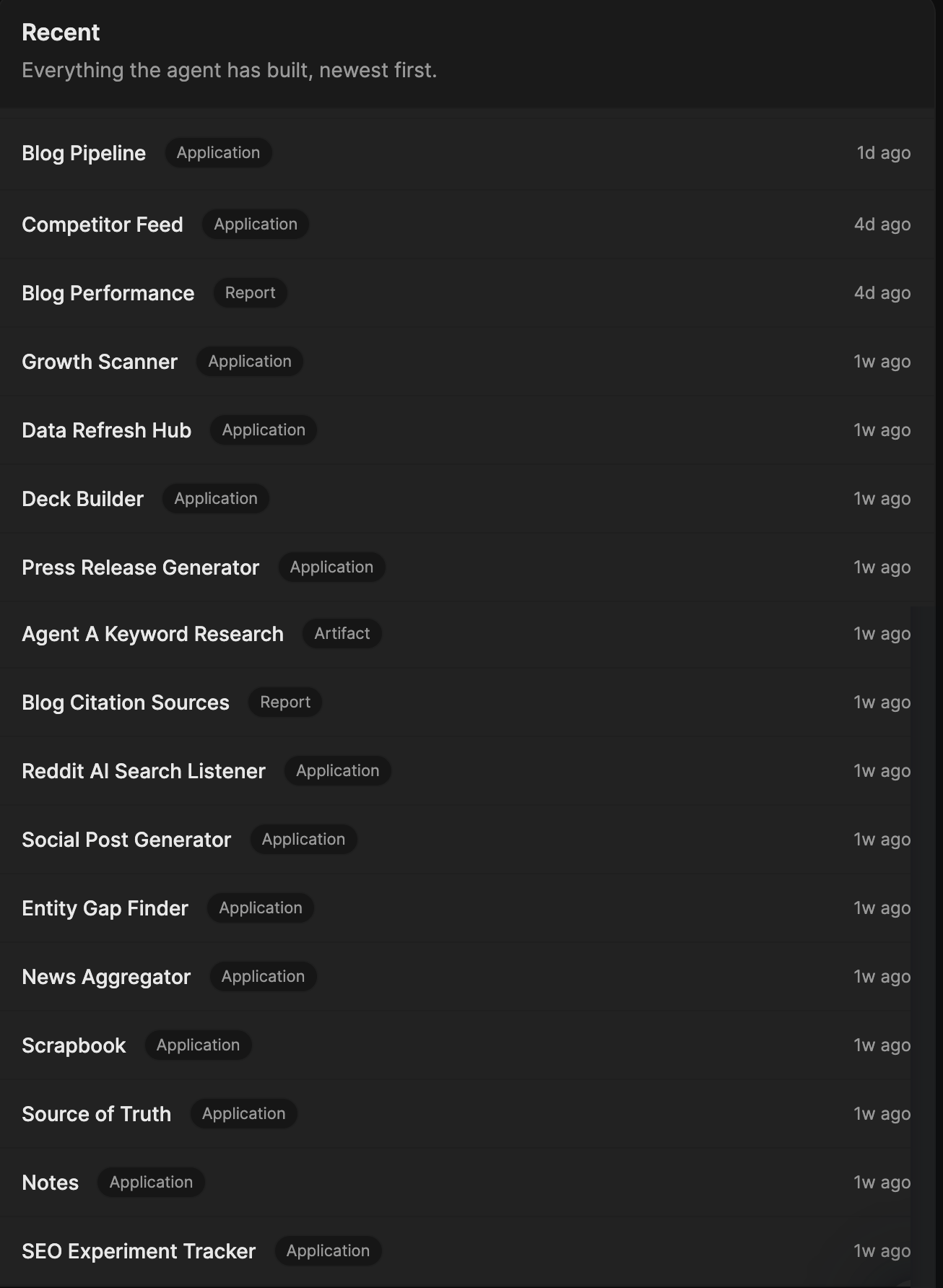
Once our own AI marketing agent went live, the content team organized a week-long hackathon to explore how AI could automate parts of our workflow. By the end of the week, the team had built 16 different apps, all created by the agent. Zero lines of code from us, we just guided its steps.
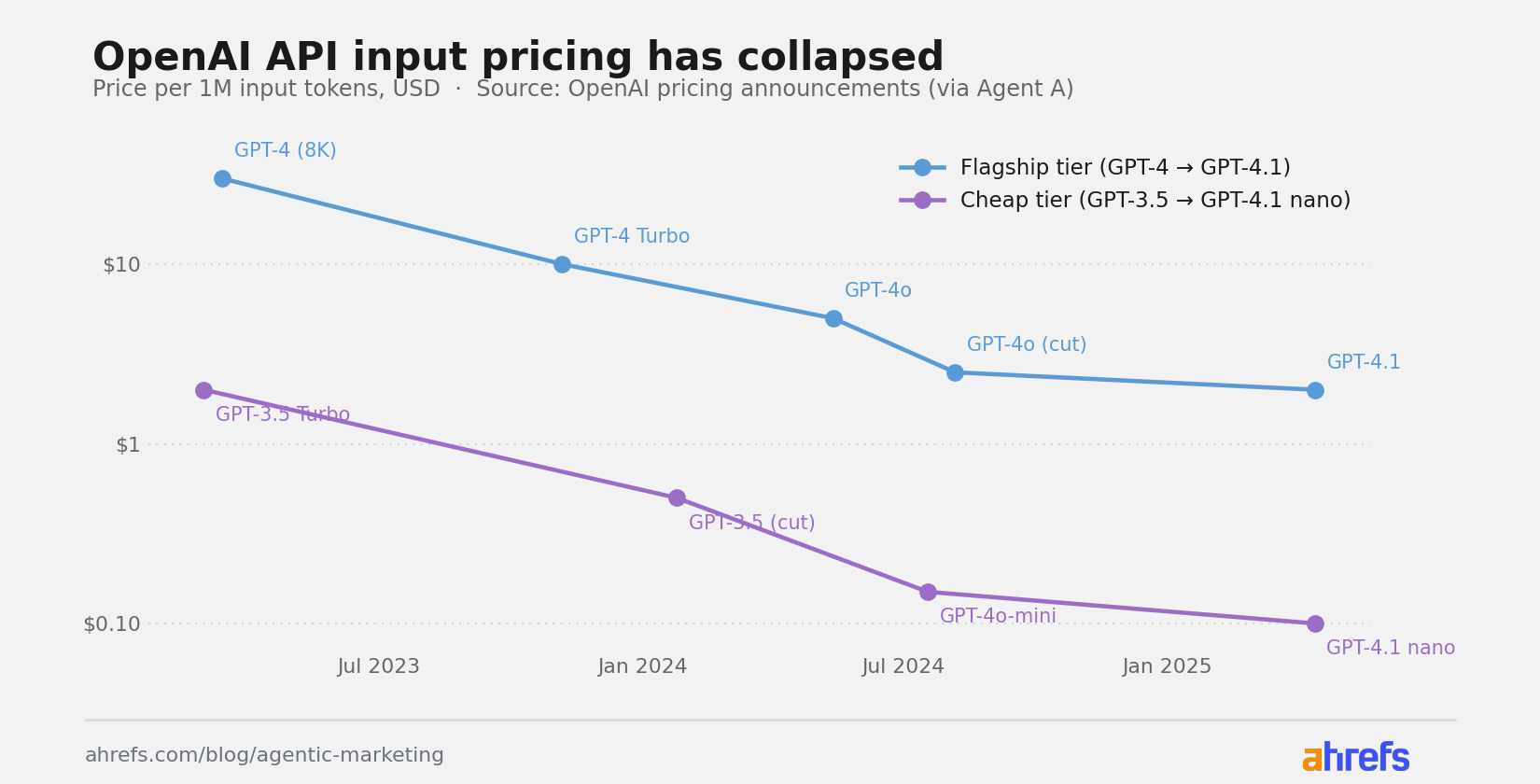
The other half of the story is cost. LLM prices have dropped 15–20× since 2023. OpenAI’s flagship model went from $30 per million input tokens with GPT-4 in 2023 to $2 with GPT-4.1, according to OpenAI’s pricing announcements (data compiled by Agent A).
A multi-step agent run that used to cost a few dollars now costs cents.
Three types of AI agents you’ll meet, and the key terms to know
The word “agent” gets stretched across very different products. Three categories are worth knowing apart:
- Agentic environments like Claude Code or OpenAI’s Agents SDK.
Flexible, but you wire the tools together yourself. Built mostly for developers. - Open-source agents like OpenClaw or Hermes. You host them on your
own infrastructure. Private, customizable, and the setup is on you. - Specialized agents like Ahrefs’ Agent A or Intercom’s Fin.
Pre-wired for a specific job. You skip the setup and hand off the goal.
If you’re going to talk to a vendor or read a thread about agents, you’ll hit these terms:
- Agent. An LLM plus tools plus a loop that keeps running until the
goal is met. The model alone isn’t the agent. The loop is. - Tools. Functions the agent can call: search the web, query a
database, send an email, run code. Without tools, it’s just a chatbot. - Skills. Playbooks the agent loads for recurring tasks (“how to
brainstorm titles,” “how to QA an article”). Learn more. - Workflow vs. agent. A workflow runs fixed steps with LLMs inside.
An agent picks the steps. Most vendor “agents” are actually workflows. - Sub-agents/orchestration. A top-level agent that spawns
specialists to handle parts of the job. - Human-in-the-loop (HITL). A forced approval step before the agent
continues. Required for irreversible work. - Guardrails. Hard rules the agent can’t cross (“never send
external email without approval”). - MCP (Model Context Protocol). An open standard for plugging tools
into agents. You’ll hear it in any technical conversation about how agents connect to things. Learn more.
Below are eleven everyday marketing jobs where AI agents are already doing the work.
Each use case has four parts: the task itself, what an agent can do about it, an example of how it works in Agent A, and a starter prompt you can give to any AI agent.
Run keyword research and AI mention gap analysis
SEO is two questions at once: what should we write about, and are people actually finding us? Both mean a lot of structured, repetitive data work, and a growing share of “finding us” now happens inside AI assistants like ChatGPT and Perplexity, not on a results page.
Any agent with access to live SEO data can take a real run at both. Point it at keyword and ranking data, and it can group topics, find the gaps competitors are winning, and flag where AI assistants name a rival but never mention you.
Agent A does this with two purpose-built tools.
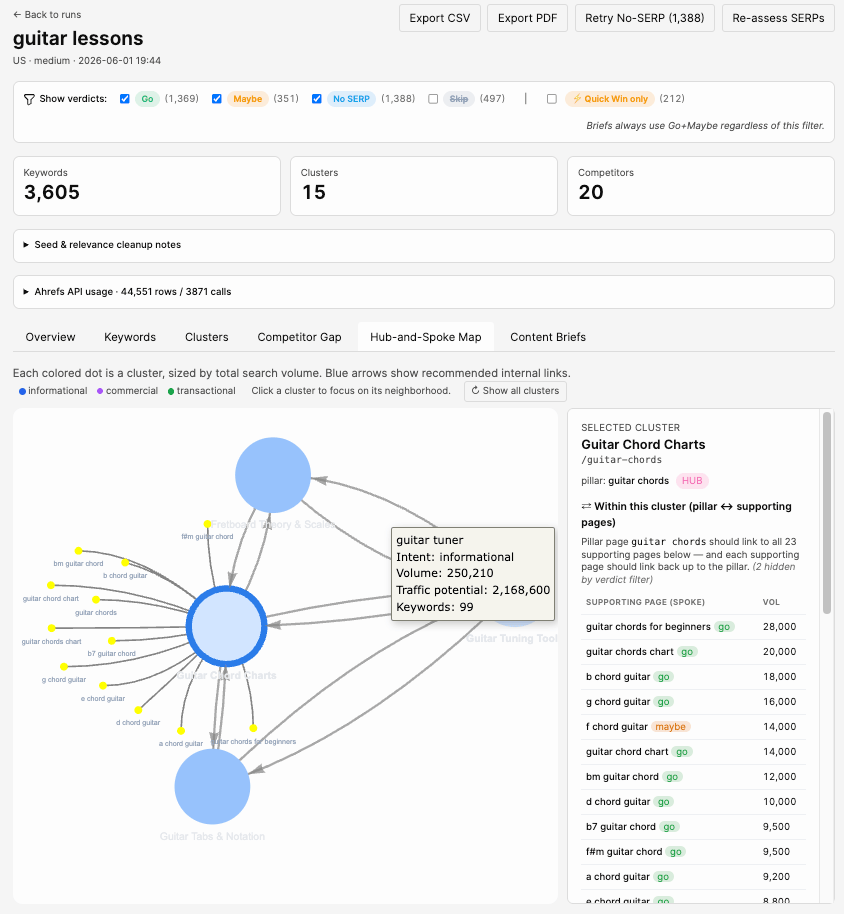
The Content Keyword Research app takes a niche you type in and runs the whole pipeline: keywords, topic clusters, quick wins, competitor gaps, and a content brief for any cluster on request.
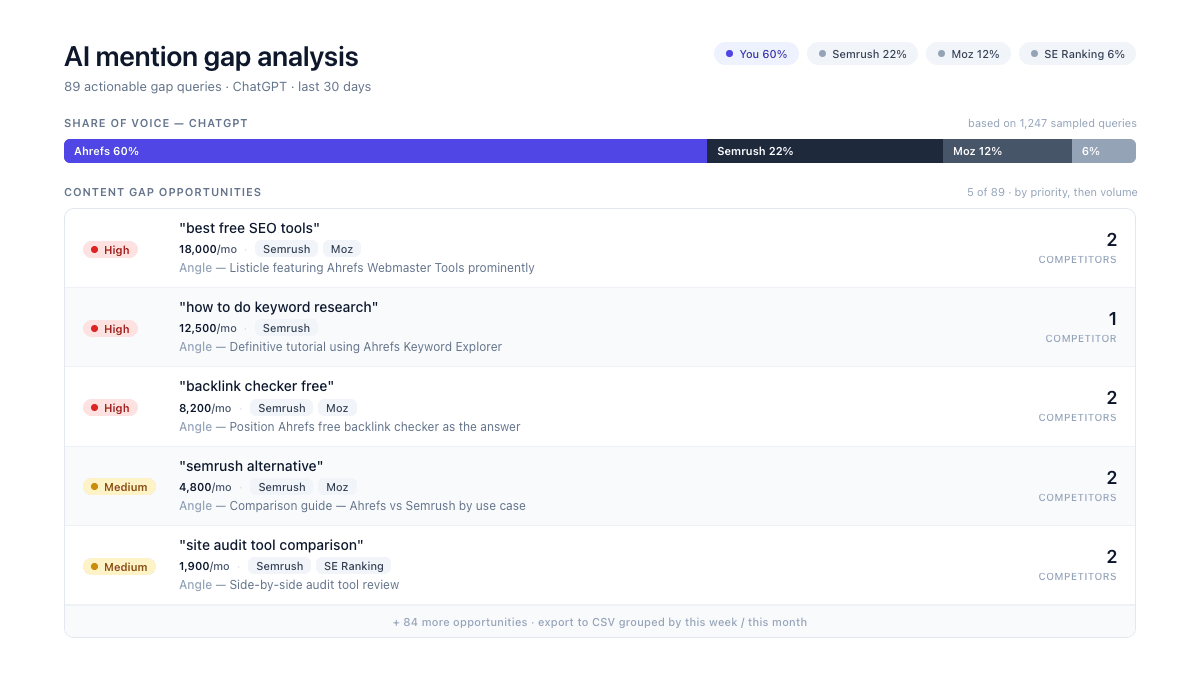
AI Mention Gap Analysis handles the AI side. It finds your competitors, measures how often ChatGPT, Perplexity, Gemini, and Google’s AI Overviews name them versus you, and returns a ranked list of questions where AI recommends a rival but never mentions you, each with its search volume and a suggested content angle.
Try it
Starting prompt for any agent:
You have access to my SEO data for [yourdomain.com] in [country]. I want the best content opportunities for the next quarter. Pull the keywords in [my niche], group them into topic clusters, and rank the clusters by how winnable they look: search volume, keyword difficulty, and whether my main competitors ([competitor 1], [competitor 2]) already cover the topic and I don't. Then run the same check against AI search: find the questions where ChatGPT, Perplexity, and Google's AI answers recommend those competitors but never mention me. Give me one prioritized list of topics to create, each with its search volume, the gap it closes, and a one-line angle for the piece.
Or get it ready-made in Agent A: install the Content Keyword Research app and use the preinstalled AI Mention Gap Analysis skill.
Take an article from keyword to finished draft
Writing a good article is a five-step slog: research the topic, plan the structure, write the draft, fact-check it, and polish it. An agent runs the first four and hands the piece back to whoever’s editing. You’re still in charge of voice and the final call; you can even take action within the process.
Ryan, our Director of Content, built an app like this with Agent A. You give it a topic and a few source links. It researches the topic, creates an editorial brief, builds an outline, writes the article, checks every claim, and stops three times so you can approve the direction before it continues.
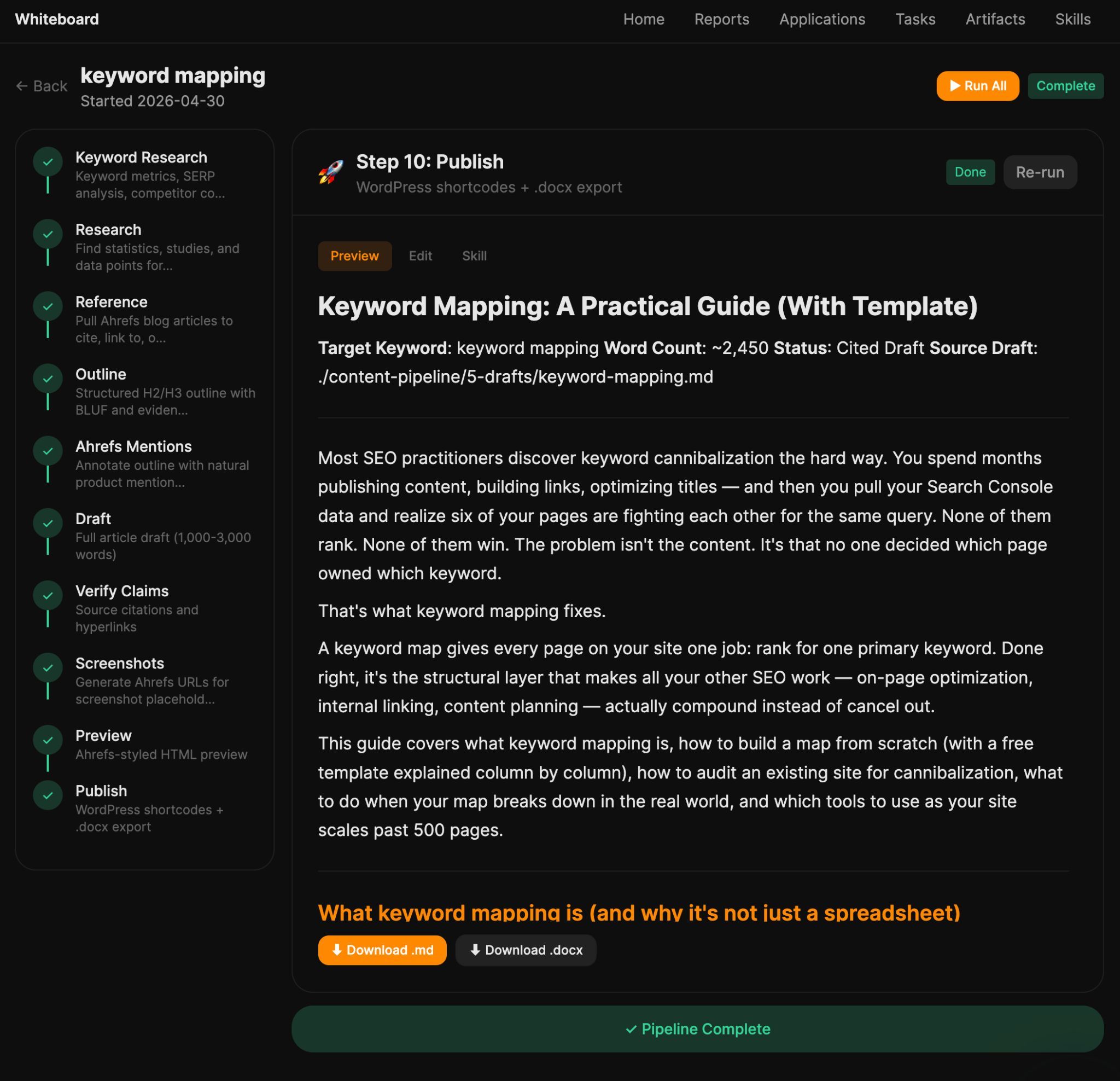
See it in action:
Try it
Starting prompt for any agent (needs to have access to Ahrefs data via MCP)
Build me an assisted long-form article pipeline. Atomic input is a target keyword. Stages run sequentially as background jobs the UI polls: (1) keyword research via Ahrefs, (2) competitor SERP fetch, (3) AI Content Helper topic snapshot, (4) bulleted outline with mandated topic coverage, (5) data-mention placement, (6) full draft, (7) polish, (8) WordPress shortcode formatting + .docx export. Each stage shows its output, has an "edit" textarea, and a "refine with feedback" chat that re-runs the stage with my notes. Style guide comes from a per-author voice profile.
Build your monthly performance report once and never again
Every month, someone on the team rebuilds the same performance report: traffic from one tool, rankings from another, backlinks from a third, all pasted into a deck with a few bullets up top explaining what changed. It eats a day, every month, forever.
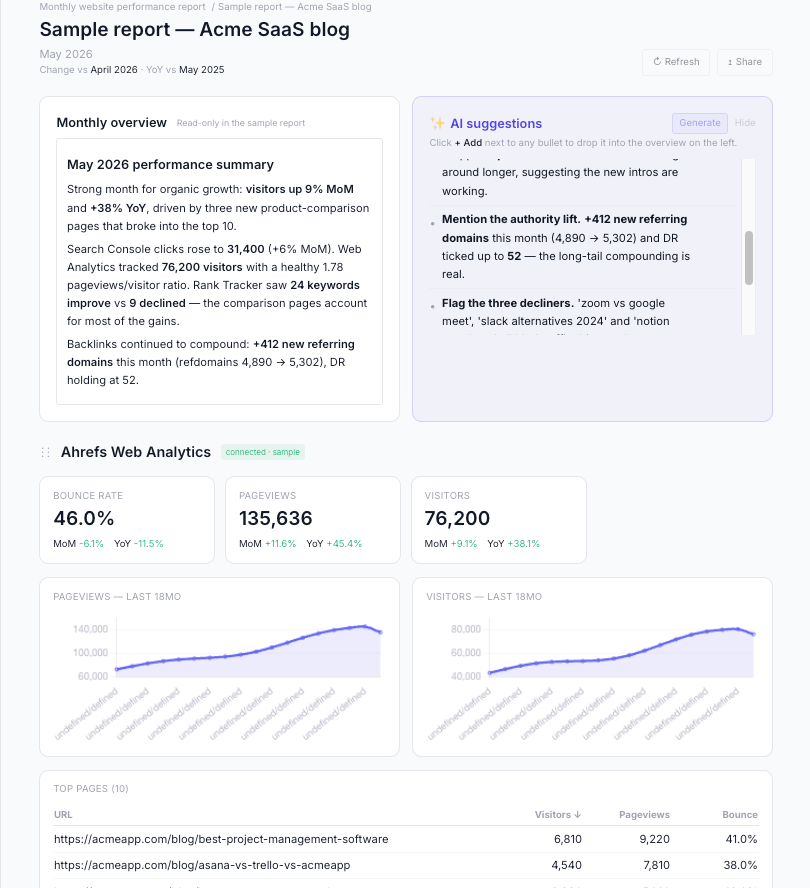
Any agent with access to your marketing data can take this over. Wire it into your traffic, rankings, and backlink numbers and it can pull the current month, compare it to the last, and write the summary of what moved and why, on a schedule, without being asked again.
Agent A does this with the Monthly Website Performance Report app. It pulls your traffic, search rankings, Search Console clicks, and backlink growth into one dashboard, then writes the plain-English summary of what changed. You set it up once, and after that, it refreshes itself each month, so the report is just there, waiting, the morning you need it.
Try it
Starting prompt for any agent:
You have access to my website's analytics, search rankings, and backlink data for [yourdomain.com]. Build me a monthly performance report. Pull last month's numbers, compare them to the month before, and cover four things: total traffic, how my tracked keywords moved, clicks and impressions from search, and any change in referring domains. At the top, write a short plain-English summary of what moved and the likely reason. Flag anything that dropped sharply enough to need a closer look, and set this to run again at the start of every month.
Or skip the build and use it in Agent A: install the Monthly Website Performance Report app, point it at your site, and it refreshes on its own.
See who your real competitors are and where they beat you
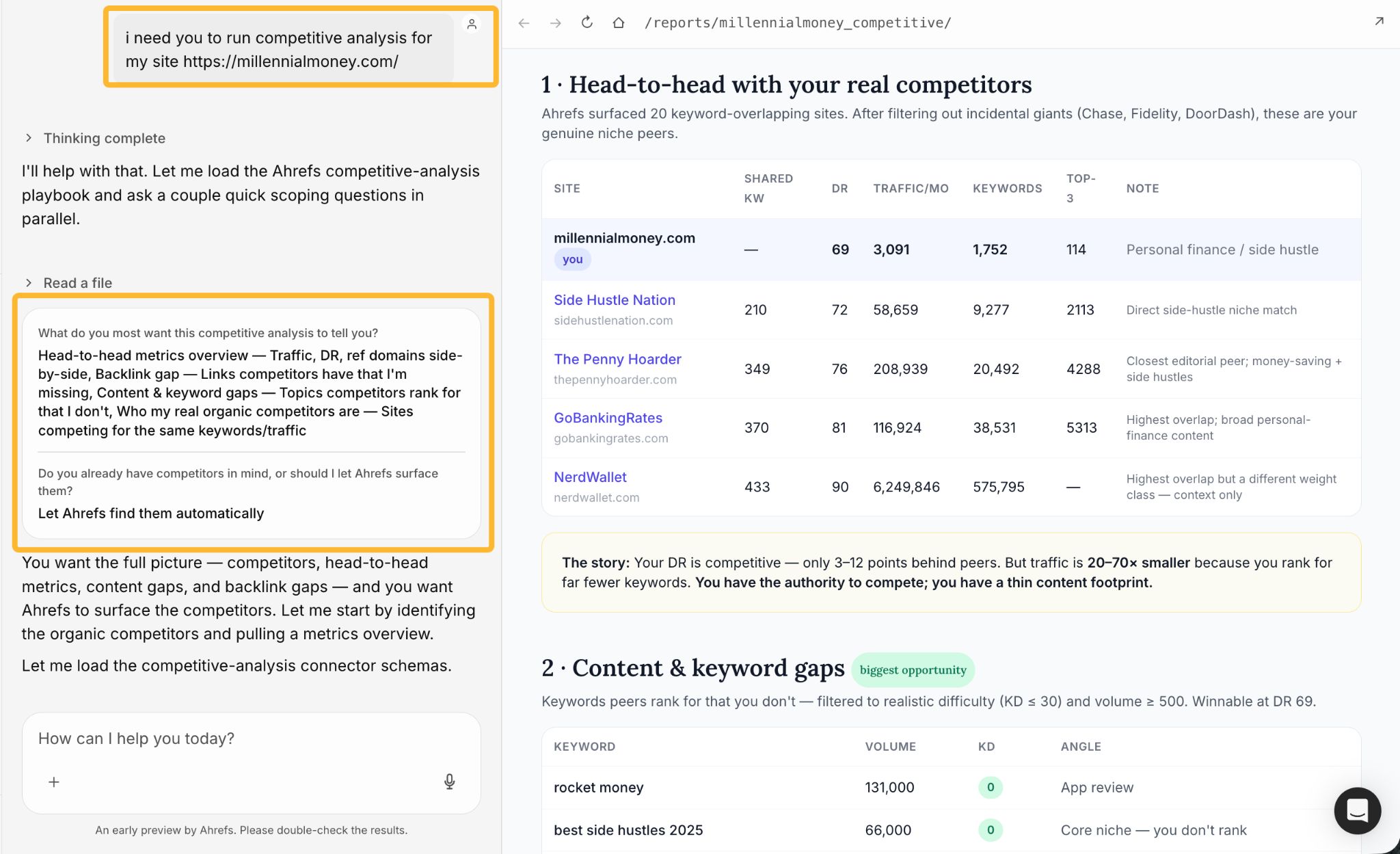
Most teams do competitive analysis once a year because doing it properly takes a full day. Any agent with access to SEO data can run the whole thing on demand. Give it your domain, and it surfaces your genuine niche competitors, builds the head-to-head comparison, and flags the content and backlink gaps worth closing.
Here’s an example from Agent A. I can type a single sentence and get a quick, high-level report because the agent is already connected to SEO data and knows exactly what information to pull. From there, I can ask it to help create content that closes keyword gaps, identifies new opportunities, and supports backlink-building efforts.
Try it
Starting prompt for any agent:
You have access to my SEO data. Run a competitive analysis for [yourdomain.com]. First find my real organic competitors—the sites fighting for the same keywords and traffic—and drop the incidental giants that only overlap by accident. Then build a head-to-head table comparing us on traffic, Domain Rating, referring domains, and number of ranking keywords. Then show me the two biggest opportunities: the high-volume, winnable keywords my competitors rank for that I don't, and the referring domains linking to several of them but not to me. Finish with a short read of where I have the authority to compete and where I'm falling behind.
Or skip the build and use it in Agent A: just ask it to run a competitive analysis on your site.
Build the tool your stack is missing
There’s always one piece of your workflow that no off-the-shelf tool quite fits. A simple internal app would solve it, but you’d need an engineer to build it. With an agent, you describe what you want, and it builds the thing.
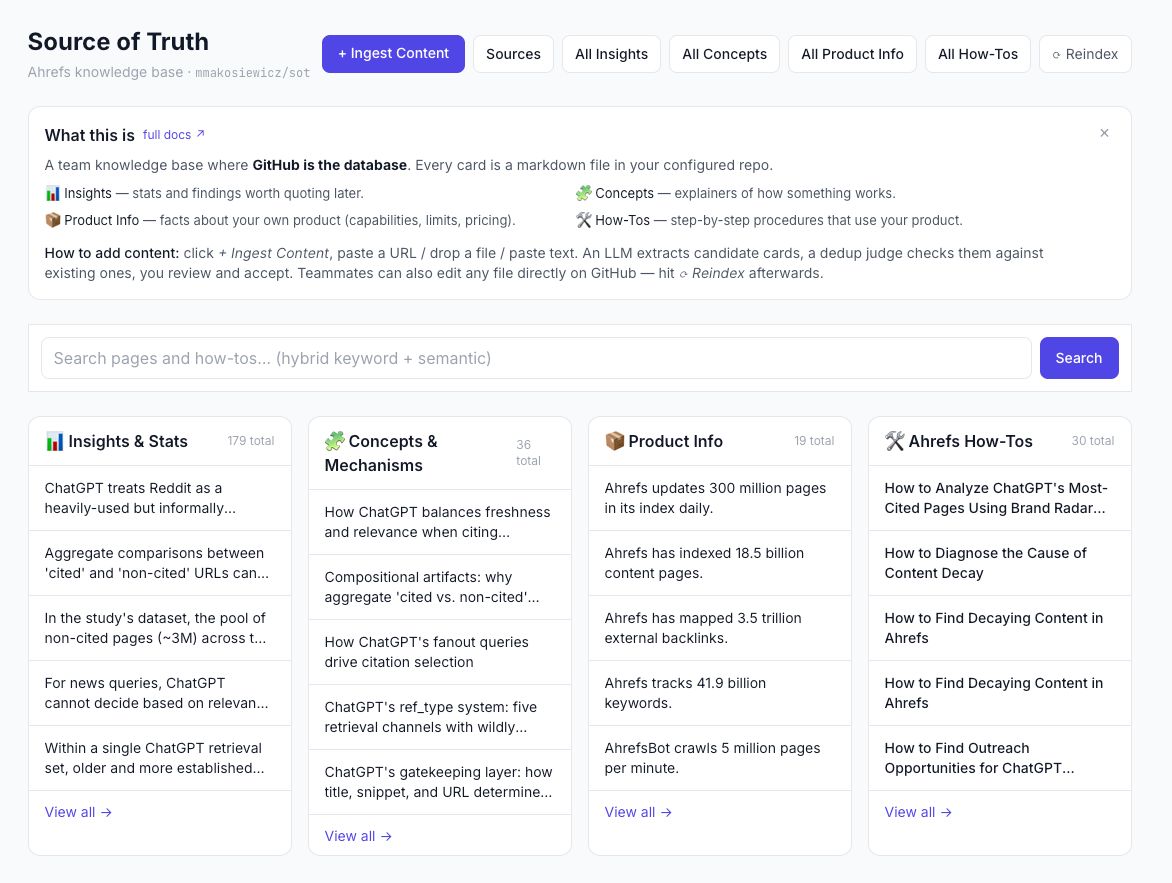
I built my Source of Truth app in Agent A: a searchable library for the information that my agent and I rely on when creating content. It stores four types of content: facts and stats, explanations, product details, and how-to guides.
Paste in an article or document, and it extracts the useful information, categorizes it, and flags duplicates before they’re added. Search works across everything, so people get a consistent answer instead of digging through docs.
I described the workflow to Agent A, it built the app, and I’ve been using it since.
Try it
Build me a simple internal knowledge base for my team. I want to paste in articles, docs, and notes and have you pull out the key facts, sort them into categories I define (like product details, style rules, and how-to guides), and skip anything that duplicates what's already saved. Make everything searchable from one box, and store it somewhere the whole team can reach.
You can also recreate my app by showing your agent this link: https://github.com/mmakosiewicz/sots_webinar. It contains all of the instructions to recreate the app and start using it.
Turn one launch brief into every asset you need for product launch
A product launch is really a stack of deliverables that all have to say the same thing on the same day: positioning, landing page copy, announcement emails, a sales one-pager, social posts. Writing each one from scratch and keeping them aligned as the message shifts is where launches slow down.
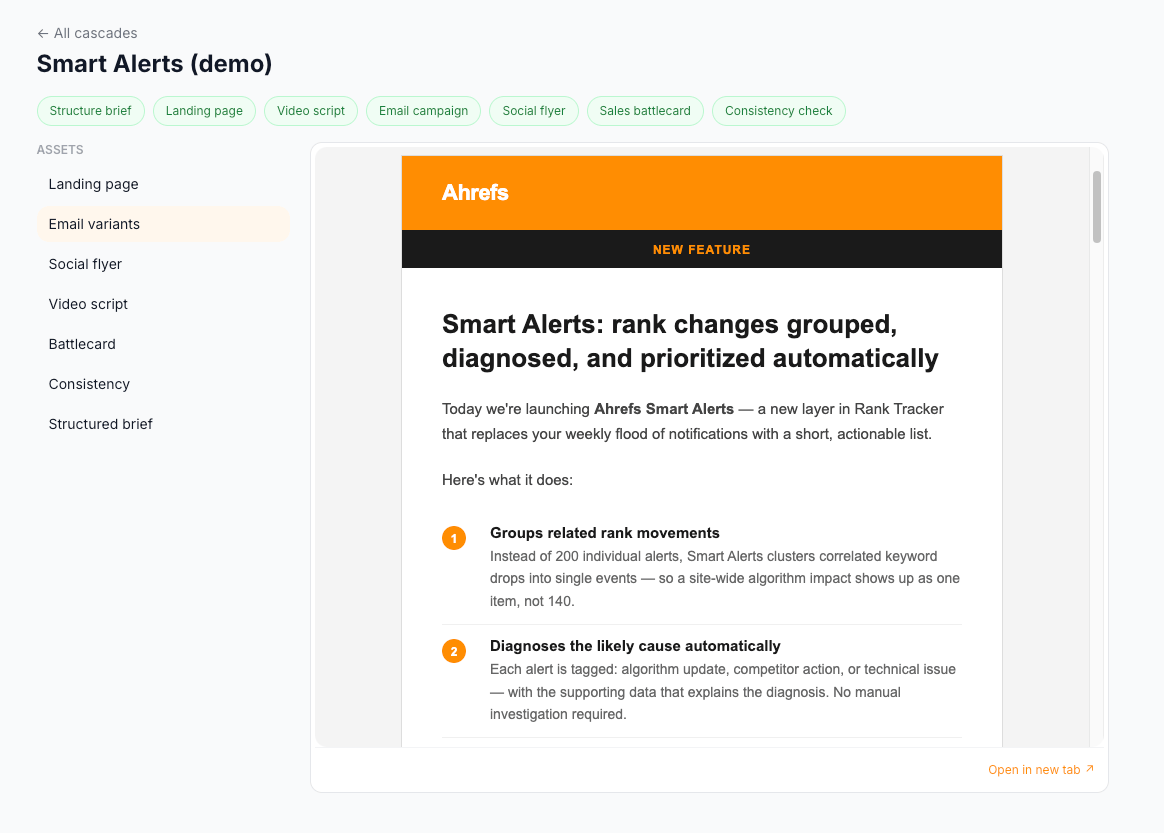
Any agent can take a single brief and produce the whole bundle at once, every piece built from the same positioning, so they stay consistent by default.
In Agent A, you hand over one launch brief, and it drafts the positioning, the landing page copy, the announcement emails, and the sales one-pager, then drops everything into the tools your team already works in, with a ticket per asset so each draft has a clear owner for review.
Try it
Starting prompt for any agent:
We're launching [product] on [date]. Here's the core positioning: [one or two lines]. Use it to draft the full launch kit: a positioning doc, landing page copy, three announcement emails, a one-page sales sheet, and five social posts. Keep every piece consistent with that positioning and in our brand voice, and give me each as its own clearly labeled draft I can review and assign.
Fix and refresh product pages across the whole catalog
In a big store, most product pages are stuck just off page one: ranking sixth or eighth for a term that would sell, one decent edit away from real traffic, and no one has time to find them, let alone rewrite them. This is a job an agent does well. Point it at a product URL, and it pulls the keywords that page already almost ranks for, then rewrites the title, description, and intro to target them, grounded in the real page so it never invents a product fact. Run it across the catalog, and the pages fix themselves a few at a time.
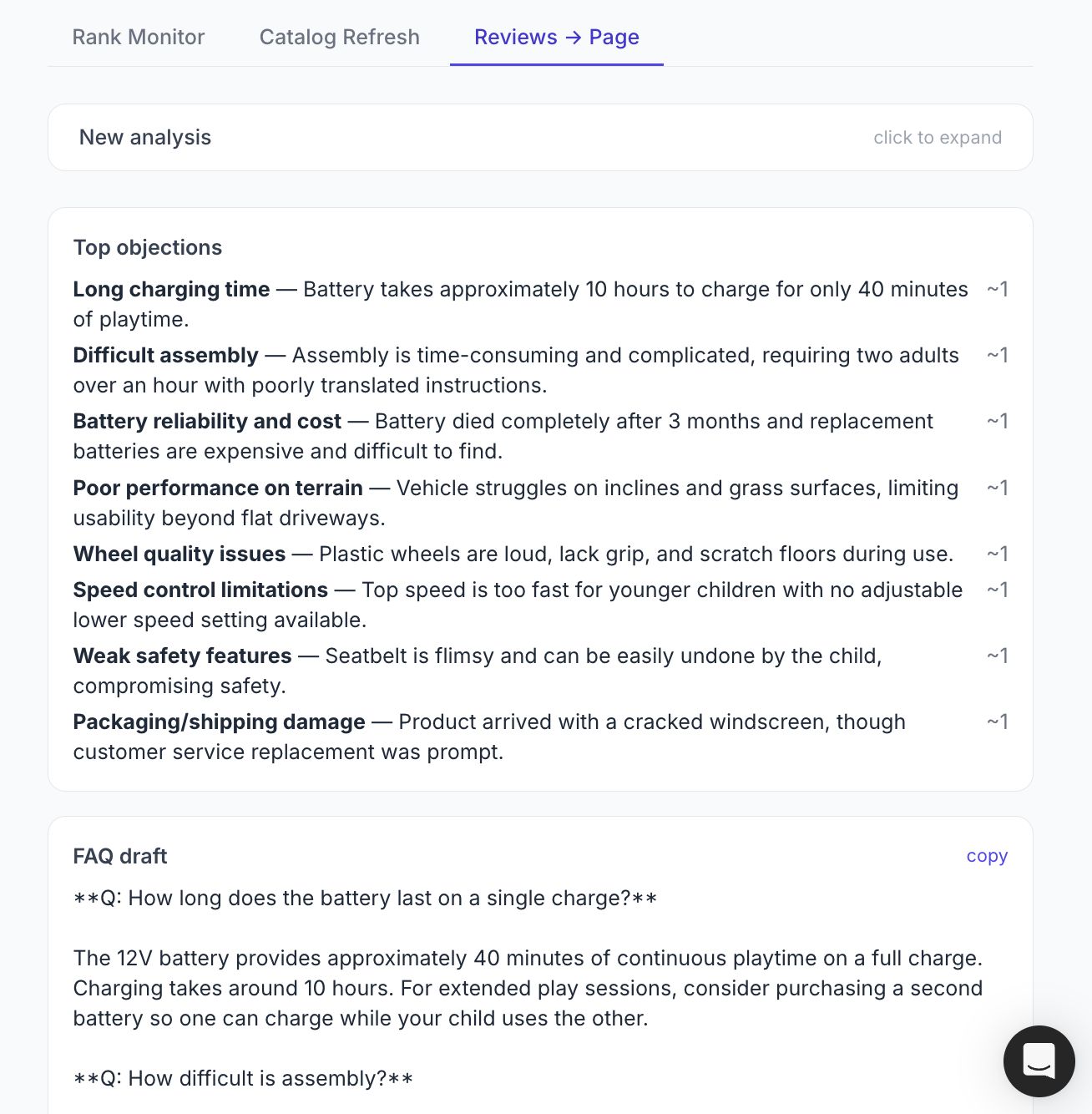
In Agent A, my colleague Andei built an E-commerce SEO Suite that does exactly this. Catalog Refresh rewrites a product page’s title, meta, and intro to target the keywords it almost ranks for. Rank Monitor flags which products slipped or opened a new SERP feature, and Reviews to Page turns customer objections into FAQ updates. One tool spots the opportunity, the others write the fix.
Try it
Starting prompt for any agent:
Build an "Ecommerce SEO Suite"—one internal app, 3 tabs, light UI, saves every run to a DB with clickable history. Use any SEO data API + any LLM.

1. Rank Monitor: input a domain + comparison window. Pull organic keywords with current vs past position. Show three lists—Drops (lost positions), Gains (improved), and SERP-feature opportunities (FAQ/image/shopping box showing but page ranks below top 3). Show keyword, old→new position, volume.

2. Catalog Refresh: input a product URL. Pull its ranking keywords, keep positions 4–30 ("almost ranking"), top \~15 by volume. Have an LLM rewrite title (≤60), H1, meta (≤155), and intro to target them, grounded in the real page text, no invented facts, no hype. Show each field + char count + copy button.

3. Reviews → Page: input a product URL or pasted reviews. LLM extracts the top \~10 recurring objections (with frequency), then drafts an honest 6–10 Q&A FAQ + 3–5 copy tweaks—using only objections that actually appear.

Loop: Rank Monitor flags a problem → Catalog Refresh / Reviews fixes it → publish → re-check. Guardrails: rewrites use only real keywords + real page copy; FAQ uses only real objections.
Write lifecycle emails based on what customers actually do in your product
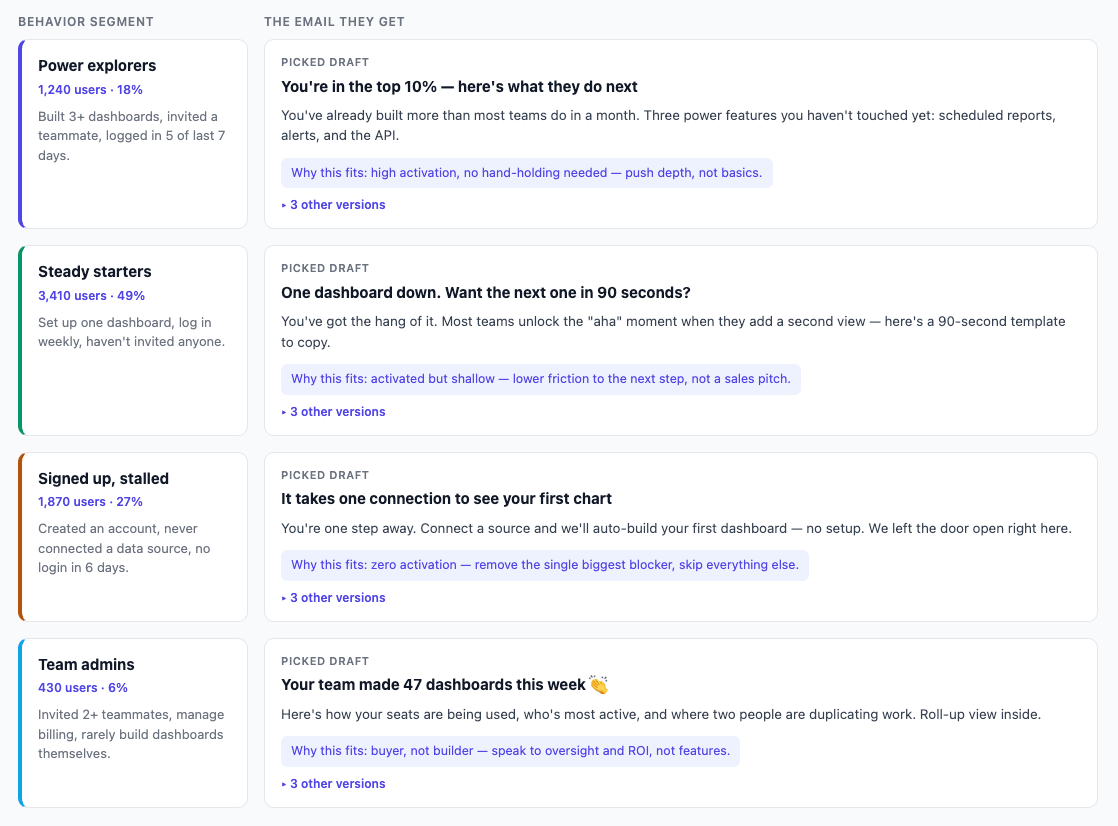
Generic onboarding emails go unread. Over-engineered ones take weeks to build. An agent with access to a product analysis tool like Mixpanel can read what your customers are actually doing in your product, group them by behavior, and write the email each group should get.
Here’s an example from Agent A. Connect your product event data and customer segments. It drafts a few email options for each segment, explains the thinking behind each one, and adds them to your email tool for review. You choose the version that feels right.
Try it
Starting prompt for any agent:
You have access to my product usage data in [analytics tool] and my customer segments. Draft a 4-email onboarding sequence for [segment], based on what these users actually do in the product, not generic copy. For each email, give me two or three subject-line options and a short note on why this message fits this segment at this stage. Put the drafts in [my email tool] for review.
Pull the admin out of hiring and screening
Marketing leaders spend more time on hiring than they’d like to admit. And the tools don’t help: your applicant tracker holds the data but won’t let you slice it, writing a job description means starting from scratch every time, and reviewing test submissions is slow manual work. An agent that can read hiring data and write code changes that fast.
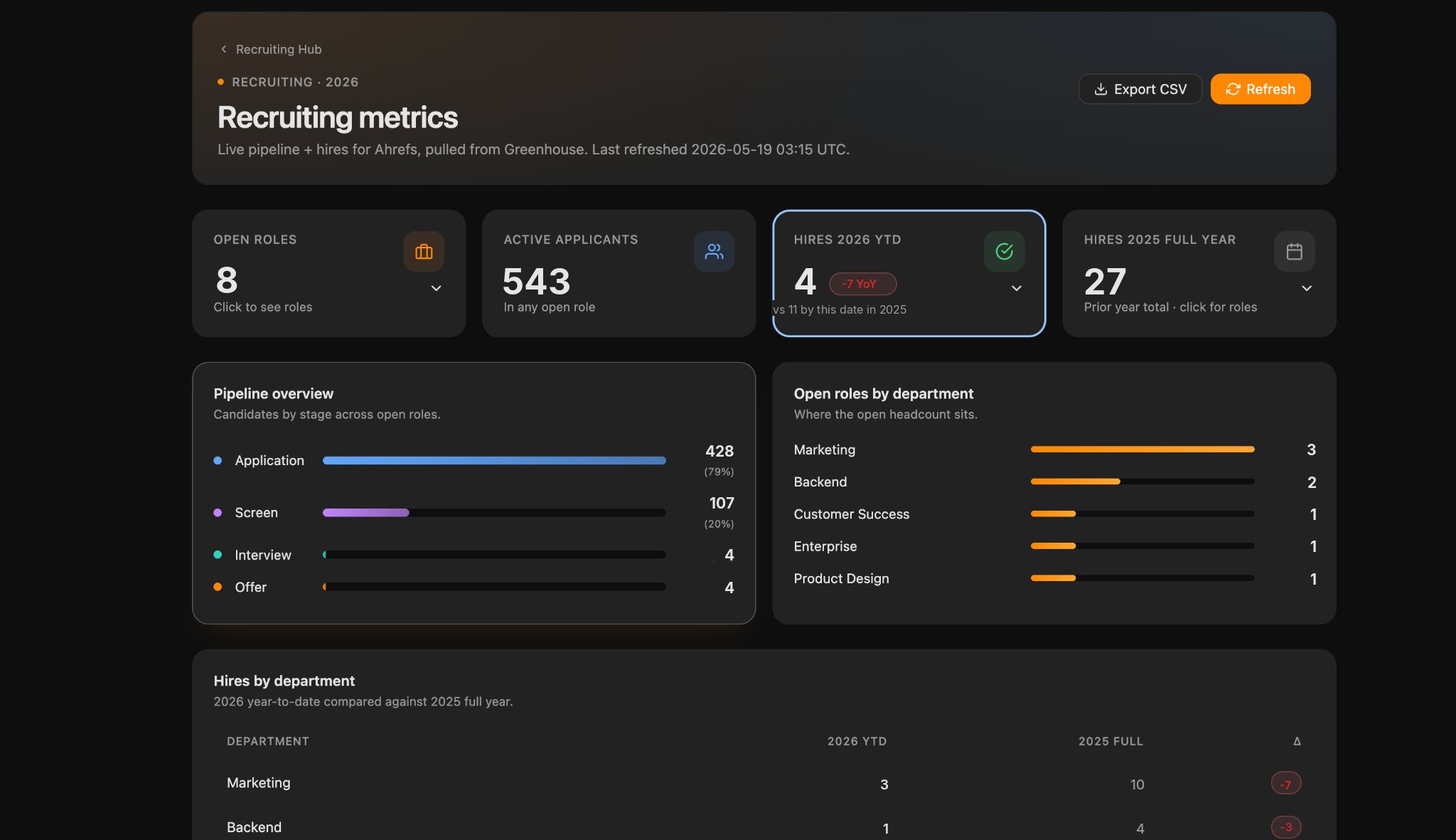
My colleague Ben built a set of recruiting tools inside Agent A that plug into our applicant tracker. A metrics dashboard turns raw pipeline data into a readable view: applicants per role, stage conversion, time-to-hire. A document generator drafts job descriptions, question banks, and test tasks from a chat, an existing role, or files you upload. And a test-task reviewer runs a calibrated first pass on technical submissions, scores them against a rubric tuned on past decisions, assigns a human reviewer, and drafts the candidate feedback.
Try it
Starting prompt for any agent:
You have access to our hiring data in [applicant tracker]. Build me a simple recruiting dashboard showing key pipeline metrics: applicants per role, time-to-hire, and stage conversion rates. Then add a second tool that drafts a job description from a role title and a few notes I give it, in our tone, and lets me upload an example profile or an old job post for context.
Find traffic-winning videos and earn the click on YouTube
Running a YouTube channel comes with two jobs that tend to slip: figuring out which videos actually earn search traffic, and producing thumbnails that earn the click. Both take time, and both are easy to put off.
An agent can carry a good share of them. It can study your or your competitor’s channel against Google’s results and tell you which videos pull traffic and what keywords drive them, and it can generate thumbnail options that match your channel’s look, so the design work doesn’t start from scratch each time.
In Agent A, there are two free apps that handle this.
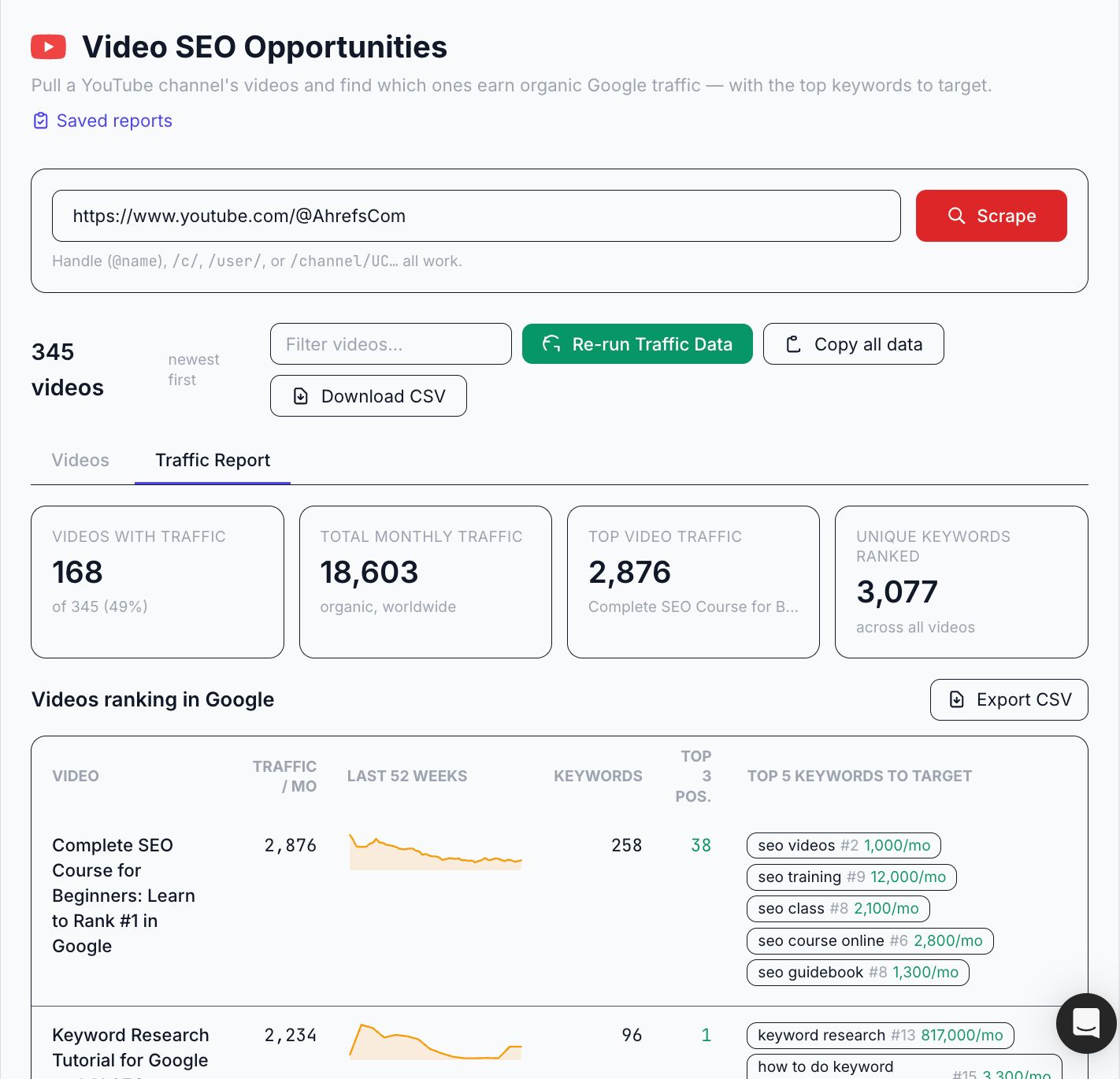
The Video SEO Opportunities app scans any YouTube channel, finds the videos already earning Google traffic, and shows the top five keywords sending it, with search volume and difficulty for each, plus a 52-week traffic line so you can see whether a video is climbing or fading.
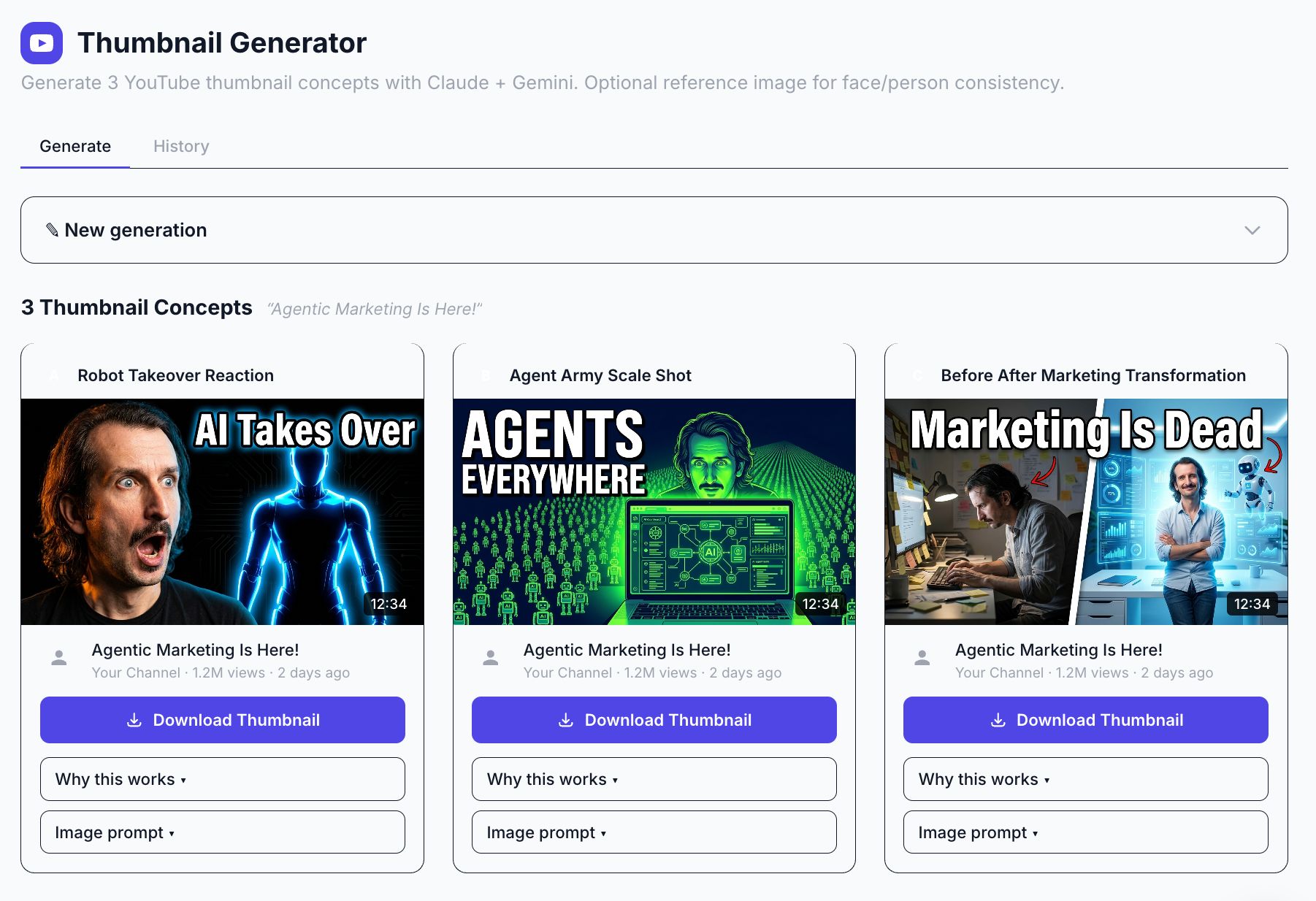
The Thumbnail Generator app produces three thumbnail concepts per video, and you can upload a reference photo so the same face shows up consistently across your channel.
Try it
Starting prompt for any agent:
"Build me two small tools for my YouTube channel. First, a channel auditor: given a channel and a country, use my SEO data to find which of its videos earn Google search traffic, and for each one show the top keywords sending traffic with their search volume, plus a line showing whether that traffic is climbing or fading over the past year. Sort it so my best and most-fixable videos rise to the top. Second, a thumbnail helper: given a video's working title and description (and optionally a photo of the person on camera), generate three thumbnail concepts paired with title variations, and explain why each would make someone stop scrolling and click. Keep the titles short and built to create curiosity, and use the person's photo as the visual anchor when I provide one."
Or skip the build and use it in Agent A: install Video SEO Opportunities and Thumbnail Generator by Sam Oh (whom you may know from our YouTube channel) from the Agent A app library.
Turn one piece of content into a week of social posts
Keeping social channels fed is steady, repetitive work. The hard part is rarely the ideas, it’s the volume: turning what you’ve already made into a feed’s worth of posts, week after week, each one suited to where it’s going.
An agent is well-suited to that. It can take a piece you’ve already published and spin it into a set of posts across your channels, so the work keeps circulating instead of going quiet a day after launch.
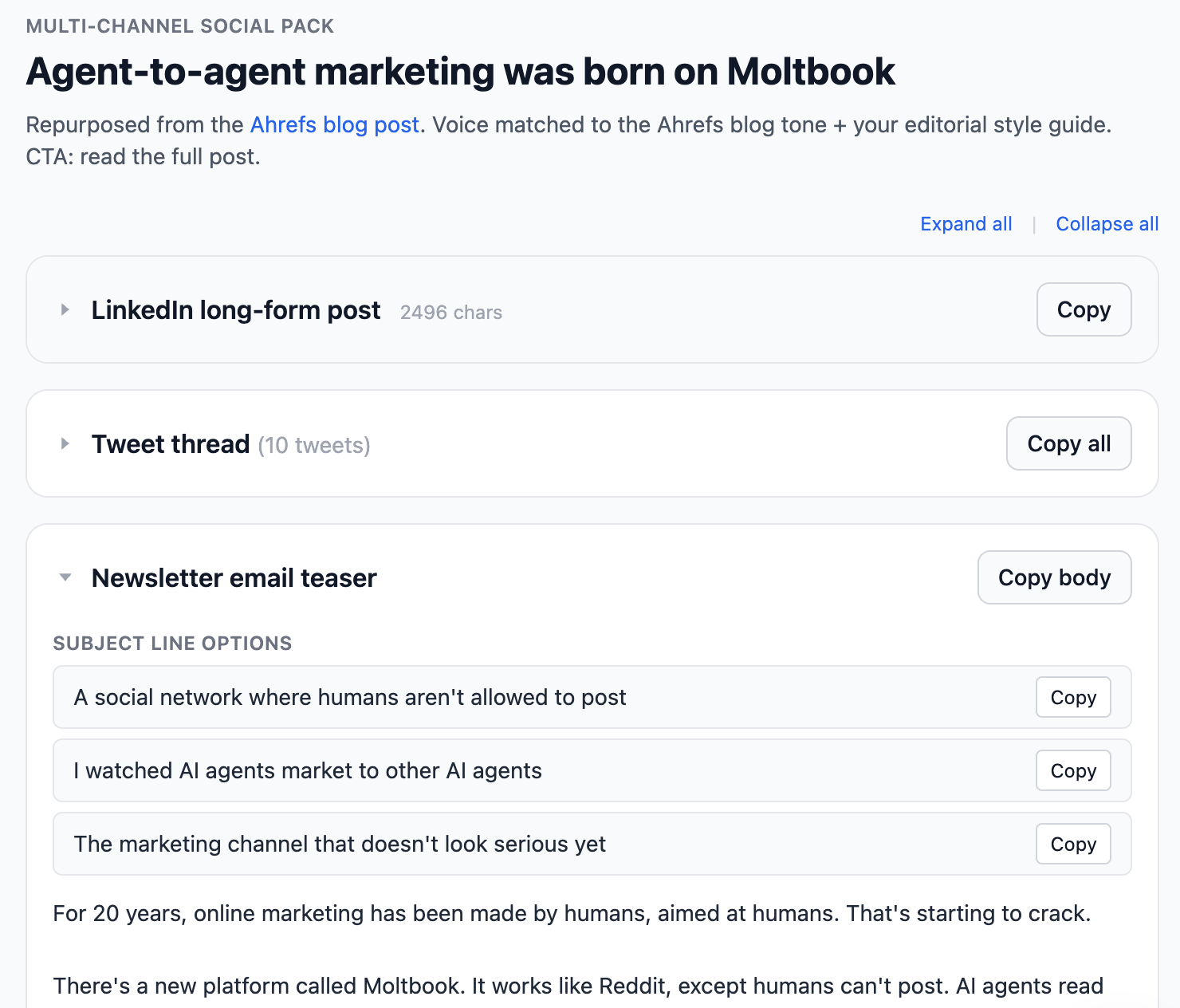
In Agent A, you point it at a published article or a video transcript. It picks out the strongest quotes, the surprising numbers, and the points worth arguing, then writes posts that fit each platform, because a LinkedIn post and a tweet are not the same animal. You get a batch to review, edit the ones worth editing, and schedule the rest.
Try it
Starting prompt for any agent:
Take [this article URL or transcript] and turn it into a week of social posts. Pull out the strongest quotes, the surprising numbers, and the points worth arguing, then write platform-specific copy: 5 LinkedIn posts, 10 tweets, and a carousel outline. Match each platform's rhythm rather than reposting the same text everywhere, and give me each as a labeled, copy-ready block I can review and schedule.
Agents are powerful, but they’re not hands-off. I learned these things the hard way:
- Connect agents to real data. An agent without live data is just a
chatbot guessing from training that’s frozen months in the past. Two agents on the same model can produce wildly different work depending on what they can see. - Always review before shipping. Agents are confident even when
they’re wrong, and a fluent answer reads as correct whether it is or not. So: agent prepares, human ships. Put a human in front of the few decisions you can’t take back, and let the low-stakes work run on its own. - Use a second agent/skill as the checker. An agent reviewing work
catches what the one that made it misses, like a writer needing an editor. Give it one job: check the first agent’s output against the original ask, the source data, and common sense. A maker and a checker beat one agent trying to be both. You can also ask your agent to create a “supervisor” skill and just invoke it whenever you want to double-check the work. - Stay organized. Every tool an agent builds is something you’ll
own and maintain, so resist spinning up ten apps you’ll open once. Keep a tidy set you actually use, and stay hands-on enough with the work to keep your own judgment sharp.
For knowledge workers, including marketers, agentic AI is likely the next evolution of work. Within the next few years, many of us may be managing teams of AI agents that handle routine tasks while we focus on what machines still struggle with: judgment, creativity, relationships, and decisions that require a human touch.
If you want to start working with your first agent today, try Agent A: it’s already connected to Ahrefs data and can run every use case in this article out of the box.
Thanks for reading! Feel free to reach out on LinkedIn or Substack.
