


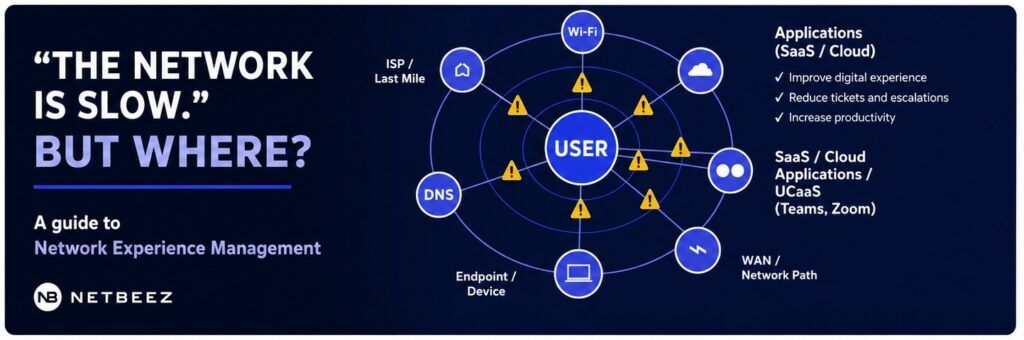
Modern IT teams are now accountable for experiences that happen far outside the networks they own.
Consider when a remote employee working from home experiences voice or video issues on a Microsoft Teams call. The service desk receives a complaint that states that “the network is slow.” The IT support staff now has to identify the full network path that may include the home Wi-Fi network, the ISP connection, the VPN tunnel and network, DNS, and the SaaS application.
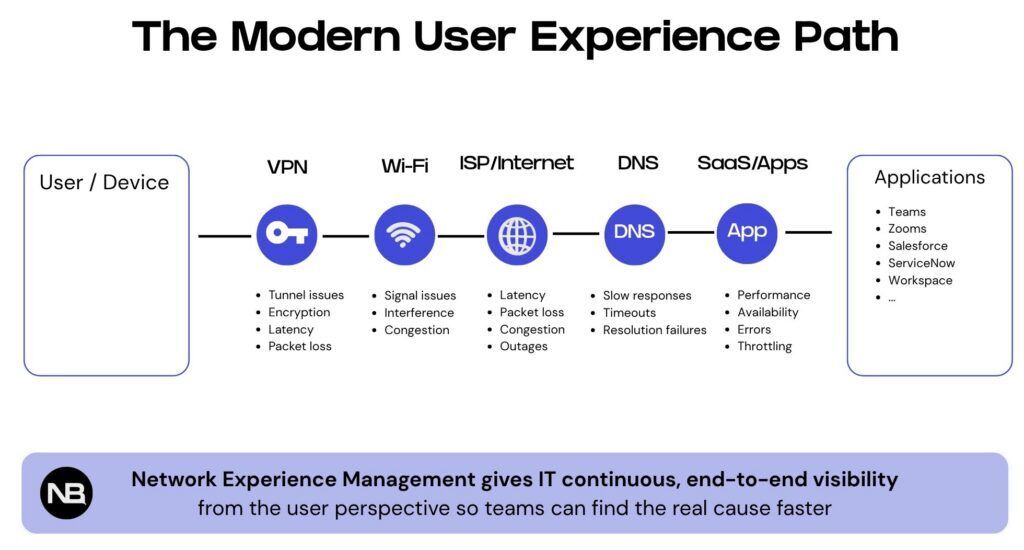
That is the visibility problem Network Experience Management is meant to solve. It gives IT teams user-perspective evidence, not just infrastructure status, so they can see whether the network is affecting the experience and where the problem likely started.
Network Experience Management is the practice of measuring network performance from the user perspective to identify failures or degradation events along the path to an application or service. A NEM tool monitors employee experience by collecting endpoint metrics and running synthetic tests via software clients and network sensors placed where users actually work.
Why traditional network monitoring is no longer enough
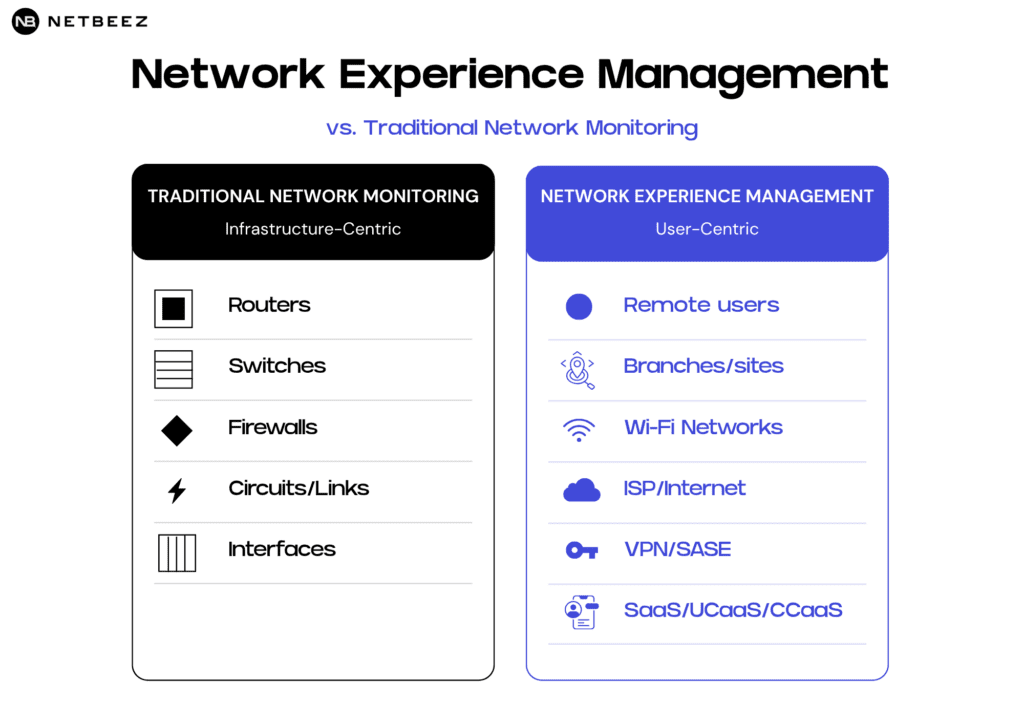
Traditional network monitoring was built for a world where most users, applications, and infrastructure were inside the corporate perimeter. In that model, IT could monitor various network components such as routers, switches, and firewalls. If the devices were up and the network traffic looked normal, the network was often considered healthy. That model no longer reflects how employees work.
Today, the real problem is not that networks are harder to monitor. It is that ownership of the user experience is now fragmented across IT, cloud providers, ISPs, SaaS vendors, and home networks. As a result, dashboards showing that core infrastructure is “green” do not prove that users are having a good experience. Remote users may still experience performance issues with digital services.
This creates a visibility gap. Network teams can see the infrastructure they own, but users experience the full path between their device and the application. When that path crosses networks, providers, locations, and cloud services outside direct IT control, traditional monitoring alone cannot explain the full experience.
Network Experience Management closes that gap by measuring performance from the user perspective.
What Network Experience Management means
Network Experience Management is a user-centric approach to network visibility. Instead of only checking whether devices, circuits, and applications are up, NEM verifies whether users can actually reach the services they need, how well those services are performing, and where degradation begins when the experience is poor.
In practical terms, Network Experience Management combines active testing, endpoint and sensor visibility, synthetic monitoring, and path analysis. NEM complements Digital Experience Monitoring by adding network-specific evidence, such as latency, packet loss, jitter, DNS response time, path behavior, Wi-Fi quality, ISP performance, and application reachability.
The goal is not simply to collect more performance metrics. The goal is to give network administrators a comprehensive view and actionable evidence about the end-user experience.
Why Digital Employee Experience needs network evidence
Digital Employee Experience, often called DEX, has become a major priority for IT organizations. DEX focuses on measuring and improving how employees experience technology, including devices, applications, collaboration tools, and support workflows.
That is an important shift. But digital employee experience is incomplete without network experience.
A DEX platform may show that an employee had a poor experience. It may identify device problems, application crashes, slow logins, or user sentiment. But when the issue involves network quality, IT still needs to dive deep into different network environments.
For example:
- A Teams call may fail because of local Wi-Fi interference.
- A contact center agent may have poor voice quality caused by jitter or packet loss.
- A SaaS application may be reachable from headquarters but slow from branch offices.
- A VPN or SASE path may introduce latency.
In each case, the business problem appears as a poor digital experience. But the root cause may be network-related.
Network Experience Management gives DEX, service desk, and network teams the missing layer of evidence needed to diagnose these problems quickly.
The hidden cost of poor network experience
Poor network experience does not only affect network teams. It affects the entire organization. When employees experience application slowness, dropped calls, or unreliable access, productivity suffers.
The cost shows up in several ways:
- Lower employee productivity
- Poor collaboration experience
- Contact center disruption
- Executive complaints
- Reduced confidence in IT
Many of these problems begin with the same phrase: “The network is slow.” Network Experience Management helps IT replace that vague complaint with specific evidence.
Service desk ticket triage
Many network-related issues first arrive at the service desk. Without evidence, Tier 1 and Tier 2 teams often escalate tickets to network engineering. When issues are escalated without context, network engineers spend time identifying the root cause. Without clear root-cause evidence, the impact usually shows up as:
- More support tickets
- Longer mean time to resolution
- More escalations to senior engineers
- More time spent in troubleshooting meetings
Network Experience Management can give the service desk a simple way to see whether a user or location is experiencing packet loss, latency, DNS failures, application reachability issues, or Wi-Fi problems.
This reduces unnecessary escalations and helps the right team take action faster.
Common use cases for Network Experience Management
Remote worker troubleshooting
Remote and hybrid workers create one of the hardest visibility challenges for IT. The user may be working from home, using Wi-Fi that IT does not manage, and accessing SaaS applications through VPN or SASE. Sometimes users may tether to their mobile phones.
When that user reports poor performance, IT needs to know where the problem originates in the network path. Network Experience Management allows IT teams to run continuous tests from the remote user’s perspective and compare performance across users, locations, ISPs, and applications.
Microsoft Teams, Zoom, and UCaaS performance
Voice and video applications are sensitive to latency, packet loss, and jitter. Even small network issues can create frozen video, robotic audio, dropped calls, and poor meeting quality.
Native UCaaS dashboards can show call quality metrics, but they may not fully explain the underlying network path or whether the problem originated from a specific segment of the delivery path. Network Experience Management gives IT teams active network evidence before, during, and after collaboration issues.
Branch office experience monitoring
A branch office can appear healthy from a device or circuit perspective while users still experience slow applications, Wi-Fi problems, DNS delays, or SaaS reachability issues.
By placing sensors or agents at branch locations, IT can continuously test critical services and identify performance degradation before users open tickets.
SASE, VPN, and SD-WAN validation
SASE, VPN, and SD-WAN projects change how users reach applications. After deployment, users may report that applications are slow, but IT needs evidence to determine whether the problem is related to tunneling, routing, policy, ISP, DNS, or application performance.
Network Experience Management allows IT teams to validate user experience before, during, and after major network changes.
Network Experience Management vs. Network Performance Monitoring
There are similarities but also differences between Network Performance Monitoring and Network Experience Management. Both are valuable. But as work becomes more distributed, user-perspective visibility becomes essential.
Network Performance Monitoring traditionally focuses on the health and performance of network infrastructure. It often monitors devices, interfaces, circuits, bandwidth, errors, and availability. This method is also called white box monitoring, device level monitoring, or inside out monitoring.
Network Experience Management focuses on how the network performs from the perspective of users, locations, and applications. This method is also called black box monitoring, end-user experience monitoring, or outside in monitoring.
To summarize: Network Performance Monitoring tells IT what is happening inside the infrastructure; Network Experience Management tells IT what users are experiencing.
What to measure
A strong Network Experience Management approach should measure several categories of performance.
Availability
Can the user, sensor, or location reach the required service?
Latency
How long does it take for traffic to travel between the user and the destination?
Packet loss
Are packets being dropped along the path?
Jitter
Is network delay varying in a way that affects real-time applications like voice and video?
DNS performance
Are DNS lookups succeeding quickly and reliably?
HTTP and application response
Are SaaS, cloud, and internal applications responding as expected?
Wi-Fi experience
Is the user affected by wireless signal, interference, roaming, or local access issues?
Path and routing behavior
What path does traffic take, and where does performance degrade?
ISP and last-mile quality
Are remote users or branches affected by local internet provider issues?
Experience by user, site, app, and region
Is the problem isolated or widespread?
The value comes from correlating these signals into a clear operational picture.
What a Network Experience Management deployment looks like
A typical NEM deployment follows this workflow:
First, IT deploys physical or virtual sensors in places where users actually work, such as branch offices, corporate sites, cloud environments. They also install lightweight clients on hybrid or remote employees’ endpoints.
Second, those agents continuously test the applications and services users depend on. This may include SaaS applications, UCaaS services, VPN gateways, DNS servers, cloud endpoints, internal applications, and internet destinations.
Third, the NEM tool computes moving averages and other baselines that represent the normal performance of remote users, locations, and applications.
Fourth, when outages or performance degradations happen, IT receives alerts tied to user experience rather than raw infrastructure status alone. The service desk and network team use the evidence to isolate likely root cause: endpoint, Wi-Fi, ISP, VPN/SASE, DNS, WAN, SaaS, or application.
Finally, IT can use the data to reduce escalations, support vendor conversations, validate changes, and report experience trends to leadership.
Why this matters for IT leadership
Network Experience Management is an operational strategy for IT leaders who are under pressure to support hybrid work, reduce support costs, improve employee experience, modernize the service desk, and maintain reliable access to cloud and SaaS applications.
In this distributed work model, user-perspective network evidence is more important than ever. With Network Experience Management, IT leaders can:
- Reduce time spent troubleshooting unclear user complaints
- Help network teams validate configuration changes and prove or disprove network responsibility
- Improve collaboration and UCaaS experience
- Validate SASE, SD-WAN, and cloud migrations
- Monitor remote and branch users proactively
The result is a more proactive IT organization.
How NetBeez helps
NetBeez provides Network Experience Management from the user perspective.
NetBeez helps teams compare experience across remote users, branches, campuses, and cloud locations using continuous active testing. That means IT can see whether a problem is isolated to one user’s Wi-Fi, one ISP, one branch, one SaaS application, or a broader network path.
This gives IT teams the evidence they need to answer questions such as:
- Is the issue affecting one user or many users?
- Is the problem isolated to a specific location, ISP, Wi-Fi network, or application?
- Did performance degrade before the ticket was opened?
- Is the network responsible, or is the issue elsewhere?
- What evidence should be included before escalating the ticket?
- Are remote and branch users receiving the experience IT expects?
NetBeez helps service desk, network, and IT operations teams move from reactive troubleshooting to proactive experience assurance.
Conclusion
The corporate perimeter no longer defines the modern network. It is defined by the experience users have when they connect to the applications they need.
That experience depends on many factors: Wi-Fi, ISP, VPN/SASE, WAN, DNS, SaaS, UCaaS, cloud paths, and endpoint conditions. When something breaks, users rarely describe the root cause. They describe the symptom.
“The network is slow.”
Network Experience Management gives IT teams the visibility to turn that symptom into evidence. It helps teams prove what happened, where it happened, who was affected, and what to do next.
For distributed enterprises, that is no longer optional. It is becoming a core part of digital employee experience.
FAQ
How is Network Experience Management different from network monitoring?
Traditional network monitoring focuses on infrastructure health, such as routers, switches, interfaces, and circuits. Network Experience Management focuses on the user’s actual network experience across Wi-Fi, ISP, VPN, SASE, WAN, SaaS, UCaaS, and cloud paths.
Why does Digital Employee Experience need network visibility?
Digital Employee Experience depends on applications, devices, and networks. If the network is slow, unstable, or unreliable, employees have a poor experience. Network visibility helps IT determine whether the network is responsible for poor digital experience.
Who uses Network Experience Management?
Network Experience Management is useful for network teams, service desk teams, IT operations, digital workplace teams, UCaaS teams, and organizations supporting remote workers, branch offices, cloud applications, and hybrid work.
What problems does Network Experience Management help solve?
It helps solve remote worker network issues, branch office performance problems, Teams and Zoom quality issues, VPN and SASE troubleshooting, DNS problems, Wi-Fi issues, SaaS reachability problems, and unnecessary ticket escalations.
How does NetBeez support Network Experience Management?
NetBeez uses active monitoring from agents and sensors to measure network and application performance from the user perspective. It helps IT teams detect, diagnose, and prove network-related experience issues across distributed environments.
