
Close Menu
    Facebook X (Twitter) Instagram
    Wifi PortalWifi Portal
    • Blogging
    • SEO & Digital Marketing
    • WiFi / Internet & Networking
    • Cybersecurity
    • Tech Tools & Mobile / Apps
    • Privacy & Online Earning
    Facebook X (Twitter) Instagram
    Wifi PortalWifi Portal
    Home»Cybersecurity»Microsoft testing adjustable taskbar, Start menu in Windows 11
    Cybersecurity

    Microsoft testing adjustable taskbar, Start menu in Windows 11

    adminBy adminMay 18, 2026No Comments3 Mins Read
    Facebook Twitter LinkedIn Telegram Pinterest Tumblr Reddit WhatsApp Email
    Windows 11
    Share
    Facebook Twitter LinkedIn Pinterest Email

    Windows 11

    Microsoft has finally brought back the resizable taskbar and Start menu to Windows 11 in the latest preview version rolling out to Insiders in the Experimental channel.

    Starting with Windows 11 Insider Preview Build 26300.8493, the taskbar can now be configured to use smaller buttons and moved to the bottom, top, left, or right side of the screen.

    “The ability to move the taskbar to the top or sides of the screen has been one of the most requested features, and we are bringing it to Windows 11,” said Diego Baca, partner director of Microsoft Design.

    “With this update, when small taskbar is enabled, you get smaller icons, a shorter taskbar, and more vertical space for your apps (see video below). No restart or sign-out is required.”

    To change the taskbar position, Insiders have to go to Settings > Personalization > Taskbar > Taskbar behaviors, where they will find this new option alongside the taskbar icon alignment option.

    The taskbar size can be adjusted in the same dialog by checking the “Show smaller taskbar buttons” option, which reduces the height of both the icons and the taskbar.

    Microsoft is also rolling out changes to give Windows users more control over the Start menu, allowing them to toggle off recommended content and customize its size.

    “These controls are designed to work together. If you want a Start menu with just your pinned apps, you can turn off Recommended and All,” Boca added. “If you want a full Start that shows everything, you can leave it all on. The goal is simple: it is your choice, and it should be easy to make.”

    However, Microsoft will maintain a list of recently installed apps, as it is a key way for users to discover new applications alongside the Microsoft Store.

    Furthermore, Microsoft is improving file relevance by adjusting how files are displayed and ordered to prioritize the most relevant items, and will also allow users to hide their name and profile picture from the Start menu.
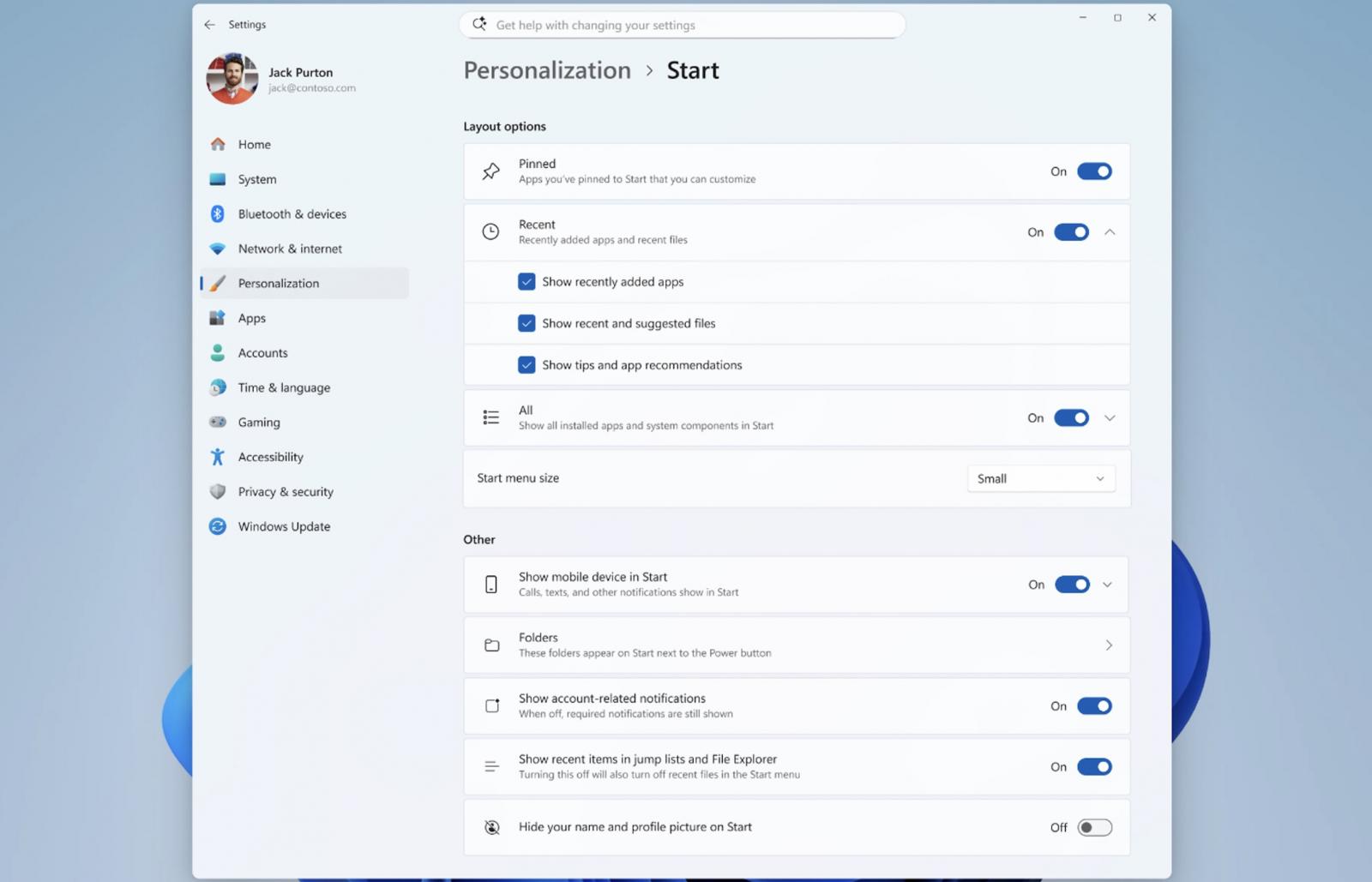
    New Start menu settings
    New Start menu settings (Microsoft)

    ​Earlier this month, Microsoft also announced that it’s testing a modern Windows Run dialog with dark mode support, which should be faster than the legacy version.

    This new Run dialog will also remove the “Browse” button, which was used by only 0.0038% of users in a sample of 35 million who opened Windows Run. Microsoft says the modern Run will not be enabled automatically, and users will need to turn it on manually in Settings > Advanced Settings.

    Windows president Pavan Davuluri announced some of these changes in March, when Microsoft pledged to improve Windows 11 system performance and make it more responsive and consistent.

    In addition to taskbar and Start menu improvements, the company plans to reduce notifications, simplify Windows settings, and ensure that device setup on new Windows PCs requires fewer reboots.

    Microsoft is also working on improving Windows search, aiming for a more consistent experience across the Start menu, taskbar, File Explorer, and Settings.

    “As part of this effort, we are evolving how Windows is built behind the scenes to raise the quality bar and deliver innovation where it matters most, shaped by the feedback we are hearing from you,” Davuluri said.


    article image

    Automated pentesting tools deliver real value, but they were built to answer one question: can an attacker move through the network? They were not built to test whether your controls block threats, your detection rules fire, or your cloud configs hold.

    This guide covers the 6 surfaces you actually need to validate.

    Download Now

    adjustable menu Microsoft start taskbar Testing Windows
    Share. Facebook Twitter Pinterest LinkedIn Tumblr Telegram Email
    Previous Article‘Claw Chain’ OpenClaw Flaws Allow Sandbox Escape, Backdoor Delivery
    Next Article How to track and measure visibility
    admin
    • Website

    Related Posts

    Google Is Testing Sponsored Shops in SERPs: What Advertisers Need to Know

    June 9, 2026

    Google adds new Performance Max asset testing tools

    June 9, 2026

    Microsoft expands Audience Ads eligibility for cryptocurrency exchanges

    June 5, 2026
    Add A Comment
    Leave A Reply Cancel Reply

    Search Blog
    About
    About

    At WifiPortal.tech, we share simple, easy-to-follow guides on cybersecurity, online privacy, and digital opportunities. Our goal is to help everyday users browse safely, protect personal data, and explore smart ways to earn online. Whether you’re new to the digital world or looking to strengthen your online knowledge, our content is here to keep you informed and secure.

    Trending Blogs

    Why your brand campaign may not be ready for AI Max

    June 10, 2026

    Umbrella Insurance Covers What Your Other Policies Don’t

    June 10, 2026

    Claude Fable 5 “Feels Next Level”

    June 10, 2026

    Arista unveils 1.6T rack-scale switch family for AI infrastructure

    June 10, 2026
    Categories
    • Blogging (91)
    • Cybersecurity (1,955)
    • Privacy & Online Earning (247)
    • SEO & Digital Marketing (1,429)
    • Tech Tools & Mobile / Apps (1,796)
    • WiFi / Internet & Networking (342)

    Subscribe to Updates

    Stay updated with the latest tips on cybersecurity, online privacy, and digital opportunities straight to your inbox.

    WifiPortal.tech is a blogging platform focused on cybersecurity, online privacy, and digital opportunities. We share easy-to-follow guides, tips, and resources to help you stay safe online and explore new ways of working in the digital world.

    Our Picks

    Why your brand campaign may not be ready for AI Max

    June 10, 2026

    Umbrella Insurance Covers What Your Other Policies Don’t

    June 10, 2026

    Claude Fable 5 “Feels Next Level”

    June 10, 2026
    Most Popular
    • Why your brand campaign may not be ready for AI Max
    • Umbrella Insurance Covers What Your Other Policies Don’t
    • Claude Fable 5 “Feels Next Level”
    • Arista unveils 1.6T rack-scale switch family for AI infrastructure
    • How and Why to Fight Back Against Social Media Bans
    • What server logs reveal that SEO tools miss
    • Disability Insurance Protects Your Most Valuable Asset
    • US Publishers Demand Common Crawl Stop Scraping Their Content
    © 2026 WifiPortal.tech. Designed by WifiPortal.tech.
    • Home
    • About Us
    • Contact Us
    • Privacy Policy
    • Terms and Conditions
    • Disclaimer

    Type above and press Enter to search. Press Esc to cancel.